
VidCollage
VidCollage is a free web tool for combining photos and videos into a single 9:16 collage for Instagram stories and reels.
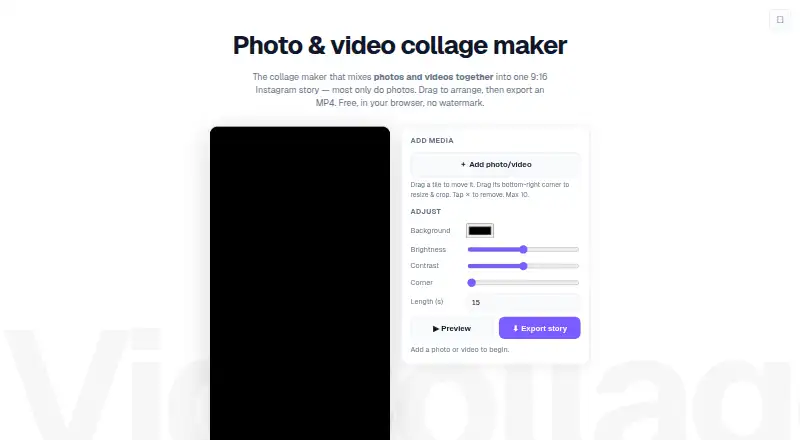
What VidCollage is
VidCollage is a free web tool for combining photos and videos into a single 9:16 collage for Instagram stories and reels. Add up to 10 items from a local device, choose an automatic layout, then drag tiles to move, resize, or crop them. The editor lets users adjust background colour, brightness, contrast, rounded corners, and collage length. Finished collages export as 9:16 MP4 files; browsers without the fast encoder use WebM instead. The Free plan costs nothing and is billed as completely free. No signup is required, exports have no stated limit, and the tool adds no watermark. The maker says media stays on the device and is processed locally in the browser rather than uploaded. VidCollage is web-based and imports media from the user’s device. Its main content limit is the maximum of 10 photos and videos per collage, even though exports are not capped.
Good
- Combines photos and videos in a 9:16 layout.
- Adjusts brightness, contrast, and collage length.
- No signup or watermark.
- No stated limit on exports.
- Media is processed locally, according to the maker.
Watch out
- A collage can include at most 10 items.
- Imports are limited to the local device.
- Web-based tool only.
Who it suits
VidCollage suits people making vertical story or reel collages from a small set of photos and videos. It may appeal to users who want local browser processing without signup or a watermark.
Verdict
VidCollage offers basic layout and appearance controls for vertical collages, with no signup or export cap. The 10-item limit is the main constraint to consider.
Plans and prices
From VidCollage's own pricing page, checked 7 Oct 2026.
| Plan | Price | What it gives you |
|---|---|---|
| Free | Free | Up to 10 photos and videos · No signup · No watermark · No limits on exports · Completely free |
The facts
Each one read from VidCollage's own pages, with the date it was checked.
What it does
- Adjustments
- Users can adjust the background colour, brightness, contrast, rounded corners, and length.checked 7 Oct 2026
- Arrange media
- Users can choose an automatic layout, then drag tiles to move, resize, and crop them.checked 7 Oct 2026
- Export
- The collage exports as a 9:16 MP4, with WebM fallback in browsers without the fast encoder.checked 7 Oct 2026
- Export limits
- The maker says there are no limits on exports.checked 7 Oct 2026
- Privacy
- The maker says media stays on the device and runs locally in the browser without being uploaded.checked 7 Oct 2026
- Signup and watermark
- The free tool requires no signup and adds no watermark.checked 7 Oct 2026
- Use limits
- Users can add up to 10 photos and videos to a collage.checked 7 Oct 2026
- What it does
- VidCollage combines photos and videos into one 9:16 collage for Instagram stories and reels.checked 7 Oct 2026
Alternatives to VidCollage
- 1

Adobe Express Video
Free planAndroidiOSWebAPI8.4Free plan - 2

Picsart
Free planAndroidiOSWebAPI8.3From $10.50 a month - 3
Canva Video
Free planAndroidiOSWebmacOS7.9Free plan - 4

Kapwing
Free planWebmacOSWindows7.6From $16 a month - 5
VEED
Free planAndroidiOSWebExtension7.5Free plan - 6

CapCut
Free planAndroidiOSWebmacOS7.4Free plan