Vagon Cloud Computer
Vagon Cloud Computer provides a personal cloud remote desktop for running demanding applications on selectable hardware.
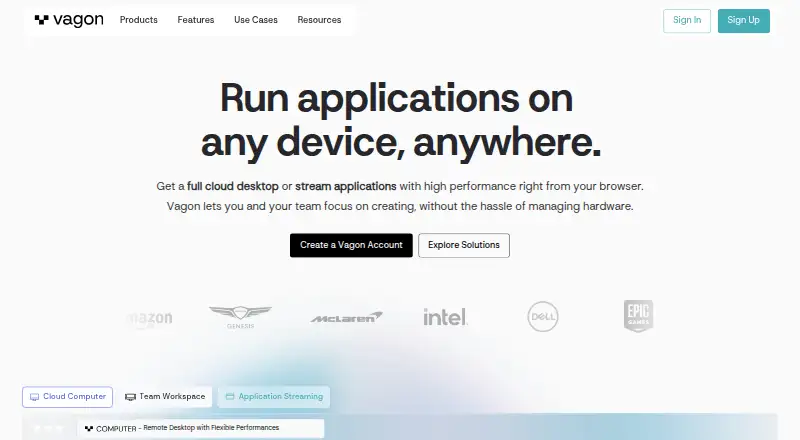
What Vagon Cloud Computer is
Vagon Cloud Computer provides a personal cloud remote desktop for running demanding applications on selectable hardware. Users can change computer performance while keeping their data and files, and choose apps for automatic installation when creating a computer or install them manually. The application library lists 146 apps for automatic installation. Vagon says its streaming supports up to 4K resolution and 60 FPS, with NVIDIA A10G GPU and Tesla T4 options listed. Access works through a browser or desktop app on computers, tablets, and mobile devices. Native apps are available for macOS and Windows; the Linux application is marked “Soon.” Tablet and mobile users can add the Vagon app from the browser dashboard to their Home Screen. Each computer is described as an isolated virtual machine with an encrypted connection. The Sand plan is $0.25 a month, billed at $0.25/hour and charged by the minute; Planet is $0.99 a month, billed at $0.99/hour and also charged by the minute. Separate storage plans are listed at $7.99 a month and $19.99 a month.
Good
- Performance can change while data and files stay the same.
- 146 apps are available for automatic installation.
- Streaming supports up to 4K and 60 FPS.
- Computers use isolated virtual machines and encrypted connections.
Watch out
- There is no free plan or free trial.
- Linux desktop application is marked “Soon.”
- Outbound transfer costs $1.5 per additional 10GB after the first 10GB monthly.
- Computer storage increases cost $5 per additional 50GB.
Who it suits
Vagon describes the service for creatives, gamers, and engineers, including people working in digital art, CAD, video editing, game development, or AI and data training. It suits users who want a remote desktop with changeable performance options.
Verdict
Vagon offers flexible remote-computer performance, app installation choices, and access across several device types. Note that computer usage is billed hourly and charged by the minute, with additional charges listed for transfer and expanded storage.
Plans and prices
From Vagon Cloud Computer's own pricing page, checked 30 Sep 2026.
| Plan | Price | What it gives you |
|---|---|---|
| Sand | $0.25 a month | 2 cores · 3.1 GHz · 4GB RAM · $0.25/hour; charged by the minute |
| Planet | $0.99 a month | 4 cores · 16GB NVIDIA T4 GPU · 16GB RAM · $0.99/hour; charged by the minute |
| Trial | $0.99, paid once | 1 hour Planet or equivalent Spark usage · 7 day computer storage · Start a Trial from $0.99 |
| Personal storage | $7.99 a month | 75 GB disk storage · 5 GB Vagon Files storage · $7.99 per month |
| Premium storage | $19.99 a month | 75 GB disk storage · 25 GB Vagon Files storage · dedicated support · $19.99 per month |
The facts
Each one read from Vagon Cloud Computer's own pages, with the date it was checked.
Where it runs
- App installation
- Users can select apps for automatic installation during computer creation or install applications manually.checked 30 Sep 2026
- Application library
- The preinstalled application library page says 146 apps can be installed automatically across several categories.checked 30 Sep 2026
- Desktop apps
- Vagon provides downloadable native apps for macOS and Windows, while its Linux application is marked “Soon.”checked 30 Sep 2026
- Devices
- Vagon says it works on desktop computers, tablets, and mobile devices through a browser or desktop app.checked 30 Sep 2026
The company
- Company location
- The maker’s site identifies San Francisco, California.checked 30 Sep 2026
- Founded
- 2019checked 28 Sep 2026
- Headquarters
- San Francisco, Californiachecked 28 Sep 2026
What it does
- Data transfer
- The pricing page says outbound transfers are free for the first 10GB each month and then cost $1.5 per additional 10GB.checked 30 Sep 2026
- GPU options
- The pricing page lists RTX enabled NVIDIA A10G GPU options and NVIDIA Tesla T4 options.checked 30 Sep 2026
- Intended users
- Vagon describes Cloud Computer as a remote desktop for creatives, gamers, and engineers, and lists digital art, CAD, video editing, game development, and AI/data training use cases.checked 30 Sep 2026
- Performance
- The service lets users change computer performance while keeping their data and files the same.checked 30 Sep 2026
- Product
- Vagon Cloud Computer provides a personal cloud remote desktop for running demanding applications on hardware chosen from flexible performance options.checked 30 Sep 2026
- Regions
- The home page says Vagon has 23+ data centers worldwide.checked 30 Sep 2026
- Security
- Vagon says each computer is an isolated virtual machine and the connection is encrypted and secured.checked 30 Sep 2026
- Storage limit
- The pricing page says computer storage can be increased to 525GB at $5 per additional 50GB.checked 30 Sep 2026
- Streaming
- Vagon says its streaming protocol supports up to 4K resolution and 60 FPS.checked 30 Sep 2026
- Tablet and mobile access
- The download page instructs tablet and mobile users to add the Vagon app from the browser dashboard to their device Home Screen.checked 30 Sep 2026
The full review of Vagon Cloud Computer
Vagon Cloud Computer is a persistent Windows desktop hosted in the cloud, with adjustable performance and choices for installing applications. It is best suited to creatives, engineers and other users who need remote computing for demanding work. Its minute-billed usage can suit occasional workloads, but storage and outbound data add to the cost.
Overview
Vagon lets users change a computer’s performance without moving its files or data. That is useful when projects vary in their demands: a lighter configuration can handle less intensive work, while GPU-equipped options can be chosen for heavier tasks. The flexibility does not make every configuration suitable for every workload, and the ongoing hourly charge makes usage time an important part of the budget.
Vagon says each computer runs as an isolated virtual machine and that its connection is encrypted and secured. Its streaming protocol supports up to 4K resolution at 60 FPS, and the service has more than 23 data centers worldwide. Those are relevant provisions for remote work, but they do not remove the need to consider transfer charges or the storage subscription.
Key features
Changeable performance and GPU choices
Vagon’s pricing page offers RTX-enabled NVIDIA A10G and NVIDIA Tesla T4 GPU options. Changing performance while retaining the same files can be convenient for project work with shifting resource needs. The Sand configuration, at 2 cores, 3.1 GHz and 4GB RAM, is the lower-cost option for lighter tasks; it is not the choice for readers who need the listed GPU-equipped Planet configuration, which provides 4 cores, a 16GB NVIDIA T4 GPU and 16GB RAM.
Application setup
Users can choose applications for automatic installation when creating a computer or install software manually. Vagon’s application library supports automatic installation of 146 apps across several categories, which can reduce setup work for people using one of those apps. Manual installation remains an option when a preferred application is not in that library.
Access and persistence
Computers are persistent, so sessions do not require users to move project files between separate machines. Vagon supports access through a browser or desktop app on computers, tablets and mobile devices. Native desktop apps are available for macOS and Windows; the Linux application is marked “Soon.” Tablet and mobile users add the Vagon app from the browser dashboard to their device Home Screen, rather than installing a native app from the download page.
Pricing
Vagon has no free plan or free trial. Its low entry price is usage-based rather than a conventional monthly subscription: computer time is billed by the minute, and the listed hourly rates make frequent or long sessions a material cost.
| Plan | Price and terms | Best fit |
|---|---|---|
| Sand | $0.25 a month; billed $0.25/hour, charged by the minute; 2 cores, 3.1 GHz, 4GB RAM | Light workloads and short sessions that do not require the listed GPU configuration. |
| Planet | $0.99 a month; billed $0.99/hour, charged by the minute; 4 cores, 16GB NVIDIA T4 GPU, 16GB RAM | GPU-oriented work such as digital art, CAD or video editing when a stronger configuration is needed. |
| Trial | $0.99, paid once; “Start a Trial from $0.99”; 1 hour of Planet or equivalent Spark usage and 7 day computer storage | A limited paid opportunity to try a Planet-level or equivalent Spark session; it is not a free trial. |
| Personal storage | $7.99 a month; 75 GB disk storage and 5 GB Vagon Files storage | Users who need the stated storage allocation for their computer and files. |
| Premium storage | $19.99 a month; 75 GB disk storage, 25 GB Vagon Files storage and dedicated support | Users who need more Vagon Files storage and dedicated support. |
Storage is a separate consideration from computer time. Computer storage can be increased to 525GB at $5 per additional 50GB. Outbound transfers are free for the first 10GB each month, then cost $1.5 per additional 10GB. Those charges matter for large projects, frequent exports or anyone who needs more than the included storage; the listed entry hourly price alone is not a complete estimate of cost.
Platforms
Vagon lists Android, iOS, Linux, macOS, web and Windows access, while the computer operating system is Windows. Browser access broadens device choice, and downloadable native desktop apps are available for Windows and macOS. Linux users should account for the fact that Vagon’s Linux application is marked “Soon”; tablet and mobile access uses the Home Screen option from the browser dashboard.
Who it's for
Vagon is aimed at creatives, gamers and engineers, with use cases including digital art, CAD, video editing, game development and AI or data training. It makes the most sense for people who want to access a persistent Windows computer remotely and vary its performance around project needs. It is a weaker fit for users who need a free ongoing desktop, prefer a fixed monthly compute bill, or expect heavy storage and outbound transfer without extra charges.
Pros and cons
- Pro: Performance can be changed without changing the computer’s files, which helps when workloads vary between projects.
- Pro: The library offers automatic installation for 146 apps, with manual installation as an alternative.
- Pro: Browser access and desktop apps for Windows and macOS provide several ways to connect to a persistent computer.
- Con: There is no free plan or free trial; the one-hour Trial costs $0.99, paid once.
- Con: Computer time is billed by the minute at hourly rates, and storage and outbound transfers can add separate charges.
- Con: The native Linux app is marked “Soon,” so Linux users do not have the same desktop-app option currently described for Windows and macOS.
Alternatives
For a broader category comparison, start with Cloud PC Services.
- LoLa Cloud PCs is worth considering for personal, non-commercial remote desktop use if you already own a compatible PC: its Remote Desktop Personal plan is free for one person and does not require a Cloud PC.
- Amazon WorkSpaces may suit readers looking for a service with a free plan and free trial; its Windows single-session user fee is $4.19 per month per user, plus provisioned instance-hour charges.
- Dizzion Cloud PC is an option for readers seeking a dedicated persistent desktop with Core or Complete tiers and CPU or GPU workload configurations; pricing is available by contacting Dizzion.
- Shadow PC is an alternative with monthly plans that include specified usage hours, session limits, resolution and SSD storage.
- TrueCloud is another paid cloud PC option.
- Ace Cloud Hosting Desktop as a Service may be relevant to readers seeking a team-desktop offering; its Enterprise plan is priced per user per month and a free trial is available.
- Fantom Cloud PC offers one-time day-pass options for readers considering a day-based alternative.
- Infosaic Cloud Virtual Desktop is another paid virtual desktop option, with monthly Light and Basic plans.
Verdict
Choose Vagon if you need a persistent Windows computer for creative or technical work and value the ability to change performance without moving files. Its application installation options and minute-billed usage make it adaptable to varied projects, but the lack of a free tier and separate storage and transfer charges can complicate budgeting. Readers who need a free ongoing option, a Linux desktop app now, or more predictable all-in pricing should look elsewhere.
Alternatives to Vagon Cloud Computer
- 1

Amazon WorkSpaces
Free planAndroidiOSWebAPI8.2From $3.25 a month - 2

Inuvika OVD Enterprise
AndroidiOSWebLinux7.3 - 3

Ace Cloud Hosting Desktop as a Service
AndroidiOSWebLinux7.2From $352.19 a month - 4

V2 Cloud
AndroidiOSWebLinux7.2From $35 a month - 5
Shells
AndroidiOSWebLinux7.0From $14.95 a month - 6
Infosaic Cloud Virtual Desktop
AndroidiOSWebLinux6.8From $11.95 a month