Shadow PC
Shadow PC streams a Windows PC from data centers to devices including Android, iOS, Linux, macOS, web, and Windows.
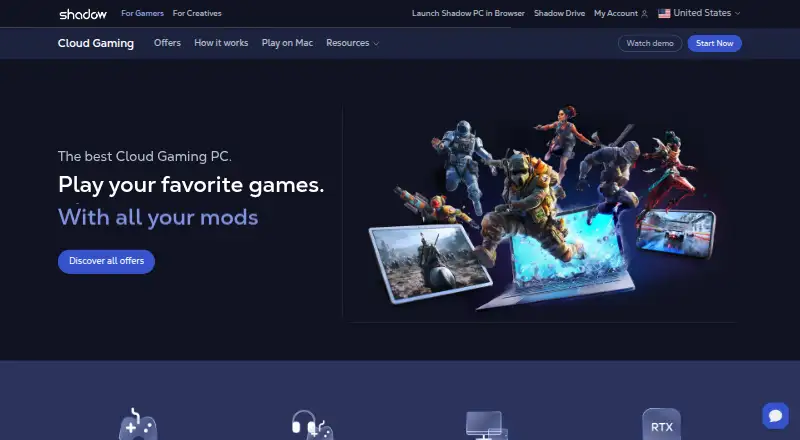
What Shadow PC is
Shadow PC streams a Windows PC from data centers to devices including Android, iOS, Linux, macOS, web, and Windows. Users can install games and mods from Steam, Epic, Battle.net, and Nexus Mods, though some games may not be compatible. Shadow also describes its RTX-powered PCs as suitable for creative software, CUDA and RTX workflows, and local AI models. Streaming supports multiple monitors and ultrawide displays, with the number of monitors depending on the plan. Plans vary in monthly hours, session lengths, display limits, and storage; listed options include 256 GB or 512 GB SSDs, and some plans include 28 GB RAM and 20 GB VRAM. Shadow recommends at least 15 Mb/s download and 5 Mb/s upload speeds. It does not back up Shadow PC data, so users should back up their files before changing offers.
Good
- Access from six listed platform types
- Supports multiple monitors and ultrawide displays
- Can run creative software and local AI models
- Persistent sessions
Watch out
- No free plan
- Some games may be incompatible
- Recommends at least 15 Mb/s download and 5 Mb/s upload
- Does not back up Shadow PC data
Who it suits
It suits people who want access to a streamed Windows PC from one of its listed device platforms, for gaming, creative software, or local AI work. Users should consider the recommended connection speeds, plan session limits, and their own backup needs.
Verdict
Shadow PC provides a streamed Windows environment with gaming, creative, and AI uses across a range of devices. Check plan hours and session lengths, compatibility, connection needs, and data backup responsibilities before subscribing.
Plans and prices
From Shadow PC's own pricing page, checked 29 Sep 2026.
| Plan | Price | What it gives you |
|---|---|---|
| Neo Lite | $29.99 a month | 120 hours/month · sessions up to 4h · 1440p · 256 GB SSD |
| Neo | $37.99 a month | 210 hours/month · sessions up to 6h · up to 5K/240 Hz · 512 GB SSD |
| Power Lite | $43.99 a month | 120 hours/month · sessions up to 4h · 1440p · 28 GB RAM · 20 GB VRAM |
| Neo Pro | $44.99 a month | 210 hours/month · sessions up to 8h · up to 5K/240 Hz · team management suite |
| Power | $54.99 a month | 210 hours/month · sessions up to 6h · up to 5K/240 Hz · 28 GB RAM · 20 GB VRAM |
| Power Pro | $59.99 a month | 210 hours/month · sessions up to 8h · up to 5K/240 Hz · 28 GB RAM · 20 GB VRAM · team management suite |
The facts
Each one read from Shadow PC's own pages, with the date it was checked.
What it does
- AI and creative work
- Shadow says its RTX-powered PCs can run creative software, CUDA/RTX workflows, and local AI models.checked 29 Sep 2026
- Datacenter security
- Shadow says its PC is hosted in a Tier 3+ data center managed by an ISO 27001 certified company.checked 29 Sep 2026
- Data storage
- Shadow says it does not back up Shadow PC data, so users should back up their data before changing offers.checked 29 Sep 2026
- Gaming
- Shadow says users can install games and mods from Steam, Epic, Battle.net, and other libraries, though some games may be incompatible.checked 29 Sep 2026
- Integrations
- The maker lists Steam, Epic, Battle.net, and Nexus Mods as sources for games and mods users can install.checked 29 Sep 2026
- Notable limits
- Shadow recommends at least 15 Mb/s download and 5 Mb/s upload speeds, and warns that some games may not be compatible.checked 29 Sep 2026
- Product
- Shadow PC streams a high-performance Windows PC from data centers to a user's device.checked 29 Sep 2026
- Pro use
- Pro plans include priority access, longer sessions, faster support response, and user and subscription management.checked 29 Sep 2026
- Security
- Shadow says account protections include IP address filtering, proprietary protocols, and other security methods.checked 29 Sep 2026
- Streaming features
- The service supports multiple monitors and ultrawide displays, with plan limits of one, two, or three monitors.checked 29 Sep 2026
The company
- Company history
- Shadow says its company was created in 2015 and its original product launched in France in 2016.checked 29 Sep 2026
- Founded
- 2015checked 28 Sep 2026
- Headquarters
- Paris, Francechecked 28 Sep 2026
Where it runs
- Platforms
- Shadow lists apps for Windows, macOS, iOS, Android, Linux, smart TVs, and Raspberry Pi OS, and also offers browser access.checked 29 Sep 2026
The full review of Shadow PC
Overview
Shadow PC is a persistent Windows desktop streamed from data centers to phones, tablets, and computers. It suits people who want to run their own games or demanding creative software without relying on their local machine. The trade-off is a metered service: monthly hours and session caps make plan choice part of the experience.
Key features
Users can install games and mods from Steam, Epic, Battle.net, Nexus Mods, and other libraries, rather than choosing from a fixed game catalogue. That flexibility is useful for people invested in those ecosystems, though Shadow cautions that some games may not be compatible.
Display options vary by plan, from 1440p to resolutions up to 5K at 240 Hz. Shadow supports ultrawide displays and multiple monitors, with plans allowing one, two, or three monitors. Power plans add 28 GB of RAM and 20 GB of VRAM, making them the more relevant choice for creative software, CUDA and RTX workflows, or local AI models. Those capabilities come with hour and session limits, so users with long uninterrupted workloads should weigh the caps carefully.
Shadow describes account protections that include IP address filtering and proprietary protocols. Its PC runs in a Tier 3+ data center managed by an ISO 27001 certified company. Shadow does not back up PC data, so users need their own backup routine, especially before changing offers.
Pricing
Shadow is paid, with plans starting at $29.99 a month. Each tier trades hours and session length against display capability, hardware, or team features:
- Neo Lite — $29.99 a month: 120 hours per month, sessions up to 4 hours, 1440p, and 256 GB SSD. A lower-cost entry for lighter or shorter gaming and desktop sessions; the 120-hour allowance and four-hour sessions are the key compromises.
- Neo — $37.99 a month: 210 hours per month, sessions up to 6 hours, resolutions up to 5K at 240 Hz, and 512 GB SSD. A better fit for frequent use and higher-end displays, without the extra memory and VRAM of Power.
- Power Lite — $43.99 a month: 120 hours per month, sessions up to 4 hours, 1440p, 28 GB RAM, and 20 GB VRAM. It prioritizes graphics-oriented hardware over longer use or higher display limits.
- Neo Pro — $44.99 a month: 210 hours per month, sessions up to 8 hours, resolutions up to 5K at 240 Hz, and a team management suite. It suits longer sessions and managed team use without the stated Power memory and VRAM.
- Power — $54.99 a month: 210 hours per month, sessions up to 6 hours, resolutions up to 5K at 240 Hz, 28 GB RAM, and 20 GB VRAM. The strongest fit among these plans for graphics-heavy work when six-hour sessions are sufficient.
- Power Pro — $59.99 a month: 210 hours per month, sessions up to 8 hours, resolutions up to 5K at 240 Hz, 28 GB RAM, 20 GB VRAM, and a team management suite. It combines the higher hardware tier with the longest stated sessions and team tools.
Choose by expected hours as well as hardware: Neo Lite and Power Lite cap use at 120 hours monthly, while the other plans allow 210. Pro tiers extend sessions to eight hours; all other listed plans cap them at six hours or less.
Platforms
Shadow PC is available through web, Windows, macOS, Linux, iOS, and Android. Shadow recommends at least 15 Mb/s download and 5 Mb/s upload speeds, so a suitable device alone is not enough for a dependable fit.
Who it's for
Shadow makes the most sense for people who want a persistent Windows environment for games they already own, demanding creative applications, or local AI work, and whose network can support streaming. Teams may value the management suite on Pro plans. It is a weaker choice for users who need unrestricted hours, sessions longer than the plan caps, universal game compatibility, or automatic data backups.
Pros and cons
- Pro: Install games and mods from multiple established libraries, rather than being restricted to a fixed catalogue.
- Pro: Power plans provide 28 GB RAM and 20 GB VRAM for the creative, CUDA/RTX, and AI workloads Shadow targets.
- Pro: A broad range of device platforms and support for ultrawide and multiple-monitor setups make the streamed desktop adaptable.
- Con: Monthly quotas and session caps can interrupt or constrain heavy use, particularly on the 120-hour Lite plans.
- Con: Some games may not work, which matters to anyone choosing the service primarily for a specific title.
- Con: Users must back up their own data; Shadow does not provide backups for Shadow PC data.
Alternatives
For a broader comparison, see Cloud PC Services.
- Amazon WorkSpaces is worth considering if a free plan or free trial is important; its listed Windows single-session user fee is $4.19 a month, plus provisioned instance-hour charges.
- Dizzion Cloud PC offers dedicated persistent desktops with Core or Complete tiers and CPU or GPU workload configurations; pricing is available by contacting Dizzion.
- Vagon Cloud Computer is an alternative with hourly plans charged by the minute, for readers who prefer usage-based billing to Shadow's monthly hour allowances.
- Ace Cloud Hosting Desktop as a Service is another paid desktop service with a free trial and an Enterprise team-desktop plan.
- Fantom Cloud PC offers one-time day passes, which may suit readers seeking a short, non-monthly unlock.
- Infosaic Cloud Virtual Desktop offers lower-priced monthly tiers with specified RAM, virtual cores, and storage, for readers comparing fixed-resource desktop plans.
- V2 Cloud has a free trial and a Basic Users plan aimed at front-desk, data-entry, call-center, and administrative workloads.
- Workspot Cloud PCs is an enterprise service with configurable desktop resources and use-based payment.
Verdict
Choose Shadow PC if you want a persistent streamed Windows machine for your own games or demanding creative and AI work, and can stay within its monthly hours and session limits. Its broad platform support and higher-tier hardware are the main reasons to choose it; look elsewhere if you need uncapped use, guaranteed compatibility with a particular game, or service-provided backups.
Alternatives to Shadow PC
- 1

Amazon WorkSpaces
Free planAndroidiOSWebAPI8.2From $3.25 a month - 2

Inuvika OVD Enterprise
AndroidiOSWebLinux7.3 - 3

Ace Cloud Hosting Desktop as a Service
AndroidiOSWebLinux7.2From $352.19 a month - 4

V2 Cloud
AndroidiOSWebLinux7.2From $35 a month - 5
Shells
AndroidiOSWebLinux7.0From $14.95 a month - 6
Vagon Cloud Computer
AndroidiOSWebLinux6.9From $0.25 a month