
UpSynk
UpSynk is a scheduling platform for individuals and teams that routes leads, syncs calendars, and manages booking experiences.
What UpSynk is
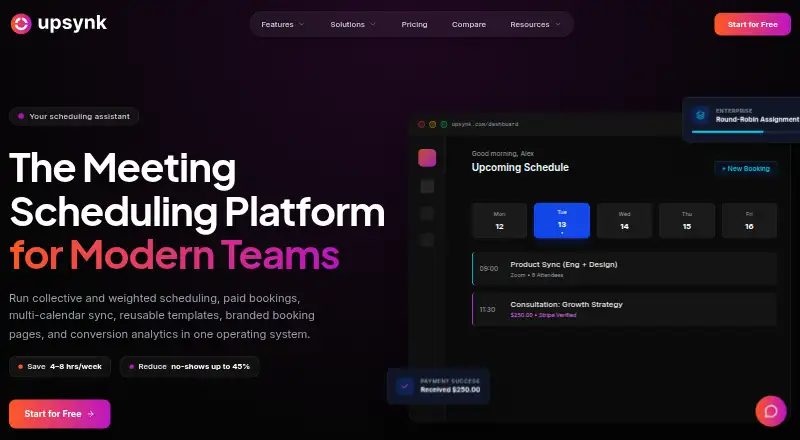
UpSynk is a scheduling platform for individuals and teams that routes leads, syncs calendars, and manages booking experiences. It supports one-to-one, group, webinar, round-robin, collective, recurring, and weighted-host scheduling. Calendar syncing with Google Calendar and Outlook checks conflicts across multiple calendars. Listed video options include Zoom, Google Meet, Webex, Whereby, and UpSynk Video Room, which generates meeting links automatically. Paid booking pages use Stripe checkout with saved-card support, 3DS authentication, billing addresses, and automatic tax when configured. The Free plan costs nothing and includes one booking page and basic Google Calendar integration. Pro costs $6 a month per seat and includes unlimited events, group and webinar bookings, paid pages, reusable templates, and Google and Outlook multi-calendar sync. Business costs $12 a month per seat and adds routing options, booking-page brand controls, conversion analytics, recordings, AI summaries, transcripts, highlights, polls, and shared notes. UpSynk lists Android, iOS, and web access, and states it is SOC-2 Type II certified, GDPR compliant, and ISO 27001 certified, with data encrypted at rest and in transit.
Good
- Supports seven scheduling types.
- Syncs Google Calendar and Outlook.
- Lists five video meeting options.
- Business includes recordings and AI summaries.
Watch out
- Free includes one booking page.
- Pro costs $6 a month per seat.
- Business costs $12 a month per seat.
Who it suits
UpSynk suits individuals and teams managing bookings, including users in sales, recruiting, healthcare, and education. Its scheduling options cover both individual appointments and team-based bookings.
Verdict
UpSynk combines varied booking formats with calendar syncing and video meeting options. The Free plan is limited to one booking page and basic Google Calendar integration; broader features are listed under its per-seat paid plans.
Plans and prices
From UpSynk's own pricing page, checked 4 Oct 2026.
| Plan | Price | What it gives you |
|---|---|---|
| Free | Free | 1 booking page · basic Google Calendar integration |
| Pro | $6 a month | Unlimited events · group and webinar bookings · paid booking pages · reusable event templates · Google and Outlook multi-calendar sync · $6/ month / seat |
| Business | $12 a month | Round-robin, collective and recurring scheduling · weighted and priority host routing · booking page builder and brand controls · conversion analytics · meeting recording and AI summaries · $12/ month / seat |
The facts
Each one read from UpSynk's own pages, with the date it was checked.
What it does
- Branding and analytics
- Business features include booking-page brand controls and booking conversion analytics.checked 4 Oct 2026
- Calendar integrations
- UpSynk says it syncs with Google Calendar and Outlook and checks conflicts across multiple calendars.checked 4 Oct 2026
- Intended users
- UpSynk presents solutions for individuals and teams in sales, recruiting, healthcare, and education.checked 4 Oct 2026
- Meeting intelligence
- Business includes meeting recording, AI summaries, transcripts, highlights, polls, and shared notes.checked 4 Oct 2026
- Payments
- Paid booking pages use Stripe checkout with saved-card support, 3DS authentication, billing addresses, and automatic tax when configured.checked 4 Oct 2026
- Scheduling
- It supports one-to-one, group, webinar, round-robin, collective, recurring, and weighted-host scheduling.checked 4 Oct 2026
- Security
- UpSynk states it is SOC-2 Type II certified, GDPR compliant, and ISO 27001 certified, with data encrypted at rest and in transit.checked 4 Oct 2026
- Support
- The plan comparison lists email support, phone support, and a dedicated success manager as support options.checked 4 Oct 2026
- Video integrations
- The site lists Zoom, Google Meet, Webex, Whereby, and its built-in UpSynk Video Room for automatically generated meeting links.checked 4 Oct 2026
- What it does
- UpSynk describes itself as a scheduling operating system for teams that routes leads, syncs calendars, and manages booking experiences.checked 4 Oct 2026
The company
- Company history
- The company’s About page says the idea began in 2021 and identifies 2024 as the year it became enterprise-ready.checked 4 Oct 2026
- Headquarters
- UpSynk says it is remote-first, with headquarters in San Francisco and engineering hubs in London and Bangalore.checked 4 Oct 2026
Money
- Free plan limit
- The pricing page says the Free Forever plan includes one booking page and basic Google Calendar integration.checked 4 Oct 2026
Where it runs
- Mobile apps
- The site links to UpSynk apps on the Apple App Store and Google Play and describes mobile booking, payment, and team-management features.checked 4 Oct 2026
The full review of UpSynk
UpSynk is a scheduling platform for individuals and teams that combines varied booking formats with calendar coordination. It is best suited to teams that need more than basic appointment booking, especially those routing meetings among hosts or adding paid bookings. Its free plan is a narrow starting point; the Pro and Business plans unlock the broader scheduling toolkit.
Overview
UpSynk brings lead routing, calendar syncing and booking management together. Its range runs from one-to-one appointments to group, webinar, round-robin, collective, recurring and weighted-host bookings, making it more adaptable than a simple appointment page. That breadth is useful for teams with different meeting workflows, but the free tier’s single booking page is a meaningful constraint for anyone managing multiple services or teams.
It syncs with Google Calendar and Outlook and checks conflicts across multiple calendars. Video options include Zoom, Google Meet, Webex, Whereby and automatically generated links through UpSynk Video Room. The security measures it states—SOC-2 Type II and ISO 27001 certification, GDPR compliance, and encryption in transit and at rest—are relevant for organizations handling sensitive scheduling data.
Key features
Scheduling and routing
One-to-one and group bookings cover common appointment needs, while webinar bookings add a format for larger sessions. Round-robin, collective, recurring and weighted-host scheduling are more specialized tools for distributing meetings across a team or coordinating several hosts. Those team-oriented options make the Business tier the more compelling fit for complex routing; they are not part of the listed Pro package.
Payments and meeting tools
Paid booking pages use Stripe checkout, with saved cards, 3DS authentication, billing addresses and automatic tax when configured. These controls suit teams charging for appointments, though they are a paid-plan feature. Business adds brand controls and booking conversion analytics, plus recording, AI summaries, transcripts, highlights, polls and shared notes. That is a substantial meeting follow-up package, but it is only worthwhile if a team will use those tools regularly.
Pricing
UpSynk has a Free Forever plan, a 14-day trial and paid plans starting at $6/user/mo. The paid prices are billed per seat, so team costs rise with each user.
| Plan | Price | What it includes |
|---|---|---|
| Free | free | One booking page and basic Google Calendar integration. |
| Pro | $6 a month | Billed $6/ month / seat; unlimited events, group and webinar bookings, paid booking pages, reusable event templates, and Google and Outlook multi-calendar sync. |
| Business | $12 a month | Billed $12/ month / seat; round-robin, collective and recurring scheduling, weighted and priority host routing, booking-page builder and brand controls, conversion analytics, meeting recording and AI summaries. |
Free works for an individual with one booking page and basic Google Calendar needs, but it omits Outlook sync and the broader booking formats in Pro. Pro is the practical upgrade for unlimited events, paid bookings and multi-calendar syncing. Business doubles the per-seat price and is the right step for team routing, branding, analytics and meeting intelligence. The 14-day trial offers a limited window to assess paid features before choosing a plan.
Platforms
UpSynk is available on web, Android and iOS. Its mobile apps support booking, payments and team management, which makes it more suitable than a web-only scheduler for users who need to manage bookings on a phone.
Who it's for
UpSynk presents its product for individuals and teams in sales, recruiting, healthcare and education. Pro suits users who need more than a single basic booking page, while Business is aimed at teams coordinating hosts or measuring booking conversion. It is less appealing to someone who only needs one simple calendar link and has no need for paid bookings or team workflows.
Pros and cons
- Pro: Multiple booking formats, including webinars and group sessions, let one service handle more than one meeting pattern.
- Pro: Google and Outlook multi-calendar sync on Pro helps avoid conflicts across calendars.
- Pro: Business combines host routing with analytics and meeting follow-up tools, useful for teams that need those functions together.
- Con: Free is capped at one booking page and basic Google Calendar integration, limiting its use for broader workflows.
- Con: Team costs scale per seat, and routing, branding, analytics and meeting intelligence require the higher-priced Business plan.
Alternatives
For more interview-focused options, browse Interview Scheduling Software.
- Cadence is a strong fit if a free interview workflow with self-scheduling, Google Calendar and Microsoft 365 sync, candidate status pages and scorecards matters more than UpSynk’s broader booking formats.
- ModernLoop may suit buyers looking for an interview-scheduling product who are prepared to contact sales for pricing.
- Arrange is worth considering for hiring teams wanting multiple scheduling flows, hiring-manager calendars and ATS integrations in its $35 a month Pro plan.
- Cronofy Interview Scheduling is a paid interview-scheduling option with a free trial for teams willing to book a demo for pricing.
- IncFeed is another paid, web-based alternative.
- ANCI AI is a paid option available on web, iOS and Android.
- Talview may fit organizations that want unit-based pricing and feature bundles, with a typical minimum commitment of approximately 150 to 200 candidates.
- Cal.com is a broader scheduling alternative with a free plan for one user, unlimited event types and calendars, and 100+ app integrations.
Verdict
UpSynk is a good choice for individuals and teams that need flexible booking formats, multi-calendar coordination and a path to team routing or paid appointments. Its strongest case is the range of scheduling and meeting tools across Pro and Business. Look elsewhere if one free booking page is too restrictive or if per-seat Business pricing does not suit your team.
Getting started
- Visit the UpSynk website
- Choose Free, Pro, or Business
- Create a booking page
- Connect Google Calendar or Outlook
- Add video meeting integrations such as Zoom or Google Meet
- Configure payment settings with Stripe for paid bookings
- Install the Android or iOS app if needed
Limits worth knowing
The Free Forever plan includes one booking page and basic Google Calendar integration. Pro costs $6.00 per month per seat, while Business costs $12.00 per month per seat and is required for advanced routing, branding controls, conversion analytics, recordings, and AI summaries.
Questions
What does UpSynk cost?
Free costs $0.00. Pro costs $6.00 per month per seat, and Business costs $12.00 per month per seat.
Is there a free plan?
Yes. Free Forever includes one booking page and basic Google Calendar integration.
Which platforms are supported?
UpSynk provides Android, iOS, and web apps.
Which calendars can it sync?
It syncs with Google Calendar and Outlook and checks conflicts across multiple calendars.
Can UpSynk handle paid bookings?
Yes. Paid booking pages use Stripe checkout with saved cards, 3DS authentication, billing addresses, and automatic tax when configured.
What security certifications does UpSynk state?
UpSynk states that it is SOC-2 Type II certified, GDPR compliant, and ISO 27001 certified, with encryption at rest and in transit.
Alternatives to UpSynk
- 1

Cal.com
Free planAndroidiOSWebAPI8.3Free plan - 2
Schedly
Free planAndroidiOSWebAPI8.1Free plan - 3

SchedulingKit
Free planAndroidiOSWebAPI8.1From $10 a month - 4
Compono Hire
Free planAndroidiOSWebAPI8.0Free plan - 5

MangoApps
AndroidiOSWebAPI7.9From $9 a month - 6

Sense
AndroidiOSWebAPI7.4From $500 a month