UninstallView
UninstallView is a free Windows utility for viewing installed programs and uninstalling software on local or remote computers.
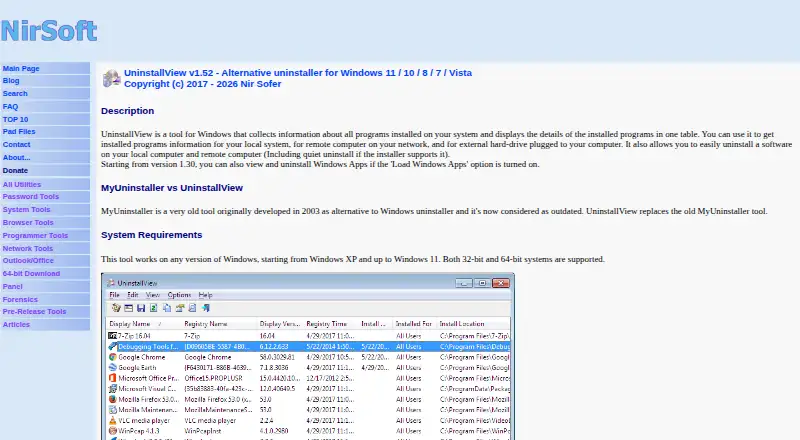
What UninstallView is
UninstallView is a free Windows utility for viewing installed programs and uninstalling software on local or remote computers. Its list can draw from the current system, other user profiles, a remote computer, an external drive, or a shadow copy. With Load Windows Apps enabled, it can include and uninstall Windows Apps. Available uninstall methods include standard uninstall, change-install when available, and quiet uninstall when the program supplies a quiet command. Program lists can be exported as text, tab-delimited, CSV, HTML, XML, or JSON, including from the command line. The tool is portable: run UninstallView.exe without an installation process or extra DLL files. NirSoft lists Windows XP through Windows 11 support for both 32-bit and 64-bit systems. Remote uninstall requires Microsoft Sysinternals PsExec in the same folder; remote commands run as SYSTEM, and some uninstallers may not work properly in that context. The utility reads uninstall details from the Registry and may supplement missing information from other sources, which NirSoft says can be inaccurate.
Good
- Portable utility runs without installation or extra DLL files.
- Can export lists in six formats.
- Supports Windows XP through Windows 11.
- Can load uninstall data from several sources.
Watch out
- Remote uninstall requires PsExec in the same folder.
- Some remote uninstallers may not work properly as SYSTEM.
- Supplemental program details may be inaccurate.
Who it suits
UninstallView suits Windows users who want to inspect program details, export installed-software lists, or run uninstall commands. Its data-source options can also help users examine other profiles, drives, shadow copies, or remote computers.
Verdict
UninstallView combines program inventory, export, and uninstall options in a portable Windows utility. Remote removal has PsExec and SYSTEM-context requirements, and some supplemental details may be inaccurate.
Plans and prices
From UninstallView's own pricing page, checked 8 Oct 2026.
| Plan | Price | What it gives you |
|---|---|---|
| UninstallView | Free | Freeware · Windows utility · redistribution allowed if unmodified and not sold or included in a commercial product |
The facts
Each one read from UninstallView's own pages, with the date it was checked.
What it does
- Batch uninstall
- Yeschecked 23 Sep 2026
- Data accuracy
- UninstallView first reads official uninstall information from the Registry and may supplement missing details from other sources, which the maker says can be inaccurate.checked 8 Oct 2026
- Data sources
- It can load uninstall information from the current system, other user profiles, a remote computer, an external drive, or a shadow copy.checked 8 Oct 2026
- Download verification
- NirSoft provides MD5, SHA1, SHA256, and SHA512 hashes for the 32-bit and 64-bit downloads so users can compare downloaded files with the server copies.checked 8 Oct 2026
- Export
- Installed program lists can be exported to text, tab-delimited, CSV, HTML, XML, or JSON formats, including from the command line.checked 8 Oct 2026
- Forced uninstall
- Nochecked 23 Sep 2026
- Install monitoring
- Nochecked 23 Sep 2026
- Leftover scan
- Nochecked 23 Sep 2026
- Notable limits
- Deleting uninstall Registry keys is disabled by default, is available only for the local current-user data source, and can prevent the software from being uninstalled.checked 8 Oct 2026
- Portable
- The utility requires no installation process or additional DLL files and starts by running UninstallView.exe.checked 8 Oct 2026
- Portable version
- Yeschecked 23 Sep 2026
- Purpose
- UninstallView lists installed programs and their details, and can uninstall software on local or remote computers.checked 8 Oct 2026
- Remote uninstall
- Remote uninstall uses Microsoft Sysinternals PsExec, which must be placed in the same folder as UninstallView; remote commands run as SYSTEM and some uninstallers may not work properly this way.checked 8 Oct 2026
- Security and privacy
- NirSoft says its utilities do not collect personal information from users' computers or send information to anyone; its site separately records anonymous usage data and uses third-party advertising cookies.checked 8 Oct 2026
- Support
- The maker invites users to email problems, suggestions, comments, or bug reports to [email protected].checked 8 Oct 2026
- Supported systems
- The maker lists Windows XP through Windows 11 and support for both 32-bit and 64-bit systems.checked 8 Oct 2026
- Uninstall modes
- It supports standard uninstall, change-install when available, and quiet uninstall when the software provides a quiet uninstall command.checked 8 Oct 2026
Money
- Free plan
- Yeschecked 23 Sep 2026
The company
- Maker
- NirSoft is run by developer Nir Sofer, who says he develops and maintains the site and utilities himself; the site began in 2001.checked 8 Oct 2026
Where it runs
- Windows Apps
- With the Load Windows Apps option enabled, it can list and uninstall Windows Apps.checked 8 Oct 2026
Alternatives to UninstallView
- 1
IObit Uninstaller
Free planWindows8.2Free plan - 2

Wise Program Uninstaller
Free planWindows8.1From $14.95 a year - 3
Argente Uninstall Manager
Free planWindows7.9From €9 a year - 4

Geek Uninstaller
Free planWindows7.6Free plan - 5

Uninstalr
Free planWindows7.4$39 one-time - 6
Revo Uninstaller
Windows7.3