UltraBackup
UltraBackup, also described as UltBackup, is a free open-source plugin for automated backups on Minecraft Java servers using Bukkit, Spigot, or Paper 1.13 an…
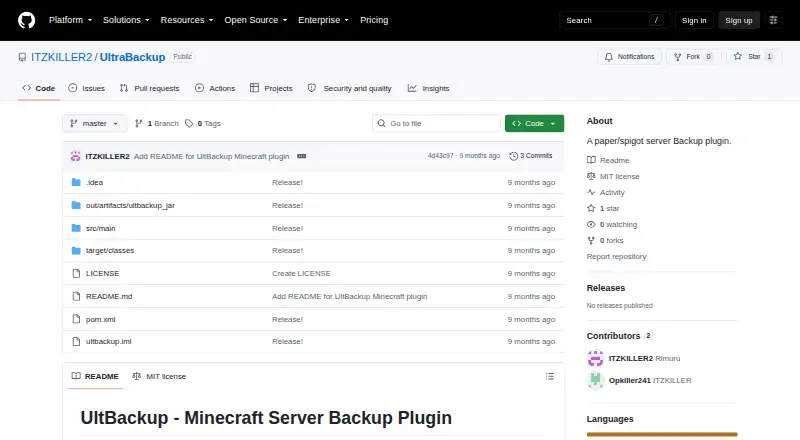
What UltraBackup is
UltraBackup, also described as UltBackup, is a free open-source plugin for automated backups on Minecraft Java servers using Bukkit, Spigot, or Paper 1.13 and later. It saves all worlds before creating ZIP archives, supports compression levels from 0 to 9, reports progress, and performs backup work asynchronously. Operators can exclude selected files or folders, such as caches, logs, and existing backups. Backups may stay local or upload to Google Drive through OAuth 2.0, SFTP, or FTP. Older local backups can be removed automatically; the example configuration keeps the last 10. The `/restore` command schedules a full restoration and shuts down the server to perform it. Installation requires placing `UltBackup.jar` in the server's `plugins/` folder, restarting, and editing `plugins/UltBackup/config.yml`. SFTP transfers are encrypted, while FTP is unencrypted and not recommended for the public internet. SFTP and FTP passwords are stored in plain text in the configuration file. The project uses the MIT License.
Good
- Supports Bukkit, Spigot, and Paper 1.13+
- Creates configurable ZIP archives
- Uploads to Google Drive, SFTP, or FTP
- Offers file and folder exclusions
- Deletes older backups automatically
Watch out
- FTP transfers are unencrypted
- Credentials are stored in plain text
- Restore shuts down the server
- Scheduled backups are not available
Who it suits
UltraBackup suits Minecraft Java server operators running Bukkit, Spigot, or Paper. It is aimed at administrators who want local or cloud backup destinations and configurable retention.
Verdict
UltraBackup covers full-server backup creation, retention, upload, and restoration for supported Minecraft servers. Its storage choices are broad, but FTP and plain-text credentials require careful configuration.
The facts
Each one read from UltraBackup's own pages, with the date it was checked.
What it does
- Backup features
- It saves worlds before backup, creates configurable ZIP archives, reports progress, and can delete older backups automatically.checked 8 Oct 2026
- Backups
- It saves all worlds before backup and creates ZIP archives with configurable compression levels from 0 to 9.checked 8 Oct 2026
- Cloud integrations
- The plugin supports Google Drive, SFTP, and FTP uploads, as well as local-only backups.checked 8 Oct 2026
- Compatibility
- The project lists Bukkit 1.13+, Spigot 1.13+, and Paper 1.13+ as compatible.checked 8 Oct 2026
- Configuration limits
- The example configuration keeps the last 10 local backups by default and sets ZIP compression level to 6, configurable from 0 to 9.checked 8 Oct 2026
- Credential handling
- The README says SFTP and FTP passwords are stored in plain text in `config.yml` and recommends restricting that file's permissions.checked 8 Oct 2026
- Filtering
- An exclusion list can omit selected files or folders, with cache, logs, and backups shown as examples.checked 8 Oct 2026
- Intended audience
- The repository describes the plugin as made for the Minecraft community and targets Minecraft server operators using Bukkit, Spigot, or Paper.checked 8 Oct 2026
- Intended users
- The README presents the plugin for Minecraft server operators using Bukkit, Spigot, or Paper.checked 8 Oct 2026
- License
- The repository's MIT license permits use, copying, modification, distribution, sublicensing, and sale, subject to its stated conditions.checked 8 Oct 2026
- Product
- The project describes UltBackup as a Minecraft Bukkit, Spigot, and Paper plugin for automated server backups with cloud upload.checked 8 Oct 2026
- Progress
- The plugin provides real-time backup progress updates and runs backup operations asynchronously.checked 8 Oct 2026
- Purpose
- The README describes UltBackup as a Bukkit, Spigot, and Paper plugin for automated Minecraft server backups.checked 8 Oct 2026
- Restore
- The `/restore` command schedules restoration and shuts down the server to perform it.checked 8 Oct 2026
- Retention
- It can delete older backups automatically, with the example configuration keeping the last 10 locally.checked 8 Oct 2026
- Security
- The README says SFTP transfers are encrypted and warns that FTP is unencrypted and not recommended for the public internet.checked 8 Oct 2026
- Server compatibility
- The README lists Bukkit, Spigot, and Paper 1.13+ as supported.checked 8 Oct 2026
- Setup
- Installation instructions say to place `UltBackup.jar` in the server's `plugins/` folder, restart, and configure `plugins/UltBackup/config.yml`.checked 8 Oct 2026
- Storage integrations
- Supported upload destinations are Google Drive via OAuth 2.0, SFTP, and FTP, and configuration also allows local-only backups.checked 8 Oct 2026
- Support
- The README directs users to server console errors, configuration checks, credential checks, and its troubleshooting guide for help.checked 8 Oct 2026
- Transfer security
- The README describes SFTP as encrypted and FTP as unencrypted and not recommended for the public internet.checked 8 Oct 2026
Money
- Limits and planned features
- Automated scheduled backups, Discord notifications, incremental backups, backup encryption, and a web interface are listed as future features.checked 8 Oct 2026
Alternatives to UltraBackup
- 1
FastBack
Free planOpen sourceLinuxmacOSWindows7.2Free plan - 2
Just Enough Backups
Free planOpen sourceLinuxmacOSSelf-hostedWindows7.1Free plan - 3
FolderRewind
Free planOpen sourceAPIWindows7.0Free plan - 4
DriveBackupV2
Free planOpen sourceAPISelf-hosted6.9Free plan - 5
MineBackup
Free planLinuxmacOSSelf-hostedWindows6.6Free plan - 6
InstantBackup
Free planLinuxmacOSSelf-hostedWindows6.5Free plan