
Twinkle Tray
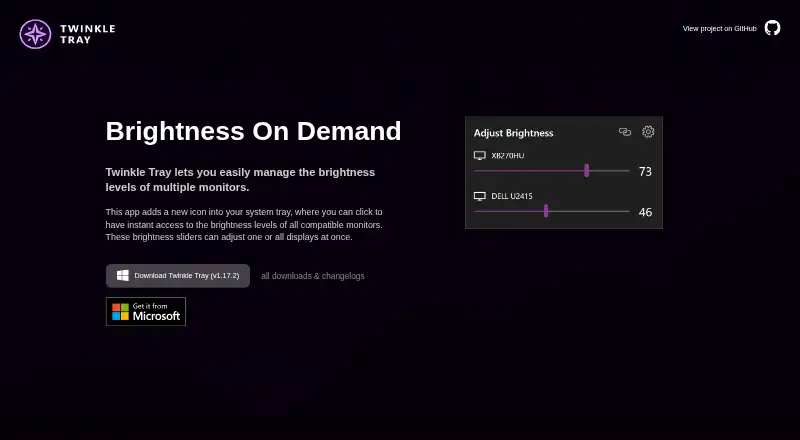
Twinkle Tray is a Windows utility for managing brightness on multiple displays from a system-tray icon.
What Twinkle Tray is
Twinkle Tray is a Windows utility for managing brightness on multiple displays from a system-tray icon. Its sliders let you adjust one display or all displays together, and it can control DDC/CI monitor settings such as contrast, volume, and power state. It works with most laptops and DDC/CI-enabled monitors, using WMI for internal laptop screens and DDC/CI for external displays. You can schedule brightness changes by time of day or when the computer is idle, and bind hotkeys to individual screens or all displays. Command-line arguments allow custom scripting, and the app is localized in over 20 languages. It is free and is available through the Microsoft Store or as a GitHub installer. Compatibility can be limited with VGA or DVI connections and some USB, Thunderbolt, or Surface docks using HDMI or DisplayPort. Its privacy policy describes Google Analytics collection of settings, system and interaction details, and estimated location; an opt-out is available in Settings.
Good
- Adjusts one display or all displays together.
- Controls DDC/CI contrast, volume, and power state.
- Schedules changes by time or computer inactivity.
- Supports hotkeys and command-line scripting.
- Free, with localization for over 20 languages.
Watch out
- Some VGA and DVI connections may not work.
- Some USB, Thunderbolt, and Surface docks may be incompatible.
- Privacy policy describes Google Analytics collection, with opt-out in Settings.
Who it suits
It suits Windows users who want to adjust brightness across multiple displays, including through schedules or hotkeys. Check display and dock compatibility if your setup uses VGA, DVI, or a dock.
Verdict
Twinkle Tray brings multi-display brightness and other DDC/CI controls to a Windows system-tray utility, with scheduling and hotkey options. Confirm that your monitor connection is compatible before relying on it.
Plans and prices
From Twinkle Tray's own pricing page, checked 1 Oct 2026.
| Plan | Price | What it gives you |
|---|---|---|
| Free | Free | Windows 10 & Windows 11 · most laptops and DDC/CI-enabled monitors · 100% free |
The facts
Each one read from Twinkle Tray's own pages, with the date it was checked.
What it does
- Automation
- It supports brightness adjustments by time of day or when the computer is idle.checked 1 Oct 2026
- Brightness control
- Brightness sliders can adjust one display or all displays at once.checked 1 Oct 2026
- Compatibility limits
- VGA/DVI connections and some USB, Thunderbolt, or Surface docks with HDMI or DisplayPort may not be compatible.checked 1 Oct 2026
- Data sharing
- The privacy policy says collected details are stored in Google Analytics and are not shared with other third parties.checked 1 Oct 2026
- Display support
- It works with most laptops and DDC/CI-enabled monitors.checked 1 Oct 2026
- Distribution
- Twinkle Tray is available through the Microsoft Store or as a GitHub installer.checked 1 Oct 2026
- Hotkeys
- Users can bind hotkeys to adjust specific displays or all displays.checked 1 Oct 2026
- License
- The source code is provided under the MIT License.checked 1 Oct 2026
- Localization
- The application is localized for over 20 languages.checked 1 Oct 2026
- Monitor controls
- It can control DDC/CI features including contrast, volume, and power state.checked 1 Oct 2026
- Privacy
- The privacy policy says it collects user settings, operating system, CPU name, app version, user interactions, and estimated location through Google Analytics, with an opt-out in Settings.checked 1 Oct 2026
- Protocols
- Twinkle Tray uses DDC/CI for external displays and WMI for internal laptop displays.checked 1 Oct 2026
- Purpose
- Twinkle Tray manages brightness levels for multiple monitors from a Windows system-tray icon.checked 1 Oct 2026
- Scripting
- It supports command-line arguments for custom scripting.checked 1 Oct 2026
- Support
- The official site links to GitHub source code, opened issues, and troubleshooting documentation.checked 1 Oct 2026
The full review of Twinkle Tray
Twinkle Tray is a free Windows utility for adjusting brightness and other controls across multiple displays from the system tray. It suits people who want one place to manage external monitors and a laptop screen, especially when they value schedules or hotkeys. Its breadth is useful, but monitor and connection compatibility should shape the buying decision.
Overview
Twinkle Tray brings display controls that are often scattered across monitor buttons or separate settings into a single Windows utility. It uses DDC/CI for external displays and WMI for internal laptop displays, covering most laptops and DDC/CI-enabled monitors. That makes it a practical choice for mixed-display setups, provided the connection path supports the required controls.
VGA and DVI connections may not work, and some USB, Thunderbolt, or Surface docks using HDMI or DisplayPort can also cause compatibility problems. Readers relying on a dock should confirm their setup works before making Twinkle Tray central to their workflow.
Key features
Brightness sliders can change an individual display or all displays at once, a useful distinction for people who want independent control without giving up quick system-wide adjustments. DDC/CI controls also cover contrast, volume, and power state, while monitor profiles add another way to manage displays.
Scheduling can adjust brightness by time of day or when the computer is idle. Hotkeys can target a particular display or all of them, and command-line arguments allow custom scripting. These options suit users who want repeatable control beyond manual slider changes; they are less important if brightness is only adjusted occasionally.
Localization covers more than 20 languages. The source code is available under the MIT License, and support paths include GitHub source code, opened issues, and troubleshooting documentation.
Pricing
Free — free. The plan is billed 100% free and supports Windows 10 and Windows 11, most laptops, and DDC/CI-enabled monitors. It includes DDC/CI control, input switching, monitor profiles, settings scheduling, CLI or API access, and auto brightness. There is no paid tier or feature gate to weigh against a lower-cost option in the stated plan, so it is an easy fit for Windows users who want the included controls without a subscription or purchase.
Twinkle Tray is distributed through the Microsoft Store or as a GitHub installer. Its privacy policy says it collects user settings, operating system, CPU name, app version, user interactions, and estimated location through Google Analytics. Users can opt out in Settings; the collected details are stored in Google Analytics and are not shared with other third parties.
Platforms
Twinkle Tray runs on Windows, with the free plan covering Windows 10 and Windows 11. It uses WMI for internal laptop displays and DDC/CI for external displays, so Windows support alone does not guarantee that every monitor or dock connection will cooperate.
Who it's for
Choose Twinkle Tray if you use Windows with several displays and want shared or per-monitor brightness control alongside scheduling, hotkeys, profiles, and scripting. Its free plan makes it particularly compelling for users who need those controls without a paid license. Look elsewhere if you need macOS or Linux support, or if your monitor connection is incompatible.
Pros and cons
- Pros: One free utility combines per-display and all-display brightness with contrast, volume, and power controls, reducing the need to manage each display separately.
- Pros: Scheduling, hotkeys, monitor profiles, and command-line arguments give users several ways to automate or tailor adjustments.
- Pros: The opt-out for Google Analytics collection gives privacy-conscious users a way to decline the stated tracking.
- Cons: Compatibility depends on DDC/CI support and the connection; VGA/DVI and some dock setups may not work.
- Cons: It is Windows-only, so it is not a cross-platform choice for households or workplaces mixing operating systems.
Alternatives
For a broader browse, start with Monitor Control Software.
- Lunar is the macOS alternative to consider if you use a Mac; its free Manual Mode has a 100-adjustment limit.
- ASUS DisplayWidget Center is another free option for Windows or macOS, but it is limited to compatible ASUS monitors.
- ClickMonitorDDC is a free Windows alternative for personal use with no premium features stated.
- BetterDisplay is a macOS alternative with a free offering and a Pro perpetual license at $21.99, paid once for covered versions, including at least one year of updates.
- ddcutil is a free option for Linux, API, or self-hosted use, distributed under GPLv2.
- DisplayBuddy is a paid alternative with a free trial and macOS and Windows support; its Personal plan is $24.99, paid once for one Mac, unlimited presets, and lifetime access.
- DDC-CI Control Bridge is a free alternative with API, Linux, macOS, self-hosted, and Windows platforms.
- MonitorControl is a free macOS alternative that controls display brightness, volume, and contrast.
Verdict
Twinkle Tray is a strong choice for Windows users who want free, flexible control of multiple displays, particularly when schedules, hotkeys, or scripting matter. Its range of controls is the main reason to choose it; connection compatibility is the main reason to look elsewhere or verify a setup before relying on it.
Alternatives to Twinkle Tray
- 1
ddcutil
Free planAPILinuxSelf-hosted6.6Free plan - 2

ClickMonitorDDC
Free planWindows6.5Free plan - 3

Lunar
Free planmacOS6.5$23 one-time - 4
DisplayBuddy
macOSWindows6.3$24.99 one-time - 5
Monitor Switch
Free planWebAPILinuxSelf-hosted6.3Free plan - 6
AOC G-Menu
Free planWindows6.2Free plan