TutorialsPoint Coding Ground
TutorialsPoint Coding Ground lets you choose a programming language and write and run code in a browser.
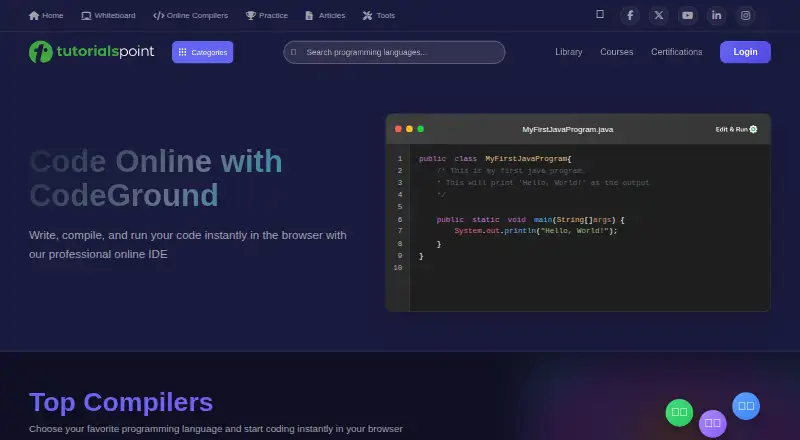
What TutorialsPoint Coding Ground is
TutorialsPoint Coding Ground lets you choose a programming language and write and run code in a browser. Its CodeGround page lists more than 100 compilers, editors, and terminals. Options include Python, C, JavaScript, Java, C++, Go, Rust, C#, PHP, Kotlin, Swift, Scala, and Dart, along with tools for web technologies such as HTML5, CSS3, Bootstrap, Angular, Vue.js, and Node.js. Interactive terminals cover Linux, Node.js, R, Ruby, Lua, PHP, NumPy, SciPy, and Octave. On the Kotlin compiler page, you can enter code in a source tab, run it in the browser, and provide input through a terminal while it runs. Project controls include opening, saving, and sharing work; sharing creates a short link that is deleted after almost three months of inactivity. Editor settings include theme, font and tab sizes, line numbers, and Ace, Vim, or Emacs choices. The web-based service has a free plan at no cost. TutorialsPoint is based in Hyderabad, India.
Good
- Lists more than 100 compilers, editors, and terminals.
- Supports numerous programming languages and web technologies.
- Kotlin projects can be opened, saved, and shared.
- Editor offers Ace, Vim, and Emacs choices.
- Free plan at no cost.
Watch out
- Available platform is web only.
- Inactive shared links are deleted after almost three months.
Who it suits
It suits aspiring programmers and IT professionals who want browser-based coding tools across many languages. It may also fit learners using TutorialsPoint’s computer science and programming education resources.
Verdict
Coding Ground brings a broad range of browser coding tools together under a free plan. Check the available tool for your language and note the inactivity limit on shared project links.
Plans and prices
From TutorialsPoint Coding Ground's own pricing page, checked 8 Oct 2026.
| Plan | Price | What it gives you |
|---|---|---|
| Coding Ground | Free | 100+ compilers, editors, and terminals |
The facts
Each one read from TutorialsPoint Coding Ground's own pages, with the date it was checked.
What it does
- Available tools
- The page says more than 100 compilers, editors, and terminals are available on CodeGround.checked 8 Oct 2026
- Editing and execution
- The Kotlin compiler page says users can write or paste code in the source tab and execute it in the browser.checked 7 Oct 2026
- Editor settings
- The Kotlin editor offers theme, font size, tab size, line-number visibility, and Ace, Vim, or Emacs editor choices.checked 7 Oct 2026
- Editor themes
- The article describes changing the editor theme through the View menu.checked 8 Oct 2026
- Intended audience
- The FAQ describes TutorialsPoint as an online education site for computer science, information technology, programming languages, engineering, and management subjects.checked 7 Oct 2026
- Intended users
- TutorialsPoint describes Coding Ground as a solution for aspiring programmers and IT professionals.checked 8 Oct 2026
- Interactive terminals
- The page lists interactive terminals for Linux, Node.js, R, Ruby, Lua, PHP, NumPy, SciPy, and Octave.checked 8 Oct 2026
- Language and tool range
- The compilers page lists more than 100 compilers, editors, and terminals.checked 7 Oct 2026
- Languages
- Listed tools include C, C++, Java, Python, C#, Go, Swift, Kotlin, Dart, Ruby, Rust, and Scala.checked 8 Oct 2026
- Privacy
- Tutorials Point India Limited says visitors can browse without providing personally identifiable information unless they register, while access to some services requires an account.checked 8 Oct 2026
- Project handling
- A TutorialsPoint article says projects can be created, refreshed, renamed, saved, imported, or downloaded, and mentions Google Drive and Dropbox among the options.checked 8 Oct 2026
- Project tools
- The Kotlin page provides options to open, save, save as, and share projects.checked 7 Oct 2026
- Purpose
- Coding Ground lets users practice, edit, run, compile, and share programs online without installing software.checked 8 Oct 2026
- Runtime input
- The Kotlin compiler page says programs can receive input from the terminal window at runtime.checked 7 Oct 2026
- Security
- The privacy policy says collected information is stored on secure servers and that payment details are processed through a secure payment gateway and not stored on its server.checked 8 Oct 2026
- Sharing
- The Kotlin page says sharing creates a short link that can be shared by email, WhatsApp, or social media, and that an inactive shared link is deleted after almost three months.checked 7 Oct 2026
- Support
- The privacy policy directs questions about the policy to [email protected].checked 8 Oct 2026
- Support contact
- The FAQ lists [email protected] for suggestions and other contact, and gives the company location as Hyderabad, India.checked 7 Oct 2026
- Web technologies
- Listed web tools include HTML5, CSS3, Vue.js, Node.js, TypeScript, Bootstrap, jQuery, and JavaScript.checked 8 Oct 2026
Where it runs
- Browser coding
- The compiler page invites users to choose a programming language and start coding in their browser.checked 8 Oct 2026
The company
- Company history
- The company FAQ says Tutorials Point began with an HTML tutorial in 2006 and is developed and maintained by Tutorials Point (I) Pvt. Ltd., established on June 12, 2014.checked 8 Oct 2026
- Headquarters
- Hyderabad, Telangana, Indiachecked 28 Sep 2026
Money
- Free plan
- Yeschecked 20 Sep 2026
Alternatives to TutorialsPoint Coding Ground
- 1

Replit
Free planAndroidiOSWebLinux8.4From $18 a month - 2

Playcode
Free planAndroidiOSWebAPI8.2From $25 a month - 3

StackBlitz
Free planAndroidiOSWebAPI8.2Free plan - 4

JDoodle
Free planAndroidiOSWebAPI8.0From $4 a month - 5

CodeHS
Free planAndroidiOSWeb7.6From $990 a year - 6

Google Colab
Free planWebAPIExtensionSelf-hosted7.6Free plan