TROY AssurePay Check
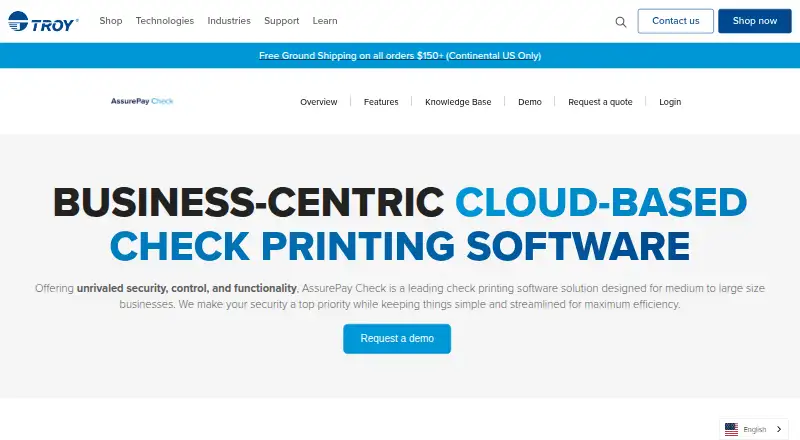
TROY AssurePay Check is cloud-based check printing software for medium-to-large businesses.
What TROY AssurePay Check is
TROY AssurePay Check is cloud-based check printing software for medium-to-large businesses. Users upload batches, review and approve them, print checks, and export Positive Pay files for their bank. Supported batch imports include .xml, .csv, .txt, and flat text files. The software can also create one-off checks, sample checks for testing, and blank checks for field use. TROY says it integrates with existing ERP and CRM systems, but does not name specific products. Listed controls include multi-factor authentication, single sign-on, IP address restrictions, and account restrictions based on user roles. The cloud service is hosted on Microsoft Azure, with regional options in the U.S., Canada, Latin America, and elsewhere. Audit reports can show every check created in the software. Positive Pay is an add-on that generates bank files for checking authenticity. Listed uses include payroll, accounts payable, claim checks, EOBs, direct deposit slips, and wealth management. Users can access and authorize batches in desktop, tablet, or mobile browsers; listed browsers are Chrome, Firefox, Safari, and Microsoft Edge. Printing requires a Windows-compatible device, with Windows 10 listed in the system requirements. Pricing is available on request.
Good
- Imports .xml, .csv, .txt, and flat text files.
- Supports one-off, sample, and blank checks.
- Includes multi-factor authentication and single sign-on.
- Audit reports cover every check created.
- Browser access supports desktop, tablet, and mobile.
Watch out
- Pricing is available on request.
- Check printing requires a Windows-compatible device.
- Positive Pay is an add-on.
- Specific ERP and CRM integrations are not named.
Who it suits
AssurePay Check suits medium-to-large businesses that handle check batches for payroll, accounts payable, claims, or other listed uses. It may also fit teams needing browser-based batch approval and Windows-compatible check printing.
Verdict
AssurePay Check covers batch review, approval, printing, and reporting, with browser access for authorization. Check printing still requires a Windows-compatible device, and Positive Pay costs extra as an add-on.
Plans and prices
From TROY AssurePay Check's own pricing page, checked 15 Oct 2026.
| Plan | Price | What it gives you |
|---|---|---|
| AssurePay Check | Priced on request | Up to 10 users · up to 50 bank accounts · up to 20 approval rules · up to 8 import profiles · up to 100,000 checks/year |
The facts
Each one read from TROY AssurePay Check's own pages, with the date it was checked.
What it does
- API
- A public-sector procurement document lists an AssurePay Check Import Service and File Upload API as a separately purchased service.checked 15 Oct 2026
- Audit reporting
- Built-in reporting and audit functions record checks and batches created in the system.checked 15 Oct 2026
- Batch imports
- The feature page lists .xml, .csv, .txt, and flat text files as supported import formats.checked 9 Oct 2026
- Digital signatures
- Authorized signatures and logos can be applied automatically when checks are printed.checked 15 Oct 2026
- Documentation
- TROY provides an online user manual covering batches, approvals, imports, manual checks, reports and configuration.checked 15 Oct 2026
- Hosting
- The service is hosted on Microsoft Azure with regional deployment options described for North America, Latin America and other regions.checked 15 Oct 2026
- Import formats
- The feature documentation lists XML, CSV, TXT and flat-text batch imports.checked 15 Oct 2026
- Independent comparison context
- Gitnux ranks TROY Group AssurePay Check first among the bank-check tools it reviewed.checked 15 Oct 2026
- Independent rating
- Rating on Gitnux: 9.5 out of 10 from 1 editorial ranking.checked 15 Oct 2026
- Integrations
- TROY says AssurePay Check integrates with existing ERP and CRM systems but does not name specific products.checked 15 Oct 2026
- License model
- The SaaS agreement grants a nonexclusive internal-use right and says customers do not receive copies of the software.checked 15 Oct 2026
- Limit: administration effort
- Gitnux warns that many roles and approval paths can increase administration overhead and require disciplined configuration.checked 15 Oct 2026
- Manual checks
- Users can create individual checks, test checks and blank checks without importing a file.checked 15 Oct 2026
- Positive Pay
- Positive Pay generates files that banks can use to verify check authenticity.checked 15 Oct 2026
- Praise: workflow traceability
- Gitnux describes the product as suitable for governed issuance with release actions aligned to audit records.checked 15 Oct 2026
Where it runs
- Browser access
- Users can review and authorize batches from desktop, tablet or mobile browsers.checked 15 Oct 2026
- Praise: approval governance
- Gitnux highlights dual-approval release controls that keep bank-ready outputs tied to audit history.checked 15 Oct 2026
The company
- Company founded
- TROY Group is listed as founded in 1963.checked 15 Oct 2026
- Company headquarters
- LinkedIn lists the company's headquarters in Costa Mesa, California.checked 15 Oct 2026
- Company history
- TROY says it was founded in 1963 and introduced AssurePay Check in 2021.checked 9 Oct 2026
- Company legal name
- Crunchbase identifies the maker as TROY Group, Inc.checked 15 Oct 2026
- Company size
- LinkedIn places TROY Group in the 51–200 employee range.checked 15 Oct 2026
- Company status
- Crunchbase lists TROY Group as an active for-profit company.checked 15 Oct 2026
- Founded
- 1963checked 28 Sep 2026
The full review of TROY AssurePay Check
TROY AssurePay Check is cloud-based check-printing software aimed at medium-to-large businesses running controlled payment operations. It is best suited to finance teams that need batch approvals, audit visibility, and bank-file workflows rather than a simple personal check utility. The main trade-off is a business-oriented purchasing process and a Windows requirement for physical printing.
Overview
AssurePay Check covers the operational path from importing a payment batch to reviewing, approving, and printing checks. It can also create individual checks, sample checks for testing, and blank checks for field use, so it accommodates both scheduled runs and exceptions. Supported applications include payroll, accounts payable, claim checks, explanation-of-benefits payments, direct-deposit slips, and wealth-management disbursements.
TROY describes integration with existing ERP and CRM systems, but no named products are identified. In practice, the integration claim is most useful to organizations that can align their systems with the software's file-based workflow. Audit reports showing every check created provide a useful issuance record for finance and compliance teams.
Key features
Batch imports and approvals
XML, CSV, TXT, and flat-text imports cover common export formats from accounting and payment systems. This gives established businesses a practical route into batch processing, although the usefulness depends on whether their source system can produce compatible files. Review and authorization are available through desktop, tablet, and mobile browsers, with Chrome, Firefox, Safari, and Microsoft Edge supported. Approvers can therefore work away from the print station without moving the entire process to a mobile app.
Controls, security, and records
Multi-factor authentication, single sign-on, IP-address restrictions, and role-based account restrictions provide a stronger control framework than an informal shared-check process. These controls matter when several people prepare, approve, or release payments. Audit reporting that records each check created adds traceability after issuance.
Printing and Positive Pay
MICR printing, customizable layouts, and blank-check support address operational check production, while the Positive Pay add-on creates files for a bank to verify check authenticity. Positive Pay is valuable for organizations with bank fraud-control requirements, but it increases the total cost beyond the core subscription. Browser access does not remove the print-station constraint: the datasheet requires a Windows-compatible device and lists Windows 10 in the system requirements.
Hosting and support
The service is hosted on Microsoft Azure, with regional options in the United States, Canada, Latin America, and other locations. U.S.-based technical support is included with the software license or subscription. TROY was founded in 1963 and introduced AssurePay Check in 2021, giving the product a long-established vendor behind a comparatively newer service.
Pricing
The AssurePay Check plan uses custom pricing for medium-to-large businesses, so a quote is required before purchase. That model is appropriate when deployment, user roles, hosting region, printing volume, or Positive Pay requirements need commercial discussion, but it makes direct budget comparison difficult. Positive Pay is an extra-cost add-on rather than part of the base package. No lower self-serve tier is offered, so smaller organizations should expect a less predictable buying process and should confirm subscription or license terms, capacity, and user coverage in their quote.
Platforms
AssurePay Check is listed for Android, iOS, Linux, macOS, web, and Windows. The broad platform listing applies to access, while actual check printing still requires a Windows-compatible device running Windows 10. Teams can therefore authorize batches from supported browsers on varied hardware, but they need a Windows print endpoint for production output.
Who it's for
This is a strong fit for medium-to-large companies with recurring payroll or accounts-payable runs, multiple approval roles, and a need to send Positive Pay files to their bank. It also suits organizations that need regional cloud hosting, SSO, or a complete audit trail. It is less suitable for a small business wanting a transparent monthly price, a purely browser-based print setup, or a lightweight personal check tool; the quote-based sale, add-on pricing, and Windows print dependency add friction in those cases.
Pros and cons
Pros
- Structured batch workflow: Upload, review, approval, and printing are joined in one process for controlled payment runs.
- Flexible file intake: XML, CSV, TXT, and flat-text imports accommodate varied accounting exports.
- Useful control layer: MFA, SSO, IP restrictions, and role-based restrictions support segregation of duties.
- Operational breadth: One-off, sample, and blank checks extend the product beyond routine batch output.
- Browser approvals: Approvers can use desktop, tablet, or mobile browsers while printing remains centralized.
Cons
- Custom pricing: Buyers cannot assess cost from a published plan price, and Positive Pay costs extra.
- Windows printing dependency: A Windows-compatible device is still required even though access spans other platforms.
- Integration uncertainty: ERP and CRM integration is promised without named products, so compatibility needs confirmation.
Alternatives
For a broader category shortlist, see Check Printing Software.
Choose CHECKPRINT instead if you want a freemium option with Android, iOS, and web access, including a free tier with one bank account and unlimited checks that carry a watermark.
Zil Money is a better direction when a free tier with limited monthly transactions or a business plan advertising unlimited transactions is more important than AssurePay Check's approval controls.
Pick ChequePro for Windows-only use with a free-forever tier covering one device, three bank accounts, and one company, or a one-time Essential purchase.
SimpleChex suits a web-only small business that can live with 10 checks per month on its free, single-user tier.
Consider Cheqaat when a 30-day no-card trial and unlimited cheque printing are preferable to quote-based procurement.
ChequeMaster is an option for personal, non-commercial Windows use with broad free layout and bank limits but no vouchers or reports.
Choose PrintCheck for free web printing with no signup, up to 500 checks per batch, and five templates.
SwiftCheckPrint is a free web alternative offering guest use and no subscription when you supply the printer and compatible stock.
Verdict
Choose TROY AssurePay Check if your organization needs a governed, auditable check workflow with browser approvals, file imports, MICR output, and optional Positive Pay. Its central advantage is control across business payment batches. Look elsewhere if you need published pricing, a small-business self-serve plan, or printing without a Windows device.
Alternatives to TROY AssurePay Check
- 1
OnlineCheckWriter.com
Free planAndroidiOSWebAPI8.0Free plan - 2

Zil Money
Free planAndroidiOSWebAPI8.0From $499.99 a month - 3
Checkeeper
AndroidiOSWebAPI7.6From $14.99 a month - 4

CHECKPRINT
Free planAndroidiOSWeb7.4From $50 a year - 5

SimpleChex
Free planWeb7.2From $5 a month - 6
MultiCHAX
Windows6.9$129 one-time