
ChequePro
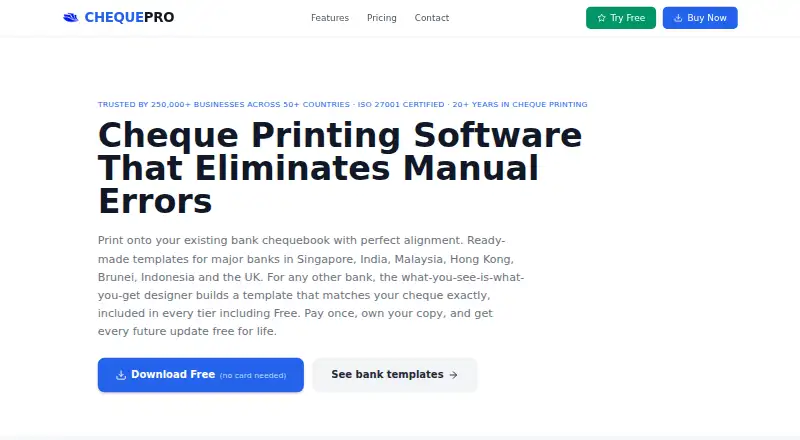
ChequePro is Windows desktop software that fills in cheque details and prints them onto an existing bank chequebook with a standard printer.
What ChequePro is
ChequePro is Windows desktop software that fills in cheque details and prints them onto an existing bank chequebook with a standard printer. It includes ready-made bank templates and a designer for creating templates where one is not already available. The software adds amount-in-words, A/c Payee crossing and other tamper-protection features. It operates offline, with data kept on the user's machine. The Business plan can batch print from CSV or Excel files. Paid plans include priority email support, and Corporate includes a dedicated account manager. Each licence covers one device; additional devices require separate licences. A 30-day trial provides access to features across the plans, after which paid features deactivate while Free features remain. The free plan continues indefinitely and is limited to one device, three bank accounts and one company. Essential costs 99.00 USD once, Business 199.00 USD once, and Corporate 299.00 USD once.
Good
- Works offline and stores data on the user's machine.
- Ready-made and custom bank templates are available.
- Business supports CSV and Excel batch printing.
- A free plan remains available indefinitely.
Watch out
- Each licence covers only one device.
- Free is limited to three bank accounts.
- Paid features deactivate after the 30-day trial.
Who it suits
ChequePro suits individuals and small businesses needing core cheque printing, as well as larger organisations that need batch printing. It is for Windows users who can work with a one-device licence.
Verdict
ChequePro offers offline cheque printing with template options and a continuing free tier. Check the device limit and free-plan account and company caps before choosing it.
Plans and prices
From ChequePro's own pricing page, checked 2 Oct 2026.
| Plan | Price | What it gives you |
|---|---|---|
| Free | Free | 1 device · Up to 3 bank accounts · 1 company · Free forever |
| Essential | $99, paid once | 1 device · Unlimited bank accounts · $99 one-time |
| Business | $199, paid once | 1 device · Batch printing · Multi-company · Multi-user with role-based permissions · $199 one-time |
| Corporate | $299, paid once | 1 device · 4-eyes authorisation · Digital signature · Dedicated account manager · $299 one-time |
The facts
Each one read from ChequePro's own pages, with the date it was checked.
What it does
- Batch printing
- The Business plan supports batch printing from CSV or Excel.checked 2 Oct 2026
- Cheque safeguards
- The software automatically adds amount-in-words, A/c Payee crossing, and other tamper-protection features.checked 2 Oct 2026
- Intended users
- The Free plan is described as core cheque printing for individuals and small businesses, while Business is described for larger organisations.checked 2 Oct 2026
- Licence limit
- Each licence is for one device, and additional devices require separate licences.checked 2 Oct 2026
- Offline use
- ChequePro is a Windows desktop application that runs offline, with data stored on the user's machine.checked 2 Oct 2026
- Purpose
- ChequePro fills in cheque details and prints them onto an existing bank chequebook using a standard printer.checked 2 Oct 2026
- Security
- The maker says ChequePro and its developer, People Central Pte Ltd, are ISO 27001 certified for information security management.checked 2 Oct 2026
- Support
- Priority email support is included with paid plans, and the Corporate plan includes a dedicated account manager.checked 2 Oct 2026
- Templates
- It offers ready-made bank templates and a custom template designer for banks without a pre-built template.checked 2 Oct 2026
The company
- Company location
- The site identifies the maker as People Central Pte Ltd, Singapore.checked 2 Oct 2026
- Headquarters
- Singaporechecked 28 Sep 2026
Money
- Trial
- The 30-day trial includes all features across the plans, after which paid features deactivate while Free features remain available.checked 2 Oct 2026
The full review of ChequePro
Overview
ChequePro is Windows desktop software that fills in cheque details and prints them onto an existing bank chequebook. It suits individuals and organisations that want offline cheque printing; its one-device licences make it a weaker fit for teams working across several computers. The free plan gives a way to start, while paid plans add capacity and controls for larger operations.
Key features
Ready-made bank templates can simplify setup, and a template designer lets users create layouts for banks without a pre-built option. ChequePro also supports blank-cheque and MICR printing, plus layout customisation. Together, these options make it adaptable to different cheque formats rather than limiting users to a fixed template set.
Automatic amount-in-words, A/c Payee crossing and other tamper-protection features build safeguards into printing. File-based accounting imports can reduce re-entry, while Business adds batch printing from CSV or Excel—most useful when processing a larger run of cheques.
ChequePro runs offline and stores data on the user's machine. That is a practical fit for users who prefer a local desktop workflow, but it does not serve teams looking for browser-based access. People Central Pte Ltd, based in Singapore, says it and ChequePro are ISO 27001 certified for information security management. Paid plans include priority email support; Corporate adds a dedicated account manager.
Pricing
The 30-day trial includes features across all plans. Once it ends, paid features deactivate and Free features remain available. Every licence covers one device, so adding computers means buying separate licences.
- Free — free, billed Free forever: one device, up to three bank accounts and one company. It covers core cheque printing for individuals and small businesses, but the account and company caps may be restrictive as needs grow.
- Essential — $99, paid once, billed $99 one-time: one device and unlimited bank accounts. This removes the Free plan's bank-account cap, but retains the one-device limit and does not include the listed Business batch-printing or multi-company and multi-user features.
- Business — $199, paid once, billed $199 one-time: one device, batch printing, multi-company support and multi-user access with role-based permissions. It is the more suitable tier for larger organisations handling repeat runs or several companies, though every additional device still needs its own licence.
- Corporate — $299, paid once, billed $299 one-time: one device, four-eyes authorisation, digital signature and a dedicated account manager. These approval and support provisions are aimed at organisations that need stronger controls, not users seeking only basic printing.
Paid plans also include priority email support. The one-time prices avoid a recurring subscription charge, but the separate-device licensing can add cost for teams.
Platforms
ChequePro is a Windows desktop application. Its offline operation and local data storage suit a single-computer workflow, but users who need Android, iOS or web access should choose another option.
Who it's for
Individuals and small businesses can use Free for core printing if three bank accounts and one company are enough. Essential fits users who need more bank accounts but remain on one device. Business is the stronger choice for larger organisations that need batch printing, multiple companies or role-based access. Corporate makes sense when approval controls and a dedicated account manager matter. Look elsewhere if your work depends on multiple devices without separate licences or access outside Windows.
Pros and cons
- Pros: Offline operation with data kept on the user's machine suits desktop-first workflows.
- Pros: Bank templates, a custom designer, MICR and blank-cheque support give users options across cheque layouts and printing needs.
- Pros: Automatic safeguards and file-based accounting imports reduce steps in the printing workflow.
- Pros: Business batch printing and Corporate approval features address larger-volume and control needs.
- Cons: Each licence covers just one device, so multi-computer use requires additional licences.
- Cons: Free is limited to three bank accounts and one company, which may prompt an upgrade as operations expand.
- Cons: Windows-only, offline operation excludes users who need browser-based or mobile access.
Alternatives
Check Printing Software is the broader category page for comparing options.
Choose Zil Money instead if you want Android, iOS, web or API platforms and a free plan with limited monthly transactions rather than ChequePro's Windows desktop workflow.
SimpleChex offers web access and a free plan with one business, unlimited bank accounts, 10 checks per month and one user, making it a potential fit for browser-based use with modest monthly volume.
VersaCheck is an alternative for users who need broader platform coverage, including Android, iOS, macOS and web, as well as Windows.
CheckWriter is another paid alternative for readers comparing cheque-writing software.
CheckPrintPro may suit readers considering a hosted alternative with a monthly subscription.
Checkrun is another paid option for readers comparing cheque software.
PrintBoss is another paid alternative to consider.
ezCheckPrinting offers a Windows single-user version for a one-time purchase, which may suit readers seeking a paid Windows option.
Verdict
Choose ChequePro if you want offline cheque printing on Windows, value flexible templates and built-in safeguards, and can work within a one-device licence. Its free tier is useful for small setups, while Business and Corporate add capabilities for larger organisations. Look elsewhere if you need web or mobile access, or if licensing each device separately does not suit your team.
Getting started
- Open the ChequePro website
- Choose the Free plan or start the 30-day trial
- Install the Windows desktop application
- Select a ready-made bank template or design a custom layout
- Enter cheque details and print onto an existing chequebook
Limits worth knowing
The Free plan is limited to one device, up to three bank accounts, and one company. The 30-day trial exposes all plan features; afterward, paid features deactivate while Free features remain.
Questions
Is there a free plan?
Yes. Free costs nothing and remains available forever, with one device, up to three bank accounts, and one company.
What do the paid plans cost?
Essential is 99.00 USD once, Business is 199.00 USD once, and Corporate is 299.00 USD once.
Does ChequePro run offline?
Yes. It is a Windows desktop application that runs offline and stores data on the user’s machine.
Can it print batches of cheques?
Batch printing from CSV or Excel is included in the Business plan.
How many devices does a licence cover?
Each licence covers one device. Additional devices require separate licences.
Is there a trial?
Yes. The 30-day trial includes features across the plans; after it ends, paid features deactivate and Free features remain available.
Alternatives to ChequePro
- 1
OnlineCheckWriter.com
Free planAndroidiOSWebAPI8.0Free plan - 2
Checkeeper
AndroidiOSWebAPI7.6From $14.99 a month - 3

CHECKPRINT
Free planAndroidiOSWeb7.4From $50 a year - 4
MultiCHAX
Windows6.9$129 one-time - 5

Checkrun
AndroidiOSWeb6.8From $50 a month - 6

ChequeMaster
Free planWindows6.7Free plan