TrayToolbar
TrayToolbar is a free portable Windows app that replaces taskbar toolbar functionality removed from Windows 11.
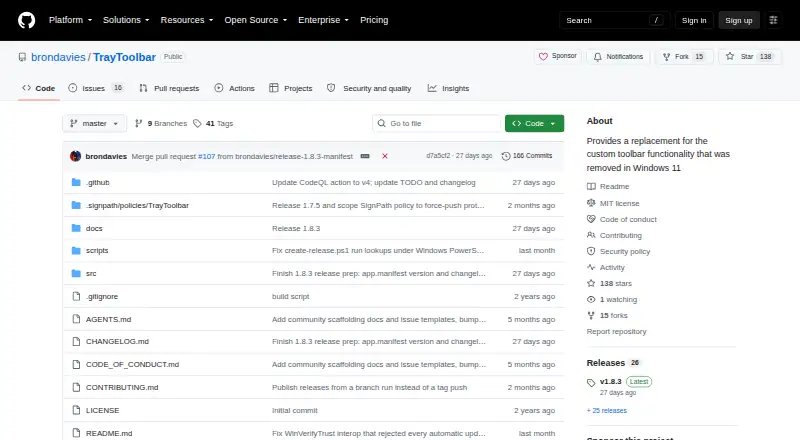
What TrayToolbar is
TrayToolbar is a free portable Windows app that replaces taskbar toolbar functionality removed from Windows 11. It creates a shortcut menu from local folders and their subfolders, launching links, files, and apps found there. Users choose folders, customize file filters, and receive automatic menu refreshes when source folders change. Global shortcut keys, custom folder icons, and icon and font sizes are configurable. The app supports Windows 11 dark mode and lists English, Spanish, French, German, Portuguese, Italian, Japanese, Chinese, Russian, and Korean. Installation requires extracting a ZIP archive to a writable folder and running TrayToolbar.exe; no setup package is used. It requires .NET Desktop Runtime 8 and provides ARM64 and x64 options. Configuration is stored in the local application data folder. Updates validate GitHub metadata, SHA-256 digests, and Authenticode signatures.
Good
- Free and portable distribution
- Launches links, files, and apps
- Automatic refresh when folders change
- Custom shortcuts, icons, and sizing
- Supports ten listed languages
Watch out
- Requires .NET Desktop Runtime 8
- Windows-only application
- No formal vulnerability-report response SLA
- Latest release is the only supported security version
Who it suits
It suits Windows 11 users who want folder-based taskbar shortcuts without an installer. It is also useful for users needing portable ARM64 or x64 builds.
Verdict
TrayToolbar restores folder-based toolbar access with configurable shortcuts and portable operation. Users should keep the runtime installed and track the supported release because security support is best-effort.
The facts
Each one read from TrayToolbar's own pages, with the date it was checked.
Where it runs
- Appearance and languages
- It supports Windows 11 dark mode and lists English, Spanish, French, German, Portuguese, Italian, Japanese, Chinese, Russian, and Korean.checked 9 Oct 2026
- Shortcuts and appearance
- Users can configure global shortcut keys, folder icons, and icon and font sizes.checked 9 Oct 2026
What it does
- Automatic refresh
- The menu updates automatically when its source folder changes.checked 9 Oct 2026
- Automatic updates
- The update flow checks GitHub release metadata and SHA-256 asset digests, then validates the staged executable's Authenticode signature.checked 9 Oct 2026
- Configuration
- TrayToolbar stores its configuration at %LOCALAPPDATA%\TrayToolbar\TrayToolbarConfig.json.checked 9 Oct 2026
- Distribution
- The app is portable: users extract a ZIP to a writable folder and run TrayToolbar.exe without a setup package.checked 9 Oct 2026
- Folder filters
- Users can choose folders and customize the file filter.checked 9 Oct 2026
- Folder updates
- The menu updates automatically when its configured folder changes.checked 9 Oct 2026
- Installation
- TrayToolbar is portable: users extract the archive and run TrayToolbar.exe without a setup package.checked 9 Oct 2026
- Integrations
- TrayToolbar uses GitHub Releases for update metadata and downloads; its README does not list third-party product integrations.checked 9 Oct 2026
- Known update limit
- The update security documentation says a separate published checksum manifest in release assets is not currently enforced.checked 9 Oct 2026
- Languages
- The app supports English, Spanish, French, German, Portuguese, Italian, Japanese, Chinese, Russian, and Korean.checked 9 Oct 2026
- Launch items
- The menu can launch links, files, and apps found in the configured folders.checked 9 Oct 2026
- Maintainer and location
- The GitHub profile identifies the maintainer as Bron Davies, associated with Brontech, LLC, and lists Utah.checked 9 Oct 2026
- Purpose
- TrayToolbar replaces the custom taskbar toolbar functionality removed from Windows 11.checked 9 Oct 2026
- Runtime and architectures
- It requires .NET Desktop Runtime 8 and provides ARM64 and x64 options.checked 9 Oct 2026
- Runtime requirement
- The application requires .NET Desktop Runtime 8.checked 9 Oct 2026
- Security support
- The project is maintained on a best-effort basis; only the latest published release is considered supported for security fixes, and there is no formal response SLA for vulnerability reports.checked 9 Oct 2026
- Shortcut menu
- It creates a menu of shortcuts from user-selected local folders and their subfolders.checked 9 Oct 2026
- Shortcuts and icons
- It supports configurable global shortcut keys and custom icons for individual folders.checked 9 Oct 2026
- Signing
- The project says tagged GitHub CI releases can publish SignPath-signed portable archives, while local unsigned builds are not valid automatic-update artifacts.checked 9 Oct 2026
- Support limits
- The project does not offer a formal response SLA for vulnerability reports.checked 9 Oct 2026
- Update integrity
- Its update flow validates GitHub release metadata and SHA-256 asset digests, then checks the staged executable with Windows Authenticode before running it.checked 9 Oct 2026
- Update signing
- The documented accepted publisher name for staged update executables is SignPath Foundation.checked 9 Oct 2026
Alternatives to TrayToolbar
- 1

DisplayFusion
Free planAndroidiOSAPIWindows7.9$34 one-time - 2

TaskbarX
Free planOpen sourceWindows7.6$1.09 one-time - 3

GitHub CodeQL
Free planWebExtensionLinuxmacOS7.5From $30 a month - 4
Winstep Nexus Dock
Free planWindows6.7$12.95 one-time - 5

Deskloom
Free planWindows6.4Free plan - 6
MyDockFinder
Windows6.4$4.99 one-time