TrainAR
TrainAR combines a procedural augmented reality training concept, didactic framework, and authoring tool for handheld devices.
What TrainAR is
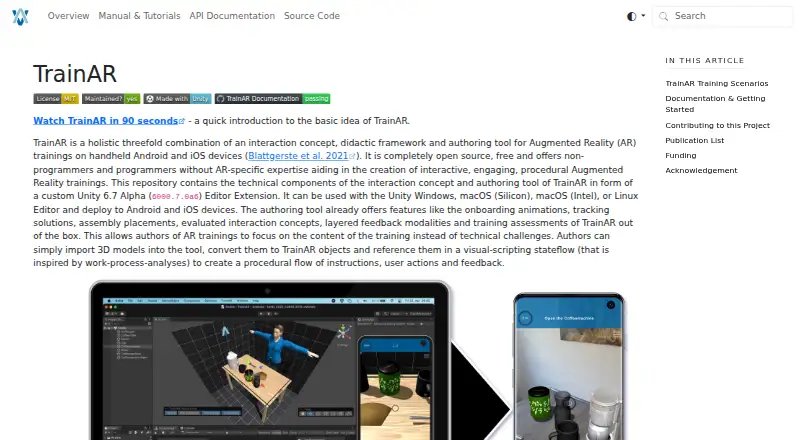
TrainAR combines a procedural augmented reality training concept, didactic framework, and authoring tool for handheld devices. Authors import 3D models, convert them to TrainAR objects, then use visual scripting to define instructions, user actions, and feedback. The authoring tool includes onboarding animations, tracking solutions, assembly placement, layered feedback, and training assessments. Users can grab, interact with, and combine objects, as well as respond to UI elements such as questions. TrainAR can also be used without its visual-scripting overlay through the Unity Editor and C# programming. The Unity extension works on Windows, macOS, and Linux; completed training apps can be deployed to Android and iOS. iOS deployment requires Xcode on macOS after building the app. The installation guide calls for Unity 2022.3 LTS and the relevant platform modules. TrainAR is free for commercial and non-commercial use under the MIT license. It supports procedural task understanding, but does not train associated motor skills.
Good
- Free for commercial and non-commercial use under MIT license
- Visual stateflow defines instructions, actions, and feedback
- Supports object interaction and UI questions
- Includes training assessments and layered feedback
Watch out
- SkinnedMeshRenderers are not supported for conversion
- iOS deployment requires Xcode on macOS
- It does not train associated motor skills
Who it suits
TrainAR is aimed at non-programmers, designers, and domain experts with media competency, while also supporting developers with Unity and programming experience. It may suit people creating procedural task training for Android or iOS devices.
Verdict
TrainAR offers a visual authoring path for procedural AR training, with an alternative Unity and C# workflow. Check the model requirements and the distinction between task understanding and motor-skill training before choosing it.
Plans and prices
From TrainAR's own pricing page, checked 3 Oct 2026.
| Plan | Price | What it gives you |
|---|---|---|
| TrainAR | Free | Open source · Free for commercial and non-commercial use under the MIT license |
The facts
Each one read from TrainAR's own pages, with the date it was checked.
What it does
- Authoring
- Authors import 3D models, convert them to TrainAR objects, and use a visual-scripting stateflow to define instructions, user actions, and feedback.checked 3 Oct 2026
- Built-in features
- The authoring tool includes onboarding animations, tracking solutions, assembly placement, evaluated interaction concepts, layered feedback, and training assessments.checked 3 Oct 2026
- Extensibility
- TrainAR can also be used without its visual scripting and authoring overlay, through the standard Unity Editor overlay and C# programming.checked 3 Oct 2026
- Integrations
- TrainAR is integrated into the Unity Editor and can incorporate Unity Visual Scripting nodes in its stateflow.checked 3 Oct 2026
- Intended audience
- TrainAR is aimed at non-programmers, designers, and domain experts with media competency, while also supporting developers with programming and Unity expertise.checked 3 Oct 2026
- Interactions
- TrainAR supports grabbing, interacting with, and combining objects, as well as UI actions such as questions.checked 3 Oct 2026
- License
- The maker says TrainAR is freely accessible for commercial and non-commercial use under the MIT license, with no acknowledgement required in the training or app itself.checked 3 Oct 2026
- Model limitation
- A model needs a Transform, MeshFilter, and MeshRenderer to be converted to a TrainAR object; SkinnedMeshRenderers are not supported.checked 3 Oct 2026
- Support and contribution
- The project invites contributions through GitHub Issues and Discussions and provides a getting-started guide, full documentation, and API references.checked 3 Oct 2026
- Training scope
- TrainAR is intended to support procedural task understanding before or after practical training, and the maker says it does not train associated motor skills.checked 3 Oct 2026
- Unity requirement
- The installation guide instructs users to install Unity 2022.3 LTS and the relevant platform build modules.checked 3 Oct 2026
- What it does
- TrainAR combines an interaction concept, didactic framework, and authoring tool for procedural augmented reality training on handheld devices.checked 3 Oct 2026
Where it runs
- Deployment platforms
- TrainAR trainings can be deployed to Android and iOS devices; deploying to iOS requires Xcode on macOS after building the app.checked 3 Oct 2026
- Editor platforms
- The Unity editor extension can be used with Unity on Windows, macOS (Silicon or Intel), and Linux.checked 3 Oct 2026
The full review of TrainAR
TrainAR is a Unity-based tool for creating procedural augmented-reality lessons on mobile devices. It suits designers and domain experts who can work with 3D media, as well as Unity developers seeking a code-based route. Its strength is guiding learners through task logic; it does not develop the motor skills needed to perform the task.
Overview
Authors import 3D models, convert them into TrainAR objects, then connect instructions, learner actions, and feedback in a visual stateflow. That makes it possible to build structured, interactive lessons without writing code. The intended audience includes non-programmers with media competency, though creating and configuring the underlying 3D content remains part of the work.
Developers can use the standard Unity Editor overlay and C#, and stateflows can include Unity Visual Scripting nodes. This flexibility is useful for teams with Unity expertise, but TrainAR is not a standalone lesson builder: the installation guide calls for Unity 2022.3 LTS and the relevant platform build modules.
Key features
TrainAR supports grabbing, interacting with, and combining objects, alongside interface actions such as questions. Its authoring toolkit includes onboarding animations, tracking solutions, assembly placement, evaluated interaction concepts, layered feedback, and assessments. Together, these features support lessons that explain a procedure and respond to learner actions, rather than simply presenting a 3D model.
Model compatibility is a practical constraint. A model must have a Transform, MeshFilter, and MeshRenderer to become a TrainAR object; SkinnedMeshRenderers are not supported. Teams relying on skinned models will need a different approach to their content.
The scope is equally important: TrainAR is intended to support procedural understanding before or after practical training, not to train the associated motor skills. It can help learners follow how a task works, but it is not a replacement for physical practice.
Pricing
TrainAR costs nothing. The open-source software is available for commercial and non-commercial use under the MIT license, with no acknowledgement required in the training or app itself. That makes it an option for organizations that need to use or adapt the tool without a software subscription.
The cost advantage comes with a Unity-based workflow rather than a hosted, ready-made course service. The project provides a getting-started guide, full documentation, and API references, and invites contributions through GitHub Issues and Discussions.
Platforms
The Unity editor extension works with Unity on Windows, macOS (Silicon or Intel), and Linux. Trainings can be deployed to Android and iOS. For iOS deployment, the app must be built and then processed with Xcode on macOS, so an iOS workflow requires access to a Mac.
TrainAR uses markerless AR. Its broad desktop editor support does not mean learners use it on desktop: the supported training deployment targets are Android and iOS.
Who it's for
TrainAR is best for domain experts and designers with media competency who want to turn a procedure into a guided, interactive lesson, especially when the goal is to support task understanding around practical training. Unity developers are also a good fit if they want to extend the workflow through C# or Unity Visual Scripting.
It is a weaker fit for teams seeking a no-Unity authoring service, lessons built around unsupported skinned models, or training intended to build physical proficiency on its own.
Pros and cons
- Free under the MIT license: commercial and non-commercial use is allowed without required acknowledgement in the training or app.
- Purpose-built procedural authoring: stateflows connect instructions, object interactions, feedback, and assessment in one lesson workflow.
- Two routes for different skill levels: visual authoring serves non-programmers, while Unity and C# offer developers an alternative.
- Unity is a prerequisite: teams need the specified Unity version and platform modules, which adds setup and technical work.
- Model support has a clear boundary: SkinnedMeshRenderers cannot be converted into TrainAR objects.
- Not motor-skill training: learners still need practical training to develop the physical skills associated with a procedure.
Alternatives
For other options, see Augmented Reality Learning Apps.
- Augmented Classroom is a freemium alternative with Android, iOS, web, and Windows support; its free Demo Plan allows one interactive test for a single mobile user.
- JigSpace is a freemium option for Android, iOS, macOS, web, and Windows, with a free plan capped at three active Jigs, three steps, 100MB of team storage, and two user seats.
- Merge EDU offers a free Classroom plan with EDU and Creator suites, student seats, and classroom management across Android, iOS, web, and Windows.
- Delightex Edu (formerly CoSpaces Edu) has a free Basic plan for up to 29 students, two projects, one class, one assignment, ten external files, and basic CoBlocks.
- Quiver offers a free tier with ten AR coloring sheets and no subscription requirement, on Android, iOS, and web.
- Assemblr EDU has a free plan with 400 3D objects, limited topics and Edu Kits, 30 MB of storage, unlimited QR markers, and 25 custom graphic AR markers.
- Narrator AR is a free app for Android and iOS.
- U.S. Army STARS Anatomy is a free Android, iOS, macOS, and web app with 30+ levels, 3D skeleton exploration, quizzes, and Bone Hunter.
Verdict
Choose TrainAR if you need a free, open-source way to author markerless AR lessons that guide learners through procedural task understanding, and your team can work in Unity with compatible models. Look elsewhere if you need motor-skill practice, support for skinned models, or an authoring workflow outside Unity.
Alternatives to TrainAR
- 1

Augmented Classroom
Free planAndroidiOSWebmacOS8.0Free plan - 2

Delightex Edu (formerly CoSpaces Edu)
Free planAndroidiOSWebAPI8.0From $7 a year - 3
Quiver
Free planAndroidiOSWeb7.9From $25 a year - 4

JigSpace
Free planAndroidiOSWebAPI7.6Free plan - 5

Merge EDU
Free planAndroidiOSWebWindows7.4From $17 a month - 6

Assemblr EDU
Free planAndroidiOSWeb7.3From $1.49 a month