
Merge EDU
Merge EDU is a K–12 learning platform that uses interactive simulations and digital teaching aids to bring science topics into lessons.
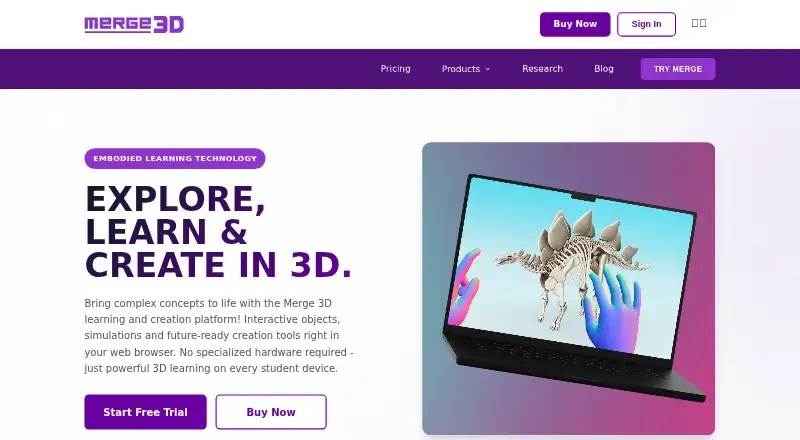
What Merge EDU is
Merge EDU is a K–12 learning platform that uses interactive simulations and digital teaching aids to bring science topics into lessons. Merge Explorer includes more than 100 simulations covering biology, physics, chemistry and astronomy; its maker says they align with core science standards. With Object Viewer, students can inspect 3D models in augmented reality, import models, and build and share collections. HoloGlobe presents satellite information from NASA and NOAA, including rainfall, cloud cover, temperatures, wildfires and snowfall. The Merge Cube can add to the AR experience, but most features do not require it. Merge EDU apps are listed for iOS, Chromebook and Windows, while the platform also lists Android and web support. The maker says play is stored locally and that the experience does not collect personally identifiable information from children during app use. Classroom and School plans are free. Individual costs $17/mo billed yearly; Teacher costs $28/mo billed yearly. A 14-day trial is available.
Good
- More than 100 science simulations.
- Object Viewer supports model imports and shared collections.
- HoloGlobe visualizes NASA and NOAA satellite data.
- Classroom and School plans are free.
Watch out
- The 14-day trial is limited in duration.
- Individual costs $17/mo billed yearly.
- Teacher costs $28/mo billed yearly.
Who it suits
It suits K–12 educators looking for interactive science lessons, 3D objects or classroom management. Schools and individual users have different listed plans.
Verdict
Merge EDU brings simulations, 3D models and satellite data into a K–12 teaching platform. Its free Classroom and School plans and paid individual and teacher options give educators distinct ways to use it.
Plans and prices
From Merge EDU's own pricing page, checked 29 Sep 2026.
| Plan | Price | What it gives you |
|---|---|---|
| Classroom | Free | Both EDU + Creator suites included · Student seats · Classroom management · Billed yearly ($0) |
| School | Free | Both EDU + Creator suites included · School-wide deployment · Admin and support · Billed yearly ($0) |
| Individual | $17 a month | Both EDU + Creator suites included · For individual use · Billed yearly ($207) |
| Teacher | $28 a month | Both EDU + Creator suites included · For classroom demonstrations · Billed yearly ($331) |
The facts
Each one read from Merge EDU's own pages, with the date it was checked.
What it does
- 3D objects
- Object Viewer lets students inspect 3D models in AR, import models, and create and share custom collections.checked 29 Sep 2026
- Curriculum
- The maker describes Merge Explorer simulations as aligned to core science standards.checked 29 Sep 2026
- Custom pricing
- The maker offers custom pricing and features for districts, enterprise customers, and special requirements.checked 29 Sep 2026
- Earth data
- HoloGlobe visualizes NASA and NOAA satellite data such as rainfall, cloud cover, temperatures, wildfires, and snowfall.checked 29 Sep 2026
- Hardware
- The Merge Cube enhances the AR experience but is not required for most features.checked 29 Sep 2026
- Purpose
- Merge EDU is a K–12 immersive learning platform with interactive simulations and digital teaching aids.checked 29 Sep 2026
- School integrations
- Merge says it partners with Microsoft across the ecosystem for reliability and school integrations.checked 29 Sep 2026
- Science simulations
- Merge Explorer offers more than 100 interactive simulations covering science topics including biology, physics, chemistry, and astronomy.checked 29 Sep 2026
- Security
- The privacy policy lists multifactor authentication, encryption of data in transit and at rest, and a data breach response plan among its safeguards.checked 29 Sep 2026
- Student privacy
- Merge says the Merge EDU Experience stores play locally and does not collect personally identifiable information from child users during app use.checked 29 Sep 2026
- Support
- The pricing page lists help documentation for Individual plans, email support for Teacher and Classroom plans, and dedicated support for School plans.checked 29 Sep 2026
Where it runs
- Devices
- The product pages list iOS, Chromebook, and Windows downloads for Merge EDU apps.checked 29 Sep 2026
The company
- Founded
- 2014checked 23 Sep 2026
- Headquarters
- San Antonio, Texas, United Stateschecked 23 Sep 2026
The full review of Merge EDU
Merge EDU is a K–12 immersive learning platform for educators who want science lessons to include interactive simulations, 3D models and Earth data. It pairs free classroom and school plans with paid individual and teacher options, making it a flexible choice for education settings with different needs.
Overview
Merge EDU brings together several kinds of digital teaching aids rather than focusing on a single AR activity. Its tools support lesson authoring and classroom management, and include both augmented and non-augmented modes. The Merge Cube can enhance the AR experience, but most features do not require it, which helps schools use the platform without making the accessory a prerequisite.
Merge says it partners with Microsoft across its ecosystem for reliability and school integrations. It also says the Merge EDU Experience stores play locally and does not collect personally identifiable information from child users during app use. Its privacy policy names multifactor authentication, encryption in transit and at rest, and a data breach response plan among its safeguards.
Key features
Science simulations
Merge Explorer offers more than 100 interactive simulations spanning biology, physics, chemistry and astronomy. Merge says they align with core science standards, giving educators a way to connect digital exploration with science instruction. The range is a clear strength for science teaching; the platform is less compelling for schools seeking a tool centered on subjects beyond the science topics covered.
3D models and Earth data
Object Viewer lets students inspect 3D models in AR, import models, and create and share custom collections. That combination supports both guided viewing and student-curated material. HoloGlobe visualizes NASA and NOAA data on subjects such as rainfall, cloud cover, temperatures, wildfires and snowfall, adding real-world Earth observations to the platform’s classroom activities.
Teaching and support
Lesson authoring and classroom management are included capabilities, while support varies by plan: Individual users get help documentation, Teacher and Classroom plans include email support, and School plans include dedicated support. That distinction matters to educators who need more than self-service help, and favors the higher education plans for institutions that want a dedicated support channel.
Pricing
Merge EDU is freemium, with a 14-day free trial and paid plans from $17/mo (annual). Both EDU and Creator suites are included in each listed plan, but the free and paid options serve different settings.
- Classroom: free, billed yearly ($0). It includes both suites, student seats and classroom management. This is the most suitable starting point for a classroom that needs student access and management without a subscription cost.
- School: free, billed yearly ($0). It includes both suites, school-wide deployment, admin and support, making it the free option aimed at broader school use.
- Individual: $17 a month, billed yearly at $207. It includes both suites for individual use. The lower paid price suits a single user, but does not include the classroom-demonstration focus of the Teacher plan.
- Teacher: $28 a month, billed yearly at $331. It includes both suites for classroom demonstrations. Teachers choosing it pay more than Individual for a plan specifically framed around demonstrating to a class.
Districts, enterprise customers and those with special requirements can request custom pricing and features. The free plans are unusually broad in the features named, but the Classroom and School descriptions do not state numerical student-seat caps or other quotas; buyers should choose based on the stated deployment and support distinction rather than assume a particular limit.
Platforms
Merge EDU supports Android, iOS, web and Windows. The product pages also list iOS, Chromebook and Windows app downloads, giving schools several device routes; the Merge Cube remains optional for most features.
Who it's for
Merge EDU is best suited to K–12 educators and schools looking to bring standards-aligned science simulations, 3D objects or satellite-data visualizations into lessons. Classroom and School plans offer a no-cost route for education use, while Individual and Teacher plans address personal use and classroom demonstrations. It is a weaker fit for buyers who need a narrow, single-purpose AR tool or a platform focused outside the science areas represented by Explorer.
Pros and cons
- Pros: More than 100 science simulations across four core subjects give educators a substantial pool of interactive material.
- Pros: Object Viewer supports imported models and shareable custom collections, extending use beyond preselected simulations.
- Pros: HoloGlobe visualizes NASA and NOAA data, bringing weather and other Earth observations into lessons.
- Pros: Free Classroom and School plans include both suites, with classroom management or school-wide deployment and support respectively.
- Cons: Individual and Teacher pricing is billed yearly despite monthly price presentation, so the annual totals are the relevant commitment figures.
- Cons: The free-plan descriptions give no numerical seat or usage caps, which makes them harder to assess for larger deployments.
- Cons: The named simulation range is science-focused, limiting its appeal to educators seeking broader subject coverage.
Alternatives
For a wider set of AR learning options, browse Augmented Reality Learning Apps. Augmented Classroom is another freemium option with a free plan and trial across Android, iOS, web and Windows; consider it if you want to compare another platform in that same device range.
Delightex Edu (formerly CoSpaces Edu) may suit a small class that can work within its free Basic plan’s limits of 29 students, two projects, one class and one assignment. JigSpace is a freemium alternative across Android, iOS, macOS, web and Windows; its free plan caps teams at two seats, three active Jigs and 100MB of storage.
Quiver is worth considering for AR coloring activities, with a free tier that includes 10 sheets and requires no subscription. Assemblr EDU is another freemium education option for web, iOS and Android.
EON-XR is a paid option with Education and Enterprise plans. Halo AR offers a free BASIC plan and a $99 a year PRO plan on Android and iOS. U.S. Army STARS Anatomy is a free alternative for 3D skeleton exploration, quizzes and anatomy levels.
Verdict
Choose Merge EDU if you teach K–12 science and want simulations, student-facing 3D model tools and Earth-data visualizations in one platform, with free plans for classroom or school deployment. Its breadth and optional hardware make it a practical education choice; look elsewhere if your priority is a more narrowly defined AR activity or broader subject coverage.
Getting started
- Open the Merge EDU website
- Choose a Classroom, School, Individual or Teacher plan
- Use the 14-day trial where applicable
- Access the service on web, Windows, iOS or Android
- Download listed apps for iOS, Chromebook or Windows
- Add a Merge Cube only if enhanced AR is desired
Limits worth knowing
Classroom and School plans are free, while Individual and Teacher plans are billed yearly at $207 and $331 respectively. The free options are defined around student seats, classroom management, school-wide deployment, administration and support; Individual is for personal use and Teacher is for classroom demonstrations.
Questions
Is Merge EDU free?
Yes. Classroom and School plans are listed at $0, and a 14-day trial is available.
What does Individual cost?
Individual is $17.00 per month, billed yearly at $207.
Which devices support Merge EDU?
Platform support includes web, Windows, iOS and Android. App downloads are listed for iOS, Chromebook and Windows.
Is the Merge Cube required?
No. The Merge Cube enhances augmented reality, but most features do not require it.
Does Merge EDU include classroom tools?
Yes. The platform lists lesson authoring and classroom management, and the Classroom plan includes student seats.
Alternatives to Merge EDU
- 1

Augmented Classroom
Free planAndroidiOSWebmacOS8.0Free plan - 2

Delightex Edu (formerly CoSpaces Edu)
Free planAndroidiOSWebAPI8.0From $7 a year - 3
Quiver
Free planAndroidiOSWeb7.9From $25 a year - 4

JigSpace
Free planAndroidiOSWebAPI7.6Free plan - 5

Assemblr EDU
Free planAndroidiOSWeb7.3From $1.49 a month - 6
Narrator AR
Free planAndroidiOS7.3$4.29 one-time