
JigSpace
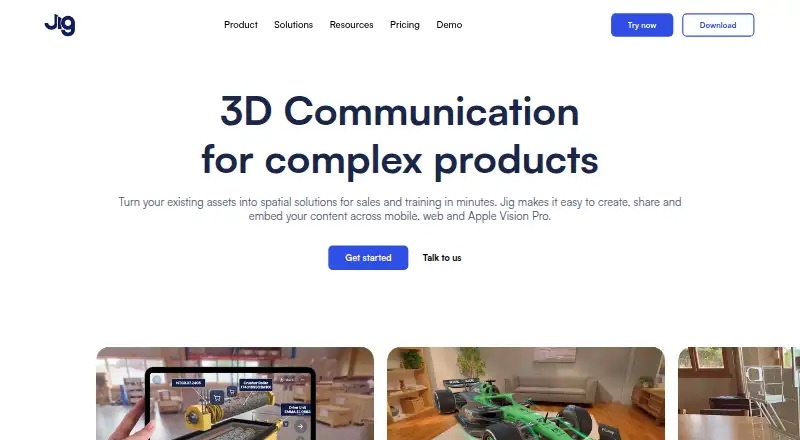
JigSpace turns existing assets into interactive 3D presentations for sales and training.
What JigSpace is
JigSpace turns existing assets into interactive 3D presentations for sales and training. Each presentation, called a Jig, can explain a concept step by step and show products in augmented reality. Users can share Jigs by link or QR code, or embed them on websites without requiring viewers to install an app. Presentations can include annotations, animations, sound, video, and custom branding. JigSpace lists integrations with 3D design and CAD tools including 3ds Max, Blender, CATIA, Fusion, Revit, Rhino, SketchUp, and SolidWorks, and automatically optimizes large 3D files and CAD formats for AR rendering. Its Apple Vision Pro app supports hand-based model manipulation, markup, and real-time multiplayer collaboration. The service is available on Android, iOS, macOS, web, and Windows. The Free plan is free and lists three active Jigs, three steps, 100MB of team storage, and two user seats; the pricing FAQ says the plan allows one project. Starter begins with a seven-day trial, which must be cancelled by the end of day seven to prevent payment. JigSpace states that data is encrypted at rest and in transit and that the platform has SOC 2 Type 2 compliance.
Good
- Jigs can be shared by link or QR code.
- Website embeds do not require a viewing app.
- Presentations support annotations, animation, sound, and video.
- Automatically optimizes large 3D files for AR rendering.
- Vision Pro app supports multiplayer collaboration.
Watch out
- Free plan allows one project.
- Free plan lists three active Jigs and three steps.
- Starter trial requires cancellation by day seven to prevent payment.
Who it suits
JigSpace suits sales, marketing, training, and product-support teams that need to present 3D assets interactively. Its pricing page also describes Starter as intended for qualified educators and startups.
Verdict
JigSpace offers a way to turn 3D assets into shareable, interactive presentations, with web embedding and AR support. Review the free-plan project limit and trial cancellation terms before choosing a plan.
Plans and prices
From JigSpace's own pricing page, checked 15 Oct 2026.
| Plan | Price | What it gives you |
|---|---|---|
| Free | Free | 1 active Jig per user · 3 steps per Jig · 2 team users · 100MB team storage · public-link visibility · Apple Vision Pro preview up to 3 minutes · annually |
| Free plan | Free | 3 active Jigs · 3 steps · 100MB team storage · 2 user seats · annually |
| Enterprise | Priced on request | Custom active Jigs and steps · 10GB storage · 30 included user seats · custom additional seats · white-labeling · analytics · SSO and enterprise security options · custom |
| Starter | Priced on request | 10 active Jigs · 10 steps per Jig · 1GB storage · 4 included user seats · 100MB maximum upload · paid Apple Vision Pro access · monthly or annually; save 30% paid annually |
The facts
Each one read from JigSpace's own pages, with the date it was checked.
What it does
- Access controls
- Teams can use password-protected sharing, role-based access, and Enterprise SSO on Organisation and Enterprise plans.checked 2 Oct 2026
- Audience
- The pricing page describes Starter as intended for qualified educators and startups, and the product pages describe sales, marketing, training, and product support uses.checked 2 Oct 2026
- Automatic optimization
- JigSpace automatically optimizes large CAD and 3D files for rendering across devices.checked 15 Oct 2026
- CAD import
- Supported imports include STEP, OBJ, FBX, GLTF, USDZ and SolidWorks assembly or part files.checked 15 Oct 2026
- CAD integration
- Its integrations page lists 3D design and CAD software including 3ds Max, Blender, CATIA, Fusion, Revit, Rhino, SketchUp, and SolidWorks.checked 2 Oct 2026
- Creation features
- JigSpace supports annotations, animations, sound, video, and custom branding in 3D presentations.checked 2 Oct 2026
- Data residency
- The default hosting region is AWS US East in Virginia, while EU residency in Frankfurt is available to Enterprise teams.checked 15 Oct 2026
- Design integrations
- The integrations directory lists tools including SolidWorks, Fusion, Inventor, Creo, Blender, Rhino, SketchUp, Revit, CATIA, Maya, Matterport, Polycam and Shapr3D.checked 15 Oct 2026
- Documentation
- The Help Center provides categorized guides for viewing, sharing, creation, teams, administration, security and billing, plus tutorials and videos.checked 15 Oct 2026
- Embedding
- Jigs support oEmbed links and iframe embedding in systems such as Confluence, Jira, Canva, Moodle, SharePoint, TalentLMS, WordPress and Zendesk.checked 15 Oct 2026
- File optimization
- JigSpace automatically optimizes large 3D files and CAD formats for rendering in augmented reality.checked 2 Oct 2026
- Installation model
- Viewing a shared Jig needs no software installation, while creating Jigs or using Vision Pro features requires a JigSpace app.checked 15 Oct 2026
- Legal name and investors
- Crunchbase identifies the legal name as JigSpace Inc and lists 14 investors, including Anorak Ventures and Aura Ventures.checked 15 Oct 2026
- Licence
- The terms grant a revocable, non-transferable, non-exclusive licence and prohibit reverse engineering, copying and derivative works, indicating proprietary software.checked 15 Oct 2026
- Limit: ecosystem maturity
- A G2 reviewer said the platform and surrounding AR/VR ecosystem were not mature or stable enough for proper testing and required AR/VR hardware for end testing.checked 15 Oct 2026
- Limit: pricing
- G2 reviewers mention that pricing tiers could be lower.checked 15 Oct 2026
- Media and interaction
- Presentations can include images, video, audio, text, effects and actions that jump to steps, URLs or other Jigs.checked 15 Oct 2026
Where it runs
- Android support
- Android devices can view Jigs through Chrome or Samsung Internet, but there is no Android creation app.checked 15 Oct 2026
- Limit: device tracking
- An Apple App Store reviewer reported that the app repeatedly failed to recognize suitable flat surfaces for AR placement.checked 15 Oct 2026
The company
- Company facts
- LinkedIn lists JigSpace as a privately held Melbourne software company founded in 2015 with 11–50 employees.checked 15 Oct 2026
- Notable company news
- JigSpace said in its 2025 year-in-review update that Apple Vision Pro installations exceeded 100,000 and that its enterprise customer base grew.checked 15 Oct 2026
Money
- Free plan limit
- The pricing FAQ says the Free plan lets users create one project and explore apps, viewers, and Jig format features.checked 2 Oct 2026
- Free-plan restrictions
- The free tier is intended for non-commercial evaluation and limits users to one Jig, three steps, two users, 100MB storage and public visibility.checked 15 Oct 2026
- Limit: cost and package limits
- Capterra reviewers complain that the product is expensive and that package restrictions and changed limits make client work harder.checked 15 Oct 2026
The full review of JigSpace
JigSpace is software for turning existing 3D assets into interactive, step-by-step presentations. It suits sales, training, and product-support teams that need to explain products across devices. App-free web viewing and AR support are compelling, but the free tier’s one-project cap makes it hard to use for ongoing work.
Overview
A Jig can guide viewers through a concept in steps and show products in augmented reality. Annotations, animation, sound, video, and custom branding help shape the explanation around a product or training need rather than leaving viewers with a model alone.
Teams can share Jigs by link or QR code, or embed them on a website without requiring viewers to install an app. That is a practical advantage for customer-facing material and audiences outside the authoring team. JigSpace also automatically optimizes large 3D files and CAD formats for AR rendering, helping teams bring existing assets into presentations.
Key features
The integrations page names 3ds Max, Blender, CATIA, Fusion, Revit, Rhino, SketchUp, and SolidWorks. This makes JigSpace relevant to teams with established design and CAD workflows; automatic file optimization is a useful complement when those workflows produce large assets.
On Apple Vision Pro, users can manipulate 3D models by hand, add markup, and collaborate in real time with other users. That is a distinct option for teams presenting or reviewing models in Vision Pro, though it matters less to teams whose audiences primarily use phones or browsers.
JigSpace states that data is encrypted at rest and in transit and that it has SOC 2 Type 2 compliance. Teams can also use password-protected sharing, role-based access, and Enterprise SSO on Organisation and Enterprise plans. Those controls make the higher tiers more relevant for organizations managing access to shared presentations.
Pricing
JigSpace is freemium. The Free plan costs nothing, billed annually, and includes 3 active Jigs, 3 steps, 100MB of team storage, and 2 user seats. The pricing FAQ separately says Free users can create one project and explore apps, viewers, and Jig format features. The one-project cap is the more consequential constraint for anyone building multiple presentations, while the small storage and seat allowances make Free best for individual exploration or a limited trial of the workflow.
Starter has custom pricing and is offered as a monthly or yearly subscription; the page says “Save 30% paid annually.” It includes 10 active Jigs, 10 steps, 1GB of team storage, and 4 user seats. The plan is intended for qualified educators and startups, making its larger quotas a better fit for small teams that need more than a single project. A Starter subscription begins with a 7-day free trial; cancel by the end of day 7 to prevent payment.
Enterprise has custom pricing, with usage and active Jigs and steps customized, 10GB of team storage, and 30 included user seats. It is the fit for larger organizations needing more seats and adjustable usage, as well as the access controls available on this tier.
Platforms
JigSpace is available on Android, iOS, macOS, web, and Windows, with Apple Vision Pro support. The range covers mobile and desktop creation or viewing, while embedded web presentations let recipients view without a dedicated viewing app. Email support, a Help Center, and tutorials provide routes for customer assistance.
Who it's for
JigSpace is best suited to sales, marketing, training, and product-support teams that can make use of existing 3D or CAD assets and need guided presentations that travel beyond their own devices. Educators and startups may find Starter’s higher project and seat limits more useful than Free. It is a less natural fit for someone who only needs a basic 3D viewer or wants to build several presentations without moving beyond the free project cap.
Pros and cons
- App-free sharing: Links, QR codes, and website embeds make it easier to put presentations in front of customers and trainees.
- Rich presentation tools: Annotations, animation, sound, video, and branding support guided explanations rather than static model display.
- Works with established assets: Named CAD and 3D integrations, plus automatic optimization for AR, suit teams bringing existing models into presentations.
- Very limited free project capacity: The FAQ’s one-project cap and the plan’s 3 active Jigs constrain users who need to maintain multiple presentations.
- Paid costs require a sales or subscription decision: Starter and Enterprise have custom pricing, so readers cannot compare their prices from the plan terms alone.
Alternatives
For a broader set of AR creation options, browse AR Creation Software; for education-focused discovery, see Augmented Reality Learning Apps.
- MyWebAR is worth considering if its free Creator plan’s 100 views per year, 100 MB of storage, and 5 projects better match your needs than JigSpace’s project and active-Jig limits.
- BlippBuilder may suit users who want a free way to create, test, and explore projects, and can accept that publishing requires a paid plan.
- Kivicube is an option for users whose needs fit its free Basic plan’s 2 scenes, 500 scene experiences, non-commercial-use restriction, ads, and 30M model upload limit.
- STYLY is an alternative with a free Creator plan that includes limited commercial use, location-alignment features, smartphone and HMD support, and basic data features.
- WorldCAST may fit creators seeking unlimited monthly views, no expiry, personal and commercial use, QR code generation, and basic analytics on its free Creator plan.
- Reality Composer is a free alternative for iPhone and iPad users on iOS 17.0 or later or iPadOS 17.0 or later.
- Creo is another option for readers comparing paid 3D software.
- Mattercraft is a paid web-based alternative with a free trial.
Verdict
Choose JigSpace if your team needs to turn existing 3D assets into guided, shareable presentations and values AR, website embedding, and access controls. Its clearest strength is making product explanations usable across devices without asking every viewer to install an app. Look elsewhere if the free one-project cap is too restrictive or if you need to compare paid-plan prices before committing.
Getting started
- Open the JigSpace website
- Choose the Free plan or start a Starter subscription
- Use the seven-day Starter trial and cancel by the end of day seven to prevent payment
- Create a Jig with the visual editor
- Import or connect assets from supported 3D and CAD software
- Share by link or QR code, or embed the Jig on a website
- Use the Android, iOS, macOS, web or Windows app
Limits worth knowing
The Free plan permits one project, three active Jigs, three steps, 100MB of team storage and two user seats. Starter has a seven-day free trial that must be cancelled by the end of day seven to prevent payment.
Questions
Does JigSpace have a free plan?
Yes. The Free plan costs nothing and includes three active Jigs, three steps, 100MB of team storage and two user seats.
How long is the Starter trial?
Starter begins with a seven-day free trial. Cancel by the end of day seven to prevent payment.
Which platforms can run JigSpace?
JigSpace supports Android, iOS, macOS, web and Windows. It also provides an Apple Vision Pro app.
Can viewers watch without installing an app?
Yes. Jigs can be shared by link or QR code and embedded directly into websites without requiring a viewing app.
What 3D software does it integrate with?
The integrations list includes 3ds Max, Blender, CATIA, Fusion, Revit, Rhino, SketchUp and SolidWorks.
What security controls are available?
JigSpace says data is encrypted at rest and in transit and that the platform has SOC 2 Type 2 compliance. Organisation and Enterprise plans add password-protected sharing, role-based access and Enterprise SSO.
Alternatives to JigSpace
- 1

MyWebAR
Free planAndroidiOSWebAPI8.1From $39 a month - 2

Artivive Bridge
Free planAndroidiOSWeb7.9Free plan - 3

Assemblr EDU
Free planAndroidiOSWeb7.3From $1.49 a month - 4
Kivicube
Free planAndroidiOSWebAPI7.3From CN¥79.90 a year - 5
WorldCAST
Free planAndroidiOSWeb7.3From $10 a month - 6
STYLY
Free planAndroidiOSWeb7.2From $799 a month