TorrServer
TorrServer is a free, self-hosted server that streams torrent content over HTTP without first requiring the full file to be downloaded.
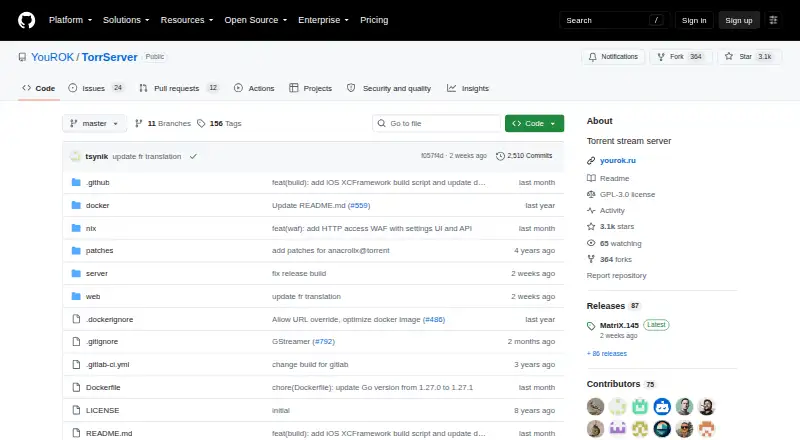
What TorrServer is
TorrServer is a free, self-hosted server that streams torrent content over HTTP without first requiring the full file to be downloaded. It caches torrent data, and the cache size can be adjusted to system parameters and connection speed. A cross-browser web interface is available at the default local address http://127.0.0.1:8090. The REST API and native MCP endpoint let compatible clients manage torrents and obtain playback URLs; those URLs can be used with VLC, mpv, or a browser. The project also documents Smart TV use through Media Station X. Torznab search supports Jackett, Prowlarr, and similar indexer managers. Optional features include a DLNA server and GStreamer HLS remuxing and transcoding in designated builds. Deployment options include standalone installs, Docker, and Docker Compose. Security options include Basic authentication, HTTPS with user-supplied or generated certificates, and read-only database mode. The README cautions that with HTTP media enabled, stream URLs and Basic authentication credentials are unencrypted, so it should be used only on a trusted network. TorrServer is GPL-3.0 licensed.
Good
- Streams without downloading the full file first
- Cache size can be adjusted
- Provides REST API and native MCP endpoint
- Supports standalone, Docker, and Docker Compose deployment
Watch out
- HTTP media can send URLs and credentials unencrypted
- iOS XCFramework requires iOS 18.0 or later
- FUSE and GStreamer are unavailable on iOS
Who it suits
TorrServer suits people who want to stream torrent content through a self-hosted service and use compatible players or clients. It may also fit users deploying through Docker or a standalone installation.
Verdict
TorrServer offers several deployment and playback paths, with adjustable caching and documented security controls. Keep its unencrypted HTTP media caveat in mind and restrict that mode to a trusted network.
Plans and prices
From TorrServer's own pricing page, checked 7 Oct 2026.
| Plan | Price | What it gives you |
|---|---|---|
| TorrServer | Free | Self-hosted torrent streaming server · GPL-3.0 licensed |
The facts
Each one read from TorrServer's own pages, with the date it was checked.
What it does
- API and MCP
- TorrServer provides a REST API and a native MCP endpoint that compatible clients can use to manage torrents and obtain playback URLs.checked 7 Oct 2026
- Caching
- It caches torrent data and allows the cache size to be adjusted to system parameters and internet connection speed.checked 7 Oct 2026
- Deployment
- The project documents standalone installs, Docker, and Docker Compose deployment.checked 7 Oct 2026
- License
- The repository identifies its license as GPL-3.0.checked 7 Oct 2026
- Media features
- Optional features include a DLNA server and GStreamer HLS remuxing and transcoding in designated builds.checked 7 Oct 2026
- Player integrations
- The project says playback URLs can be used with VLC, mpv, or a browser, and documents Smart TV use through Media Station X.checked 7 Oct 2026
- Purpose
- TorrServer streams torrent content over HTTP without requiring users to download the full file first.checked 7 Oct 2026
- Search integrations
- Torznab search supports Jackett, Prowlarr, and similar indexer managers.checked 7 Oct 2026
- Security caveat
- The README warns that when HTTP media is enabled, stream URLs and Basic authentication credentials travel unencrypted, and says to use it only on a trusted network.checked 7 Oct 2026
- Security controls
- Documented options include HTTP Basic authentication, HTTPS with user-supplied or generated certificates, and read-only database mode.checked 7 Oct 2026
- Web interface
- The project lists a cross-browser web interface and says the default local address is http://127.0.0.1:8090.checked 7 Oct 2026
Where it runs
- iOS limits
- The iOS XCFramework requires iOS 18.0 or later; FUSE and GStreamer are unavailable on iOS, and background playback is the host app’s responsibility.checked 7 Oct 2026
The full review of TorrServer
TorrServer is a self-hosted server that streams torrent content over HTTP before the full file has downloaded. It suits people who want to connect torrent playback to their own media players, browser, or compatible clients. Its appeal is flexible deployment and playback; its main constraint is that HTTP media must stay on a trusted network.
Overview
Rather than serving as a conventional desktop torrent client, TorrServer acts as a streaming layer: it uses torrent data to provide media over HTTP while caching content locally. That makes it a good fit for users who want playback without waiting for a complete download, especially those comfortable running and configuring a server. The project is GPL-3.0 licensed.
Key features
Cache size can be adjusted to system resources and internet connection speed. This gives operators control over the trade-off between storage use and streaming conditions, though it also means choosing a suitable cache is part of managing the setup.
The cross-browser web interface defaults to http://127.0.0.1:8090. Torznab search support connects with Jackett, Prowlarr, and similar indexer managers, which is useful for people already organizing searches through those tools.
A REST API and native MCP endpoint let compatible clients manage torrents and retrieve playback URLs. URLs can be opened in VLC, mpv, or a browser, and Smart TV use through Media Station X is documented. Optional DLNA and GStreamer HLS remuxing and transcoding broaden the possible media workflows, but GStreamer features apply only to designated builds.
Standalone installation, Docker, and Docker Compose provide several ways to deploy the server. Security controls include HTTP Basic authentication, HTTPS with user-supplied or generated certificates, and a read-only database mode. These controls do not remove the key caveat: when HTTP media is enabled, stream URLs and Basic authentication credentials travel unencrypted. That mode belongs on a trusted network, not an untrusted one.
Pricing
TorrServer is free: its plan costs free and includes a self-hosted torrent streaming server under the GPL-3.0 license. There are no paid tiers or trial terms to weigh; the trade-off is that users provide and manage their own deployment rather than choosing a hosted service.
Platforms
The supported platforms are Windows, macOS, Linux, Android, and iOS, with API, web, and self-hosted use also supported. Magnet links and remote control are supported, as is DHT.
iOS has specific constraints: its XCFramework requires iOS 18.0 or later, FUSE and GStreamer are unavailable, and background playback is the responsibility of the host app. It is therefore less suitable for users expecting those capabilities to be supplied by TorrServer itself on iOS.
Who it's for
TorrServer is best for technically comfortable users who want to stream torrent content through a self-managed server and value API access, player choice, and deployment flexibility. It is a weaker choice for anyone seeking a managed service, a simple standalone player, or HTTP media playback on networks they do not trust.
Pros and cons
- Pros: Free, GPL-3.0-licensed software with standalone, Docker, and Docker Compose deployment options.
- Pros: Adjustable caching, a browser interface, search integrations, and API-based control support varied self-hosted setups.
- Pros: Playback URLs work with VLC, mpv, or a browser, with documented Smart TV use through Media Station X.
- Cons: HTTP media exposes stream URLs and Basic authentication credentials in unencrypted form, limiting that mode to trusted networks.
- Cons: iOS requires version 18.0 or later, lacks FUSE and GStreamer, and leaves background playback to the host app.
- Cons: Optional DLNA and GStreamer features are not universal across builds.
Alternatives
For a broader comparison, browse Peer-to-Peer File Sharing Software.
Choose Feem instead if the priority is direct file transfers across devices rather than streaming torrent content: its free plan offers unlimited file transfers, while Feem Pro iOS costs $4.99 a year and renews manually each year.
BiglyBT is a free alternative for users looking for torrent software across Android, Linux, macOS, web, or Windows.
BitComet may suit users seeking free software for private, personal, non-commercial use across its supported platforms.
Resilio Sync is another free option for non-commercial use; its Sync 3.0 personal license must be activated and does not expire.
aMule is a free, GPL-2.0-licensed alternative with no telemetry or advertisements.
qBittorrent is worth considering if free, open-source software without ads is the priority.
Transmission offers all features in its free plan, with no ads or tracking.
WebTorrent is a free alternative for non-commercial use, described as non-profit, open source, and MIT-licensed.
Verdict
Choose TorrServer if you want a free, self-hosted way to stream torrent content and connect playback to your preferred players or compatible clients. Its adjustable cache and broad deployment options are compelling for a configurable setup. Look elsewhere if you need a managed or simpler playback experience, or if your use case requires HTTP media on an untrusted network.
Getting started
- Open the TorrServer project website.
- Choose a standalone installation, Docker, or Docker Compose deployment.
- Access the cross-browser interface at http://127.0.0.1:8090 by default.
- Use the REST API or MCP endpoint with a compatible client, or use playback URLs in VLC, mpv, or a browser.
- If enabling HTTP media, keep use to a trusted network because URLs and Basic authentication credentials travel unencrypted.
Limits worth knowing
When HTTP media is enabled, stream URLs and Basic authentication credentials are unencrypted. On iOS, the XCFramework requires iOS 18.0 or later; FUSE and GStreamer are unavailable, and background playback depends on the host app.
Questions
How much does TorrServer cost?
It is free; the listed plan is free.
Which platforms does TorrServer support?
Listed platforms include Windows, macOS, Linux, Android, iOS, web, API, and self-hosted use.
Is TorrServer open source?
The repository identifies its license as GPL-3.0.
How can I deploy TorrServer?
Documented options are standalone installation, Docker, and Docker Compose.
Which players can use TorrServer playback URLs?
The project says URLs can be used with VLC, mpv, or a browser, and documents Smart TV use through Media Station X.
What security options are documented?
Options include HTTP Basic authentication, HTTPS with user-supplied or generated certificates, and read-only database mode. When HTTP media is enabled, URLs and Basic authentication credentials travel unencrypted.
Alternatives to TorrServer
- 1

Feem
Free planAndroidiOSWebAPI8.0From $4.99 a year - 2

BiglyBT
Free planOpen sourceAndroidWebAPILinux7.7Free plan - 3

BitComet
Free planAndroidWebAPIExtension7.5Free plan - 4

aMule
Free planOpen sourceWebAPILinuxmacOS7.4Free plan - 5
Avidemux
Free planOpen sourceWebLinuxmacOSWindows7.3Free plan - 6
µTorrent Web
Free planWebmacOSWindows6.9From $6.95 a year