Tomatoid
Tomatoid is a free web app Pomodoro timer for structuring work sessions and breaks.
What Tomatoid is
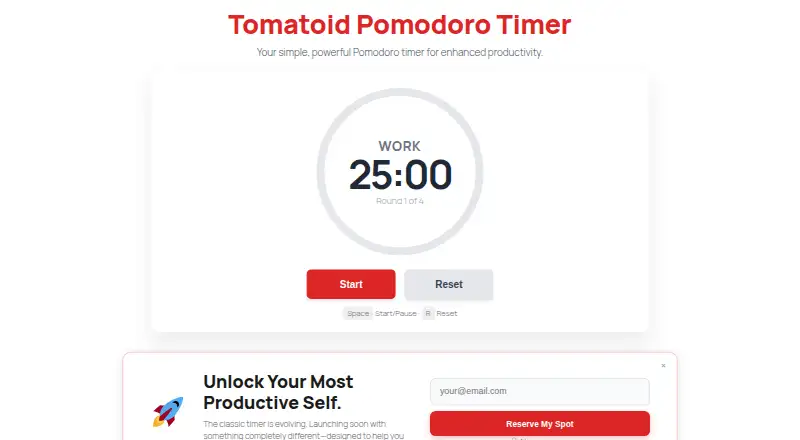
Tomatoid is a free web app Pomodoro timer for structuring work sessions and breaks. It starts with 25 minutes of work followed by a 5-minute break, then provides a 30-minute break after four rounds. You can play, pause, or reset the timer at any point. The site describes its design as minimalist and intended to reduce distractions. No account is required, and Tomatoid says it does not collect personal information from timer users. Once the page has loaded, the timer can continue offline if the page remains open in the browser. The service is described as optimized for Chrome, Firefox, Edge, and Safari, and as working in most modern browsers. It can be used on desktop and laptop computers running Windows, macOS, or Linux, as well as in mobile browsers on iOS and Android; it can also be added to a device's home screen. Tomatoid is a web app, not an app in the iOS App Store or Google Play Store. Its Free plan costs nothing, and no free trial is offered.
Good
- Starts with a 25-minute work session and 5-minute break
- Adds a 30-minute break after four rounds
- No account is required
- Can work offline after loading while left open
- Works in desktop and mobile browsers
Watch out
- Not available in the iOS App Store or Google Play
- Offline use requires the page to remain open
Who it suits
Tomatoid suits people who want a simple work-and-break timer in a browser without creating an account. It is an option across desktop and mobile browsers, but not for someone specifically seeking a native App Store or Google Play app.
Verdict
Tomatoid covers a straightforward Pomodoro cycle with pause, reset, and offline browser use. Choose it if a web timer fits your routine and you do not need a native mobile app.
Plans and prices
From Tomatoid's own pricing page, checked 4 Oct 2026.
| Plan | Price | What it gives you |
|---|---|---|
| Free | Free | Pomodoro timer · no account required |
The facts
Each one read from Tomatoid's own pages, with the date it was checked.
What it does
- Account
- An account is not required to use the timer.checked 4 Oct 2026
- Long break
- After four rounds, the timer provides a 30-minute break.checked 4 Oct 2026
- Minimal design
- The site describes Tomatoid as simple and minimalist, with a focus on reducing distractions.checked 4 Oct 2026
- Offline use
- The timer can be used offline after the page has loaded, if it remains open in the browser.checked 4 Oct 2026
- Privacy
- The site says it does not collect personal information from timer users.checked 4 Oct 2026
- Purpose
- Tomatoid is a free web app Pomodoro timer designed to help users focus and be productive.checked 4 Oct 2026
- Support and integrations
- The opened site pages do not state support channels or integrations.checked 4 Oct 2026
- Timer controls
- Users can play, pause, or reset the timer at any time.checked 4 Oct 2026
- Work interval
- The timer starts with a 25-minute work session followed by a 5-minute break.checked 4 Oct 2026
Where it runs
- Browser support
- The site says Tomatoid is optimized for Chrome, Firefox, Edge, and Safari and should work in most modern browsers.checked 4 Oct 2026
- Desktop platforms
- The web app is described as accessible on desktop and laptop computers running Windows, macOS, and Linux.checked 4 Oct 2026
- Mobile platforms
- The web app works in mobile browsers on iOS and Android, and can be added to a device's home screen.checked 4 Oct 2026
- Native apps
- The site says Tomatoid is not available in the iOS App Store or Google Play Store.checked 4 Oct 2026
Money
- Cost
- The site says Tomatoid is completely free, with no hidden fees, and will always be free.checked 4 Oct 2026
The full review of Tomatoid
Tomatoid is a free Pomodoro timer that runs in a web browser, suited to people who want a preset focus-and-break routine without signing up. Its appeal is restraint: it covers the essentials at no cost, but it is not a native mobile app or a flexible productivity suite.
Overview
Tomatoid sets a 25-minute work session followed by a 5-minute break, then gives a 30-minute break after four rounds. Play, pause, and reset controls let you manage the timer without changing that schedule. This is a sensible fit for anyone happy to follow a conventional Pomodoro rhythm; those who need different session lengths should look elsewhere.
The minimalist design aims to keep distractions down, and no account is needed. Tomatoid says it does not collect personal information from timer users. After the page has loaded, the timer can work offline as long as the page stays open in the browser.
Key features
- Preset focus cycle: The 25/5-minute pattern and longer break after four rounds provide structure without requiring setup. The trade-off is that the intervals are fixed.
- Basic timer controls: Play, pause, and reset cover the common needs of a simple session timer, but do not add task or planning tools.
- Browser use, including offline: Tomatoid is optimized for Chrome, Firefox, Edge, and Safari and should work in most modern browsers. Offline use requires loading the page first and keeping it open.
Pricing
Tomatoid has one plan: Free at no cost, covering the Pomodoro timer with no account required. There is no free trial because the timer is already free; the site says it has no hidden fees and will always be free. That makes it an uncomplicated choice for occasional or regular timer use, though there are no paid features or additional plan options to move up to.
Platforms
Tomatoid’s listed coverage is web. It works in mobile browsers on iOS and Android and can be added to a device’s home screen, as well as running on Windows, macOS, and Linux desktop or laptop computers. It is not available in the iOS App Store or Google Play Store, so choose another option if you specifically want a native mobile app.
Who it's for
Tomatoid suits browser users who want a free, account-free timer and are content with standard Pomodoro intervals. It is less suitable for people who want to customize session lengths, use a native mobile app, or combine timing with broader task-management features.
Pros and cons
- Pros: No account or payment is needed; the timer supports pause and reset; offline use is possible after loading the page; the site says timer users’ personal information is not collected.
- Cons: Work and break durations are fixed; offline use depends on keeping the browser page open; there is no native iOS or Android app.
Alternatives
For more than a basic timer, these alternatives cover different needs:
- Pomodoist is worth considering if you want an open-source option under the AGPL-3.0-only license, a free plan, and broader platform coverage that includes extensions; it also offers a free trial.
- Focus To-Do is a freemium alternative with a free plan and coverage across mobile, desktop, web, and extensions. Its 3 Months plan is $3.99 a month, billed every three months; choose it if that paid option better fits your needs.
- Pomofocus may suit users who want a free web timer with estimate finish time, templates, visual reports, and custom settings—more ways to shape and review sessions than Tomatoid provides.
- Tomato Timer is another free browser timer, with a built-in to-do list and custom focus durations; its macOS app costs $3.99, paid once.
- Forest is a freemium choice for Android, iOS, web, and extension users. Its free plan includes core focus features, occasional ads, one Time Guard app or site, and one Mindful Space soundscape.
- Flowkeeper is a free desktop app for Linux, macOS, and Windows, with no subscriptions or paid features.
- Pomello has a free Basic plan with unlimited boards and lists, productivity and time tracking, checklist items as tasks, custom timer sounds, and productivity-data export.
- PomodoroTimers is a free option for Android, iOS, and web; its core focus tools are free to use.
Browse more options in Pomodoro Timer Apps.
Verdict
Choose Tomatoid if you want a no-cost, account-free Pomodoro timer in your browser and its fixed 25/5-minute cycle works for you. Its simplicity is the reason to pick it; look elsewhere if custom intervals or a native mobile app are essential.
Alternatives to Tomatoid
- 1
Pomodoist
Free planOpen sourceAndroidiOSWebAPI8.6Free plan - 2

Forest
Free planAndroidiOSWebExtension8.1From $35.99 a year - 3
Pomodoro PWA Timer
Free planAndroidiOSWebAPI8.0From $49 a month - 4
Focus To-Do
Free planAndroidiOSWebExtension7.6Free plan - 5
PomoDial
Free planWebExtension7.2From $2.99 a month - 6

Pomofocus
Free planWebLinuxmacOSWindows7.0Free plan