
Timeshift
Timeshift is a free Linux utility for creating incremental filesystem snapshots and restoring a system to an earlier state.
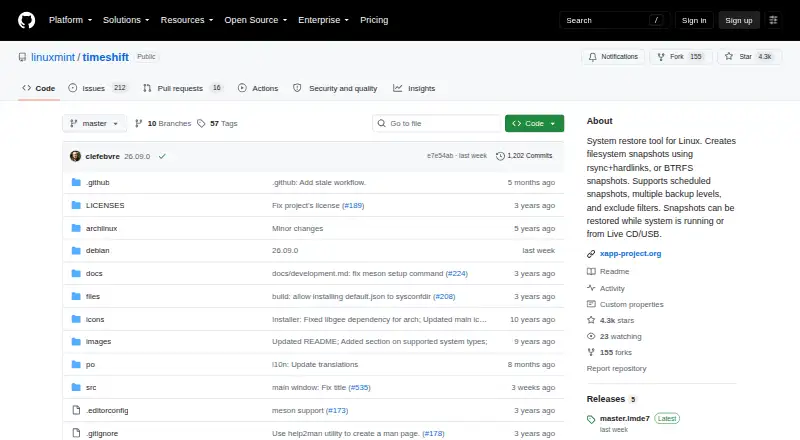
What Timeshift is
Timeshift is a free Linux utility for creating incremental filesystem snapshots and restoring a system to an earlier state. It focuses on system files and settings, excluding users’ home-directory contents by default. Snapshots can use rsync with hard links or BTRFS filesystem features. Scheduling supports hourly, daily, weekly, monthly, and boot levels, with configurable retention counts. Restores can run from the active system or another system with Timeshift installed, including an Ubuntu Live CD or USB; a restore started from the running system requires a reboot to finish. The project lists normal, LUKS-encrypted, LVM2, BTRFS, GRUB2, and EFI configurations, subject to constraints. BTRFS requires an Ubuntu-type layout with @ and @home subvolumes. Docker and containerized systems are unsupported. Package instructions cover Debian-based distributions, Fedora, Arch, and ALT Linux.
Good
- Free system snapshot and restore utility
- Rsync and BTRFS snapshot methods
- Hourly through boot scheduling
- Restores from live media or another system
- Supports encrypted, LVM2, GRUB2, and EFI setups
Watch out
- Home directories excluded by default
- BTRFS requires a specific subvolume layout
- Docker and containerized systems unsupported
- Snapshots need sufficient free disk space
Who it suits
Timeshift suits Linux users who need system recovery snapshots rather than routine personal-file backup. It is useful when scheduled restore points and supported filesystem configurations match your setup.
Verdict
Timeshift provides scheduled Linux system snapshots with two storage methods and several restore paths. Check its BTRFS layout, container limitations, and storage requirements before relying on it.
Plans and prices
From Timeshift's own pricing page, checked 8 Oct 2026.
| Plan | Price | What it gives you |
|---|---|---|
| Timeshift | Free | System snapshot and restore utility for Linux |
The facts
Each one read from Timeshift's own pages, with the date it was checked.
What it does
- Backup scope
- mixedchecked 20 Sep 2026
- BTRFS limit
- BTRFS snapshots require an Ubuntu-type subvolume layout with @ and @home subvolumes; other layouts are not supported.checked 8 Oct 2026
- Computer backup
- Yeschecked 20 Sep 2026
- Container limit
- Docker and containerized systems are not supported, and the project says results there are unpredictable.checked 8 Oct 2026
- Installation
- The README gives package installation instructions for Debian-based distributions, Fedora, Arch, and ALT Linux.checked 8 Oct 2026
- Integrations
- Rsync mode uses rsync and hard links; BTRFS mode uses BTRFS filesystem snapshots.checked 8 Oct 2026
- Project stewardship
- The README says Timeshift is part of the XApp project, maintained by Linux Mint; XApp describes itself as open source and cross-distribution.checked 8 Oct 2026
- Purpose
- Timeshift creates incremental filesystem snapshots to restore a Linux system to an earlier state.checked 8 Oct 2026
- Restore
- Snapshots can be restored from the running system or from another system with Timeshift installed, including from an Ubuntu Live CD or USB.checked 8 Oct 2026
- Restore modes
- mixedchecked 20 Sep 2026
- Restore reboot
- Restoring from the running system requires a reboot to complete.checked 8 Oct 2026
- Scheduled snapshots
- It supports hourly, daily, weekly, monthly, and boot snapshot levels, with configurable retention counts.checked 8 Oct 2026
- Snapshot methods
- It supports rsync snapshots using hard links and BTRFS snapshots using built-in filesystem features.checked 8 Oct 2026
- Storage
- Timeshift requires sufficient free disk space for snapshots and recommends saving them to an external non-system partition for best results.checked 8 Oct 2026
- Support and contributions
- The project invites users to report issues, submit code changes, and contribute translations.checked 8 Oct 2026
- Supported systems
- The project lists normal, LUKS-encrypted, LVM2, BTRFS, GRUB2, and EFI configurations as supported, subject to its stated constraints.checked 8 Oct 2026
- User files
- User home-directory contents are excluded by default because Timeshift is designed to protect system files and settings rather than user data.checked 8 Oct 2026
Money
- Free plan
- Yeschecked 20 Sep 2026
Where it runs
- Supported platforms
- linuxchecked 20 Sep 2026
Alternatives to Timeshift
- 1
UrBackup
Free planOpen sourceAndroidWebAPILinux9.4Free plan - 2

IDrive
Free planAndroidiOSWebLinux9.2From $0.25 a month - 3

Bareos
Free planOpen sourceWebAPILinuxmacOS9.1From €480 a year - 4

MSP360 Backup
Free planAndroidiOSWebAPI9.0Free plan - 5

iCloud Backup
Free planAndroidiOSWebAPI8.6From $0.99 a month - 6

Backblaze Computer Backup
AndroidiOSWebmacOS8.5From $7.88 a month