TimeFlow
TimeFlow is personal planning software that places tasks and habits into open spaces between meetings during working hours, then rearranges them when meeting…
What TimeFlow is
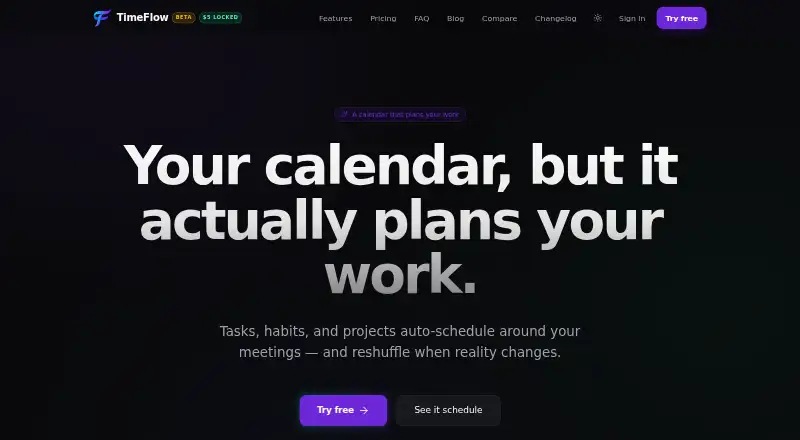
TimeFlow is personal planning software that places tasks and habits into open spaces between meetings during working hours, then rearranges them when meetings change. It supports two-way Google Calendar synchronization, recurring time blocks, task management, and automatic scheduling. Projects can include deadlines, phases, templates, a kanban board, and a separate working-hours schedule. A live timer records task time across devices. AutoScheduler MAX uses an LLM to suggest strategic weekly placements, explain those suggestions, and let the regular scheduler reflow around approved anchors. TimeFlow also offers a remote MCP server for Claude Code, Cursor, Claude Desktop, and Windsurf. That connection can manage tasks and list projects and phases, but cannot access calendars, schedules, habits, time tracking, or AutoScheduler settings. The service is aimed at individual planning rather than team scheduling. It is in beta, with a warning that data loss is possible. Beta is free until billing begins, then costs $5 a month while subscribed.
Good
- Schedules tasks around meetings
- Two-way Google Calendar sync
- Projects include kanban boards and phases
- Live timer works across devices
- Android, iOS, and web access
Watch out
- Beta status carries possible data loss
- No mobile app-store download
- MCP cannot access calendar or time tracking
- Beta pricing may change after billing rolls out
Who it suits
TimeFlow suits individuals who want their calendar to arrange personal work, tasks, and habits. It is not presented as team scheduling software.
Verdict
TimeFlow combines calendar-aware scheduling with projects, habits, and optional LLM planning. Its beta status, data-loss warning, and MCP restrictions are important when deciding whether it fits personal planning needs.
Plans and prices
From TimeFlow's own pricing page, checked 9 Oct 2026.
| Plan | Price | What it gives you |
|---|---|---|
| Beta | $5 a month | All features · No card needed during beta · Cancel anytime · Free until billing rolls out; then $5/month, locked while subscribed |
| Standard | $10 a month | All features · Priority email support · After beta; beta subscribers keep the $5/month rate |
| Standard annual | $96 a year | All features · Priority email support · Annual option at 1.0 launch; save 20% |
The facts
Each one read from TimeFlow's own pages, with the date it was checked.
What it does
- AI data handling
- When the chat assistant or AutoScheduler MAX is used, the site says workspace snapshots are sent to the selected OpenAI or Anthropic model provider; task-title redaction is available for MAX.checked 9 Oct 2026
- AutoScheduler MAX
- AutoScheduler MAX uses an LLM to propose strategic weekly placements, explains its choices, and lets the regular scheduler reflow around approved anchors.checked 9 Oct 2026
- Beta limits
- TimeFlow is in beta, and its site cautions that data loss is possible and users should not rely on it as their only record of irreplaceable scheduling.checked 9 Oct 2026
- Data security
- The privacy policy says data is stored in Supabase Postgres with row-level security, daily backups retained for seven days, and US-region hosting through Vercel and Supabase.checked 9 Oct 2026
- Integrations
- TimeFlow supports two-way Google Calendar sync and a remote MCP server for clients including Claude Code, Cursor, Claude Desktop, and Windsurf.checked 9 Oct 2026
- MCP limits
- The MCP integration can manage tasks and list projects and phases, but cannot access calendar events, schedules, habits, time tracking, or AutoScheduler settings.checked 9 Oct 2026
- Mobile access
- TimeFlow can be opened in a phone browser and added to the home screen; the site says iOS and Android are supported without an app-store download.checked 9 Oct 2026
- Projects
- Projects can have deadlines, phases, templates, a kanban board, and their own working-hours schedule.checked 9 Oct 2026
- Support
- Beta users are offered a direct line to the maintainer for bugs and feature requests; the post-beta Standard plan lists priority email support.checked 9 Oct 2026
- Time tracking
- A live task timer logs time to the task, and the site says it works across devices.checked 9 Oct 2026
- What it does
- TimeFlow schedules tasks and habits into gaps between meetings during working hours, and rearranges them when meetings change.checked 9 Oct 2026
- Who it is for
- The site describes TimeFlow as personal planning software for people who want their calendar to plan work, rather than team scheduling software.checked 9 Oct 2026
Alternatives to TimeFlow
- 1
Pomodoist
Free planOpen sourceAndroidiOSWebAPI8.6Free plan - 2
TimeFinder
Free planAndroidiOSWebmacOS8.2$119.99 one-time - 3

Routine
Free planAndroidiOSWebLinux8.0From $5 a month - 4
TimeBloc
Free planAndroidiOS7.8From $4.99 a month - 5

Ellie Planner
Free planiOSWebmacOSWindows7.7From $9.99 a month - 6

Sunsama
AndroidiOSLinuxmacOS7.7