TimeBolt
TimeBolt is video editing software for removing silence, filler words, false starts, and bad takes, with text-based editing and automatic captions.
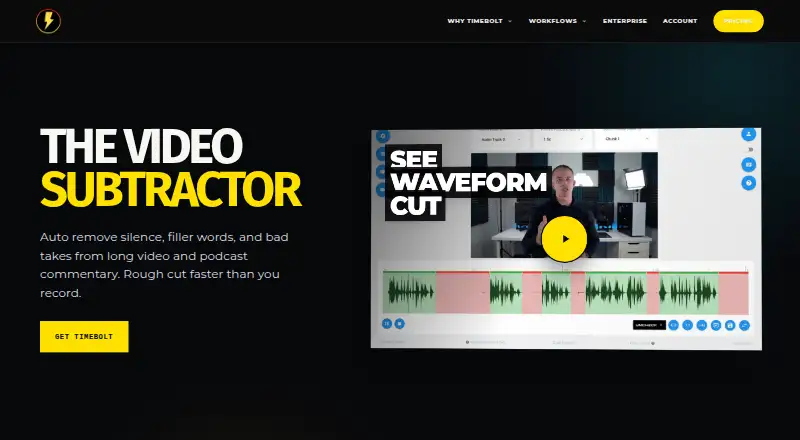
What TimeBolt is
TimeBolt is video editing software for removing silence, filler words, false starts, and bad takes, with text-based editing and automatic captions. It processes videos locally instead of uploading them to the cloud. The free plan is forever free but supports video only, watermarks exports, and does not save projects. Paid plans support video and audio files of any duration and exports up to 4K. Pro costs $17 per month, $97 per year, or $347 lifetime. TimeBolt offers XML and plugin workflows for Riverside, Premiere Pro, Final Cut Pro, and DaVinci Resolve. A license works on up to two machines with simultaneous logins. Teams adds centralized license management, seat changes, key reassignment, and priority support. Vault is an on-premise deployment built for HIPAA, FINRA, and FedRAMP compliance pathways. A 30-day risk-free trial and 30-day refund policy are listed.
Good
- Removes silence, filler words, and bad takes
- Creates synced automatic captions
- Processes videos locally
- Exports up to 4K on paid plans
- Supports XML and editor workflows
Watch out
- Free exports include watermarks
- Free plan supports video only
- Free plan cannot save projects
- Pro Banger uploads limited to 12 minutes
Who it suits
TimeBolt suits video editors who want automated silence removal, caption creation, and text-based editing on Windows or macOS. It also fits teams needing license administration or on-premise processing.
Verdict
TimeBolt combines automated cleanup, captions, local processing, and editor integrations. The free tier demonstrates core silence removal but adds watermarks and omits project saving, while paid options expand media support and export capabilities.
Plans and prices
From TimeBolt's own pricing page, checked 28 Sep 2026.
| Plan | Price | What it gives you |
|---|---|---|
| Free | Free | Forever free; exports are watermarked · Video-only support · Silence detection and removal · Watermarked exports · No XML/NLE export · No project saving · Forever free |
| Pro | $17 a month | 12-minute Banger upload limit · Billed monthly · Cancel anytime |
| Teams | $97 a year | Volume discounts available · Everything in Pro · Centralized license dashboard · Add and remove seats · Reassign keys · Priority support · UMCHECK available pay-per-use · Volume discounts available |
| Vault | Priced on request | Based on deployment size and requirements · Fully on-premise deployment · Video processed on customer infrastructure · Enterprise deployment and support · Optional on-premise UMCHECK AI |
| Pro Monthly | $17 a month | Cancel anytime · billed monthly |
| Pro Annual | $97 a year | Cancel anytime; save 52% · billed annually |
| Pro Lifetime | $347, paid once | Lifetime access and all future updates |
The facts
Each one read from TimeBolt's own pages, with the date it was checked.
What it does
- Automatic captions
- Yeschecked 21 Sep 2026
- Editing features
- TimeBolt removes silence, filler words, false starts, bad takes, and creates synced captions.checked 28 Sep 2026
- Editing integrations
- TimeBolt offers XML and plugin export and workflows for major video editors.checked 28 Sep 2026
- Encryption details
- The page does not state an encryption standard.checked 28 Sep 2026
- Local processing
- TimeBolt processes videos locally and does not upload them to the cloud.checked 28 Sep 2026
- Maximum export resolution
- 4kchecked 21 Sep 2026
- Media support
- Paid plans support video and audio files of any duration.checked 28 Sep 2026
- Paid pricing
- Pro costs $17 monthly, $97 annually, or $347 lifetime.checked 28 Sep 2026
- Refund policy
- Refunds are available within 30 days, with no questions asked.checked 28 Sep 2026
- Security pathways
- Vault is on-premise and built for HIPAA, FINRA, and FedRAMP compliance pathways.checked 28 Sep 2026
- Silence removal
- Yeschecked 21 Sep 2026
- Support access
- Account access, license keys, downloads, and support are available at timebolt.io/access.checked 28 Sep 2026
- Text-based editing
- Yeschecked 21 Sep 2026
- UMCHECK pricing
- UMCHECK is available on paid plans at $0.03 per minute of video.checked 28 Sep 2026
The company
- Company fact
- The site identifies the company as TimeBolt, LLC, operating since 2019.checked 28 Sep 2026
- Team management
- Teams provides centralized license management, seat changes, and key reassignment.checked 28 Sep 2026
Money
- Free limits
- Free supports video only, silence detection and removal, and no project saving.checked 28 Sep 2026
- Free plan
- Yeschecked 21 Sep 2026
- Free tier
- The free plan is forever free but has watermarked exports.checked 28 Sep 2026
- Trial period
- TimeBolt offers a 30-day risk-free trial with a money-back guarantee.checked 28 Sep 2026
Where it runs
- Machine installations
- One license works on up to two machines with simultaneous logins.checked 28 Sep 2026
- Supported apps
- Listed workflows include Riverside, Premiere Pro, Final Cut Pro, and DaVinci Resolve.checked 28 Sep 2026
- Supported platforms
- TimeBolt supports Mac and Windows.checked 28 Sep 2026
Alternatives to TimeBolt
- 1

Captions
Free planAndroidiOSWebAPI8.3From $4.99 a month - 2

Picsart
Free planAndroidiOSWebAPI8.3From $10.50 a month - 3

CyberLink PowerDirector
Free planAndroidiOSmacOSWindows8.2From $59.99 a year - 4

Vmaker
Free planiOSWebExtensionmacOS8.2From $18 a month - 5
FlexClip
Free planAndroidiOSWebWindows8.1From $143.88 a year - 6

Videoleap
Free planAndroidiOSWeb8.1From $5.83 a month