
Thumblore
Thumblore is a web app that creates YouTube and Shorts thumbnails from a title or topic, without requiring design skills.
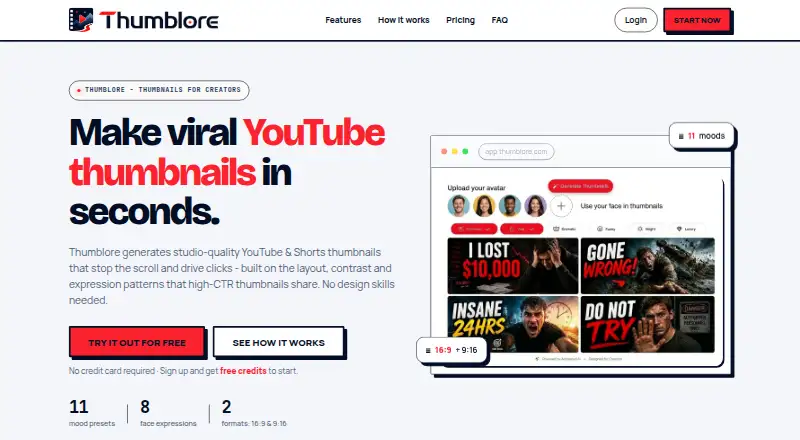
What Thumblore is
Thumblore is a web app that creates YouTube and Shorts thumbnails from a title or topic, without requiring design skills. Each generation produces two options, with the text, faces, and color arranged automatically. You can ask for headline, color, or layout changes through plain-English chat editing. It supports 16:9 and 9:16 outputs, including formats for Stories, Shorts, and Reels. Users can create or upload reusable avatars, and place multiple saved avatars in one thumbnail. New accounts get 100 credits at signup without a payment card; generation and editing spend credits, and the app shows the cost before confirmation. The free plan includes one saved avatar and exports with a Thumblore badge. Users own generated outputs subject to applicable law and model-provider rights, and may use them commercially.
Good
- Each generation returns two thumbnail options.
- Plain-English chat edits headlines, colors, and layouts.
- Reusable avatars can be combined in one thumbnail.
- Supports 16:9 and 9:16 outputs.
- Commercial use is permitted subject to stated rights.
Watch out
- Free exports include a Thumblore badge.
- Generation and editing use credits.
- The free plan includes one saved avatar.
Who it suits
Thumblore suits creators who want to produce thumbnails from a video title or topic and adjust them through chat. It may also suit people who reuse faces or need both landscape and vertical formats.
Verdict
Thumblore brings thumbnail generation, chat-based edits, and reusable avatars together in a web app. Check the credit allowance and export conditions for the plan that fits your workflow.
Plans and prices
From Thumblore's own pricing page, checked 29 Sep 2026.
| Plan | Price | What it gives you |
|---|---|---|
| Free | Free | 100 credits at signup · ≈5 thumbnails · 1 saved avatar · exports with Thumblore badge · plain-English editing |
| Starter | $9 a month | 700 credits/mo · ≈40 thumbnails · up to 10 saved avatars · 3 AI-generated avatars/mo · Story/Short/Reel formats · no watermark · HD exports · $9/mo (was $10) |
| Pro | $24 a month | 2,000 credits/mo · ≈120 thumbnails · unlimited saved avatars · 20 AI-generated avatars/mo · avatar swap and pop-out in editor · $24/mo (was $30) |
| Studio | $45 a month | 4,200 credits/mo · ≈240 thumbnails · unlimited avatars and AI generations · shortest wait on every generation · $45/mo (was $75) |
The facts
Each one read from Thumblore's own pages, with the date it was checked.
What it does
- Avatars
- Users can create or upload a face, save it, and reuse it across thumbnails; multiple saved avatars can appear in one thumbnail.checked 29 Sep 2026
- Commercial use
- The terms say users own generated outputs, subject to applicable law and underlying model-provider rights, and may use them commercially.checked 29 Sep 2026
- Credit limits
- The cost of a generation or edit varies with the work involved, and the app shows the cost before the action is confirmed.checked 29 Sep 2026
- Credits
- New accounts receive 100 credits once at signup without a payment card; AI generation and editing spend credits.checked 29 Sep 2026
- Data use
- Thumblore says it does not sell personal data or use prompts or outputs to train foundation models.checked 29 Sep 2026
- Editing
- Users can request changes to headlines, colors, and layouts in plain English through chat editing.checked 29 Sep 2026
- Formats
- The product supports 16:9 and 9:16 formats, including Story, Short, and Reel outputs.checked 29 Sep 2026
- Generation
- A generation returns two thumbnail options with text, faces, and color handled automatically.checked 29 Sep 2026
- Integrations
- The privacy policy names Dodo Payments, Supabase, Cloudflare, Google Cloud Vertex AI/Gemini, and Cloudflare R2 as service processors.checked 29 Sep 2026
- Purpose
- Thumblore generates YouTube and Shorts thumbnails from a video title or topic, without requiring design skills.checked 29 Sep 2026
- Security
- The privacy policy lists TLS in transit, encryption at rest, role-based access, and database row-level security as security measures.checked 29 Sep 2026
- Support
- Support is available through the contact page and at [email protected].checked 29 Sep 2026
The company
- Maker
- Thumblore is operated by Monday Canvas.checked 29 Sep 2026
The full review of Thumblore
Thumblore is a web app for making thumbnails from a video title or topic, aimed at creators who want artwork without taking on design work. Its automatic options, chat edits, and reusable avatars make it most compelling for repeat publishing; credit-based costs and badge-marked free exports are the main trade-offs.
Overview
Each generation produces two options, with text, faces, and color arranged automatically. You can then request headline, color, or layout changes in plain English. That gives creators a way to refine a starting point without switching to a separate design workflow, though both generation and editing draw down credits.
Thumblore supports 16:9 and 9:16 outputs for YouTube, Shorts, Stories, Reels, and other supported social formats. Users can create or upload faces and save them for reuse; multiple avatars can appear in one thumbnail. The terms allow commercial use of generated outputs, subject to applicable law and underlying model-provider rights.
Key features
Generation and chat editing
Two options per generation provide a useful choice rather than a single fixed result. Plain-English requests can adjust headlines, colors, and layouts, which suits creators who know what they want changed but do not want to edit a design manually. Credit costs vary with the work involved, so the approximate thumbnail counts attached to plans are not guaranteed quotas; the app shows the cost before confirmation.
Reusable avatars and multiple formats
Saved faces help keep a recurring presenter recognizable across a channel’s thumbnails, and a single image can include more than one saved avatar. Support for both landscape and vertical outputs also makes the tool relevant beyond standard YouTube videos, including Shorts, Reels, and Stories.
Privacy, security, and support
Thumblore says it does not sell personal data or use prompts or outputs to train foundation models. Its privacy policy identifies TLS in transit, encryption at rest, role-based access, and database row-level security. Named service processors include Dodo Payments, Supabase, Cloudflare, Google Cloud Vertex AI/Gemini, and Cloudflare R2. Support is available through the contact page and at [email protected].
Pricing
Thumblore is freemium. The free plan costs nothing, requires no payment card at signup, and provides 100 credits once—about five thumbnails—plus one saved avatar and plain-English editing. Exports carry a Thumblore badge, making the free tier better for trying the workflow than publishing polished, unbranded work. Credits are shared by generations and edits.
Starter costs $9 a month, billed $9/mo (was $10). It includes 700 credits monthly, approximately 40 thumbnails, up to 10 saved avatars, three AI-generated avatars per month, Story/Short/Reel formats, unwatermarked exports, and HD exports. This is the practical entry point for regular creators who need clean exports and a modest avatar library.
Pro costs $24 a month, billed $24/mo (was $30). Its 2,000 monthly credits are estimated at about 120 thumbnails; it adds unlimited saved avatars, 20 AI-generated avatars per month, and avatar swap and pop-out in the editor. Choose it when multiple recurring faces or those editor controls justify the step up from Starter.
Studio costs $45 a month, billed $45/mo (was $75). It provides 4,200 credits monthly, approximately 240 thumbnails, unlimited avatars and AI generations, and the shortest wait on every generation. It is aimed at heavier production; for occasional use, the lower tiers avoid paying for capacity and priority that may go unused. The listed per-month amounts are the plan prices, while credit use varies by task.
Platforms
Thumblore runs on the web. Its supported outputs cover YouTube, YouTube Shorts, Instagram Reels, TikTok, Instagram Stories, Facebook Stories, and YouTube Community posts. The format range makes it a fit for creators repurposing visual assets across video and social channels, rather than a tool limited to landscape video thumbnails.
Who it's for
Thumblore suits solo creators and small publishing teams that want quick thumbnail concepts, conversational revisions, and consistent saved faces across recurring content. Its vertical formats are useful for creators publishing both long-form and short-form video. It is less suitable for someone who needs unlimited predictable output on a low-cost plan: credit consumption changes with the work, and the free tier’s badge limits its usefulness for final exports.
Pros and cons
- Two starting options per generation: gives creators a choice before they spend time refining a direction.
- Chat-based adjustments: supports headline, color, and layout changes without requiring design skills.
- Reusable avatars and vertical formats: help maintain a recognizable face across landscape and short-form content.
- Free signup without a card: provides 100 one-time credits for trying generation and editing.
- Variable credit costs: make exact output volume less predictable than a fixed per-image allowance.
- Free exports carry a badge: creators seeking unbranded work need a paid plan.
Alternatives
AI Thumbnail Generators and Video Thumbnail Makers are useful category lists if you want to compare a wider set of tools before choosing.
Choose ThumbPocket if a free web editor and credit top-ups suit you better: its 120-credit top-up is 9.99 EUR, billed anytime, with one credit per AI generation; a Creator monthly plan is also offered.
Thumbsmith is another freemium web option; its free tier includes three starter HQ credits, daily watermarked four-up previews, and a full editor with templates and saved projects.
Thumix may suit buyers who prefer credits that never expire: its Try plan is $1.99 a month for 20 credits, approximately 10 images, with commercial use included.
Thumbmagic is a freemium web alternative with a free trial; its Starter plan is $17 a month, billed yearly, for 100 thumbnails monthly, one avatar, starter templates, AI editing, and no watermark.
Thumby is worth considering if you want a freemium option that also supports iOS and Android.
ThumbGen has a free one-time plan at 0.00 USD with 150 credits, up to 18 thumbnails, up to 4K output, and reference images; choose it if those free-plan features matter more than Thumblore’s saved-avatar workflow.
ThumbMaker and ThumbnailGo are other freemium web alternatives.
Verdict
Thumblore is a strong fit for creators who publish regularly, want a consistent face across thumbnails, and value conversational refinement over manual design work. Its broad format support and reusable avatars are the clearest reasons to choose it. Look elsewhere if variable credit use makes budgeting uncomfortable, or if you need unbranded exports without paying: the free plan adds a badge, while paid plans begin at $9 a month.
Getting started
- Open the Thumblore website
- Create a new account without entering a payment card
- Receive the 100 signup credits
- Provide a YouTube video title or topic
- Generate two thumbnail options
- Request headline, color, or layout changes through chat editing
- Export the finished thumbnail
Limits worth knowing
The free plan provides 100 signup credits, approximately five thumbnails, one saved avatar, and exports with a Thumblore badge. Generation and edit costs vary by workload and are shown before confirmation.
Questions
How much does Thumblore cost?
Thumblore has a free plan.
Is there a free plan?
Yes. The Free plan costs nothing and includes 100 signup credits, approximately five thumbnails, one saved avatar, plain-English editing, and exports with a Thumblore badge.
Which platforms and formats are supported?
Thumblore is available on the web. It supports YouTube, YouTube Shorts, Instagram Reels, TikTok, Instagram Stories, Facebook Stories, and YouTube Community posts, with 16:9 and 9:16 formats.
Can generated thumbnails be used commercially?
The terms say users own generated outputs, subject to applicable law and underlying model-provider rights, and may use them commercially.
Who operates Thumblore?
Thumblore is operated by Monday Canvas.
Which services are named as integrations or processors?
The privacy policy names Dodo Payments, Supabase, Cloudflare, Google Cloud Vertex AI/Gemini, and Cloudflare R2 as service processors.
Alternatives to Thumblore
- 1

CoverHook
Free planWebAPI7.3From $99 a year - 2

FacelessLab
Free planWeb7.3From $14 a month - 3
Thumbn
Free planWebAPI7.3From $19 a month - 4
Thumbnail X
Free planWeb7.2From $1.99 a month - 5
ThumbnailGo
Free planWebAPI7.2From $9 a month - 6
Thumby
Free planAndroidiOSWeb7.2Free plan