
Thumbsmith
Thumbsmith is a web-based AI tool for creating YouTube thumbnails.
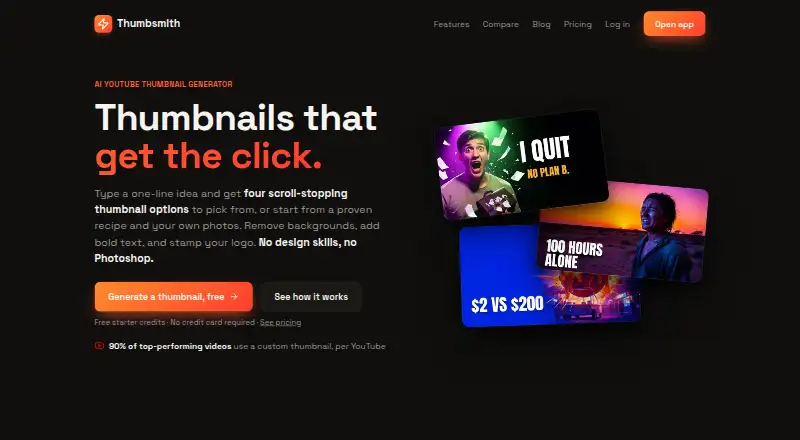
What Thumbsmith is
Thumbsmith is a web-based AI tool for creating YouTube thumbnails. A one-line idea produces four options, and its editor supports bold text, background removal, logo layers and a 1280×720 composition. Users can also make thumbnails without AI, starting from a ready-made recipe or their own background image and adding text and photos manually. Recipes provide a background, a subject slot and styled text. Finished work can be rendered in high quality and exported at 1280×720. Logos can be added as layers on any plan; Studio can automatically place a saved logo on each render and create batches for up to 10 video titles at once. The Free plan includes three starter HQ credits, daily watermarked four-option previews and 10 background removals per day. Pro costs $5 a month and lists 80 HQ generations per month. Studio costs $19 a month and lists 400 monthly generations. A separate credit top-up costs $15, paid once for 200 credits. The site describes YouTube-ready exports but does not list a direct YouTube integration.
Good
- Generates four thumbnail options from a one-line idea
- Supports manual creation from recipes or user backgrounds
- Exports high-quality thumbnails at 1280×720
- Any plan can add a logo layer
- Studio batches up to 10 video titles
Watch out
- Free previews are watermarked
- Free plan includes only three starter HQ credits
- No direct YouTube integration is listed
Who it suits
Thumbsmith suits YouTube creators who want to generate or manually compose thumbnails for videos. It may also suit users who need batch generation or consistent logo placement through Studio.
Verdict
Thumbsmith offers both AI-generated options and manual thumbnail composition, with clear export dimensions. The free tier is limited, while paid plans specify monthly generation allowances.
Plans and prices
From Thumbsmith's own pricing page, checked 30 Sep 2026.
| Plan | Price | What it gives you |
|---|---|---|
| Free | Free | 3 starter HQ credits · Daily 4-up previews (watermarked) · Full editor, templates & saved projects |
| Pro | $5 a month | 80 HQ generations/mo · No watermark · Face/logo in thumbnails · Unlimited background removal · $5/mo |
| Credit top-up | $15, paid once | 200 credits · 200 credits for $15 |
| Studio | $19 a month | 400 HQ generations/mo · Batch generation (10 titles at once) · Brand kit with logo on every render · $19/mo |
The facts
Each one read from Thumbsmith's own pages, with the date it was checked.
What it does
- Batch generation
- Studio includes batch generation for up to 10 video titles at once.checked 30 Sep 2026
- Branding
- Any plan can add a logo as a layer, while Studio can automatically place a saved brand logo on every render.checked 30 Sep 2026
- Editing
- The editor supports bold text, background removal, logo layers, and 1280×720 composition.checked 30 Sep 2026
- Export
- Users can render a thumbnail in high quality and export it at 1280×720.checked 30 Sep 2026
- Generation
- A one-line idea generates four thumbnail options to choose from.checked 30 Sep 2026
- Integrations
- The site describes YouTube-ready thumbnail exports but does not list a direct YouTube integration.checked 30 Sep 2026
- Manual creation
- AI is optional; users can start with a recipe or their own background image and add text and photos by hand.checked 30 Sep 2026
- Paid limits
- The pricing page lists 80 HQ generations per month for Pro and 400 per month for Studio.checked 30 Sep 2026
- Purpose
- Thumbsmith is an AI YouTube thumbnail generator designed to create thumbnails for click-through rate.checked 30 Sep 2026
- Security
- The opened maker pages do not state security certifications or compliance details.checked 30 Sep 2026
- Support
- The site offers an email newsletter for thumbnail and click-through-rate guides, but the opened pages do not state a support channel.checked 30 Sep 2026
- Templates
- Users can start from ready-made recipes that provide a background, subject slot, and styled text.checked 30 Sep 2026
Money
- Free limits
- Free accounts get 3 starter HQ credits, daily watermarked four-option previews, and 10 background removals per day.checked 30 Sep 2026
The full review of Thumbsmith
Thumbsmith is a web app for creating YouTube thumbnails, whether you want AI-generated concepts or to compose a design yourself. It suits creators who need control over a 1280×720 thumbnail and a choice of monthly generation volume. Its $5-per-month Pro plan is a practical entry point for watermark-free work, while Studio is aimed at creators with higher volume or recurring branding needs.
Overview
Enter a one-line idea and Thumbsmith generates four thumbnail options, or begin with a recipe or your own background image and build manually. That flexibility makes it useful when you want to compare visual directions without giving up control over the final composition. Free accounts offer a way to explore the editor, but watermarked previews and only three starter high-quality credits make the free tier a poor fit for a regular publishing workflow.
Key features
Generate, then refine—or start from scratch
Four options from one idea give creators several concepts to consider at once. Recipes provide a background, subject slot and styled text, while manual creation lets users bring their own background image and add text and photos. The editor also supports bold text, background removal and logo layers. This combination works well for creators who want a structured starting point but still need to shape the result; those seeking a fully hands-off thumbnail generator may find the manual choices unnecessary.
YouTube-sized exports and branding
High-quality renders export at 1280×720, matching the stated composition size for YouTube thumbnails. A logo can be added as a layer on any plan, but automatic placement of a saved brand logo on every render is reserved for Studio. Thumbsmith describes YouTube-ready exports, not direct YouTube publishing, so creators must handle the upload separately.
Background removal and batch work
Free accounts can remove up to 10 backgrounds per day, while Pro includes unlimited background removal. The daily free allowance is helpful for occasional experiments, but its watermark and three starter high-quality credits constrain finished output. Studio can generate for up to 10 video titles at once, a meaningful time-saver for creators preparing a batch of videos; Pro does not include that batch feature.
Pricing
Thumbsmith is freemium, with paid plans starting at $5 a month. The main distinction is not just generation volume: Studio adds batch generation and automated logo placement, while Pro offers a smaller monthly quota at a lower price.
| Plan | Price | What it includes | Best fit |
|---|---|---|---|
| Free | free | 3 starter HQ credits, daily watermarked four-option previews, full editor, templates, saved projects and 10 background removals per day | Trying the editor or making occasional concepts |
| Pro | $5 a month | 80 HQ generations per month, no watermark, face/logo in thumbnails and unlimited background removal | Individual creators who want regular watermark-free output |
| Credit top-up | $15, paid once | 200 credits | Users who need credits without moving to a monthly plan |
| Studio | $19 a month | 400 HQ generations per month, batch generation for 10 titles at once and a brand kit that places a logo on every render | Higher-volume creators with recurring branding needs |
Free gives access to the full editor and saved projects, but its high-quality allowance is only three credits and its previews carry a watermark. Pro removes that watermark and raises the monthly allowance to 80; it is the clear step up for consistent individual use. Studio costs more but provides five times Pro’s monthly generation quota, plus batch work and automatic logo placement. The one-time credit top-up is an alternative to a subscription when a user needs an additional 200 credits, but it does not include Studio’s workflow features.
Platforms
Thumbsmith runs on the web. It creates YouTube-ready thumbnail exports, but does not provide a stated direct YouTube integration.
Who it's for
Pro suits individual creators who need watermark-free exports and up to 80 high-quality generations monthly. Studio is better for creators producing thumbnails in batches or wanting a saved logo applied consistently. The free plan suits evaluation and occasional use, not dependable output at volume. It is less suitable for anyone who expects thumbnails to publish directly to YouTube from the tool.
Pros and cons
- Pros: Four options from one idea provide multiple directions to choose from before refining.
- Pros: Recipes and manual composition let users work from templates or their own background images.
- Pros: Pro combines 80 monthly HQ generations, no watermark and unlimited background removal for $5 a month.
- Pros: Studio’s 10-title batch generation and automatic logo placement are useful for repeated, branded production.
- Cons: Free high-quality output is capped at three starter credits, and its daily previews are watermarked.
- Cons: Batch generation and automatic saved-logo placement require the 19.00 USD-per-month Studio plan.
- Cons: Thumbnail export is YouTube-ready, but direct publishing integration is not part of the described workflow.
Alternatives
Browse AI Thumbnail Generators to compare more tools in the category.
- Thumblore is another free web option; its signup credits cover about five thumbnails, with one saved avatar and exports bearing a Thumblore badge.
- ThumbMaker may suit users who prefer an annual payment: its Premium plan is $9.90 a year and includes 800 images per month.
- Thumbmagic is a web alternative with a free plan and free trial, plus paid Starter and Pro plans.
- CoverHook is another freemium web alternative.
- CTRpilot is worth considering if a one-time purchase suits better than Thumbsmith’s monthly plans; its paid Starter package includes 100 credits and 20 thumbnails.
- ThumbGen offers a free plan with 150 credits and up to 18 thumbnails, which may suit users prioritizing a larger initial allowance.
- BeyondBeings is another freemium web alternative.
- ThumbPocket is a freemium web alternative with a free editor and one-time credit top-ups.
Verdict
Choose Thumbsmith if you want both generated starting points and manual control in a YouTube-sized editor. Pro is the strongest fit for individual creators who need regular watermark-free renders without Studio’s higher price; choose Studio when batch generation and automatic branding justify the extra cost. Look elsewhere if a direct YouTube publishing workflow is essential, or if the free tier’s small high-quality allowance cannot support your output.
Alternatives to Thumbsmith
- 1

CoverHook
Free planWebAPI7.3From $99 a year - 2

FacelessLab
Free planWeb7.3From $14 a month - 3
Thumbn
Free planWebAPI7.3From $19 a month - 4
Thumbnail X
Free planWeb7.2From $1.99 a month - 5
ThumbnailGo
Free planWebAPI7.2From $9 a month - 6
Thumby
Free planAndroidiOSWeb7.2Free plan