Termalin
Termalin is an SSH client for people and AI agents, bringing terminal sessions, file tools, database access, and agent connections together.
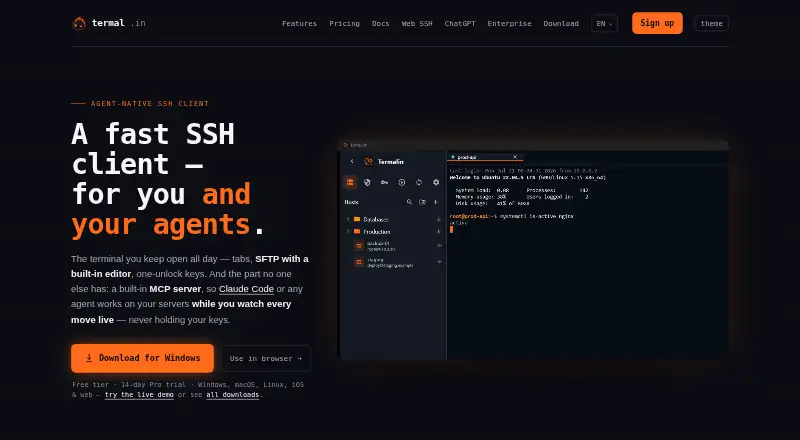
What Termalin is
Termalin is an SSH client for people and AI agents, bringing terminal sessions, file tools, database access, and agent connections together. Its terminal has browser-style tabs, a hosts sidebar, snippets, and session restoration with scrollback. File tools cover SFTP, FTP, and S3, with an editor and dual-pane file manager. The database client supports 13 engines, including PostgreSQL, SQLite, MongoDB, Redis, and SQL Server. A built-in MCP server lets connected agents start sessions, run commands, work with SFTP files, and join live sessions while the user watches. A web cabinet provides terminal, file-browsing, and recording-replay access without installing the app. Termalin supports Windows, macOS, Linux, and web access. The free plan includes SSH and SFTP; Pro adds cloud vault and device sync for $8/user/mo (annual), and a 14-day trial is listed. The Windows .exe may trigger an unknown-publisher warning because it is not code-signed; the Microsoft Store build is signed.
Good
- Supports SSH, SFTP, FTP, and S3 file browsing.
- Database client supports 13 engines.
- MCP server enables agent access to sessions and files.
- Web cabinet offers access without installing the app.
Watch out
- Windows .exe is not code-signed yet.
- Cloud vault and device sync require Pro.
- Enterprise pricing is not listed.
Who it suits
Termalin suits people who need SSH sessions, file transfers, and database access in one client, as well as users connecting MCP-capable agents to terminal workflows. Its web cabinet may suit those who need access from a phone or tablet without installing the app.
Verdict
Termalin combines terminal, file, database, and agent capabilities with a free plan. Check the Windows installer warning and whether the paid sync features fit your needs.
Plans and prices
From Termalin's own pricing page, checked 28 Sep 2026.
| Plan | Price | What it gives you |
|---|---|---|
| Free | Free | SSH & SFTP · local encrypted vault · session recording & replay · watch grid · 13-engine database client · MCP agent · Free forever |
| Pro | $8 a month | Everything in Free · encrypted cloud vault · device sync · snippet sync · command automation · cloud recordings · agent live-session access · billed yearly |
| Team | $15 a month | Everything in Pro · shared team vault · session sharing · collaboration · roles & permissions · consolidated billing · billed yearly |
| Beta founders — Pro, for life | $149, paid once | Lifetime Pro · all future Pro features included · limited to beta · single payment |
| Enterprise | Priced on request | Multiple vaults · granular access · SAML SSO coming soon · org audit review coming soon · agent governance beta · SCIM coming soon · SLA & priority support · dedicated manager · migration & onboarding · Talk to us |
The facts
Each one read from Termalin's own pages, with the date it was checked.
What it does
- Agent access
- The MCP server lets agents open sessions, run commands, read or write files over SFTP, and step into live sessions while the user watches.checked 28 Sep 2026
- Agent integrations
- Termalin documents connections for Claude, ChatGPT, Cursor, Codex and other MCP-capable agents through local or hosted MCP.checked 28 Sep 2026
- Authentication
- Accounts support TOTP with backup codes and passkeys, while SSH host keys are pinned on first use.checked 28 Sep 2026
- Compliance status
- Termalin says data minimisation and account/data deletion on request are shipped, an independent penetration test is planned, and SOC 2 is on the roadmap.checked 28 Sep 2026
- Connector
- A private-server Connector dials out to Termalin, requires no inbound port, uses short-lived certificates and keeps the agent blind to SSH bytes.checked 28 Sep 2026
- Database support
- Its database client supports 13 engines, including PostgreSQL, MySQL/MariaDB, SQLite, MongoDB, Redis, ClickHouse, Elasticsearch, Cassandra/ScyllaDB, Neo4j, InfluxDB, RabbitMQ, SQL Server and Cloudflare D1.checked 28 Sep 2026
- Encryption
- Vault data is encrypted on the device with a master-password-derived PBKDF2-HMAC-SHA256 key and AES-256-GCM before synchronization.checked 28 Sep 2026
- File tools
- Termalin includes SFTP, FTP and S3 file browsers, a built-in editor and a dual-pane file manager for transfers.checked 28 Sep 2026
- Notable limit
- The Windows .exe is not code-signed yet, so SmartScreen may show an unknown-publisher warning; the Microsoft Store build is signed.checked 28 Sep 2026
- Product
- Termalin is a fast SSH client for users and AI agents, with tabs, SFTP, one-unlock keys and a built-in MCP server.checked 28 Sep 2026
- Recordings
- Session recordings contain terminal output and event markers, not raw keystrokes; hidden-prompt passwords are not echoed into recordings.checked 28 Sep 2026
- Scripting API
- Yeschecked 24 Sep 2026
- Session sync
- Yeschecked 24 Sep 2026
- SSH support
- Yeschecked 24 Sep 2026
- Support
- Enterprise includes SLA and priority support plus a dedicated manager, migration and onboarding; vulnerability reports are acknowledged within 3 working days.checked 28 Sep 2026
- Terminal
- The terminal provides xterm-256color sessions, browser-style tabs, a hosts sidebar, snippets and session restore with scrollback.checked 28 Sep 2026
Where it runs
- Browser cabinet
- The web cabinet provides terminal, SFTP/FTP/S3 browsers and recording replay from a laptop, phone or tablet without installing the app.checked 28 Sep 2026
- Platforms
- Downloads are provided for Windows 10 or later, macOS 11 or later and Linux x86_64 AppImage; the site also lists iOS apps and a browser cabinet.checked 28 Sep 2026
- Supported platforms
- Windows,macOS,Linuxchecked 24 Sep 2026
Money
- Free plan
- Yeschecked 24 Sep 2026
The full review of Termalin
Overview
Termalin brings SSH sessions, file management, database connections and AI-agent access into one workspace. It suits users who regularly move between those tasks and want them connected; it is less compelling if all you need is a standalone terminal.
Key features
Terminal, files and databases
Terminal sessions use xterm-256color, with browser-style tabs, a hosts sidebar, snippets and session restore with scrollback. That makes it a capable base for recurring remote work, while SFTP, FTP and S3 browsers, a built-in editor and a dual-pane file manager reduce the need to switch tools for transfers and edits. The database client spans 13 engines, from PostgreSQL and MySQL/MariaDB to Redis, MongoDB and Cloudflare D1, a useful breadth for people managing varied systems.
Agent access and browser cabinet
The built-in MCP server lets compatible agents open sessions, run commands, read and write files over SFTP, and join live sessions while the user watches. Documented integrations include Claude, ChatGPT, Cursor and Codex. This is a meaningful advantage for users who want agents operating alongside their own terminal work, but not a reason to pay for Termalin if agent access is irrelevant to their workflow.
The browser cabinet offers terminal, file browsing and recording replay from a laptop, phone or tablet without installing the app. A private-server Connector dials out rather than requiring an inbound port; it uses short-lived certificates and keeps the agent blind to SSH bytes.
Security and recordings
Vault data is encrypted on the device before synchronization with a master-password-derived PBKDF2-HMAC-SHA256 key and AES-256-GCM. Accounts support TOTP with backup codes and passkeys, and SSH host keys are pinned on first use. Session recordings capture terminal output and event markers, not raw keystrokes; hidden-prompt passwords are not echoed into recordings. Termalin says data minimisation and account and data deletion on request are shipped, while an independent penetration test is planned and SOC 2 is on the roadmap. That distinction matters to organizations assessing security assurances: the planned measures are not completed certifications or tests.
Pricing
The Free plan costs nothing, forever. It includes SSH and SFTP, a local encrypted vault, session recording and replay, a watch grid, the 13-engine database client and MCP agent access. It is unusually broad for a no-cost starting point, but it does not include cloud vault, device sync, snippet sync, command automation, cloud recordings or agent live-session access.
Pro costs $8 a month, billed yearly, and adds those cloud and automation features to Free. It fits an individual who needs encrypted cloud storage and synchronized work across devices. Team costs $15 a month, billed yearly, and adds a shared team vault, session sharing, collaboration, roles and permissions, and consolidated billing; it is the relevant step up when several people need coordinated access. Both paid prices are per user, so team costs scale with seats.
Enterprise has custom pricing. It adds multiple vaults, granular access and agent governance, as well as SLA and priority support, a dedicated manager, migration and onboarding. These services are aimed at organizations with access-control and rollout needs, rather than individuals seeking a cheaper alternative to Pro.
A 14-day trial is offered. The beta-only Beta founders — Pro, for life plan is shown at $149 a month, billed limited to the beta, and promises lifetime Pro access with future Pro features. The unusual price and billing wording make it worth checking the terms carefully before treating it as a one-time lifetime purchase.
Platforms
Termalin supports Windows, macOS and Linux, and its browser cabinet works from a laptop, phone or tablet without installing the app. The Windows .exe is not yet code-signed, so SmartScreen may show an unknown-publisher warning; the Microsoft Store build is signed. Users who are uncomfortable with that warning should choose the signed Store build.
Who it's for
Termalin is best suited to developers, administrators and teams that combine SSH, file transfers, database work and agent-assisted operations. Free covers a substantial local workflow; Pro is for individuals who need cloud sync and automation, while Team and Enterprise address collaboration and governance. Users who want only a terminal emulator, or do not need its bundled tools and agent features, may prefer a simpler alternative.
Pros and cons
- Pro: SSH, multiple file protocols, a built-in editor and a 13-engine database client share one workspace, reducing tool changes for mixed infrastructure work.
- Pro: Free includes a local encrypted vault, recordings, database access and MCP agent capabilities, making it possible to evaluate a broad workflow without a subscription.
- Pro: Agent live-session access is paired with user visibility, and the Connector avoids requiring an inbound port.
- Con: Cloud vault, device and snippet sync, command automation, cloud recordings and agent live-session access require Pro or above.
- Con: The unsigned Windows installer may trigger SmartScreen, even though a signed Store build is available.
- Con: Independent penetration testing is planned and SOC 2 is on the roadmap, so organizations requiring those completed assurances should not assume they are in place.
Alternatives
Browse Terminal Emulators for more options. Choose Contour if you want a free terminal emulator across Linux, macOS and Windows without Termalin's paid sync tiers. Warp is a freemium option with a free plan and core terminal features, including Warp Agent CLI access, for developers who want to compare terminal-focused workflows. Tabby is a free FOSS alternative for Linux, macOS and Windows. gitsome is another free option, with Linux, macOS, Windows and self-hosted platforms. Hyper is a free terminal option for Linux, macOS and Windows. WezTerm offers open-source software under the MIT License, with pre-built releases or source builds. Ghostty is free and open source for Linux and macOS, with no commercial backing or dedicated support team. iTerm2 is free software for macOS only.
Verdict
Choose Termalin if your work spans remote shells, files, databases and AI agents and you want those capabilities in one place. Its broad free plan makes it easy to start, while sync and team collaboration justify the paid tiers for users who need them. Look elsewhere if you need only a terminal, or if an unsigned Windows installer or the absence of completed independent testing and SOC 2 is a deal-breaker.
Getting started
- Open https://termal.in
- Choose the free plan or start the 14-day trial
- Install the Windows, macOS, or Linux app, or use the web cabinet
- Add SSH hosts and open a terminal session
- Use SFTP, database connections, recordings, or the MCP server
Limits worth knowing
The Free plan provides a local encrypted vault; encrypted cloud vault, device sync, snippet sync, command automation, cloud recordings, and live-session agent access are Pro features at $8.00 per month billed yearly. Shared vaults, collaboration, and roles require Team at $15.00 per month billed yearly.
Questions
Is there a free plan?
Yes. Free is listed as free and is billed free forever.
How much is Pro?
Pro costs $8.00 per month per user when billed yearly, and a 14-day trial is listed.
Which platforms are supported?
Supported platforms include Windows, macOS, Linux, web, iOS, and API access.
What does the free plan include?
It includes SSH and SFTP, a local encrypted vault, session recording and replay, a watch grid, the 13-engine database client, and MCP agent access.
Which AI agents can connect?
Termalin documents connections for Claude, ChatGPT, Cursor, Codex, and other MCP-capable agents through local or hosted MCP.
Is the Windows app signed?
The Windows .exe is not code-signed yet, so SmartScreen may show an unknown-publisher warning. The Microsoft Store build is signed.
Alternatives to Termalin
- 1

Warp
Free planLinuxmacOSSelf-hostedWindows7.6From $50 a month - 2

MobaXterm
Free planWindows7.4From $69 a year - 3
Cool Retro Term
Free planOpen sourceLinuxmacOSSelf-hosted7.1Free plan - 4

Contour
Free planLinuxmacOSWindows6.8Free plan - 5
gitsome
Free planLinuxmacOSSelf-hostedWindows6.8Free plan - 6

Konsole
Free planLinuxmacOSWindows6.8Free plan