
Konsole
Konsole is a free terminal emulator for running a command shell and controlling a computer through a text-based command line.
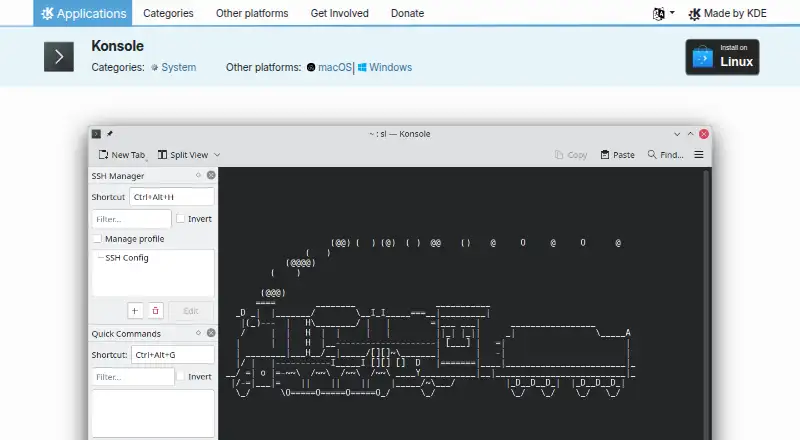
What Konsole is
Konsole is a free terminal emulator for running a command shell and controlling a computer through a text-based command line. It supports Linux, Windows, and macOS and is listed under the GPL-2.0+ license. Tabs and multiple profiles help organize sessions; profiles can automate common commands, including SSH connections to another machine. Tabs can be split into left-right or top-bottom views, and a layout can be saved to a file. Konsole also supports bookmarks, searching, and saving output; scrollback can be saved as a text or HTML file. Activity monitoring can notify users about silence, activity, a shell prompt, or a completed process. With shell integration enabled, Konsole distinguishes prompts, input, and command output and provides visual hints for commands that resulted in errors. A D-Bus interface allows software to control Konsole windows and sessions. Linux installation options include application stores, distribution package managers, and Flathub; Windows and macOS platform pages include nightly builds intended for testing.
Good
- Supports tabs, multiple profiles, and split views.
- Profiles can automate commands such as SSH connections.
- Can save scrollback as text or HTML.
- Includes activity monitoring and a D-Bus interface.
Watch out
- Nightly builds are intended for testing.
- The interface is text-only and command-line based.
Who it suits
Konsole suits people who run a command shell and want to organize sessions with tabs, profiles, and split views. Its monitoring and shell integration may also help users tracking command activity and output.
Verdict
Konsole offers session organization, output saving, and activity monitoring across its listed platforms. Users considering the nightly builds should note that they are intended for testing.
Plans and prices
From Konsole's own pricing page, checked 5 Oct 2026.
| Plan | Price | What it gives you |
|---|---|---|
| Konsole | Free | Free and open-source terminal application |
The facts
Each one read from Konsole's own pages, with the date it was checked.
What it does
- Activity monitoring
- Konsole can monitor a tab for silence, activity, a shell prompt, or a process finishing and display notifications.checked 4 Oct 2026
- Bookmarks and search
- Konsole supports bookmarks and searching.checked 5 Oct 2026
- Downloads
- The KDE Applications page offers Linux installation through application stores or a distribution package manager, and links to Windows and macOS platform pages.checked 4 Oct 2026
- Funding
- KDE says it is a voluntary community rather than a for-profit company and that KDE e.V. receives donations to fund expenses.checked 5 Oct 2026
- Integrations
- The handbook documents a D-Bus interface for controlling Konsole windows and sessions.checked 4 Oct 2026
- Intended users
- The documentation describes Konsole as a text-only command-line interface for users running a command shell.checked 4 Oct 2026
- KDE software
- KDE says its software is free and open source, with freedoms to use, study, change, and redistribute it free of charge.checked 5 Oct 2026
- License
- Konsole is listed under the GPL-2.0+ license.checked 5 Oct 2026
- Monitoring
- Konsole includes silence and activity monitoring.checked 5 Oct 2026
- Nightly builds
- Konsole nightly versions are described as intended for testing and generated from the latest development branch.checked 5 Oct 2026
- Output
- Konsole can save output.checked 5 Oct 2026
- Profiles
- Konsole supports multiple profiles.checked 5 Oct 2026
- Purpose
- Konsole runs a command shell and provides a command-line interface for directly controlling a computer.checked 5 Oct 2026
- Scripting API
- Yeschecked 20 Sep 2026
- Search and output
- The feature list includes searching and saving output, and the handbook says scrollback can be saved as a text or HTML file.checked 4 Oct 2026
- Shell integration
- With shell integration enabled, Konsole can distinguish prompts, input, and command output and provide visual hints for commands that resulted in errors.checked 4 Oct 2026
- Split panes
- Yeschecked 20 Sep 2026
- Split views
- The handbook describes splitting tabs into left-right or top-bottom views and saving a tab layout to a file.checked 4 Oct 2026
- SSH support
- Yeschecked 20 Sep 2026
Money
- Free plan
- Yeschecked 20 Sep 2026
The company
- Headquarters
- Berlin, Germanychecked 28 Sep 2026
- Maker
- KDE describes itself as an international community that has built and distributed free, open-source software since 1996.checked 5 Oct 2026
Where it runs
- Linux installation
- The page lists Linux installation through Discover and other AppStream application stores, a distribution package manager, or Flathub.checked 5 Oct 2026
- Other platforms
- The page lists Windows and macOS as other platforms and provides nightly installers for Windows and macOS ARM and Intel.checked 5 Oct 2026
The full review of Konsole
Konsole is a focused terminal emulator for people who control computers through command shells and need several sessions kept orderly. It suits developers, administrators, and other technical users who repeat SSH connections, watch long-running commands, or preserve terminal output. The bottom line is a capable, no-cost command-line tool whose value comes from session management rather than a broader graphical workspace.
Overview
Konsole provides a text-only interface for running a shell and controlling a computer from the command line. Tabs and profiles let you separate projects, machines, or environments, while profiles can automate recurring commands such as opening an SSH connection. That makes repeated operational work more consistent and reduces setup steps, although users who only ever need one uncomplicated shell may find the extra organisation unnecessary.
The project comes from KDE, founded in 1996 and headquartered in Berlin, Germany. KDE describes its software as free and open source, and Konsole is distributed under the GPL-2.0+ license. That combination suits individuals and organisations that need permission to use, study, modify, and redistribute the application without a subscription.
Key features
Sessions and layouts
Tabs keep multiple shells in one application, and multiple profiles let each environment retain its own setup. Split views arrange tabs left-to-right or top-to-bottom, which is useful when comparing output or coordinating a local shell with a remote one. A tab layout can be saved to a file, so a familiar multi-session arrangement can be recreated instead of rebuilt manually. This is meaningful for repeatable workflows, but less important for a single-session user.
Search, bookmarks, and output
Search and bookmarks make large scrollback buffers easier to navigate. Konsole can save scrollback as either a text file or an HTML file, giving users a practical record for later reference, troubleshooting, or sharing. Saving output is useful when a command produces more information than can be reviewed immediately; it does not turn the terminal into a full document-management tool.
Monitoring and shell awareness
Activity monitoring can watch for silence, renewed activity, a shell prompt, or a process finishing, then display a notification. That is a strong fit for builds, transfers, and other commands that run while attention is elsewhere. With shell integration enabled, Konsole distinguishes prompts, input, and command output and can show visual hints when a command resulted in an error. These features improve awareness without requiring constant focus on the active tab.
Automation and control
SSH support works naturally with profiles for repeatable remote access. A documented D-Bus interface can control Konsole windows and sessions, giving technically inclined users a route to external automation. The scripting and integration capabilities are valuable in managed workflows, while they may be more complexity than casual command-line use requires.
Pricing
Konsole costs free on the Konsole plan. It is a free and open-source terminal application, with no free trial because there is no paid tier to trial. There are no seat charges, quotas, renewal terms, or paid-plan feature gates stated. KDE operates as a voluntary community rather than a for-profit company, with KDE e.V. accepting donations to fund expenses. This is the straightforward choice for anyone who wants the complete application without a recurring bill.
Platforms
Konsole supports Linux, Windows, and macOS. Linux users can install it through Discover and other AppStream stores, a distribution package manager, or Flathub. Windows and macOS downloads are provided through their platform pages, including nightly installers for Windows and for both ARM and Intel Macs. Nightly versions come from the latest development branch and are intended for testing, so users who prioritise stability should choose regular releases.
Who it's for
Choose Konsole if your work is shell-driven and benefits from reusable profiles, SSH sessions, split layouts, searchable or saved output, and notifications for unattended processes. It is especially sensible for Linux-oriented teams standardising on free, modifiable software. It is less suitable if you want a graphical development environment, a terminal with a wider productivity layer, or a tool designed primarily for nontechnical users.
Pros and cons
Pros
- Free GPL-2.0+ software: no subscription or paid feature tier, with rights to modify and redistribute.
- Reusable session structure: tabs, profiles, split views, and saved layouts support repeatable multi-shell work.
- Useful unattended-work notifications: monitoring can report silence, activity, prompts, and completed processes.
- Practical record keeping: search, bookmarks, and text or HTML output saving help preserve and revisit terminal results.
- Broad desktop coverage: Linux, Windows, and macOS support avoids locking a team to one operating system.
Cons
- Text-only focus: it does not serve as a graphical development workspace or broader productivity suite.
- Nightly builds are for testing: users choosing those installers accept development-branch software rather than a stability-first release.
- Advanced controls favour technical users: D-Bus, shell integration, and profile automation are most useful when command-line workflows are already central.
Alternatives
For a wider directory of choices, see Terminal Emulators.
- Termalin is the better pick when you need a freemium terminal spanning API, iOS, Linux, macOS, web, and Windows, with a free tier that includes SSH and SFTP, an encrypted vault, recording and replay, and a watch grid.
- Contour is another free terminal for Linux, macOS, and Windows.
- gitsome suits users seeking a free, open-source CLI across Linux, macOS, self-hosted systems, and Windows.
- Warp is worth choosing for a freemium developer terminal with a free monthly tier and Warp Agent CLI access.
- Tabby is a free FOSS option for Linux, macOS, and Windows.
- Alacritty is a free, open-source terminal for the same three desktop platforms.
- Hyper is another free Linux, macOS, and Windows terminal.
- WezTerm offers open-source releases for Linux, macOS, and Windows, including an MIT-licensed option.
Verdict
Konsole is a strong recommendation for shell-first users who want organised tabs, repeatable profiles, SSH workflows, monitoring, and saved output at no cost. Its main reason to choose it is the depth of practical session control under a permissive free-and-open-source model. Look elsewhere if your priority is a graphical workspace, a richer productivity layer, or a terminal experience built around features beyond command-line operation.
Alternatives to Konsole
- 1

Warp
Free planLinuxmacOSSelf-hostedWindows8.3From $50 a month - 2

MobaXterm
Free planWindows8.1From $69 a year - 3
Termalin
Free planiOSWebAPILinux7.8From $8 a month - 4

Tabby
Free planLinuxmacOSWindows7.5Free plan - 5

Tabby (formerly Terminus)
Free planWebLinuxmacOSSelf-hosted7.2Free plan - 6
ZOC
macOSWindows7.1$79.99 one-time