TensorBoard
TensorBoard is a free suite of visualization tools for understanding, debugging and optimizing TensorFlow programs during machine learning experiments.
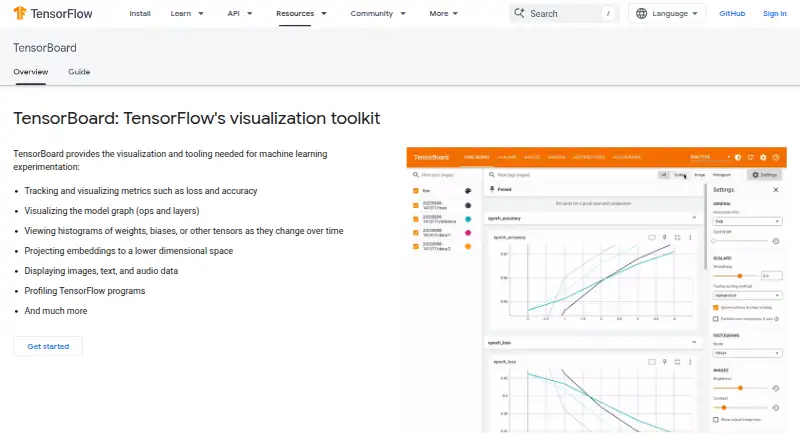
What TensorBoard is
TensorBoard is a free suite of visualization tools for understanding, debugging and optimizing TensorFlow programs during machine learning experiments. It tracks metrics such as loss and accuracy, and its Graph Explorer displays model graphs for inspection. Dashboards can show changes in tensor distributions through histograms and percentile summaries. TensorBoard can also display logged images, audio and text, project high-dimensional embeddings, and profile TensorFlow programs. For Keras workflows, a TensorFlow callback records metrics, training graph visualizations, weight histograms and sampled profiling data. You can launch it from the command line or in a notebook with the `%tensorboard` line magic. The project is designed for offline use, including locally, behind a corporate firewall or in a datacenter. TensorBoard 2.0 and later defaults to `--host localhost`; using `--bind_all` serves it on the public network over IPv4 and IPv6. The README names Chrome and Firefox as supported browsers and warns that other browsers may have bugs or performance issues. Without a TensorFlow installation, TensorBoard does not support log directories on Google Cloud Storage.
Good
- Visualizes loss and accuracy metrics
- Graph Explorer displays TensorFlow models
- Shows images, audio, text and embeddings
- Includes tools for profiling TensorFlow programs
- Free to use
Watch out
- Other browsers may have bugs or performance issues
- No TensorFlow installation limits Cloud Storage log directories
Who it suits
It suits people working with TensorFlow who want to inspect training metrics, model graphs, distributions or profiling data. Its offline use also fits local or datacenter workflows.
Verdict
TensorBoard brings experiment metrics, model views and profiling tools into one visualization suite. Check the browser and storage limitations when planning how to view logs.
Plans and prices
From TensorBoard's own pricing page, checked 30 Sep 2026.
| Plan | Price | What it gives you |
|---|---|---|
| TensorBoard | Free | No price or usage limits stated on the opened pages |
The facts
Each one read from TensorBoard's own pages, with the date it was checked.
Where it runs
- Browser support
- The README says TensorBoard can be used in Google Chrome or Firefox and that other browsers may have bugs or performance issues.checked 30 Sep 2026
What it does
- Histograms and distributions
- Dashboards show how tensor distributions change over time, including histograms and percentile summaries.checked 30 Sep 2026
- Keras integration
- The TensorFlow Keras callback records metrics, training graph visualizations, weight histograms, and sampled profiling data.checked 30 Sep 2026
- License
- The TensorBoard GitHub repository identifies its license as Apache-2.0.checked 30 Sep 2026
- Metrics
- It tracks and visualizes metrics such as loss and accuracy.checked 30 Sep 2026
- Model graphs
- Its Graph Explorer visualizes TensorBoard graphs to inspect TensorFlow models.checked 30 Sep 2026
- Notebook integration
- TensorBoard can be launched in notebooks using the `%tensorboard` line magic or from the command line.checked 30 Sep 2026
- Offline and hosting
- The project README says TensorBoard is designed to run offline and can be used locally, behind a corporate firewall, or in a datacenter.checked 30 Sep 2026
- Other data
- TensorBoard can display logged images, audio, and text, and project high-dimensional embeddings.checked 30 Sep 2026
- Profiling
- TensorBoard includes tools for profiling TensorFlow programs.checked 30 Sep 2026
- Purpose
- TensorBoard is a suite of visualization tools for understanding, debugging, and optimizing TensorFlow programs during machine learning experimentation.checked 30 Sep 2026
- Security setting
- TensorBoard 2.0 and later defaults to `--host localhost`; `--bind_all` makes it serve on the public network over IPv4 and IPv6.checked 30 Sep 2026
- Storage limit
- The README says TensorBoard does not support log directories on Google Cloud Storage when run without a TensorFlow installation.checked 30 Sep 2026
- Support
- The TensorBoard README directs general usage questions to Stack Overflow and bug reports to GitHub Issues.checked 30 Sep 2026
The full review of TensorBoard
Overview
TensorBoard is a free visualization toolset built around TensorFlow training runs. It is a strong fit for people who want to inspect experiments locally or from notebooks, rather than manage the full machine-learning lifecycle in one service.
Key features
Metric charts for measures such as loss and accuracy make it easier to see how training progresses. Histograms and percentile summaries add context by showing how tensor distributions shift over time, while Graph Explorer lets you inspect a model’s TensorFlow graph. Together, these views help diagnose what is happening inside a run, not merely compare its headline scores.
TensorBoard also displays logged images, audio, and text, and projects high-dimensional embeddings. That makes it useful when an experiment produces more than scalar metrics. Its profiler adds tools for examining TensorFlow program performance, but TensorBoard is not an artifact tracker, dataset versioning system, or model registry; teams needing those capabilities will need other software.
Keras users can use the TensorFlow callback to record metrics, training graph visualizations, weight histograms, and sampled profiling data. TensorBoard can be launched from a notebook with the %tensorboard line magic or from the command line, giving iterative workflows a direct route into its dashboards.
The project is designed to run offline, including locally, behind a corporate firewall, or in a datacenter. It defaults to binding to localhost in TensorBoard 2.0 and later. Using --bind_all instead exposes the service on the public network over IPv4 and IPv6, so that setting deserves deliberate security review. Google Cloud Storage log directories are unsupported when TensorBoard runs without a TensorFlow installation.
Google Chrome and Firefox are supported choices; other browsers may have bugs or performance issues. General usage questions go to Stack Overflow, while bug reports belong on GitHub Issues. The project is licensed under Apache-2.0.
Pricing
TensorBoard is free, with a listed price of no cost and no free trial. The free plan has no stated usage or price limits, which makes it a practical fit for individuals and teams wanting visualization without a subscription. Its trade-off is scope rather than a stated quota: it focuses on experiment views and does not provide artifact tracking, dataset versioning, or a model registry.
Platforms
TensorBoard is available through its API, Linux, macOS, Windows, the web, and self-hosted deployment. The offline design and local launch options favor users who want to keep viewing close to their own training environment.
Who it's for
TensorBoard is best for TensorFlow practitioners who need to compare run metrics, inspect graphs and distributions, or profile training without depending on a hosted service. It is less suited to teams looking for a broader experiment-management platform that also tracks artifacts, versions datasets, or registers models.
Pros and cons
- Pro: A wide range of run views—metrics, graphs, distributions, media, embeddings, and profiling—helps investigate different kinds of training evidence in one place.
- Pro: Free use, notebook and command-line launch options, and offline operation support local workflows without a required hosted service.
- Con: Its center of gravity is TensorFlow, so it is not a general-purpose lifecycle hub for artifact tracking, dataset versioning, or model registration.
- Con: Google Cloud Storage log directories do not work when TensorBoard runs without TensorFlow, and browser choice matters beyond Chrome and Firefox.
- Con: Changing the default localhost binding to --bind_all makes the service publicly reachable over IPv4 and IPv6, which requires care.
Alternatives
Choose Comet if its free Open Source plan’s AI observability, agent testing, tracing, and test-suite features better match the work. Consider Weights & Biases when its Free plan’s five model seats, 5 GB per month of storage, and 1 GB per month of Weave data ingestion suit your team’s needs.
ClearML is another alternative. ZenML may suit users who want its Open Source plan’s unlimited executions and projects with self-hosting, or a Scale plan priced at $999 a month. MLRun offers a free Open Source plan with community support, while managed MLRun on Iguazio has custom pricing. Trackio is a free option with no stated plan limits. For package storage rather than TensorBoard-style experiment visualization, GitLab Package Registry is a different kind of alternative. Hopsworks AI Lakehouse may fit readers who specifically want a Free plan with one project and Feature Store plus Model Registry.
Browse the ML Experiment Tracking Software category for more options.
Verdict
TensorBoard is an easy recommendation for TensorFlow users who need free, local-first inspection of training metrics, model structure, and performance. Its concentrated visualization toolkit is the reason to choose it; look elsewhere if you need experiment tracking to extend into artifact management, dataset versioning, and model registration.
Alternatives to TensorBoard
- 1
Paperspace Gradient
Free planOpen sourceWebAPIExtensionLinux8.3From $8 a month - 2
Weights & Biases
Free planAndroidiOSWebAPI8.3From $60 a month - 3

Comet
Free planWebAPILinuxmacOS7.9From $19 a month - 4

ClearML
Free planWebAPILinuxmacOS7.4From $15 a month - 5

MLRun
Free planWebAPILinuxmacOS6.6Free plan - 6
Trackio
Free planWebAPILinuxmacOS6.4Free plan