
Tauri Bundler
Tauri Bundler is free, open-source Rust tooling for packaging applications as platform-specific bundles and installers.
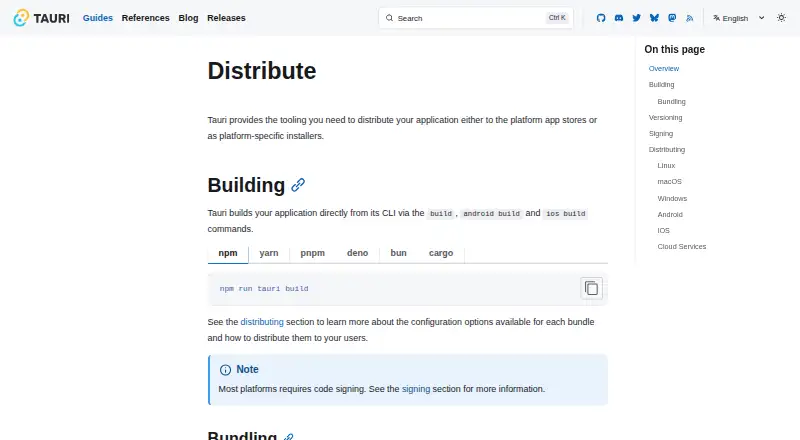
What Tauri Bundler is
Tauri Bundler is free, open-source Rust tooling for packaging applications as platform-specific bundles and installers. Its build command bundles an application in its configured formats by default, and separate build and bundle steps are available for customization. Distribution documentation covers Linux, macOS, Windows, Android, and iOS. Linux formats include Debian packages, Snap, AppImage, Flatpak, RPM, and AUR; macOS options include the App Store and direct-download DMG installers. The guides also cover the Microsoft Store, Google Play, and Apple’s App Store. Build instructions show npm, yarn, pnpm, Deno, Bun, and Cargo commands, and Tauri documents a GitHub pipeline for building and releasing applications. Tauri describes itself as frontend-agnostic and supports most frontend frameworks out of the box, but it acts as a static web host and does not natively support server-based alternatives such as SSR. Code signing is required on most platforms; macOS distribution outside the App Store also requires notarization. The bundler’s public API is intended mainly for tauri-cli and does not strictly follow SemVer.
Good
- Build command bundles configured formats by default.
- Supports several Linux package formats.
- Guides cover mobile app stores.
- Build instructions include common package managers and Cargo.
Watch out
- Server-based frontend alternatives such as SSR are not natively supported.
- Code signing is required on most platforms.
- macOS distribution outside its App Store requires notarization.
- Public API does not strictly follow SemVer.
Who it suits
Tauri Bundler suits developers packaging applications for desktop and mobile distribution routes. Its frontend support and static-host limitation are relevant when selecting a build approach.
Verdict
Tauri Bundler covers packaging routes across desktop and mobile platforms, with multiple Linux formats and documented build workflows. Check the frontend limitation, signing requirements, and API stability note before building around it.
Plans and prices
From Tauri Bundler's own pricing page, checked 30 Sep 2026.
| Plan | Price | What it gives you |
|---|---|---|
| Tauri Bundler | Free | Open-source Rust library · wraps Rust executables in OS-specific app bundles · public API stability is not strictly SemVer |
The facts
Each one read from Tauri Bundler's own pages, with the date it was checked.
What it does
- API stability
- The bundler README says its public API does not strictly adhere to SemVer because it is intended primarily for use in tauri-cli.checked 30 Sep 2026
- Build CLI
- Applications can be built with Tauri CLI commands, including `build`, `android build`, and `ios build`.checked 30 Sep 2026
- Build integrations
- The build instructions show npm, yarn, pnpm, Deno, Bun, and Cargo commands for building Tauri applications.checked 30 Sep 2026
- Build workflow
- Tauri's build command automatically bundles an application for its configured formats by default.checked 30 Sep 2026
- Bundling
- The `build` command bundles an application for its configured formats by default, with separate build and bundle steps available for customization.checked 30 Sep 2026
- CI integration
- Tauri documents a GitHub pipeline for building and releasing Tauri applications.checked 30 Sep 2026
- Cloud delivery
- The distribution guide describes cloud services as supporting global app distribution and automatic updates, and links to CrabNebula Cloud.checked 30 Sep 2026
- Code signing
- Tauri says code signing is required on most platforms, and macOS distribution outside the App Store also requires notarization.checked 30 Sep 2026
- Configuration
- Tauri can load bundler settings from the bundle object in tauri.conf.json, while the library can also be used by non-Tauri apps.checked 30 Sep 2026
- Desktop distribution
- The documentation covers macOS App Store and DMG distribution, plus Microsoft Store and Windows installer distribution.checked 30 Sep 2026
- Frontend compatibility
- Tauri describes itself as frontend agnostic and says it supports most frontend frameworks out of the box.checked 30 Sep 2026
- Frontend limitation
- Tauri acts as a static web host and does not natively support server-based frontend alternatives such as SSR.checked 30 Sep 2026
- Governance
- The Tauri Programme within the Commons Conservancy was established to support Tauri's open-source values and facilitate transparent governance.checked 30 Sep 2026
- Mobile distribution
- Tauri documents Android distribution through Google Play and iOS distribution through the App Store.checked 30 Sep 2026
- Other stores
- The distribution guides cover the Microsoft Store for Windows, Google Play for Android, and the App Store for iOS.checked 30 Sep 2026
- Output formats
- Linux distribution formats include Debian packages, Snap, AppImage, Flatpak, RPM, and AUR.checked 30 Sep 2026
- Purpose
- Tauri Bundler wraps Rust executables in OS-specific app bundles and is used as a library by the Tauri CLI.checked 30 Sep 2026
- Security audits
- Tauri says major and minor releases undergo security audits that cover Tauri organization code and upstream dependencies.checked 30 Sep 2026
- Security controls
- Tauri capabilities can grant or deny permissions for selected windows and webviews to constrain frontend access.checked 30 Sep 2026
- Signing
- Tauri says code signing digitally signs application executables and bundles to validate the provider's identity, and is required on most platforms.checked 30 Sep 2026
- Support
- The prerequisites guide directs users with installation issues to the troubleshooting guide or Tauri Discord.checked 30 Sep 2026
Where it runs
- Linux formats
- Linux distribution formats listed include Debian, Snap, AppImage, Flatpak, RPM, and AUR.checked 30 Sep 2026
- macOS distribution
- macOS apps can be distributed through the App Store or as direct-download DMG installers.checked 30 Sep 2026
- macOS requirement
- Tauri says macOS distribution requires code signing, and distribution outside the App Store also requires notarization.checked 30 Sep 2026
The full review of Tauri Bundler
Overview
Tauri Bundler is an open-source Rust library for turning Rust executables into operating-system-specific app bundles. It suits developers already building with Tauri who need packaging across desktop and mobile targets; its broad format coverage is useful, but direct use of its API comes with a stability caveat.
Most users reach it through Tauri CLI: the build command bundles configured formats by default, with separate build and bundle steps for workflows that need customization. The library can also serve non-Tauri apps, but its public API is intended mainly for tauri-cli and does not strictly follow Semantic Versioning.
Key features
Packaging and release workflow
Tauri documents build commands for npm, yarn, pnpm, Deno, Bun, and Cargo, as well as a GitHub pipeline for building and releasing applications. Command-line packaging, silent installation, auto-update support, and CI/CD integration make it a practical fit for teams automating releases. The default build-and-bundle behavior reduces steps for routine packaging, while the separate stages leave room to customize the workflow.
Linux output options include Debian packages, Snap, AppImage, Flatpak, RPM, and AUR. macOS distribution can use the App Store or direct-download DMG installers; Windows guidance covers the Microsoft Store and installers. Mobile distribution guides cover Google Play for Android and the App Store for iOS. That range is a meaningful advantage for developers targeting several ecosystems, though packaging does not eliminate each platform's release requirements.
Frontend and security
Tauri is frontend agnostic and supports most frontend frameworks out of the box, but it acts as a static web host rather than natively supporting server-based alternatives such as SSR. Projects that depend on server-rendered frontends should therefore look elsewhere or plan around that constraint. Capabilities can grant or deny permissions for selected windows and webviews, giving developers a way to limit frontend access.
Most platforms require code signing, which digitally signs executables and bundles to validate the provider's identity. macOS distribution also requires signing, and distribution outside the App Store requires notarization. These are consequential release steps, not optional polish. Tauri says major and minor releases undergo security audits covering its organization code and upstream dependencies.
Pricing
Tauri Bundler: free. The free plan is an open-source Rust library that wraps Rust executables in operating-system-specific app bundles. There are no paid tiers or seat limits in the stated plan, making it suitable for individual developers and teams comfortable with an open-source, CLI-centered workflow. In exchange, users integrating the library directly must account for its API's non-SemVer stability policy.
Platforms
Tauri Bundler targets Linux, macOS, Windows, Android, and iOS. Its documented distribution paths span desktop installers and stores as well as Google Play and the iOS App Store. Cloud services are described as supporting global app distribution and automatic updates, with CrabNebula Cloud linked as an option.
Who it's for
Choose Tauri Bundler if you are building Tauri applications and want one documented packaging workflow across desktop and mobile targets, with multiple Linux formats and CI guidance. It is also an option for non-Tauri applications, but the library's intended focus and API stability note make direct integration a less comfortable choice for developers who need a stable public interface. Teams committed to server-rendered frontends should also weigh its static-host limitation.
Pros and cons
Pros
- Broad target coverage: Linux, macOS, Windows, Android, and iOS routes support projects shipping across device ecosystems.
- Several Linux formats: Debian, Snap, AppImage, Flatpak, RPM, and AUR give Linux developers distinct distribution routes.
- Release automation guidance: CLI build commands and a documented GitHub pipeline support repeatable build and release workflows.
- Permission controls: Capabilities can constrain access by window and webview rather than granting frontend access indiscriminately.
Cons
- Frontend constraint: Native support for server-based frontend alternatives such as SSR is absent because Tauri serves static web content.
- Release prerequisites: Code signing is required on most platforms, and macOS distribution outside its App Store also requires notarization.
- API stability tradeoff: The public API does not strictly adhere to SemVer, a risk for projects relying on direct library integration.
Alternatives
Software Packaging Tools is the broader category for comparing packaging options. Consider electron-builder if you want a free packaging option focused on Linux, macOS, and Windows. InstallAware is another choice for those platforms; its free Visual Studio edition requires Visual Studio and allows commercial use.
IzPack is a free option for Linux, macOS, Windows, and self-hosted targets, under Apache License 2.0. Advanced Installer may fit Windows-only projects seeking a freeware tier for Simple projects, with licensed features requiring a license.
electron-packager, nFPM, and NSIS are other free alternatives. For a paid alternative with a free trial, InstallBuilder lists Linux, macOS, and Windows support.
Verdict
Tauri Bundler is a strong fit for Tauri developers who need a free, command-line packaging workflow spanning desktop and mobile distribution. Its broad format coverage and release automation guidance are the main reasons to choose it. Look elsewhere if your frontend depends on native SSR support or if a directly integrated bundling API must follow strict SemVer.
Getting started
- Visit https://tauri.app/distribute/ for distribution guidance.
- Build the application with Tauri CLI, using `build`, `android build`, or `ios build` as appropriate.
- Use the configured build formats, or separate build and bundle steps when customization is needed.
- Choose a distribution route for the target platform, such as a Linux package, macOS DMG or store, Microsoft Store, Google Play, or Apple’s App Store.
- Arrange code signing where required; notarize macOS distribution outside the App Store.
Limits worth knowing
Tauri serves static web content and does not natively support server-based frontend alternatives such as SSR. The bundler’s public API does not strictly adhere to SemVer.
Questions
How much does Tauri Bundler cost?
It is free, with a free plan.
Which platforms does it support?
The listed target platforms are Linux, macOS, Windows, Android, and iOS.
Which Linux package formats are covered?
The listed options are Debian, Snap, AppImage, Flatpak, RPM, and AUR.
Does it support frontend frameworks?
Tauri describes itself as frontend agnostic and says most frontend frameworks work out of the box. It does not natively support server-based frontend alternatives such as SSR.
Is code signing required?
Tauri says most platforms require code signing. macOS distribution outside the App Store also requires notarization.
Is the bundler’s public API SemVer-stable?
No. Its public API does not strictly adhere to SemVer and is intended primarily for use in tauri-cli.
Alternatives to Tauri Bundler
- 1
Avidemux
Free planOpen sourceWebLinuxmacOSWindows7.3Free plan - 2

Advanced Installer
Free planWindows6.6From $399 a year - 3

WiX Toolset
Free planAPIExtensionWindows6.6From $6,500 a year - 4
CyberInstaller Suite
Free planWindows6.5€39.90 one-time - 5
makeself
Free planLinuxmacOSSelf-hostedWindows6.5Free plan - 6
Master Packager Suite
Free planWindows6.5From $1,199 a year