electron-packager
electron-packager turns Electron application source code into folders containing a renamed Electron executable and supporting files for distribution.
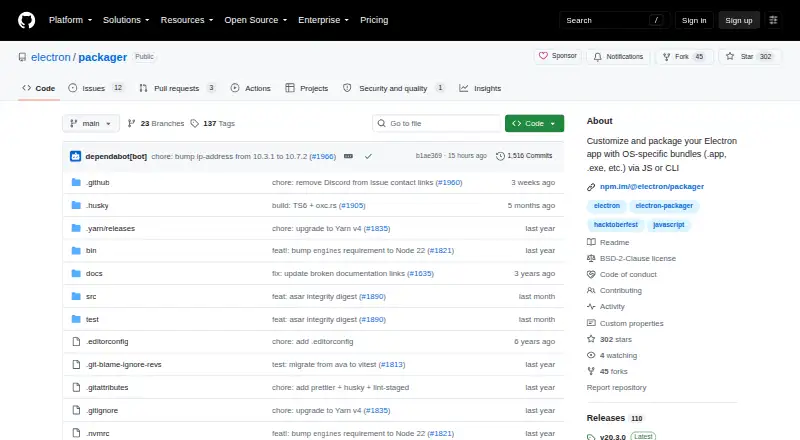
What electron-packager is
electron-packager turns Electron application source code into folders containing a renamed Electron executable and supporting files for distribution. It is a free, open-source Node.js library and command-line tool, usable from a terminal or through JavaScript. Packager can find or download the matching Electron release and build for a selected platform and architecture, all valid combinations, or the host combination. Output targets include Windows, macOS—including Mac App Store targets—and Linux; these are also listed as supported host systems. Documented architectures include x86, x86_64, arm64, universal macOS, Linux armv7l, and Linux mips64el, though some availability depends on Electron versions. CLI options include a regular-expression ignore filter for files and folders. Electron Forge uses Packager internally, and installer tools can use its output folders to create distributables. It requires Node.js 22.12.0 or higher, with local installation recommended. Signing macOS or Mac App Store bundles requires a macOS build host, and the project notes that packaged applications can be relatively large.
Good
- Provides both CLI and JavaScript library interfaces
- Targets Windows, macOS, and Linux
- Can select a platform and architecture for builds
- Ignore option filters files and folders
Watch out
- Requires Node.js 22.12.0 or higher
- macOS bundle signing requires a macOS build host
- Some architecture options depend on Electron versions
- Packaged applications can be relatively large
Who it suits
electron-packager suits Electron developers who need application bundles for Windows, macOS, or Linux and are comfortable with Node.js. It can also suit workflows that use Electron Forge or installer tools that accept its output folders.
Verdict
electron-packager provides a free way to create Electron distribution folders across its listed platforms and architectures. Account for the Node.js requirement, and plan macOS signing builds on a macOS host.
Plans and prices
From electron-packager's own pricing page, checked 7 Oct 2026.
| Plan | Price | What it gives you |
|---|---|---|
| Free | Free | Open-source Node.js library and CLI · requires Node.js 22.12.0 or higher |
The facts
Each one read from electron-packager's own pages, with the date it was checked.
What it does
- API plugins
- The project lists API-hook plugins for locale selection, non-proprietary FFmpeg codecs, and rebuilding native Node.js modules.checked 7 Oct 2026
- Architecture support
- Documented target architectures include x86, x86_64, arm64, universal macOS, Linux armv7l, and Linux mips64el, with some architecture availability limited by Electron versions.checked 7 Oct 2026
- Build behavior
- Packager can find or download the matching Electron release and create an app bundle for a chosen platform and architecture, all valid combinations, or the host combination.checked 7 Oct 2026
- Configuration
- The CLI supports optional flags, and its ignore option filters files and folders with a regular expression.checked 7 Oct 2026
- Integrations
- Electron Forge uses Electron Packager internally, while related installer tools use Packager-created folders to create distributables.checked 7 Oct 2026
- Interfaces
- It can be used as a command-line tool or as a Node.js library through JavaScript.checked 7 Oct 2026
- Prerequisite
- The module requires Node.js 22.12.0 or higher and the project recommends installing it locally rather than globally.checked 7 Oct 2026
- Purpose
- Electron Packager bundles Electron app source code with a renamed Electron executable and supporting files into folders ready for distribution.checked 7 Oct 2026
- Security
- GitHub reports that the project has not set up a SECURITY.md security policy.checked 7 Oct 2026
- Signing limit
- A macOS or Mac App Store app bundle can only be signed when the build runs on a macOS host.checked 7 Oct 2026
- Size limit
- The project notes that packaged Electron apps can be relatively large, with a minimal zipped app approximately the size of the matching zipped Electron binary.checked 7 Oct 2026
- Support
- The project directs usage questions to its FAQ and troubleshooting questions to its contributing documentation.checked 7 Oct 2026
Where it runs
- Host platforms
- The project lists Windows, macOS, and Linux as supported host platforms for running Packager.checked 7 Oct 2026
- Target platforms
- It generates application bundles for Windows, macOS including Mac App Store targets, and Linux.checked 7 Oct 2026
The full review of electron-packager
electron-packager is a focused bundling utility for Electron applications, offered as both a command-line program and a JavaScript library. It suits developers and build teams that want distribution-ready application folders while keeping installers, signing and updates in separate tools. Its free, open-source model is a strong fit when your build environment can meet the current Node.js requirement.
Overview
Packager combines Electron source code with a renamed Electron executable and its supporting files, producing folders ready for distribution. Outputs include .app bundles, .exe-based Windows applications and other platform-specific application directories. This is a packaging stage rather than a complete installer or update system, so release teams must add those capabilities elsewhere.
A build can target one platform and architecture, every valid combination, or the host combination. Packager can locate or download the matching Electron release as part of that job. The CLI is practical for shell and CI workflows, while the JavaScript API allows a Node.js build script to incorporate packaging with other release steps.
Key features
Platform and architecture targeting
Supported targets include Windows, macOS (including Mac App Store targets) and Linux. Documented architectures cover x86, x86_64, arm64, universal macOS, Linux armv7l and Linux mips64el. Availability can depend on the Electron version, so a broad target matrix still requires version planning rather than assuming every combination will work.
Configurable packaging
Optional CLI flags provide control over a build, and the ignore option removes files and folders that match a regular expression. That is useful for keeping development material out of a distribution folder, although the filtering approach puts responsibility for a precise pattern on the build author.
Node.js API and ecosystem fit
The library interface makes Packager suitable for JavaScript-based release automation, not only one-off terminal commands. Electron Forge uses it internally, and related installer tools can consume the folders it creates. API-hook plugins are listed for locale selection, non-proprietary FFmpeg codecs and rebuilding native Node.js modules, extending the packaging step for common Electron build concerns.
Build and signing constraints
Packaged Electron applications can be relatively large: a minimal zipped application is approximately the size of the corresponding zipped Electron binary. More importantly for release planning, a macOS or Mac App Store bundle can only be signed when the build runs on a macOS host. Cross-platform packaging is therefore not the same as cross-platform signing.
Pricing
| Plan | Price | What it includes |
|---|---|---|
| Free | free | Open-source Node.js library and CLI; requires Node.js 22.12.0 or higher |
There is one plan, with no free trial because the software is already free. The cost advantage is clear for individual developers and teams that can operate their own build and release tooling. The trade-off is operational rather than monetary: you need Node.js 22.12.0 or newer, and the project recommends installing it locally instead of globally. No seats, usage quotas or renewal charges are stated.
Platforms
Packager runs on Windows, macOS and Linux hosts. It can produce application bundles for those same families, with the architecture choices above and outputs such as .app and .exe. A macOS host remains mandatory when signing macOS or Mac App Store applications, making a macOS build machine part of that release path.
Who it's for
Choose Packager if you are building an Electron application and want a small, scriptable step that creates platform-specific folders for later installation or distribution. It is particularly appropriate for JavaScript teams that value a Node.js API, need selective platform and architecture builds, or already use Electron Forge or a separate installer pipeline.
It is less suitable as a standalone product for teams expecting installers, automatic updates or built-in signing orchestration. The Node.js prerequisite and the macOS-host signing rule also matter to organizations with constrained or entirely non-macOS build infrastructure.
Pros and cons
Pros
- Free open-source CLI and library: supports both repeatable command-line jobs and integrated JavaScript build scripts without a paid tier.
- Broad target selection: Windows, macOS and Linux targets plus several documented architectures accommodate varied desktop distributions.
- Useful ecosystem position: Electron Forge already uses Packager, and installer tools can build on its output folders.
- Practical filtering and hooks: regular-expression ignores and listed API plugins help tailor application contents and native-module builds.
Cons
- Not a full release system: installers and auto-update support are outside its scope, so additional tools are required.
- Current Node.js floor: Node.js 22.12.0 or higher can complicate older build environments; local installation is recommended.
- Signing limitation: macOS signing cannot be completed from a Windows or Linux host.
- Potentially large output: even a minimal zipped package is about the size of its Electron binary.
Alternatives
Tauri Bundler is the better choice when you want Rust executables wrapped into OS-specific bundles and need Android or iOS targets alongside desktop platforms; it is also free, though its public API stability is not strictly SemVer.
makeself fits Unix-oriented distribution when self-extracting archives are the goal rather than Electron application bundles.
Electron Forge is a free Electron-focused alternative with no stated paid plans or usage limits, and it already incorporates Packager internally.
nFPM is worth considering for free package creation across Linux, macOS, web and Windows environments.
electron-builder is another free option for Electron packaging across Linux, macOS and Windows.
InstallAware suits readers who want a Visual Studio-based freeware edition, with a free trial and commercial use permitted.
IzPack is a free Apache License 2.0 alternative for installer work across desktop and self-hosted platforms.
NSIS is appropriate when you specifically need Windows installers; it is completely free for any use and supports installers up to 2GB.
Browse the Software Packaging Tools list for more options.
Verdict
electron-packager is a sensible choice for developers who need free, scriptable Electron bundles across major desktop platforms and are prepared to manage installers, updates and signing separately. Choose it for its straightforward CLI/API packaging step and architecture coverage; look elsewhere if you want an all-in-one installer and release service or cannot provide the required Node.js and macOS build environments.
Alternatives to electron-packager
- 1
Avidemux
Free planOpen sourceWebLinuxmacOSWindows7.3Free plan - 2

Tauri Bundler
Free planAndroidiOSLinuxmacOS7.2Free plan - 3

Advanced Installer
Free planWindows6.6From $399 a year - 4

WiX Toolset
Free planAPIExtensionWindows6.6From $6,500 a year - 5
CyberInstaller Suite
Free planWindows6.5€39.90 one-time - 6
makeself
Free planLinuxmacOSSelf-hostedWindows6.5Free plan