tabiori
tabiori is a travel itinerary app for planning and sharing trips with family and friends.
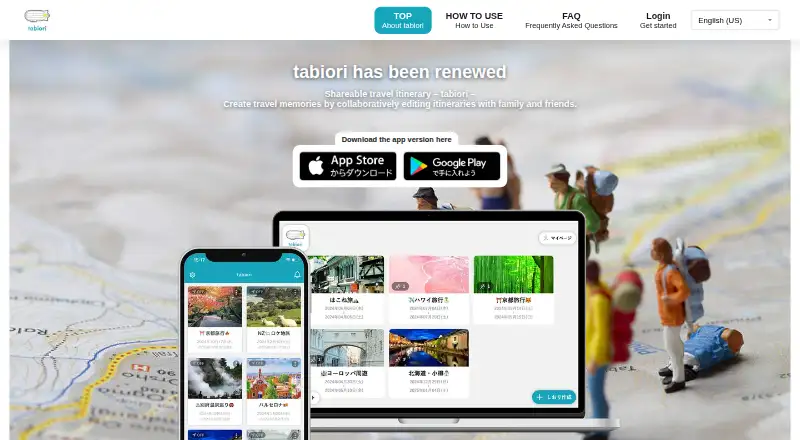
What tabiori is
tabiori is a travel itinerary app for planning and sharing trips with family and friends. Invite people by QR code or URL to view and co-edit an itinerary; itineraries start private and are visible or editable only to invited members. The schedule can add place details from searches, automatically total entered travel costs, and support multiple currencies. Checklists, notes, chat, and scrapbook-style photo sharing help organize trip preparations and preserve memories. Its ChatGPT integration can create itineraries and change schedules, checklists, and notes through conversation. The integration can access only itineraries belonging to the connected signed-in user, and requested changes apply immediately for itinerary members to see. Itineraries can be viewed offline using data last loaded while online. Convenience-store printing is available, while home printing from a PC is a Premium feature. The Free plan costs nothing, includes ads, and allows up to 100 MB of uploads per itinerary; Premium increases that limit to 10 GB. tabiori is available on Android, iOS, Linux, macOS, web, and Windows.
Good
- Invited members can co-edit itineraries.
- Travel costs can be totaled automatically.
- Multiple currencies are supported.
- Offline viewing uses previously loaded data.
- ChatGPT can create or edit trip details.
Watch out
- Free users have a 100 MB upload limit per itinerary.
- The Free plan shows ads.
- Home printing from a PC requires Premium.
- Offline access is limited to data loaded online.
Who it suits
tabiori suits families and friends coordinating trip details together, especially when shared schedules, notes, chat, and checklists are useful. It may also fit travelers who want itinerary access offline or need to track costs in multiple currencies.
Verdict
tabiori combines collaborative planning with shared trip notes and schedule tools. Its free plan has ads and a per-itinerary upload cap, while some printing and storage options require Premium.
Plans and prices
From tabiori's own pricing page, checked 7 Oct 2026.
| Plan | Price | What it gives you |
|---|---|---|
| Free | Free | Basic use · 100 MB upload capacity per itinerary · ads shown |
| Free basic | Free | Basic itinerary use · 100 MB scrapbook per itinerary · ads · ¥299 convenience-store print-data fee |
| Convenience-store print data | ¥299, paid once | User number valid 5 days · Lawson, FamilyMart or Seicomart machines in Japan · per print-data submission; store printing charged separately |
| Premium (web) monthly | ¥470 a month | 10 GB scrapbook per itinerary · original-quality images · itinerary lock · ad-free · free print-data submission · home-PC printing · auto-renewing |
| Premium (App Store/Google Play) monthly | ¥480 a month | Premium itinerary type · 10 GB scrapbook · original-quality images · ad-free · free print-data submission · auto-renewing |
| Premium (web) annual | ¥3,800 a year | 10 GB scrapbook per itinerary · original-quality images · itinerary lock · ad-free · free print-data submission · home-PC printing · auto-renewing |
| Premium (App Store/Google Play) annual | ¥3,900 a year | Premium itinerary type · 10 GB scrapbook · original-quality images · ad-free · free print-data submission · auto-renewing |
The facts
Each one read from tabiori's own pages, with the date it was checked.
What it does
- Account deletion
- Deleting an account removes all data created or used by that account and cannot be undone.checked 15 Oct 2026
- AI access
- AI can access only itineraries that the connected signed-in user belongs to; requested changes apply immediately and are visible to itinerary members.checked 7 Oct 2026
- AI integration
- The ChatGPT integration can create itineraries and add or edit schedules, checklists and notes from conversation inputs.checked 15 Oct 2026
- API and SDKs
- Official pages document MCP connectivity but do not publish a conventional REST API, downloadable SDK or self-hosting package.checked 15 Oct 2026
- Capacity limits
- Free users can upload up to 100 MB per itinerary; Premium users can upload up to 10 GB.checked 7 Oct 2026
- Collaborative itineraries
- Members can be invited by QR code or URL to view and co-edit an itinerary.checked 7 Oct 2026
- Data backend
- The privacy policy says MCP-related data may be stored and processed through Firebase and Google Cloud services including Firestore and Cloud Storage.checked 15 Oct 2026
- Documentation
- The official help center contains FAQ and feature how-to pages covering schedules, checklists, scrapbook, printing and account settings.checked 15 Oct 2026
- Downloads
- Gotaru says its smartphone apps have accumulated more than 10 million downloads in total; tabiori's localized site reports 2.8 million downloads.checked 15 Oct 2026
- Limit: cancellation support
- One independent review describes being unable to reach the cancellation page and receiving no response after contacting support.checked 15 Oct 2026
- Limit: checklist ordering
- Reviewers complain that checklist items historically appeared in an unexpected order and could not always be rearranged.checked 15 Oct 2026
- Limit: crashes
- An App Store reviewer says the app frequently crashes during use.checked 15 Oct 2026
- Limit: print payment flow
- A reviewer reports that a kiosk print number disappeared quickly after Apple Pay payment and that support did not respond to a refund inquiry.checked 15 Oct 2026
- Limit: schedule defaults
- Reviewers report that new schedules can inherit the last date and time, creating repetitive corrections.checked 15 Oct 2026
- Location sharing
- Members can share their locations during the itinerary period, and sharing is limited to that trip window.checked 15 Oct 2026
- Maps and routes
- A schedule with location data displays on a map, with lines connecting neighboring schedules.checked 15 Oct 2026
- MCP authorization
- The Editor MCP integration uses OAuth and separate editor:read and editor:write permissions for AI clients such as ChatGPT, Claude and Cursor.checked 15 Oct 2026
The company
- Company founded
- Gotaru's company page lists 2025年1月20日 in its company overview.checked 15 Oct 2026
- Company headquarters
- Gotaru lists its office at 1-5-23 Chuo-machi, Oita City, Oita Prefecture, Japan.checked 15 Oct 2026
- Company legal name
- The maker is 株式会社ゴタール (Gotaru, Co., Ltd.).checked 15 Oct 2026
- Company size
- Japan's gBizINFO employment record lists four insured employees for Gotaru's Oita establishment.checked 15 Oct 2026
- Headquarters
- Oita, Japanchecked 28 Sep 2026
- Maker
- tabiori is operated by Gotaru Co., Ltd., based in Oita City, Oita Prefecture, Japan.checked 7 Oct 2026
Money
- Cost tracking
- Schedule costs are automatically totaled in itinerary information and multiple currencies are supported.checked 15 Oct 2026
The full review of tabiori
tabiori is a collaborative travel planner for groups coordinating schedules, expenses, and trip records. It is best suited to family and friend trips where several people need to contribute; its main trade-off is that free storage is limited and some printing options sit behind Premium.
Overview
Itineraries start private, with access limited to invited members. Guests can join by QR code or URL and view or co-edit the plan, a useful arrangement for keeping group planning in one place without exposing trip details publicly. Offline viewing uses the itinerary data last loaded while online, so it helps with access on the move but depends on syncing the plan beforehand.
tabiori is operated by Gotaru Co., Ltd., based in Oita City, Japan. Its cloud infrastructure and modern security measures are intended to protect user data.
Key features
Shared schedules and expenses
Schedules can include place details from searches, and tabiori automatically totals entered travel costs across multiple currencies. That makes it practical for groups tracking trip spending across destinations, though the stated feature is cost totaling rather than a comprehensive budgeting system.
Planning, conversation, and memories
Checklists, notes, and chat support preparation, while photo sharing and scrapbook tools let travelers keep trip memories alongside the itinerary. Bringing these together can reduce the need to split planning and records across separate tools; free users should account for the 100 MB upload ceiling per itinerary if they expect to share many photos.
ChatGPT integration
The ChatGPT integration can create itineraries and add or edit schedules, checklists, and notes through conversation. It can access only itineraries belonging to the connected signed-in user, and requested edits take effect immediately and are visible to itinerary members. That makes it a convenient way to revise a shared plan, but changes are not private drafts.
Printing and offline access
Itineraries can be printed at convenience stores, while printing from a home PC requires Premium. Offline access is for viewing data last loaded online, not for relying on a freshly updated itinerary without a connection.
Pricing
tabiori is freemium, with no free trial. The Free plan costs nothing and provides basic use, a 100 MB upload capacity per itinerary, and ads. It suits occasional or lighter trips, but ads and the storage cap are meaningful compromises for photo-heavy itineraries.
Paid plans start at 4 /mo. Premium raises the per-itinerary upload capacity to 10 GB and enables home printing from a PC, making it a better fit for travelers who keep substantial photo records or want printed plans at home. Those are the stated Premium distinctions; the exact plan price and billing terms beyond the starting price are not given here.
Platforms
tabiori is available on Android, iOS, Linux, macOS, the web, and Windows. PC browser use is supported on Windows, macOS, and Linux, with current major browsers recommended. Its broad platform coverage suits groups using a mix of phones and computers.
Who it's for
Choose tabiori for family or friend trips where co-editing, shared notes, chat, and photo records matter as much as the schedule. It is less compelling for travelers who want a generous free upload allowance, ad-free use without paying, or home printing on the free plan.
Pros and cons
- Pros: Invited members can co-edit private itineraries, avoiding a single planner as the only source of updates.
- Pros: Multiple currencies, automatic cost totals, checklists, notes, chat, and photo sharing put practical planning and trip records together.
- Pros: Offline viewing and convenience-store printing offer options when a connection or home printer is unavailable.
- Cons: Free uploads stop at 100 MB per itinerary, which can constrain groups sharing many photos.
- Cons: The free plan shows ads, and home printing from a PC requires Premium.
- Cons: Offline access only uses data last loaded online, so travelers need to open the plan before losing connectivity.
Alternatives
Browse Travel Itinerary Apps to compare more trip-planning options. Choose Pappus Travel Planner if you want free software under GPL-3.0-or-later; its license states no warranty. Roadtrippers is another freemium option with a free trial; its free plan allows one saved trip and three stops per trip, while Basic is $11.99 a month for three saved trips and 20 stops per trip.
TripIt offers a free plan limited to three uploaded documents per trip and a Pro plan at $49 a year for 25 documents per trip, making it worth considering when document uploads are central to the choice. Jettova provides free trip planning and account-based itinerary saving, with bookings paid to partners at their listed prices. Lambus has a free basic platform and a separate PRO option, priced at €24.99 a year as a one-time gift purchase for one year.
Pilot is a free option with an itinerary builder, route and map tools, file and reservation import, and real-time collaboration. Rome2Rio is free with no subscriptions and unlimited free searches, a fit for travelers prioritizing search. TravelMap offers a free plan capped at 100 photos, with straight-line routes and a private blog; its Premium plan is $43.61 a month, with VAT added at checkout.
Verdict
tabiori is a strong choice for groups who want a private, shared itinerary that combines schedules, cost totals, planning conversations, and trip memories. Its free plan is a useful starting point, but travelers who expect to upload many photos or print at home should factor Premium into the decision; those who need generous free storage should look elsewhere.
Getting started
- Visit the tabiori website or use it on Android, iOS, Linux, macOS, web, or Windows.
- Choose the Free plan for basic use, or a paid plan starting at $4/mo.
- Create an itinerary and invite members by QR code or URL.
- Add schedule details, checklists, notes, chat, or photos.
- Load itinerary data while online before viewing it offline.
Limits worth knowing
The Free plan includes ads and allows up to 100 MB of uploads per itinerary. Premium raises the upload limit to 10 GB; home printing from a PC is also a Premium feature.
Questions
Does tabiori have a free plan?
Yes. The Free plan is free and includes basic use, ads, and up to 100 MB of uploads per itinerary.
Which platforms support tabiori?
tabiori is available on Android, iOS, Linux, macOS, web, and Windows.
Can multiple people edit an itinerary?
Yes. Members invited by QR code or URL can view and co-edit it. Itineraries start private and are limited to invited members.
Can tabiori itineraries be used offline?
Yes. They can be viewed offline using data last loaded while online.
Who operates tabiori?
tabiori is operated by Gotaru Co., Ltd., based in Oita City, Oita Prefecture, Japan.
Alternatives to tabiori
- 1
TripIt
Free planAndroidiOSWebAPI8.0From $49 a year - 2

Tripomatic
Free planAndroidiOSWebAPI8.0From $23.99 a year - 3
Jettova
Free planAndroidiOSWebAPI7.9From $34.99 a year - 4

TREK
Free planOpen sourceAndroidiOSWebAPI7.9Free plan - 5
Travefy
AndroidiOSWebAPI7.7From $20 a month - 6

Pilot
Free planAndroidiOSWeb7.4$49 one-time