Pappus Travel Planner
Pappus Travel Planner organizes trips into day-by-day itineraries with destinations, transport, and costs tracked by category and person.
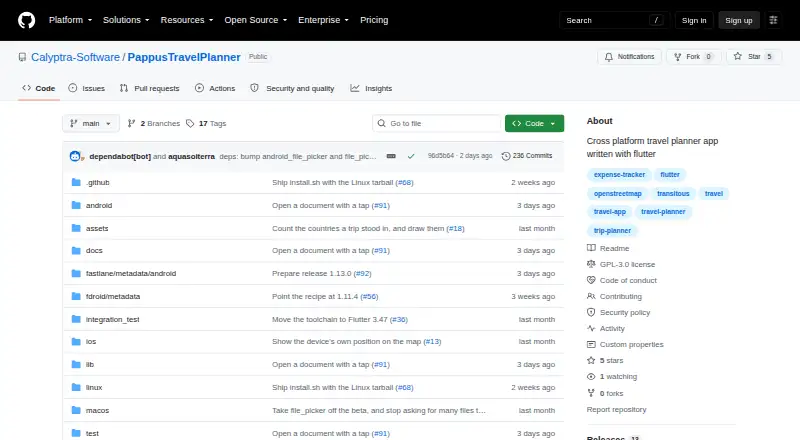
What Pappus Travel Planner is
Pappus Travel Planner organizes trips into day-by-day itineraries with destinations, transport, and costs tracked by category and person. Itinerary entries can include places, transport legs, times, shared-ticket groups, reorderable items, and alternatives. Trip data stays in a portable SQLite file; the app requires no account or server and says it uploads nothing. It works offline except for optional connection searches and map tiles, which use network services. Optional searches through Transitous can find public transport, trains, buses, and other operator routes, import results, and refresh live times. Maps use OpenStreetMap tiles, and users can add GPX tracks to itinerary legs. Cost tools support multiple currencies, custom categories, exchange rates, spending statistics, and settle-up calculations. Photos and documents can be stored with an itinerary entry, group, or trip. Trips can be shared in importable .tpt bundles or exported as PDF or .ics; PDF and calendar exports cannot be imported back. The free app supports Android, iOS, Linux, macOS, web, and Windows, though Android has no store listing and Windows builds are unsigned.
Good
- Works offline apart from optional network-based features.
- Stores trip data in a portable SQLite file.
- Tracks costs across multiple currencies.
- Trip bundles can include attachments.
- Free software under GNU GPL version 3 or later.
Watch out
- Calendar sync is not available.
- PDF and calendar exports cannot be imported back.
- Android has no store listing yet.
- Windows builds are unsigned.
Who it suits
It may suit travelers who want day-by-day plans with transport and shared cost tracking, including offline access. Its portable trip database may appeal to people who prefer not to use an account or server.
Verdict
Pappus Travel Planner combines itinerary building, optional route searches, maps, and cost tracking in a free app. Consider its export limits and platform-specific download caveats before choosing it.
Plans and prices
From Pappus Travel Planner's own pricing page, checked 5 Oct 2026.
| Plan | Price | What it gives you |
|---|---|---|
| Free software | Free | GPL-3.0-or-later; no warranty stated |
The facts
Each one read from Pappus Travel Planner's own pages, with the date it was checked.
What it does
- Attachments
- Photos and documents can be attached to an itinerary entry, group, or trip and are stored inside the database file.checked 5 Oct 2026
- Calendar sync
- Nochecked 21 Sep 2026
- Downloads
- The README says Android, Linux, and Windows builds are available from Releases; Android has no store listing yet, and Windows builds are unsigned.checked 5 Oct 2026
- Exports
- Trips can be shared in an importable .tpt bundle with attachments, or exported as PDF or .ics; PDF and calendar exports cannot be imported back.checked 5 Oct 2026
- Itineraries
- Users can build day-by-day itineraries with places, transport legs, times, shared-ticket groups, reorderable items, and alternative plans.checked 5 Oct 2026
- Languages and themes
- The app supports English and German, with light, dark, and system theme options.checked 5 Oct 2026
- License
- Pappus Travel Planner is free software under GNU GPL version 3 or, at the user's option, any later version, and the license disclaims warranty.checked 5 Oct 2026
- Maps
- Trip maps use OpenStreetMap tiles and support importing GPX tracks onto itinerary legs.checked 5 Oct 2026
- Offline use
- The app works offline except for optional connection searches and map tiles, which use network services.checked 5 Oct 2026
- Purpose
- Pappus plans trips day by day, including destinations, transport, and costs by category and person.checked 5 Oct 2026
- Support and security
- The README directs security reports through a separate route and says they should not be posted as public issues.checked 5 Oct 2026
- Transport search
- Optional real connection search uses Transitous to find public transport, trains, buses, and other operator routes, and can import results and refresh live times.checked 5 Oct 2026
Money
- Costs
- Costs can be tracked in multiple currencies with custom categories and exchange rates, and the app provides spending statistics and settle-up calculations.checked 5 Oct 2026
- Free plan
- Yeschecked 21 Sep 2026
The company
- Data ownership
- Trip data is stored in a portable SQLite file, and the app says it requires no account or server and uploads nothing.checked 5 Oct 2026
Where it runs
- Platforms
- The project describes Android as its primary target and says the same codebase runs on web, Linux, Windows, macOS, and iOS.checked 5 Oct 2026
The full review of Pappus Travel Planner
Pappus Travel Planner is a free trip-planning app for building day-by-day itineraries, tracking costs and keeping trip data in a portable file. It suits travelers who value offline access and control over their data; its unsigned Windows builds and lack of an Android store listing make downloading less straightforward.
Overview
Pappus brings itinerary planning, optional transport searches, maps, attachments and expense tracking into one trip database. It works offline except for connection searches and map tiles, which rely on network services. There is no account or server requirement, and the app says it uploads nothing. That makes it a strong fit for travelers who want their plans in a file they control, though it does not sync calendars automatically.
Key features
Itineraries can include destinations, transport legs and times, shared-ticket groups, alternative plans and reorderable entries. The structure can handle more than a simple checklist, while preserving alternatives for trips that may change. Optional Transitous searches find public transport, trains, buses and other operator routes; results can be imported and live times refreshed. These searches are an add-on to the planner, not a requirement for offline trip management.
Maps use OpenStreetMap tiles, and GPX tracks can be imported onto itinerary legs. Costs can be recorded in multiple currencies with custom categories and exchange rates; spending statistics and settle-up calculations help groups understand who paid what. Photos and documents can be attached to a trip, group or itinerary entry and remain inside its database file.
Trips can be shared as importable .tpt bundles that include attachments, or exported as PDF and .ics. The latter formats are one-way exports: they cannot be imported back into Pappus. That makes .tpt the better choice for handing a complete editable trip to another user.
Pricing
Pappus is free software under GNU GPL version 3 or any later version, with no warranty. The Free software plan costs nothing. There are no paid tiers to weigh against its itinerary, route-search, map or cost-tracking features, but the GPL license and warranty disclaimer may matter to users seeking a commercial support commitment.
Platforms
Pappus supports Android, iOS, Linux, macOS, web and Windows. The README provides Android, Linux and Windows builds from Releases; Android has no store listing yet, and Windows builds are unsigned. Those download caveats may deter users who prefer app-store installation or signed Windows software. Calendar sync is not supported, although trips can be exported as .ics files. English and German are supported, with light, dark and system themes.
Who it's for
Pappus is best for independent travelers and groups who want detailed itineraries, shared expense calculations and offline access without putting trip data on an account-based service. Its portable SQLite database and attachment support suit people who prefer to retain their own records. It is a weaker fit for travelers who need calendar sync, or who want a polished store download on Android or a signed Windows installer.
Pros and cons
- Pro: Day-by-day plans combine places, transport, times and alternatives, giving complex trips more structure than a basic task list.
- Pro: Multi-currency costs, exchange rates and settle-up calculations address a practical pain point for group travel.
- Pro: Offline use and a portable SQLite file provide control over trip data; attachments stay with the database.
- Con: Calendar sync is absent, so .ics export is the available calendar route—and exported calendars cannot be imported back.
- Con: Android has no store listing and Windows builds are unsigned, adding friction for those platforms.
- Con: Connection searches and map tiles require network access, so those features are not fully offline.
Alternatives
Browse Travel Itinerary Apps for more trip-planning choices, or To-do list apps if your trip planning is closer to task management.
Choose Lambus if you want a free basic app on Android, iOS or web and are open to a separate PRO plan, which costs €24.99 a year. TREK is another free option, including Linux and self-hosting, for users comfortable with its AGPL-3.0 license and personal or internal company use terms.
TripIt may suit travelers who want a document-organizing option: its free plan allows three documents per trip, while Pro costs $49 a year and allows 25. Pilot is a free Android, iOS and web alternative with a flexible itinerary builder, route and map tools, file and reservation import, and real-time collaboration.
Stippl is worth considering if calendar sync matters: its free plan includes unlimited trips, co-planners and expenses, plus PDF export and calendar sync. TripCraftr offers a free plan with unlimited trips and invitees, but caps documents at five per trip and Lorenzo replies at five per day on the nearest trip. TripMapper has a free Trip plan and a paid Trip+ plan at £3.99 a month. Tripomatic may fit shorter plans: its free tier caps planned activities at five days per calendar month and places and hotels at 25 per trip, and includes ads.
Verdict
Choose Pappus if you want a free, offline-capable planner that combines detailed itineraries with group expense tracking and keeps trip data in a portable file. Look elsewhere if calendar sync is essential or you want straightforward store installation on Android and signed Windows builds.
Getting started
- Visit the Pappus Travel Planner project website.
- Choose a build from Releases for Android, Linux, or Windows.
- Install the chosen build; Windows builds are unsigned.
- Create a trip and add itinerary items, transport, costs, or attachments.
Limits worth knowing
The app is free under GNU GPL version 3 or later. The license disclaims warranty.
Questions
How much does Pappus Travel Planner cost?
It is free software. The listed plan price is free.
Does it work offline?
Yes, except optional connection searches and map tiles, which use network services.
Which platforms have builds available?
The listed platforms are Android, iOS, Linux, macOS, web, and Windows. The README says Android, Linux, and Windows builds are available from Releases; Android has no store listing yet.
Can I import exported trips?
The .tpt bundle is importable and can include attachments. PDF and .ics exports cannot be imported back.
Is Pappus open source?
It is free software under GNU GPL version 3 or, at the user's option, any later version.
Alternatives to Pappus Travel Planner
- 1
tabiori
Free planAndroidiOSWebAPI8.0From ¥3,800 a year - 2
TripIt
Free planAndroidiOSWebAPI8.0From $49 a year - 3

Tripomatic
Free planAndroidiOSWebAPI8.0From $23.99 a year - 4
Jettova
Free planAndroidiOSWebAPI7.9From $34.99 a year - 5

TREK
Free planOpen sourceAndroidiOSWebAPI7.9Free plan - 6
Travefy
AndroidiOSWebAPI7.7From $20 a month