Synology Router Manager
Synology Router Manager (SRM) is the operating system for Synology networking products, with an interface intended for home power users and professional IT s…
What Synology Router Manager is
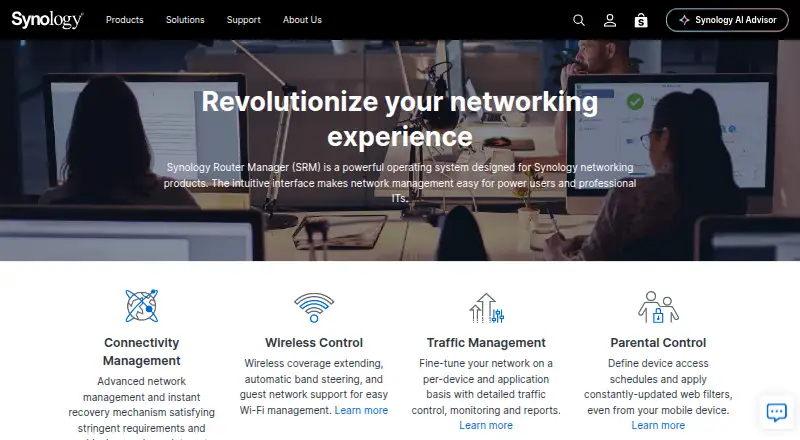
Synology Router Manager (SRM) is the operating system for Synology networking products, with an interface intended for home power users and professional IT staff. Its network tools include WAN failover and load balancing, policy routing, port forwarding, QoS controls, and traffic reports. SRM 1.3 supports up to five isolated local networks, each with up to three SSIDs when Smart Connect is disabled, as well as 802.1Q VLAN tagging. Wi-Fi features include mesh management, band steering, roaming standards 802.11k/v/r, guest networks, and WPA3 options. Safe Access adds profiles, schedules, time quotas, web filters, Safe Search, and internet usage reports. Threat Prevention inspects traffic and can drop high-risk packets. VPN Plus supports several VPN types, though license counts vary by router model. The DS router app supports setup and network management on iOS 12 or later and Android 8 or later. SRM is free and deployed on-premises; IPv4/IPv6 dual stack is available on the RT6600ax, RT2600ac, and RT1900ac.
Good
- Supports WAN failover, load balancing, and policy routing.
- SRM 1.3 supports isolated networks and VLAN tagging.
- Safe Access includes schedules, quotas, and web filters.
- Threat Prevention inspects traffic and can drop risky packets.
- Free, on-premises deployment for Synology networking products.
Watch out
- VPN client and site-to-site license counts vary by router model.
- Google Safe Browsing requires a Google API key.
- IPv4/IPv6 dual stack is listed for three router models.
Who it suits
SRM is aimed at people managing a Synology network, from home power users to professional IT staff. Its management and access controls may suit networks that need segmentation, traffic controls, or VPN options.
Verdict
SRM combines network configuration, Wi-Fi, access controls, and security tools for Synology networking products. Check router-model limits and VPN licensing needs before relying on particular capabilities.
The facts
Each one read from Synology Router Manager's own pages, with the date it was checked.
Where it runs
- Browser support
- SRM lists Google Chrome, Firefox, Microsoft Edge, and Safari 13 or later as supported browsers.checked 8 Oct 2026
- Management app
- The DS router mobile app can perform initial setup, manage Wi-Fi and mesh points, monitor network status, and manage client internet activity; it requires iOS 12 or later or Android 8 or later.checked 8 Oct 2026
- Mobile platforms
- The Synology router product comparison lists VPN Plus and DS router for Android and iOS.checked 8 Oct 2026
What it does
- Business authentication
- VPN Plus supports authentication through Active Directory and LDAP.checked 8 Oct 2026
- Certificates
- Synology Routers can apply for and automatically renew Let’s Encrypt SSL certificates.checked 8 Oct 2026
- Compatibility limit
- The connectivity page says IPv4/IPv6 dual stack is available on the RT6600ax, RT2600ac, and RT1900ac.checked 8 Oct 2026
- Connectivity
- Smart WAN supports multiple internet connections, failover, load balancing, and policy routing.checked 8 Oct 2026
- Downloads and support
- Synology’s Download Center provides operating system and package files by product category and model, and links to technical support.checked 8 Oct 2026
- Intended users
- Synology presents SRM as useful for personal networks as well as power users and professional IT staff.checked 8 Oct 2026
- Mobile management
- Synology describes a DS router interface for configuring mesh networks, Safe Access profiles, port forwarding, and traffic control.checked 8 Oct 2026
- Network management
- SRM supports port forwarding, traffic control, QuickConnect, DDNS, web filtering, and IPv4/IPv6 dual stack.checked 8 Oct 2026
- Network segmentation
- SRM 1.3 supports up to 5 VLANs and 15 Wi-Fi SSIDs, with access rules to control communication between networks.checked 8 Oct 2026
- Parental and access controls
- Safe Access provides user and network profiles, schedules, time quotas, web filters, Safe Search for Google, Bing, and YouTube, and internet usage reports.checked 8 Oct 2026
- Product
- Synology Router Manager is an operating system for Synology networking products, with an interface aimed at power users and professional IT staff.checked 8 Oct 2026
- Security
- Threat Prevention inspects incoming and outgoing network traffic and blocks malicious packets.checked 8 Oct 2026
- Security integrations
- SRM's security features include Google Safe Browsing and threat intelligence databases; Google Safe Browsing requires a Google API key.checked 8 Oct 2026
- Threat protection
- Threat Prevention detects network intrusions, can automatically drop high-risk packets, and supports up to 30,000 custom class and signature policies.checked 8 Oct 2026
- VPN
- VPN Plus supports WebVPN, SSL VPN, Remote Desktop, SSTP, OpenVPN, L2TP over IPSec, and PPTP; the number of VPN client and site-to-site licenses varies by router model.checked 8 Oct 2026
- What it is
- Synology Router Manager (SRM) is an operating system designed for Synology networking products, with an interface for home power users and professional IT staff.checked 8 Oct 2026
- Wi-Fi
- SRM supports mesh Wi-Fi management, band steering, roaming standards 802.11k/v/r, guest networks, and WPA3 security options.checked 8 Oct 2026
The company
- Company
- Synology lists its headquarters in New Taipei City, Taiwan.checked 8 Oct 2026
- Founded
- Synology says it was founded in 2000.checked 8 Oct 2026
- Headquarters
- Banqiao District, New Taipei City, Taiwanchecked 28 Sep 2026
Alternatives to Synology Router Manager
- 1

ManageEngine Network Configuration Manager
Free planAndroidiOSWebAPI8.2From $238 a year - 2
MikroTik RouterOS
Free planAndroidiOSWebAPI8.2Free plan - 3

UniFi Network
Free planAndroidiOSWebAPI8.1From $29 a month - 4
NetBox
Free planOpen sourceWebAPILinuxSelf-hosted7.6Free plan - 5

Domotz
AndroidiOSWebAPI7.3From $1.50 a month - 6

TP-Link Omada SDN
Free planAndroidiOSWebLinux6.9Free plan