Syncios Manager
Syncios Manager is desktop software for managing, backing up, and restoring data on iOS and Android devices.
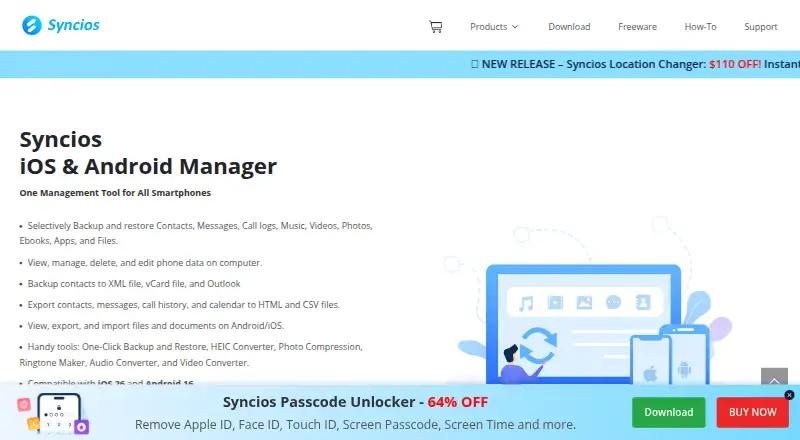
What Syncios Manager is
Syncios Manager is desktop software for managing, backing up, and restoring data on iOS and Android devices. It runs on Windows and macOS and supports phone-to-computer and phone-to-phone transfers. Users can selectively back up or restore contacts, messages, call logs, music, videos, photos, ebooks, apps, and files. Contacts, messages, call history, and calendars can be exported as HTML or CSV; contacts can also be backed up to Outlook, XML, or vCard files. Media tools transfer music and videos, manage playlists, remove duplicate songs, and organize photo albums. Photo features include downloading from iCloud Photo Stream, converting HEIC images to JPG, and compressing images. Syncios can manage device files and folders and import or export apps, ebooks, and bookmarks. Listed utilities include a HEIC converter, photo compression, ringtone maker, audio converter, and video converter. A free version is listed, along with a 1 Year Subscription at $34.95 a year, a Lifetime License at $44.95, paid once, and a Business License at $249 a year. Subscription and lifetime plans cover 1-5 devices on one PC; the business plan covers unlimited devices on one PC.
Good
- Selectively backs up and restores many data types.
- Transfers data between phones and computers.
- Exports contacts, messages, call history, and calendars.
- Free version is listed.
Watch out
- Runs only on Windows and macOS.
- 1 Year Subscription is $34.95 a year.
- Lifetime License is $44.95, paid once.
- Business License is $249 a year.
Who it suits
It suits iOS and Android users who want desktop tools for backups, transfers, and media or file management. Its plans also offer options for 1-5 devices or unlimited devices on one PC.
Verdict
Syncios Manager combines backup, transfer, export, and media utilities for iOS and Android devices. Compare the free version and paid license terms against the number of devices and PC coverage you need.
Plans and prices
From Syncios Manager's own pricing page, checked 19 Oct 2026.
| Plan | Price | What it gives you |
|---|---|---|
| Free Version | Free | device-to-PC and PC-to-device transfer · limited features compared with Full Version |
| 1 Year Subscription | $34.95 a year | 1–5 devices · 1 PC · free updates · technical support · Auto-renew; cancel anytime |
| Lifetime License | $44.95, paid once | 1–5 devices · 1 PC · lifetime free updates |
| Business License | $249 a year | Unlimited devices · 1 PC |
The facts
Each one read from Syncios Manager's own pages, with the date it was checked.
Where it runs
- Android companion
- Syncios distributes an Android companion APK version 3.0.1 for Android 3.0 or later, sized at 4.73 MB.checked 19 Oct 2026
- Device compatibility
- The Japanese technical page lists Android 3.0–16 and iOS 9–26 support and names iPhone, iPad, iPod plus major Samsung, Google, LG, Sony, Huawei, OnePlus and Xiaomi devices.checked 19 Oct 2026
- File and app management
- Its file-system module imports, exports, creates and deletes folders and supports importing, exporting and backing up mobile apps.checked 19 Oct 2026
- Mac download
- The download center provides a Mac build requiring macOS 10.9 or later.checked 19 Oct 2026
What it does
- API and SDKs
- The official product pages and sitemap provide desktop downloads, guides and FAQs but expose no public API or SDK.checked 19 Oct 2026
- Built-in utilities
- Included utilities are a HEIC converter, photo compressor, ringtone maker, audio converter and video converter.checked 19 Oct 2026
- Data export
- It can export contacts, messages, call history, and calendars to HTML and CSV files.checked 4 Oct 2026
- Desktop availability
- The download center offers Syncios Mobile Manager for Windows 11/10/8/7 and macOS 10.9 and above.checked 4 Oct 2026
- Desktop requirements
- The listed Windows requirements are Windows 11/10/8.1/8/7, a 750 MHz Intel or AMD CPU, at least 256 MB RAM and 200 MB free disk space.checked 19 Oct 2026
- Documentation
- The user guide documents device connection, media, contacts, messages, apps, books, files, backup, recovery, conversion and troubleshooting workflows.checked 19 Oct 2026
- Formats
- Documented formats include MOV, M4V, MP4, MP3, M4A, WAV, AIFF, M4R, M4B, JPG, JPEG, PNG, BMP, TIF, TIFF, EPUB and PDF.checked 19 Oct 2026
- Integrations
- Contacts can be backed up to XML, vCard or Outlook, while contacts, messages, call history and calendars can be exported as HTML or CSV.checked 19 Oct 2026
- License model
- The EULA grants a limited, non-transferable right to install the proprietary software on one computer and prohibits reverse engineering, decompiling and derivative works.checked 19 Oct 2026
- Limit: compatibility gaps
- Complaints cite versions that failed to recognize newer iOS 17/18 or Android 14 devices, sometimes for months after purchase.checked 19 Oct 2026
- Limit: paid recovery pricing
- G2’s pros-and-cons summary includes a complaint that subscription pricing is expensive and that recovery previews can produce ineffective results.checked 19 Oct 2026
- Limit: refunds and recovery
- A Trustpilot reviewer says a requested 30-day refund was refused after the product did not meet their data-recovery needs.checked 19 Oct 2026
- Media management
- It transfers music and videos between Android or iOS devices and a computer, manages playlists, and can remove duplicate songs.checked 4 Oct 2026
- Media transfer
- It transfers music, videos, photos, ringtones, podcasts, audiobooks, ebooks and other media between mobile devices and a computer.checked 19 Oct 2026
- One-click backup
- One-click backup and restore covers photos, contacts, videos, bookmarks, apps, music, SMS, call history and ebooks, with original media quality retained.checked 19 Oct 2026
- Outlook integration
- Syncios can back up contacts to Outlook as well as XML and vCard files.checked 4 Oct 2026
The company
- Company database record
- Crunchbase lists Anvsoft as a private Boston, Massachusetts software company with 101–250 employees and says it has served customers since 2003.checked 19 Oct 2026
- Company founded and headquarters
- Anvsoft’s German company page says it was founded in 2002 and is headquartered in Shenzhen.checked 19 Oct 2026
- Company identity
- The EULA identifies Anvsoft Inc. as Syncios’s developer and owner.checked 19 Oct 2026
- Company size
- LinkedIn lists Anvsoft as privately held with 51–200 employees and founded in 2005.checked 19 Oct 2026
The full review of Syncios Manager
Overview
Syncios Manager is desktop software for managing, backing up, restoring, and moving data on iOS and Android devices. Its breadth is a strength, but paid licenses cover just one PC, so households or teams with several computers should weigh that limit.
Key features
Selective backup and restore spans contacts, messages, call logs, music, videos, photos, ebooks, apps, and files. That makes Syncios useful when you want to preserve chosen categories rather than make a single undifferentiated copy. Contacts, messages, call history, and calendars can also be exported as HTML or CSV, giving users readable files outside the device.
For music and video, Syncios moves content between a computer and Android or iOS devices, manages playlists, and removes duplicate songs. Photo tools cover transfers, albums, iCloud Photo Stream downloads, HEIC-to-JPG conversion, and compression. This is a capable toolkit for people who routinely organize media; it is more than a simple migration utility, and may be overkill for a one-off phone swap.
It can manage files and folders on both mobile systems and import or export apps, ebooks, and bookmarks. Additional utilities include a ringtone maker, audio converter, and video converter. Contacts can be backed up to Outlook, XML, or vCard files, which adds useful options for people who keep address books outside their phones.
Pricing
The Free Version costs nothing. Syncios offers a free plan, but the feature comparison determines what that version includes; check that coverage before making it your regular backup tool.
The 1 Year Subscription costs $34.95 a year, billed Auto-Renew. Cancel Anytime. It covers 1-5 devices on 1 PC, making it the lower-cost paid choice for an individual or household using one computer. The Lifetime License costs $44.95, paid once for the same 1-5 devices and 1 PC; it avoids a recurring subscription, but does not expand computer coverage.
The Business License costs $249 a year and covers unlimited devices on 1 PC. It is the option for a computer managing a larger device pool, not for a team that needs the software installed across multiple PCs. Paid purchases include free technical support and free updates to the latest version.
Platforms
The desktop download center supports Windows 11, 10, 8, and 7, plus macOS 10.9 and above. The product page states compatibility with iOS 27 and Android 16, while its technical specifications give iOS 9–26 and Android 3.0–16. That difference makes it worth checking compatibility for an iOS 27 device before depending on it. Syncios supports phone-to-phone and phone-to-computer transfer, app transfer, and computer backup.
Who it's for
Syncios is best suited to users who want one desktop toolkit for selective backups, exports, media organization, and file management across iOS and Android. Its one-PC licenses fit an individual or a household sharing a computer; the Business License suits larger device volumes on a single workstation. It is a weaker fit when you need licenses for several PCs or only want a basic phone-cloning tool.
Pros and cons
- Pros: Selective backup spans many personal data and media categories, useful when a full-device copy is not what you need.
- Pros: HTML and CSV exports, plus Outlook, XML, and vCard contact backups, make data usable beyond the phone.
- Pros: Media and photo utilities combine transfers, playlist management, duplicate-song removal, HEIC conversion, and compression.
- Cons: Every paid license is limited to 1 PC, including the unlimited-device Business License.
- Cons: The 1 Year Subscription auto-renews, while the free version's feature coverage needs checking against the comparison before purchase decisions.
Alternatives
Phone Transfer Software is the broader category to compare if Syncios does not match your transfer needs.
Choose vivo EasyShare for free-data file transfer and phone cloning. Huawei HiSuite is a free desktop option; its Mac version supports picture, video, file, and backup/restore functions. Xiaomi Home is a free Android and iOS app when its region-dependent device support fits your setup. Verizon Content Transfer is free to download from the App Store and transfers without wires, accounts, or cloud.
ApowerManager is another freemium Android, iOS, Mac, and Windows option; its Personal Monthly plan is $29.95 a month, billed monthly, auto-renewing with cancellation anytime and a 7-day money-back guarantee. Wondershare MobileTrans is a paid option with a free plan and trial across Android, iOS, Mac, and Windows; its Monthly Plan is $25.99 a month and includes phone backup and restore, app backup and restore, and deleted WhatsApp data restore. FoneTool is a freemium alternative with Android, iOS, and Windows support; its FoneTool Unlocker Pro yearly plan is $29.95 a year for 5 iOS devices and 1 PC, with 1 year of free upgrades.
Contact Transfer is a paid Android, iOS, and Windows option with a one-time-purchase lifetime software license.
Verdict
Choose Syncios Manager if you want selective iOS and Android backups plus exports and media tools in one desktop package. The strongest reason to choose it is the range of data it can move, preserve, and export; the clearest reason to look elsewhere is the one-PC limit across every paid plan.
Alternatives to Syncios Manager
- 1
AirMore
Free planAndroidiOSWebLinux8.1From $40.99 a year - 2
vivo EasyShare
Free planAndroidiOSmacOSWindows7.3Free plan - 3

HONOR Device Clone
Free planAndroidiOSWindows7.2Free plan - 4
FoneTool
AndroidiOSWindows6.8From $29.95 a year - 5
Wondershare MobileTrans
AndroidiOSmacOSWindows6.8From $29.99 a year - 6
Android Switch
Free planAndroidiOS6.7Free plan