
ApowerManager
ApowerManager is a phone manager for Android and iOS that connects a mobile device with a computer.
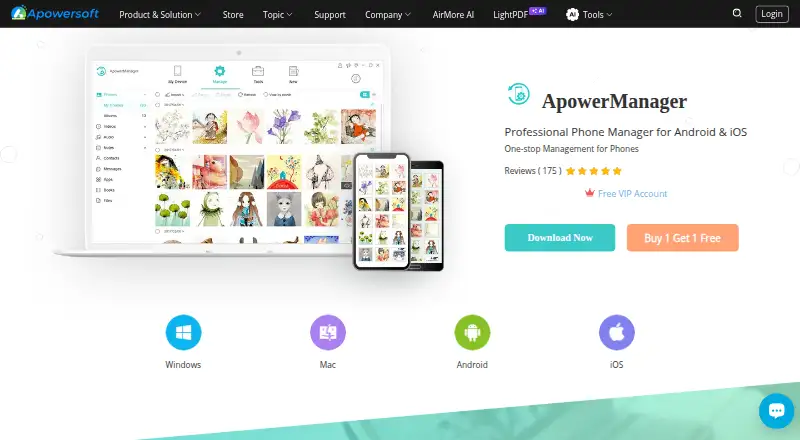
What ApowerManager is
ApowerManager is a phone manager for Android and iOS that connects a mobile device with a computer. It lets users import, export, delete, preview, and play phone photos, videos, and music on the computer. It can back up, arrange, transfer, and print contacts and messages; iOS users can manage call history, while Android users can send messages from a PC. The software also organizes apps, documents, and files, with access to iOS notes and app files and Android SD cards. Phone data can be backed up to Windows or Mac, and backup files can be restored to a phone with one click. The maker cautions that incorrect operation or differences in data storage and access can cause restore failure. Screen mirroring to a computer or projector works over USB or a wireless network and includes screenshot and screen recording tools. Listed systems include Windows 10/8/7, Mac OS 10.10 or higher, and iOS 8.0 or higher; supported devices include iPhone and iPad.
Good
- Transfers and manages photos, videos, and music.
- Backs up phone data to Windows or Mac.
- Mirrors screens over USB or wireless network.
- Offers screenshot and screen recording tools.
Watch out
- Restore attempts may fail due to operation or storage differences.
- Monthly license has a 7-day money-back guarantee.
- Requires Windows 10/8/7 or Mac OS 10.10 or higher.
Who it suits
ApowerManager suits Android and iOS users who want to manage phone media, files, contacts, messages, and backups from a computer. It may also suit users who want to mirror a phone screen to a computer or projector.
Verdict
ApowerManager brings phone file management, backup, and screen mirroring to Windows and Mac computers. A free plan is listed, with paid plans from $59.90/yr; restore failure is a stated risk.
Plans and prices
From ApowerManager's own pricing page, checked 2 Oct 2026.
| Plan | Price | What it gives you |
|---|---|---|
| Personal Monthly | $29.95 a month | 7-day money-back guarantee · Monthly; auto-renew, cancel anytime |
| Personal Annual | $39.95 a year | Free updates · technical support · Annual; auto-renew, cancel anytime |
| Personal Lifetime | $59.95, paid once | Free lifetime updates · technical support · Lifetime |
| Business Annual | $79.95 a year | Business license · Annual; auto-renew, cancel anytime |
| Business Lifetime | $159.90, paid once | Free lifetime service · upgrades · team license priced per user · Lifetime |
The facts
Each one read from ApowerManager's own pages, with the date it was checked.
What it does
- Backup and restore
- It backs up phone data to Windows or Mac and can restore backup files to a phone with one click.checked 2 Oct 2026
- Contacts and messages
- It can back up, organize, transfer, and print contacts and messages; iOS users can manage call history, and Android users can send messages from a PC.checked 2 Oct 2026
- Files
- It organizes apps, documents, and files, and provides access to iOS notes and app files and Android SD cards.checked 2 Oct 2026
- Media management
- It lets users import, export, delete, preview, and play mobile photos, videos, and music on a computer.checked 2 Oct 2026
- Privacy data practices
- The privacy policy says the company collects account, usage, and device information and may use third-party tracking tools such as Google Analytics and Firebase.checked 2 Oct 2026
- Product
- ApowerManager is a phone manager for Android and iOS.checked 2 Oct 2026
- Restore limitation
- The maker cautions that incorrect operation and differences in data storage and access may cause restore failure.checked 2 Oct 2026
- Screen mirroring
- It mirrors a phone screen to a computer or projector over USB or wireless network and includes screenshot and screen recording tools.checked 2 Oct 2026
- Security and privacy
- The store says payment and personal information are protected with advanced encryption and fraud protection; the privacy policy says it uses GDPR-aligned technical and organizational measures.checked 2 Oct 2026
- Support and refund
- The store advertises technical support and a 30-day money-back guarantee, reduced to 7 days for monthly licenses.checked 2 Oct 2026
- Supported systems
- The page lists Windows 10/8/7, Mac OS 10.10 or higher, and iOS 8.0 or higher; supported devices include iPhone and iPad.checked 2 Oct 2026
The company
- Company
- The maker identifies itself as WANGXU TECHNOLOGY (HK) CO., LIMITED, located in Hong Kong, and says the company was founded in 2010.checked 2 Oct 2026
Money
- Free VIP offer
- The maker offers one month of free VIP after a user submits a screenshot of a five-star review on Google Play or the App Store.checked 2 Oct 2026
The full review of ApowerManager
Overview
ApowerManager is a desktop phone manager for Android and iOS. It brings common phone-content tasks to a computer, including media and file management, contact and message handling, backup and restore, and screen mirroring. Depending on the platform, it can also provide access to Android SD cards or iOS notes and app files. Some tools are platform-specific: iOS users can manage call history, while Android users can send messages from a PC.
Its main role is to help organize and transfer phone data from a computer. It supports transfers between a phone and computer, app transfers, and computer backups. Screen mirroring can send a phone display to a computer or projector over USB or a wireless network.
Key features
Media and file management
ApowerManager lets users import, export, delete, preview, and play photos, videos, and music on a computer. It also organizes apps, documents, and other files. The available access depends on the device: the product lists iOS notes and app files, as well as Android SD cards.
Contacts, messages, and call history
Contacts and messages can be backed up, organized, transferred, and printed. iOS users can manage call history, while Android users can send messages from a PC. These platform-specific functions make the supported phone type an important consideration before choosing the software.
Backup, restore, and mirroring
Phone data can be backed up to a Windows or Mac computer, and backup files can be restored to a phone with one click. The maker cautions that a restore may fail because of incorrect operation or differences in how data is stored and accessed. Screen mirroring works over USB or a wireless network and includes screenshot and screen-recording tools.
Pricing
ApowerManager has a free plan, with paid plans listed from $59.90/yr. The store’s specific plan prices and terms are:
| Plan | Price and term | Listed terms |
|---|---|---|
| Personal Monthly | $29.95 a month | Billed monthly, auto-renews, cancel anytime; 7-day money-back guarantee |
| Personal Annual | $39.95 a year | Billed annually, auto-renews, cancel anytime; free updates and technical support |
| Personal Lifetime | $59.95, paid once | Free lifetime updates and technical support |
| Business Annual | $79.95 a year | Billed annually, auto-renews, cancel anytime; business license |
| Business Lifetime | $159.90, paid once | Free lifetime service and upgrades; team license priced per user |
The store advertises technical support and a 30-day money-back guarantee, with the guarantee reduced to 7 days for monthly licenses. The maker also offers one month of free VIP after a user submits a screenshot of a five-star review on Google Play or the App Store.
Platforms
ApowerManager supports Android, iOS, macOS, and Windows. The product page lists Windows 10, 8, and 7; Mac OS 10.10 or higher; and iOS 8.0 or higher, with iPhone and iPad among the supported devices. Its backup feature targets Windows or Mac computers. The listed Android requirements are not specified in the available platform details.
Who it's for
ApowerManager may suit people who want to manage phone media, files, contacts, or messages from a computer, or keep phone backups on Windows or Mac. It is also relevant to users who need phone-to-computer or app transfers, or want to mirror a phone screen and capture screenshots or recordings. Check the platform-specific tools and system requirements against the particular phone and computer before relying on a feature.
Pros and cons
Pros
- Combines media and file management, contacts and messages, backups, and screen mirroring.
- Offers a free plan and several personal and business payment options.
- Includes computer backup and one-click restore of backup files.
- Lists technical support and a money-back guarantee, subject to a shorter period for monthly licenses.
Cons
- Some functions differ between Android and iOS.
- The maker warns that restore attempts can fail due to operation errors or differences in data storage and access.
- The privacy policy says the company collects account, usage, and device information and may use third-party tracking tools such as Google Analytics and Firebase.
The store says payment and personal information are protected with advanced encryption and fraud protection. The privacy policy describes GDPR-aligned technical and organizational measures. These statements should be considered alongside the policy’s account, usage, and device-data collection practices.
Alternatives
For other phone-transfer options, see our Phone Transfer Software guide. Alternatives include Wondershare MobileTrans, FoneTool, vivo EasyShare, Dr.Fone Phone Transfer, EaseUS MobiMover, and Syncios Data Transfer. For a different kind of product, the directory also lists MagicINFO Cloud and Verizon Content Transfer.
Verdict
ApowerManager brings a broad set of phone-management tasks to Windows and Mac, with support for Android and iOS devices. Its strongest fit is for users who want to work with phone media, files, contacts, messages, or backups from a computer, while mirroring and capture tools add a separate display use case. The practical caveats are platform-dependent features, stated system requirements, and the maker’s warning that restores can fail. Review the plan terms and privacy practices as well as device compatibility before choosing it.
Alternatives to ApowerManager
- 1
AirMore
Free planAndroidiOSWebLinux8.1From $40.99 a year - 2
Syncios Manager
Free planAndroidiOSmacOSWindows7.9From $34.95 a year - 3
vivo EasyShare
Free planAndroidiOSmacOSWindows7.3Free plan - 4

HONOR Device Clone
Free planAndroidiOSWindows7.2Free plan - 5
FoneTool
AndroidiOSWindows6.8From $29.95 a year - 6
Wondershare MobileTrans
AndroidiOSmacOSWindows6.8From $29.99 a year