AirMore
AirMore connects an Android or iOS mobile device to a PC wirelessly, letting users transfer and manage data through a PC browser.
What AirMore is
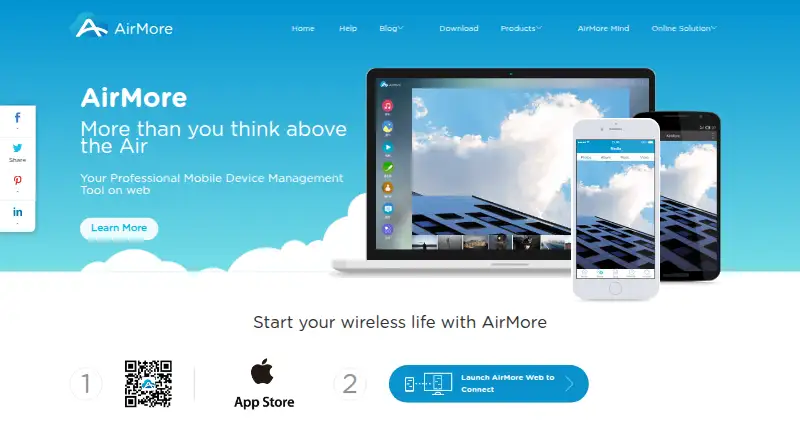
AirMore connects an Android or iOS mobile device to a PC wirelessly, letting users transfer and manage data through a PC browser. It can move music, videos, photos, and documents between the phone and computer, and play music and videos in the browser. The interface also manages text, Word, Excel, EPUB, and PDF files. On Android, users can view call logs and notifications, manage contacts, and send or manage messages from the browser. AirMore provides wireless screenshots and an Android screen reflector that displays the phone screen on a computer. Its local connection mode uses the same Wi-Fi network to transfer files; AirMore says those files are not stored on its server, which provides the QR code and connection data. The homepage says file transfers support HTTPS and require user permission to access a device. AirMore runs in a PC browser without a client or plugin. It is free to use, though Backup & Restore is labeled as under construction.
Good
- Transfers music, videos, photos, and documents.
- Works in a PC browser without a client or plugin.
- Local mode sends files over the same Wi-Fi network.
- Android screen reflector displays the phone on a computer.
- Free to use.
Watch out
- Backup & Restore is under construction.
- Call logs, notifications, and messaging tools are Android-only.
Who it suits
AirMore suits Android and iOS users who want to manage phone files from a PC browser without installing a PC client. Android users can also use its browser tools for messages, contacts, call logs, and notifications.
Verdict
AirMore provides browser-based file transfer and management across Android, iOS, and PC. Note that Backup & Restore is not ready, and several communication tools are limited to Android.
Plans and prices
From AirMore's own pricing page, checked 11 Oct 2026.
| Plan | Price | What it gives you |
|---|---|---|
| AirMore | Free | Free to use · wireless connection between mobile device and PC |
| Free | Free | Core wireless transfer · in-app purchases available · Free |
| AirMore Monthly VIP | $3.99 a month | Premium version access · Monthly |
| AirMore Quarterly VIP | $9.99 a month | Premium version access · Quarterly |
| AirMore Yearly VIP | $40.99 a year | Premium version access · Yearly |
The facts
Each one read from AirMore's own pages, with the date it was checked.
What it does
- API and SDK
- The official home, download, and help pages describe browser and mobile-app use but do not publish a public API or SDK.checked 14 Oct 2026
- Backup status
- The official feature page marks Backup & Restore as under construction.checked 14 Oct 2026
- Call logs
- Android call history can be displayed in the browser and call notifications can appear there.checked 14 Oct 2026
- Communication
- On Android, AirMore can display call logs and notifications and let users manage contacts and send or manage messages from a browser.checked 11 Oct 2026
- Connection
- The security page describes a local connection mode that connects devices on the same Wi-Fi network and sends transferred files through that local network.checked 11 Oct 2026
- Connection model
- The current connection mode requires the phone and PC to be on the same Wi-Fi network.checked 14 Oct 2026
- Contacts
- Android contacts can be added, edited, and deleted from the browser.checked 14 Oct 2026
- Data handling
- AirMore says transferred files in local connection mode are not stored on its server, which provides the QR code and data needed to establish the connection.checked 11 Oct 2026
- Developer restrictions
- The EULA prohibits decompiling, reverse engineering, or attempting to obtain the source code.checked 14 Oct 2026
- Documentation
- The help center lists 13 Android articles, 10 iOS articles, and 8 AirMore Web articles.checked 14 Oct 2026
- Document support
- The service handles text, Word, Excel, EPUB, and PDF documents with drag-and-drop transfer.checked 14 Oct 2026
- File management
- The browser file manager supports accessing, creating, moving, and deleting files and folders.checked 14 Oct 2026
- Files and documents
- The browser interface can manage files and transfer documents including text, Word, Excel, EPUB, and PDF files.checked 11 Oct 2026
- Licence
- The EULA identifies AirMore as copyrighted proprietary software owned by WANGXU TECHNOLOGY (HK) CO., LIMITED.checked 14 Oct 2026
- Limit: network dependence
- Appmus reports that transfer performance depends heavily on Wi-Fi quality and that screen mirroring can lag on weak networks.checked 14 Oct 2026
Where it runs
- App management
- The Android manager supports installing, uninstalling, backing up, and sharing Android apps.checked 14 Oct 2026
- Browser support
- The App Store description names Safari, Chrome, and Firefox as supported browsers.checked 14 Oct 2026
- Limit: App Store complaints
- App Store reviewers report failed QR recognition, unreliable same-Wi-Fi connections, and crashes.checked 14 Oct 2026
- Limit: iOS connectivity
- Wondershare reports that some users have difficulty connecting iOS devices to PCs through AirMore.checked 14 Oct 2026
The company
- Company founding and size
- The corporate profile says WANGXU was founded in 2010 and had more than 40 products, 180 employees, and users in over 100 countries during its 2011–2019 growth period.checked 14 Oct 2026
- Company headquarters
- The maker’s corporate profile describes WANGXU TECHNOLOGY (HK) CO., LIMITED as a Hong Kong-based company.checked 14 Oct 2026
- Company legal name
- AirMore identifies WANGXU TECHNOLOGY (HK) CO., LIMITED as its trademark owner and operator.checked 14 Oct 2026
- Company registration
- A Hong Kong company directory records WangXu Technology (HK) Co., Limited as incorporated on 26 August 2019 and currently live.checked 14 Oct 2026
Money
- Free plan
- Yeschecked 20 Sep 2026
The full review of AirMore
AirMore connects a phone to a PC through a browser, with wireless tools for moving and managing files. It suits people who want routine phone-to-computer access without installing a desktop client, especially Android users who want communication tools too. Its free core is useful, but the unfinished backup feature leaves an important gap.
Overview
AirMore puts phone content within reach of a PC browser, so users can transfer and manage data without a PC client or plugin. That makes it a sensible option for occasional file moves and browser-based access from a computer. Its appeal is stronger on Android: several of its extra tools are Android-only, while the core transfer workflow supports both Android and iOS.
Key features
File and media management
AirMore transfers photos, music, videos, and documents, including text, Word, Excel, EPUB, and PDF files. Users can also play music and videos in the browser. The range covers common file handling between a phone and PC, but AirMore is a poor fit for anyone who needs a dependable backup and restore workflow: Backup & Restore is under construction.
Android tools
On Android, AirMore can show call logs and notifications, and lets users manage contacts and messages from a browser. Wireless screenshots and a screen reflector that displays the phone screen on a computer add useful ways to view and interact with phone content. These extras make it more compelling for Android users; iOS users should choose it for transfers and file management rather than expect the same communication and reflection features.
Connection and security
In local connection mode, the phone and PC connect over the same Wi-Fi network and transferred files travel across that network. AirMore says those files are not stored on its server, which provides the QR code and data used to establish the connection. The service also says file transfers support HTTPS and device access requires user permission. That setup gives users a clear local-transfer option, though it depends on both devices being on the same Wi-Fi network.
Pricing
AirMore is freemium. The free AirMore plan costs nothing and covers wireless connection between a mobile device and PC. AirMore Monthly VIP and AirMore Yearly VIP use custom pricing. The paid plan names establish monthly and yearly options, but their included features and terms are not described, so the free plan is the clearest choice for users who only need the core connection and transfer workflow.
Platforms
AirMore supports Android, iOS, and web. The phone connects to a PC through a browser, with no PC client or plugin required. Android gets the call, notification, contact, message, screenshot, and screen-reflector tools; iOS users still have the core phone-to-PC file and media functions.
Who it's for
Choose AirMore if you want free, wireless transfers and browser-based file management from an Android or iOS phone, particularly when you do not want desktop software installed. Android users have the stronger case because of the added communication and screen tools. Look elsewhere if backup and restoration is central to your workflow, or if you need the same expanded phone controls on iOS.
Pros and cons
Pros
- Free wireless phone-to-PC connection, with browser access and no PC client or plugin.
- Transfers cover photos, music, videos, and several common document formats, with browser playback for music and video.
- Android users can access call logs, notifications, contacts, messages, screenshots, and screen reflection from the browser.
- Local connection mode sends files over the same Wi-Fi network, and AirMore says those files are not stored on its server.
Cons
- Backup & Restore is under construction, so AirMore does not suit users who need that workflow.
- Communication and screen-reflector tools are described for Android, limiting the extra utility for iOS users.
- The Monthly VIP and Yearly VIP plans have custom pricing, with no included features or terms described.
- Local connection mode requires the phone and PC to share a Wi-Fi network.
Alternatives
For phone migration and transfer-specific needs, the Phone Transfer Software category is a useful place to compare options; for broader transfer services, browse File transfer services.
Pick Android Switch for a free Android and iOS option when you want a dedicated app. vivo EasyShare is another free choice if phone cloning and free-data file transfer are the priority, with Android, iOS, macOS, and Windows support. HONOR Device Clone suits users looking for a free cloning option across Android, iOS, and Windows.
Choose Huawei HiSuite if you prefer a Mac or Windows download; its Mac version supports picture, video, file, and backup/restore functions. Syncios Manager is a desktop alternative for Mac and Windows with a free version and a 1 Year Subscription at $34.95 a year, billed Auto-Renew. Xiaomi Home is a free Android and iOS option when device support in your region suits your needs.
For a move from Android to a new iPhone or iPad, Move to iOS transfers content, with some free apps transferring when available in both stores and supported. Verizon Content Transfer is a free-download option for Android and iOS transfers without wires, accounts, or cloud.
Verdict
AirMore is a good fit for users who want a free, browser-based way to move and manage phone files without installing a PC client. Android owners get the most from its communication and screen tools, while iOS users get a more focused transfer and media workflow. Its main reason to look elsewhere is clear: Backup & Restore is not ready, and AirMore should not be treated as a backup solution.
Getting started
- Visit the AirMore website.
- Use an Android or iOS device with a PC browser.
- Connect the mobile device and PC wirelessly using AirMore.
- For local file transfers, connect both devices to the same Wi-Fi network.
Limits worth knowing
Backup & Restore is marked as under construction.
Questions
Is AirMore free?
Yes. It has a free plan listed as free.
Which platforms does AirMore support?
Its listed platforms are Android, iOS, and web. Its download page says it supports both Android and iOS.
Do I need to install a PC client?
No. AirMore says its features can be used in a PC browser without a PC client or plugin.
How does local file transfer work?
The devices connect over the same Wi-Fi network, and files transfer through that network. AirMore says files transferred in local mode are not stored on its server.
Who makes AirMore?
AirMore is identified as a registered trademark of WANGXU TECHNOLOGY (HK) CO., LIMITED.
Can AirMore back up and restore data?
Its Backup & Restore feature is labeled as under construction.
Alternatives to AirMore
- 1
Syncios Manager
Free planAndroidiOSmacOSWindows7.9From $34.95 a year - 2
vivo EasyShare
Free planAndroidiOSmacOSWindows7.3Free plan - 3

HONOR Device Clone
Free planAndroidiOSWindows7.2Free plan - 4
FoneTool
AndroidiOSWindows6.8From $29.95 a year - 5
Wondershare MobileTrans
AndroidiOSmacOSWindows6.8From $29.99 a year - 6
Android Switch
Free planAndroidiOS6.7Free plan