Super Dispatch
Super Dispatch is an auto transport platform that connects shippers and carriers handling vehicle moves.
What Super Dispatch is
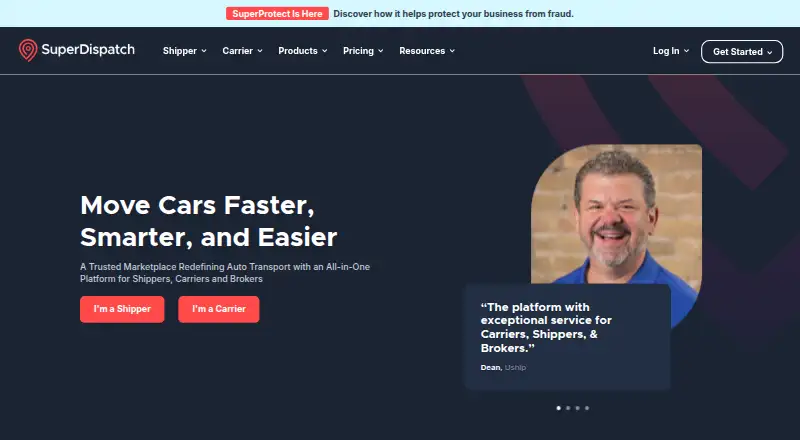
Super Dispatch is an auto transport platform that connects shippers and carriers handling vehicle moves. Its Shipper TMS covers work from creating an order through payment, with electronic documents and real-time tracking. For carriers, Carrier TMS and the Driver App support load management, eBOLs, inspections, GPS tracking, billing, and reporting. The Driver App is available on Android and iOS, alongside web, API, and extension platforms. Carrier TMS Lite is free for single drivers or small owner-operators, but does not include advanced reporting, automated invoicing, GPS tracking, or integrations. Integrations include REST APIs, EDI, Zapier, and QuickBooks Online or Desktop. Platform data is encrypted in transit and at rest, and the company completes an annual SOC 2 Type II audit.
Good
- Shipper TMS tracks orders through payment.
- Driver App supports Android and iOS.
- Integrates with Zapier and QuickBooks.
- Platform data is encrypted in transit and at rest.
Watch out
- Free Carrier TMS Lite omits GPS tracking.
- Lite excludes advanced reporting and automated invoicing.
- Shipper Pro has monthly VIN limits and possible overage fees.
Who it suits
Super Dispatch suits carriers and shippers moving cars, including brokers, dealers, auctions, and fleet leasing businesses. Its free Carrier TMS Lite is aimed at single drivers and small owner-operators.
Verdict
Super Dispatch brings carrier and shipper workflows together, with mobile driver tools and transport tracking. Check the Lite feature exclusions and Shipper Pro's VIN limits when choosing a plan.
Plans and prices
From Super Dispatch's own pricing page, checked 15 Oct 2026.
| Plan | Price | What it gives you |
|---|---|---|
| Carrier TMS Lite | Free | Driver App · limited Carrier TMS dashboard · Super Loadboard · offers and carrier profile · excludes advanced reporting, automated invoicing, GPS tracking and integrations |
| Carrier Pro | $55 a month | first seat $55/month · each additional seat $50/month · Carrier TMS · Driver App · load management · GPS · reporting · QuickBooks · Chrome extension · per seat |
| Shipper Pro | $129 a month | Super Loadboard · order management · GPS and ETA · notifications · electronic documentation · pricing recommendations · SuperPay · reporting |
| Shipper Pro | $159 a month | Super Loadboard · eBOL · GPS and ETA · verified carrier network · order, billing and customer management · reporting · automated price negotiation · includes 2 seats; additional seats $79/month |
| Shipper Enterprise | $2,999 a month | 1,000+ VINs/month or exclusive carrier networks · automated price negotiation · private loadboard · Shipper TMS API · premier onboarding · customer success manager |
The facts
Each one read from Super Dispatch's own pages, with the date it was checked.
What it does
- Accounting integration
- Carrier Pro includes QuickBooks integration for syncing invoices and payments.checked 15 Oct 2026
- API access
- Super Dispatch API access is a subscription-based feature that can automate loads, drivers, statuses, and operational data synchronization.checked 30 Sep 2026
- API access condition
- API access is subscription-based and may need to be enabled on an account before credentials are issued.checked 15 Oct 2026
- API capabilities
- The API supports posting and managing loads, assigning drivers, receiving delivery statuses and synchronizing order and vehicle data.checked 15 Oct 2026
- API support limit
- Support assists with API access, account configuration and documentation but does not troubleshoot customers’ custom code or internal systems.checked 15 Oct 2026
- API testing
- Super Dispatch provides a test account or sandbox so integrations can be validated without changing production data.checked 15 Oct 2026
- Audience
- Shipper Pro is designed for shippers, brokers, dealers, auctions, and fleet leasing businesses.checked 30 Sep 2026
- Automated negotiation
- Shipper Pro can negotiate carrier rates automatically on behalf of the shipper.checked 15 Oct 2026
- Carrier tools
- Carrier TMS and the Driver App support load management, eBOLs, inspections, GPS tracking, billing, and reporting.checked 30 Sep 2026
- Carrier workflow
- Carrier Pro combines load booking, dispatch management, inspections, electronic bills of lading, GPS updates, billing and reporting.checked 15 Oct 2026
- Chrome extension
- The Super Dispatch Connection extension imports dispatch sheets, connects supported CRMs and shows load status and driver-location information.checked 15 Oct 2026
- Customer support onboarding
- Shipper Pro includes personalized virtual onboarding with a dedicated specialist.checked 30 Sep 2026
- Data protection
- Platform data is encrypted in transit and at rest using AES-256 for stored data.checked 30 Sep 2026
- Digital documents
- The platform provides electronic bills of lading, inspection photos, proof-of-delivery records and invoices.checked 15 Oct 2026
- Encryption
- The security overview says data is encrypted in transit and at rest using AES-256 for stored data.checked 15 Oct 2026
- Funding
- Crunchbase lists nine investors, including Unbound Ventures and KCRise Fund, but masks the total funding amount.checked 15 Oct 2026
- GPS tracking
- Shipper TMS displays carrier GPS status, estimated arrival times and last known location on order pages and maps.checked 15 Oct 2026
- Integrations
- Integrations include REST APIs, EDI with OpenText, Glovis, and ICL Systems, Zapier, and QuickBooks Online or Desktop.checked 30 Sep 2026
- Legal name
- The Chrome Web Store identifies the developer as Super Dispatch, Inc.checked 15 Oct 2026
The company
- Company facts
- LinkedIn lists Super Dispatch as a privately held software-development company founded in 2013 with 51–200 employees and headquarters in Kansas City, Missouri.checked 15 Oct 2026
- Company ownership
- Super Dispatch says it was founded by Bek Abdullayev in 2013 and is privately owned and independent.checked 15 Oct 2026
- Founded
- 2013checked 28 Sep 2026
- Headquarters
- Kansas City, Missouri, United Stateschecked 28 Sep 2026
Money
- Free-plan limits
- Carrier TMS Lite is intended for single drivers or small owner-operators and excludes advanced reporting, automated invoicing, GPS tracking, and integrations.checked 30 Sep 2026
The full review of Super Dispatch
Super Dispatch is an auto-transport platform for carriers and shippers, combining shipment management with driver tools. It suits teams coordinating vehicle moves as well as owner-operators who want a mobile workflow; the free Lite tier is most compelling for a single driver willing to work without tracking and integrations.
Overview
Shipper TMS covers a vehicle move from order creation through payment, with electronic documents and real-time tracking. Carrier TMS and the Driver App focus on load management, eBOLs, inspections, GPS tracking, billing, and reporting. Bringing both sides into one platform is useful when a business needs to coordinate shipments and drivers, but the free carrier tier omits several capabilities that make that coordination more automated.
Key features
The Driver App is available on Android and iOS. Carrier tools include load management, electronic bills of lading, inspections, GPS tracking, billing, and reporting; map schedule views and live location tracking support dispatch visibility. These are practical tools for active vehicle transport operations, though Lite users do not get GPS tracking or advanced reporting.
Shipper TMS combines order handling, electronic documentation, and tracking through payment. Shipper Pro can add SuperProtect, a paid add-on that draws on account activity, FMCSA data, platform behavior, and historical context to surface carrier risk signals. It gives shippers another input when assessing carrier risk, but is an extra rather than part of the base plan.
Integrations include REST APIs, EDI with OpenText, Glovis, and ICL Systems, Zapier, and QuickBooks Online or Desktop. API access is a subscription-based feature for automating loads, drivers, statuses, and operational data synchronization, so teams should account for that separate subscription when planning integrations. The platform encrypts data in transit and uses AES-256 for stored data; it also undergoes an annual SOC 2 Type II audit by an independent AICPA-accredited evaluator.
Pricing
Carrier TMS Lite: free. The free tier includes the Driver App, a limited Carrier TMS dashboard, and Super Loadboard. It is aimed at single drivers and small owner-operators, but excludes advanced reporting, automated invoicing, GPS tracking, and integrations. That makes it a sensible starting point for basic load work, not a full-featured dispatch setup.
Carrier Pro: $55 a month. Pricing starts at $55/month per seat, with the first seat at $55/month and each additional seat at $50/month. Seat-based pricing suits carriers that need a paid team workflow; the per-seat structure means costs rise as more users join. Carrier Pro includes priority phone, email, or chat support from 7 am to 7 pm CT.
Shipper Pro: $159 a month. Pricing starts at $159/month and includes two seats; each additional seat costs $79/month. Monthly VIN limits vary by tier and overage fees may apply, so shippers should match a tier to their shipment volume rather than assume the starting price covers every workload. Personalized virtual onboarding with a dedicated specialist is included. SuperProtect is a paid add-on.
A free trial is offered. The pricing model is freemium, with paid plans starting at $55/user/mo; Shipper Pro pricing is custom beyond its stated starting price and tier limits.
Platforms
Super Dispatch supports Android, iOS, web, API, and an extension. Its Driver App covers the two major mobile platforms, while web and API access support office-side and integrated workflows.
Who it's for
Shipper Pro is designed for shippers, brokers, dealers, auctions, and fleet leasing businesses. Carrier TMS Lite is the narrower fit for individual drivers or small owner-operators who can do without tracking, integrations, and automation. Carriers needing those capabilities, or support with defined service hours, have a stronger case for Carrier Pro.
Pros and cons
- Pro: Shipper and carrier workflows span orders, documents, tracking, driver operations, billing, and reporting, making the platform relevant to both sides of auto transport.
- Pro: Carrier TMS Lite provides a free entry point with a Driver App and loadboard for solo operators.
- Pro: Multiple integration paths, including EDI, Zapier, and QuickBooks, can connect transport operations with other systems.
- Con: Lite removes GPS tracking, automated invoicing, advanced reporting, and integrations, limiting its value for operators who need a connected workflow.
- Con: Carrier Pro charges by seat, while Shipper Pro has tiered VIN limits and possible overages; growing teams and higher-volume shippers need to budget beyond the starting price.
- Con: API access and SuperProtect are paid features, so key automation or risk-review needs can add to the plan cost.
Alternatives
Numeo is worth considering for a smaller operation seeking a freemium option: Spot Free is free forever for one seat and one MC connection, while Spot Pro is shown at $9.99 a month billed annually. Axon Software is a paid alternative with a free trial and Android, iOS, and web support.
Ditat is a paid TMS option with a personalized demo and sales-contact pricing. Transflo Mobile+ ELD is a paid mobile option requiring fleet or broker authorization and a Fleet or Broker ID; premium add-ons are available. McLeod Software Transportation Management offers paid solutions including LoadMaster, PowerBroker, LoadMaster LTL, and DocumentPower, with pricing by contacting sales.
Degama DTMS offers a trial with internet access required and representative contact to discuss access and evaluation criteria. Diesel TMS is a freemium alternative for web and iOS. LoadMaster.app is a free option for iOS and Android.
Browse more options in Trucking Software and Dispatch Software.
Verdict
Super Dispatch is a strong fit for auto-transport businesses that want shipper and carrier operations, driver tools, and tracking within one platform. Solo drivers can start free, but the Lite exclusions make Carrier Pro the more practical choice once tracking, integrations, or automated invoicing matter. Shippers should weigh included seats against VIN limits and potential overages before choosing Shipper Pro; teams needing broad capabilities without seat or volume cost growth may prefer to compare alternatives.
Getting started
- Visit the Super Dispatch website.
- Choose Carrier TMS Lite, Carrier Pro, or Shipper Pro for the relevant workflow.
- Use the Android or iOS Driver App for mobile carrier tools.
- Consider a free trial before selecting a paid plan.
- Add subscription-based API access if you need automated operational data synchronization.
Limits worth knowing
Carrier TMS Lite excludes advanced reporting, automated invoicing, GPS tracking, and integrations. Shipper Pro has monthly VIN limits, and overage fees may apply.
Questions
Is there a free plan?
Yes. Carrier TMS Lite is listed as free.
Which platforms are available?
The platform lists Android, iOS, web, API, and extension access.
What integrations are included?
Integrations include REST APIs, EDI with OpenText, Glovis, and ICL Systems, Zapier, and QuickBooks Online or Desktop. API access is subscription-based.
What is included in Carrier TMS Lite?
The free plan includes the Driver App, a limited Carrier TMS dashboard, and Super Loadboard. It excludes advanced reporting, automated invoicing, GPS tracking, and integrations.
Alternatives to Super Dispatch
- 1
Numeo
Free planAndroidiOSWebAPI7.9From $9.99 a month - 2
TruckingOffice
AndroidiOSWebAPI7.8From $240 a year - 3
McLeod Software Transportation Management
Free planAndroidiOSWebAPI7.7Free plan - 4

AscendTMS
AndroidiOSWebAPI7.6From $69 a month - 5
SmartHop
Free planAndroidiOSWebmacOS7.5Free plan - 6
TruckLogics
AndroidiOSWeb7.1From $35.96 a month