
Streamster
Streamster is a multistreaming service for sending broadcasts to as many as four destinations.
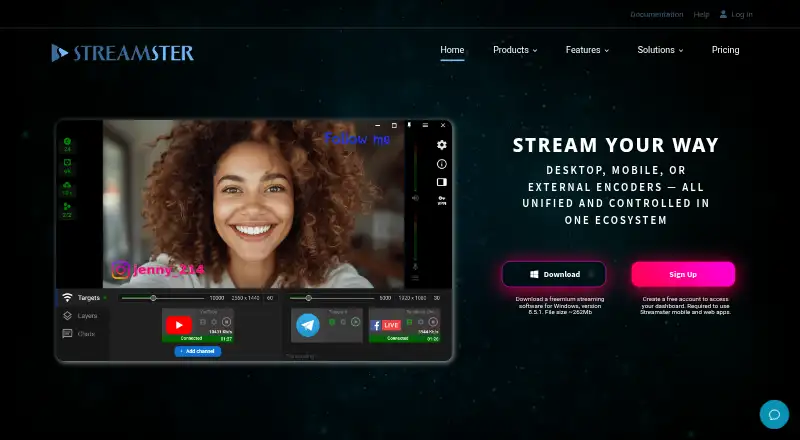
What Streamster is
Streamster is a multistreaming service for sending broadcasts to as many as four destinations. It is available on the web, Windows, iOS, and Android, though a browser-based studio is listed as unavailable. Plans vary by streaming-channel capacity, maximum bitrate, and recommended maximum resolution.
The free plan includes two channels, a maximum bitrate of 4,000 kbps, and a recommended maximum resolution of 720p. Monthly paid plans range from LITE at $15.00 per month, with four channels, to PREMIUM at $75.00 per month, with ten channels and a recommended maximum of 4K. Pay-per-use plans are billed per hour: LITE Pay-per-use is $0.48 per month and PREMIUM Pay-per-use is $1.92 per month. Those options provide four and ten channels respectively, with recommended maximum resolutions of 1080p and 4K. The listed primary stream mode is hybrid. The channel and resolution limits differ by plan, so users can consider how many simultaneous streams and destinations they need.
Good
- Supports multistreaming to up to four destinations.
- Available on web, Windows, iOS, and Android.
- Free plan includes two streaming channels.
- Premium monthly plan recommends up to 4K resolution.
Watch out
- Browser-based studio is unavailable.
- Free plan recommends a maximum resolution of 720p.
- Pay-per-use options are billed per hour.
Who it suits
It suits broadcasters who want to send streams to multiple destinations and choose a plan by channel capacity, bitrate, and recommended resolution. The free option covers two channels, while larger plan limits are available at listed prices.
Verdict
Streamster offers free, monthly, and pay-per-use plans with different channel and resolution limits. Check those limits against the number of streams and destinations needed before choosing a tier.
Plans and prices
From Streamster's own pricing page, checked 20 Sep 2026.
| Plan | Price | What it gives you |
|---|---|---|
| FREE | Free | 2 streaming channels · 4,000 kbps max bitrate · 720p recommended maximum resolution · free forever |
| LITE | $15 a month | 4 streaming channels · 7,000 kbps max bitrate · 1080p recommended maximum resolution · per month |
| REGULAR | $30 a month | 6 streaming channels · 10,000 kbps max bitrate · 1080p recommended maximum resolution · per month |
| PROFESSIONAL | $50 a month | 8 streaming channels · 15,000 kbps max bitrate · 2K recommended maximum resolution · per month |
| PREMIUM | $75 a month | 10 streaming channels · 25,000 kbps max bitrate · 4K recommended maximum resolution · per month |
| LITE Pay-per-use | $0.48 a month | 4 streaming channels · 7,000 kbps max bitrate · 1080p recommended maximum resolution · per hour |
| REGULAR Pay-per-use | $0.96 a month | 6 streaming channels · 10,000 kbps max bitrate · 1080p recommended maximum resolution · per hour |
| PROFESSIONAL Pay-per-use | $1.56 a month | 8 streaming channels · 15,000 kbps max bitrate · 2K recommended maximum resolution · per hour |
| PREMIUM Pay-per-use | $1.92 a month | 10 streaming channels · 25,000 kbps max bitrate · 4K recommended maximum resolution · per hour |
| FREE (monthly) | Free | 2 streaming channels · 4 000 Kbps per-channel bitrate · Web, desktop, and mobile apps · Multiple devices simultaneously · $0 /forever |
| FREE (pay-per-use) | Free | 2 streaming channels · 4 000 Kbps per-channel bitrate · Web, desktop, and mobile apps · Multiple devices simultaneously · $0.00 /forever |
| LITE (pay-per-use) | $0.48, paid once | 4 streaming channels · 7 000 Kbps per-channel bitrate · VPN · Web, desktop, and mobile apps · Multiple devices simultaneously · $0.48 /hour |
| REGULAR (pay-per-use) | $0.96, paid once | 6 streaming channels · 10 000 Kbps per-channel bitrate · Transcoding 1080p*30FPS / 720p*30FPS · VPN · $0.96 /hour |
| PROFESSIONAL (pay-per-use) | $1.56, paid once | 8 streaming channels · 15 000 Kbps per-channel bitrate · Transcoding 2k*30FPS / 1080p*30FPS · VPN · $1.56 /hour |
| PREMIUM (pay-per-use) | $1.92, paid once | 10 streaming channels · 25 000 Kbps per-channel bitrate · Transcoding 4k*60FPS / 1080p*60FPS · VPN · $1.92 /hour |
| LITE (monthly) | $15 a month | 4 streaming channels · 7 000 Kbps per-channel bitrate · VPN · Web, desktop, and mobile apps · Multiple devices simultaneously · $15 /month |
| REGULAR (monthly) | $30 a month | 6 streaming channels · 10 000 Kbps per-channel bitrate · Transcoding 1080p*30FPS / 720p*30FPS · VPN · $30 /month |
| PROFESSIONAL (monthly) | $50 a month | 8 streaming channels · 15 000 Kbps per-channel bitrate · Transcoding 2k*30FPS / 1080p*30FPS · VPN · $50 /month |
| PREMIUM (monthly) | $75 a month | 10 streaming channels · 25 000 Kbps per-channel bitrate · Transcoding 4k*60FPS / 1080p*60FPS · VPN · $75 /month |
The facts
Each one read from Streamster's own pages, with the date it was checked.
Where it runs
- Browser-based studio
- Nochecked 20 Sep 2026
What it does
- Business use
- Businesses can manage multiple users within one account and may receive higher discounts by paying in bulk.checked 5 Oct 2026
- Cloud distribution
- The device sends one stream to Streamster’s cloud servers, which distribute it to selected platforms.checked 5 Oct 2026
- Desktop features
- The Windows app includes multistreaming, video recording, multiple video sources, screen capture, image overlays, filters, and remote control.checked 5 Oct 2026
- External encoders
- The web app can restream video sent from OBS, Wirecast, Streamlabs, or other streaming software.checked 5 Oct 2026
- Limits
- The Windows desktop app is not available for macOS, although the browser app works on Mac and PC.checked 5 Oct 2026
- Mobile features
- The iOS and Android apps support live multistreaming, camera and orientation selection, adjustable resolution, bitrate and FPS, and remote control of desktop streams.checked 5 Oct 2026
- Product
- Streamster provides live streaming and cloud multistreaming to broadcast one stream to multiple platforms simultaneously.checked 5 Oct 2026
- Security and privacy
- Streamster says it does not store or share broadcasters’ video and audio content and uses secure technology, privacy controls, and employee access restrictions to safeguard information.checked 5 Oct 2026
- Support
- The site links to a Help Center and says users can contact its support team for help cancelling a subscription.checked 5 Oct 2026
- Supported destinations
- The web app lists 50+ compatible streaming platforms and supports custom destinations that accept RTMP.checked 5 Oct 2026
- Transcoding
- Server-side transcoding can apply different video settings for different destination platforms and is included in some paid plans.checked 5 Oct 2026
- VPN
- The Windows app offers a built-in VPN that encrypts internet traffic, and the maker says it is available with paid plans.checked 5 Oct 2026
Money
- Free and trial
- The free plan has no ads or Streamster watermark, and the pricing FAQ says there is no free trial because the free plan lets users test most features.checked 5 Oct 2026
- Free plan
- Yeschecked 20 Sep 2026
The full review of Streamster
Streamster is a multistreaming service for creators who want to send one broadcast to several platforms from desktop or mobile. It is strongest for users who need adjustable channel and video limits or occasional hourly access; its four-destination ceiling and lack of a browser-based studio narrow its appeal.
For a focused set of outlets, the combination of a no-watermark free plan, Windows production tools and mobile streaming makes Streamster a practical option. Look elsewhere if you need to reach more than four destinations or want to produce a show entirely in a browser.
Overview
Streamster sends one stream to its cloud servers, which distribute it to selected platforms. The web app supports more than 50 compatible platforms and custom RTMP destinations, and can relay video from OBS, Wirecast, Streamlabs or other streaming software. That flexibility helps creators keep their existing encoder, though the overall destination limit remains four.
Channel allowances scale from two on Free to ten on Premium, but more channels do not raise the four-destination maximum. The distinction matters: Streamster can suit a creator comparing tiers for stream capacity, but not one who needs a single broadcast to reach a larger network of outlets.
Key features
- Production tools: The Windows app includes multistreaming, recording, multiple video sources, screen capture, image overlays, filters and remote control. It offers a broader production toolkit than a simple relay, but is unavailable on macOS.
- Mobile streaming: The iOS and Android apps support live multistreaming, camera and orientation selection, adjustable resolution, bitrate and frame rate, and remote control of desktop streams. That makes a phone useful as either a streaming device or a controller.
- Transcoding: Server-side transcoding can apply different video settings for different destinations, and is included in some paid plans. This can help when outlets need different output settings, but it is not a reason to assume every paid tier includes it.
- Privacy and VPN: Streamster says it does not store or share broadcasters’ video and audio, and uses privacy controls and employee access restrictions. The Windows app also has a built-in VPN for encrypting internet traffic, available with paid plans.
Pricing
The Free plan costs nothing, billed free forever. It allows two streaming channels, up to 4,000 kbps and a recommended maximum resolution of 720p; it has no ads or Streamster watermark. It is a useful way to establish whether the channel and quality limits suit a modest setup, and there is no separate free trial.
Monthly subscriptions raise the ceilings without changing the four-destination cap:
| Plan | Price and term | Limits |
|---|---|---|
| LITE | $15 a month, billed per month | 4 channels; 7,000 kbps; recommended maximum 1080p |
| REGULAR | $30 a month, billed per month | 6 channels; 10,000 kbps; recommended maximum 1080p |
| PROFESSIONAL | $50 a month, billed per month | 8 channels; 15,000 kbps; recommended maximum 2K |
| PREMIUM | $75 a month, billed per month | 10 channels; 25,000 kbps; recommended maximum 4K |
LITE is the step up for users who outgrow two channels or 720p. REGULAR adds capacity while staying at a 1080p recommendation; PROFESSIONAL and PREMIUM are aimed at higher-resolution or higher-bitrate streams. Those higher tiers are difficult to justify if the lower ceiling already suits the broadcast.
Pay-per-use pricing is billed by the hour and provides the same channel, bitrate and resolution limits as its corresponding monthly tier: LITE Pay-per-use costs $0.48 a month, billed per hour; REGULAR Pay-per-use costs $0.96 a month, billed per hour; PROFESSIONAL Pay-per-use costs $1.56 a month, billed per hour; and PREMIUM Pay-per-use costs $1.92 a month, billed per hour. Despite the displayed per-month unit, the billing term is hourly. This structure suits sporadic sessions better than a recurring subscription, while frequent streamers should compare total hourly use with the monthly price. Businesses can manage multiple users in one account and may receive higher discounts for bulk payment.
Platforms
Streamster has web, Windows, iOS and Android apps. Its web app handles destination setup and relaying, but there is no browser-based studio. Mac users can use the browser app, but the Windows production app is not available on macOS.
Who it's for
Streamster fits creators who want cloud multistreaming, a mobile streaming option, or a Windows app with recording and scene-building tools. The free tier suits a two-channel, 720p start; hourly tiers are more relevant to occasional broadcasters, while monthly tiers serve regular users who need higher limits. It is a poor fit for broadcasts needing more than four destinations or for Mac users who require the Windows app’s production features.
Pros and cons
- Pros: The free plan has no ads or watermark, and includes two channels at a recommended 720p maximum.
- Pros: More than 50 compatible platforms, custom RTMP destinations and external-encoder restreaming offer flexibility in where and how to send a broadcast.
- Pros: Hourly pay-per-use tiers avoid a monthly subscription for occasional streams.
- Cons: All plans are capped at four destinations, even when a tier allows more channels.
- Cons: There is no browser-based studio, and the Windows app’s production features are unavailable on macOS.
- Cons: The more demanding bitrate and resolution limits require substantially higher monthly prices.
Alternatives
- Restream is worth comparing if broader platform support matters: it runs on Android, iOS, Linux, macOS, web and Windows, while its free plan allows two channels at once but includes Restream branding.
- OBS Studio is the clearer choice for a free, unrestricted encoder on Linux, macOS or Windows; its free plan has no watermarks or usage limitations, but Streamster is the option here with cloud multistreaming.
- PRISM Live Studio is an alternative for users who want a free plan or a paid option priced at $9.99 a month.
- DualStream Relay is another freemium streaming alternative.
- OneStream Live may suit users whose needs fit its free plan of two destinations, 720p and one team seat, or its paid Basic tier at $15 a month.
- Meld Studio is an alternative for macOS or Windows users; its free plan includes multistreaming and 4K recording with multitrack audio.
- XSplit Broadcaster is a Windows alternative if 720p streaming without a watermark is enough and simultaneous multistreaming is not needed on the free tier.
- Lightstream is a web-based alternative for users who want a browser studio.
- Live Streaming Software is the category to browse for more options.
- Game Streaming Software is another relevant category for game broadcasters.
- Live TV streaming services is a separate category for viewers choosing live TV services.
Verdict
Choose Streamster if you want cloud multistreaming with a useful free starting point, Windows production tools or pay-per-use access for occasional broadcasts. Its strongest reason to look elsewhere is the hard four-destination limit; Mac users who need desktop production features should also choose a tool with a native Mac app.
Getting started
- Open https://streamster.io/ in a browser.
- Choose the free plan or a paid monthly or pay-per-use option.
- Use the web app, Windows app, or Android or iOS app.
- Select compatible platforms or configure a custom RTMP destination.
- Connect an external encoder such as OBS, Wirecast, or Streamlabs if you want to restream its video.
Limits worth knowing
The free plan supports two streaming channels, a 4,000 kbps maximum bitrate, and a recommended maximum resolution of 720p. The Windows VPN and server-side transcoding are paid-plan features; transcoding is included in some paid plans.
Questions
Is there a free plan or free trial?
Yes. Streamster has a free plan with no ads or watermark. It does not offer a free trial because the free plan lets users test most features.
How much do paid plans cost?
Pay-per-use listings include LITE at $0.48 per hour and PREMIUM at $1.92 per hour.
Which platforms does Streamster support?
It lists Android, iOS, web, and Windows. The Windows desktop app is not available for macOS, though the browser app works on Mac and PC.
Can it stream from external encoding software?
Yes. The web app can restream video sent from OBS, Wirecast, Streamlabs, or other streaming software.
Does Streamster have a browser-based studio?
No. The browser app supports multistreaming, but a browser-based studio is not offered.
How many destinations can I use?
The listed maximum is four destinations. The web app lists 50+ compatible platforms and also supports custom RTMP destinations.
Alternatives to Streamster
- 1

Restream
Free planAndroidiOSWebAPI9.1From $19 a month - 2
mimoLive
Free planiOSWebAPImacOS8.7From $70 a month - 3

Amazon Interactive Video Service
Free planAndroidiOSWebAPI8.7Free plan - 4

BoxCast
AndroidiOSWebAPI8.6From $8.25 a month - 5
OneStream Live
Free planAndroidiOSWebExtension8.5From $15 a month - 6

StreamYard On-Air
Free planiOSWebExtension8.5From $35.99 a month