
OBS Studio
OBS Studio is free, open-source software for recording video and live streaming on Windows, macOS, and Linux.
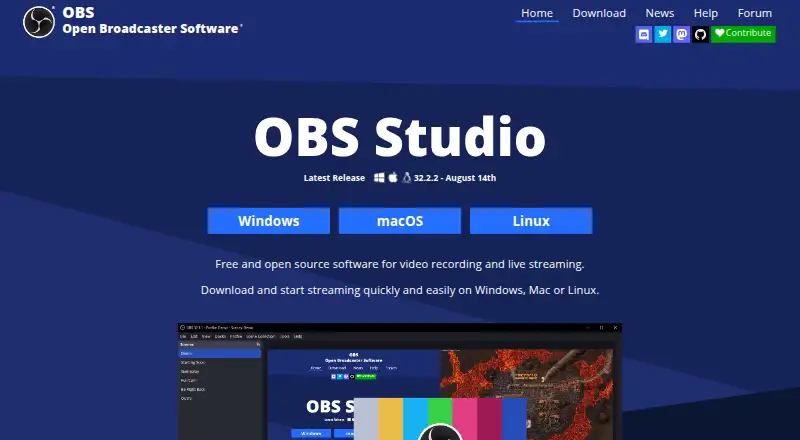
What OBS Studio is
OBS Studio is free, open-source software for recording video and live streaming on Windows, macOS, and Linux. It captures and mixes audio and video from sources such as windows, images, text, browser windows, webcams, and capture cards. You can arrange sources into an unlimited number of scenes and switch among them with customizable transitions. Studio Mode lets you preview scenes before they go live, while Multiview can monitor eight scenes. The audio mixer includes per-source filters, with support for VST plugins. Hotkeys control many recording and streaming actions. An API, native plugins, and Lua or Python scripts let users extend and customize the software. OBS supports streaming platforms including Twitch and YouTube; streams connect directly from the user's computer to the service. It is distributed under GPLv2 and may be used commercially subject to the license terms. Listed system requirements include Windows 10 or 11, macOS 13.0 or newer, and Linux distribution through Flathub or an Ubuntu 24.04-or-newer PPA.
Good
- Free and open source, with commercial use permitted under license terms
- Unlimited scenes with customizable transitions
- Studio Mode previews scenes before they go live
- Audio mixer offers per-source filters and VST support
- API, plugins, and Lua or Python scripts extend it
Watch out
- Not a browser-based studio
- Does not support multistreaming
- Requires macOS 13.0 or newer per listed requirements
Who it suits
OBS Studio suits people who want free software for video recording or live streaming and need configurable scenes, audio controls, or plugin and scripting options. It is available for Windows, macOS, and Linux.
Verdict
OBS Studio brings scene composition, recording, streaming, and audio controls into a free open-source program. Check the listed operating-system requirements and consider whether its non-browser workflow fits your setup.
Plans and prices
From OBS Studio's own pricing page, checked 29 Sep 2026.
| Plan | Price | What it gives you |
|---|---|---|
| OBS Studio | Free | No watermarks or usage limitations · can be used commercially |
The facts
Each one read from OBS Studio's own pages, with the date it was checked.
What it does
- Action hotkeys
- Hotkeys are available for many actions, including streaming and recording controls.checked 27 Sep 2026
- Audio mixer
- Includes an audio mixer with per-source filters.checked 27 Sep 2026
- Audio tools
- The audio mixer provides per-source filters such as noise gate, noise suppression, and gain, with VST plugin support.checked 29 Sep 2026
- Custom transitions
- Provides customizable transitions and supports user-provided stinger video files.checked 27 Sep 2026
- Extensibility
- OBS Studio provides an API and supports native plugins plus Lua or Python scripts.checked 29 Sep 2026
- Latest release
- Version 32.2.2, released August 14th.checked 27 Sep 2026
- Licensing and commercial use
- OBS is distributed under GPLv2 and may be used commercially without restrictions, subject to the license terms.checked 29 Sep 2026
- Multiple sources
- Scenes can include windows, images, text, browser windows, webcams, and capture cards.checked 27 Sep 2026
- Multiview monitoring
- Multiview can monitor 8 different scenes.checked 27 Sep 2026
- Network behavior
- OBS says streams connect directly from the user's computer to the streaming service and do not depend on OBS servers.checked 29 Sep 2026
- Plugin API
- A powerful API enables plugins and scripts for customization and added functionality.checked 27 Sep 2026
- Primary use
- Used for video recording and live streaming.checked 27 Sep 2026
- Production controls
- Studio Mode lets users preview scenes and sources before taking them live, and Multiview can monitor eight scenes.checked 29 Sep 2026
- Purpose
- OBS Studio is free and open source software for video recording and live streaming.checked 29 Sep 2026
- Real-time capture
- Provides high-performance real-time video and audio capturing and mixing.checked 27 Sep 2026
- Scenes and sources
- It captures and mixes video and audio from sources including windows, images, text, browser windows, webcams, and capture cards.checked 29 Sep 2026
- Scene switching
- Users can set up an unlimited number of scenes and switch between them with custom transitions.checked 29 Sep 2026
- Script languages
- Scripts can be written with Lua or Python.checked 27 Sep 2026
Where it runs
- Browser-based studio
- Nochecked 20 Sep 2026
- macOS support
- Supports macOS 12.0 or newer.checked 27 Sep 2026
The company
- Founded
- 2012checked 23 Sep 2026
- Project ownership
- OBS and OBS Studio are open source projects created and maintained by Lain.checked 27 Sep 2026
Money
- Free open source
- OBS Studio is free and open source.checked 27 Sep 2026
- Free plan
- Yeschecked 20 Sep 2026
The full review of OBS Studio
Overview
OBS Studio is desktop software for building video scenes, recording them, or sending them to a live-streaming service. It is best suited to creators who want control over how multiple sources are composed and switched, rather than a browser-based studio. Its extensive production tools come without a price or usage cap, but the scene-based workflow asks more of users than a simple clip recorder.
Scenes can combine windows, images, text, browser windows, webcams, and capture cards, with real-time video and audio capture and mixing. OBS supports popular streaming platforms, including Twitch and YouTube, and streams connect directly from the user’s computer to the streaming service rather than through OBS servers. The software is open source under GPLv2 and can be used commercially subject to the license terms.
Key features
Scene-based production
OBS supports unlimited scenes and customizable transitions, including user-provided stinger video files. That flexibility suits streams or recordings that need distinct layouts, while adding setup work for anyone who only wants to capture a quick clip. Studio Mode lets users preview scenes and sources before taking them live, and Multiview can monitor eight scenes. Hotkeys cover many actions, including recording and streaming controls, which helps manage production without relying solely on menus.
Audio and extensibility
The audio mixer offers per-source filters such as noise gate, noise suppression, and gain, with support for VST plugins. An API enables plugins and scripts to extend or customize the software; scripts can be written in Lua or Python. These tools give technically inclined users room to tailor a workflow, but OBS is less compelling for someone who wants a narrowly focused recorder with minimal configuration.
OBS supports recording and live streaming, with encoder as its primary stream mode, and supports resolutions up to 4K. It also supports stream scheduling and looping or replaying streams. Multistreaming is not supported, so creators who need to send one stream to multiple destinations should look elsewhere.
Pricing
OBS Studio costs nothing. The free plan has no watermarks or usage limitations and may be used commercially; there is no free trial because the software is free. There are no paid tiers or usage caps to trade against its full feature set.
That makes it a strong fit for individuals and commercial users who want production controls without a subscription. The trade-off is not a reduced plan but the desktop workflow itself: OBS is not browser-based, and its scene composition and configuration may be more than a basic recording task requires.
Platforms
OBS runs on Windows, macOS, and Linux, rather than in a browser. It supports Windows 10 and Windows 11, and macOS 13.0 or newer. Linux distribution is through Flathub and an Ubuntu 24.04-or-newer PPA. Check those requirements against the machine you plan to use before choosing it.
Who it's for
OBS is for streamers, video creators, and other users who want to combine several visual and audio sources, prepare multiple scenes, and control transitions and sound within one desktop program. Its unlimited scenes, filters, hotkeys, and plugin options make it especially suited to repeatable productions. It is a weaker fit for users who need multistreaming, a browser-based studio, or a simpler tool focused on capturing short gameplay clips.
Pros and cons
- Pros: Unlimited scenes, customizable transitions, and preview and multiview controls support more involved live productions.
- Pros: Per-source audio filters, VST support, and Lua or Python scripting provide control over sound and customization.
- Pros: The free plan removes watermarks and usage limitations, including for commercial use subject to GPLv2.
- Cons: The desktop-only workflow rules it out for creators who want to produce in a browser.
- Cons: No multistreaming means it cannot send a stream to multiple destinations at once.
- Cons: Scene composition and extensibility bring setup complexity that may be unnecessary for straightforward clip recording.
Alternatives
For a free Windows-only option with a GeForce 551.52 driver or later and a supported GPU required, consider NVIDIA ShadowPlay. If you want open-source game recording with replay buffer, clip editing, and automatic game highlights on Linux or Windows, Segra is another option. Streamlabs Highlighter is free on macOS and Windows and includes automated gameplay highlight detection, clip editing, and export as part of Streamlabs Desktop.
Medal is a freemium choice across Android, iOS, and Windows; its Premium plan is $9.99 a month (billed Monthly subscription) and includes removable watermarks, auto-generated subtitles, full original-quality uploads, and unlimited cloud storage. Bandicam is a freemium alternative for Linux, macOS, web, and Windows, with annual 1-PC and perpetual-use 1-PC plans as well as a business annual plan. Outplayed is a Windows freemium option with a Core plan that includes 3 months of Outplayed.tv hosting and a Premium plan with unlimited hosting. SteelSeries Moments is a free Windows option, while Razer Game Clips is another free Windows alternative.
For category browsing, see Live Streaming Software, Game Streaming Software, Game recording software, Video Podcast Software, Virtual Camera Software, and Live TV streaming services.
Verdict
Choose OBS Studio if you want a free, unrestricted desktop production tool for composing scenes, controlling audio, and recording or streaming from Windows, macOS, or Linux. Its main advantage is the breadth of control without watermarks or usage limits. Look elsewhere if you need multistreaming, a browser-based studio, or a more focused clip recorder with less setup.
Getting started
- Open the OBS Studio website.
- Choose a download for Windows, macOS, or Linux.
- Install OBS Studio on a supported system.
- Create scenes and add capture sources such as windows, webcams, or capture cards.
- Configure streaming or recording controls, and preview scenes in Studio Mode before going live.
Questions
Is OBS Studio free?
Yes. Its plan costs nothing and has no watermarks or usage limitations.
Is OBS Studio open source?
Yes. OBS Studio is distributed under GPLv2.
Which platforms does OBS Studio support?
Windows, macOS, and Linux are supported. The listed requirements include Windows 10 or 11, macOS 13.0 or newer, and Linux through Flathub or an Ubuntu 24.04-or-newer PPA.
Can OBS Studio be used commercially?
Yes. It may be used commercially subject to the GPLv2 license terms.
Which streaming services does it support?
OBS says it supports popular streaming platforms; Twitch and YouTube are identified as examples.
Does OBS Studio support multistreaming or browser-based production?
No. The listed capabilities say it has no multistreaming and no browser-based studio.
Alternatives to OBS Studio
- 1
Medal
Free planAndroidiOSWindows8.4From $7.99 a month - 2
Razer Game Clips
Free planAndroidiOSAPIWindows7.9Free plan - 3
Steam
Free planAndroidiOSWebAPI7.8Free plan - 4

Bandicam
WebLinuxmacOSWindows7.7 - 5
RePlays
Free planOpen sourceLinuxWindows7.6Free plan - 6

NVIDIA ShadowPlay
Free planWindows7.4Free plan