
Bandicam
Bandicam is screen recording software for capturing screens, gameplay, webcam video and audio.
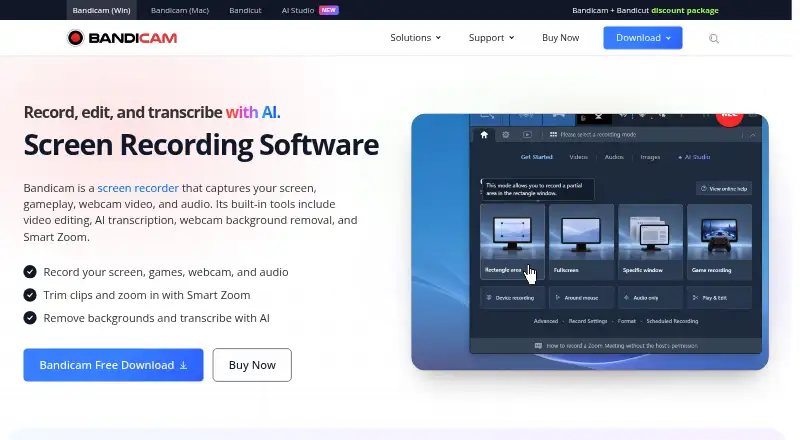
What Bandicam is
Bandicam is screen recording software for capturing screens, gameplay, webcam video and audio. It can record computer sound and microphone input, capture multiple monitors at once, and save audio-only recordings as MP3 or WAV. Game recording supports DirectX, OpenGL and Vulkan games. The webcam recorder can capture online meetings such as Zoom and Microsoft Teams, while video sources can include webcams, smartphones, consoles and other external devices. AI tools can transcribe recordings, remove webcam backgrounds and zoom automatically; transcription can produce text for subtitles, notes or scripts. A free download is available, but the page indicates registration removes its watermark and recording limit. Paid plans advertise no recording time limit and no watermark. The listed platforms include Linux, macOS, web and Windows, although the product information specifically says screen recorder products are provided for Windows and Mac. A Business License is required for commercial use with an invoice; personal licensing is for non-commercial use without an invoice.
Good
- Captures screens, gameplay, webcams and audio.
- Supports simultaneous recording of multiple monitors.
- Audio-only recordings can be saved as MP3 or WAV.
- AI transcription can produce subtitles, notes or scripts.
Watch out
- The free download has a watermark and recording limit unless registered.
- Paid plans are needed for unlimited recording time and watermark removal.
- Screen recorder products are specified for Windows and Mac.
Who it suits
Bandicam may suit people recording screens, gameplay, webcams or meetings, including users who need microphone or system audio captured. Its personal license is for non-commercial use; organizations using it commercially with an invoice need the business license.
Verdict
Bandicam covers several recording types, with separate personal and business licensing. Review the free-tier restrictions and license terms before choosing a plan.
Plans and prices
From Bandicam's own pricing page, checked 20 Sep 2026.
| Plan | Price | What it gives you |
|---|---|---|
| Personal Annual 1-PC | — | 1 PC · 1 year |
| Personal Perpetual 1-PC | — | 1 PC · Perpetual use |
| Business Annual 1-PC | $49.46 a year | 1-PC / 1-Year access for business use; renewable annual license · 1 PC · 1 year · billed annually at $49.46 |
| Business Annual 2-PC | $95.92 a year | 2-PC renewable annual license · 2 PCs · 1 year · billed annually at $95.92 |
| Personal Annual | $33.26 a year | 1-PC / 1-Year access for individuals; renewable annual license · billed annually at $33.26 |
| Personal Bandicam + Bandicut | $49.97 a year | 1-year use of Bandicam + Bandicut; discounted package · billed for 1 year at $49.97 |
| Personal Perpetual | $53.90, paid once | 1-PC perpetual use of Bandicam 2027 · one-time purchase at $53.90 |
| Business Bandicam + Bandicut | $79.33 a year | 1-year use of Bandicam + Bandicut; discounted package · billed for 1 year at $79.33 |
The facts
Each one read from Bandicam's own pages, with the date it was checked.
What it does
- AI Features
- AI tools transcribe recordings, remove webcam backgrounds, and zoom automatically.checked 28 Sep 2026
- AI Transcription
- Recordings can be transcribed into text for subtitles, notes, and scripts.checked 28 Sep 2026
- Audio Capture
- It captures computer sound and microphone input.checked 28 Sep 2026
- Audio Formats
- Audio-only recordings can be saved as MP3 or WAV.checked 28 Sep 2026
- Business License
- Organizations must use the Business License for commercial use with an invoice.checked 28 Sep 2026
- Customer Rating
- The page displays a 4.7 Google customer review rating.checked 28 Sep 2026
- Game Graphics
- Game recording supports DirectX, OpenGL, and Vulkan games.checked 28 Sep 2026
- Maximum video quality
- 4kchecked 20 Sep 2026
- Microphone recording
- Yeschecked 20 Sep 2026
- Multi-Monitor
- It can record all screens at once.checked 28 Sep 2026
- Paid Recording
- Paid plans advertise no recording time limit and no watermark.checked 28 Sep 2026
- Payment Methods
- Credit cards, PayPal, bank transfer, and more are accepted.checked 28 Sep 2026
- Personal License
- For non-commercial use with no invoice.checked 28 Sep 2026
- Recording Types
- It captures screen, gameplay, webcam video, and audio.checked 28 Sep 2026
- Support Updates
- Updates and technical support depend on the license.checked 28 Sep 2026
- System audio
- Yeschecked 20 Sep 2026
- User Count
- More than 10 million people use the screen recording software.checked 28 Sep 2026
Where it runs
- Capture platforms
- web,windows,macos,linuxchecked 20 Sep 2026
- Meeting Apps
- The webcam recorder can record Zoom, Microsoft Teams, and other online meetings.checked 28 Sep 2026
- Supported Platforms
- Bandicam provides screen recorder products for Windows and Mac.checked 28 Sep 2026
The company
- Founded
- 2008checked 28 Sep 2026
Money
- Free Limits
- The page indicates that registration removes the watermark and recording limit.checked 28 Sep 2026
- Free plan
- Yeschecked 20 Sep 2026
- Free Tier
- Bandicam offers a free download.checked 28 Sep 2026
The full review of Bandicam
Overview
Bandicam combines screen, game, webcam, and audio capture in one recorder, with AI features for transcription, background removal, and automatic zooming. It suits creators, gamers, educators, and meeting participants who need several recording sources, especially on Windows or Mac. Its broad capture range is the main attraction, while licensing determines whether the workflow is practical for regular, unrestricted recording.
Key features
Recording modes cover the desktop, gameplay, webcam video, and audio. Bandicam captures computer sound and microphone input, supports webcam overlays, and can record all screens at once. It also accepts video from smartphones, consoles, and other external devices, so it can serve as a general capture hub rather than only a desktop recorder. The webcam mode can record Zoom, Microsoft Teams, and other online meetings, which is useful for demonstrations, interviews, and reference copies.
Game capture supports DirectX, OpenGL, and Vulkan titles. Video quality reaches 4K and is advertised as near-original quality, making the software suitable for high-resolution footage when the source and hardware support it. Audio-only projects can be saved as MP3 or WAV. AI tools turn recordings into text for subtitles, notes, or scripts, remove webcam backgrounds, and zoom automatically. Those functions add value for documentation and presentation work, although someone seeking only quick game clips may not need the extra scope.
Pricing
Bandicam uses a freemium model. The free download has a recording limit and watermark; the page indicates that registration removes those restrictions. Paid plans advertise unlimited recording time and no watermark, making a paid license the sensible route for publishable or frequent recordings.
Personal use requires a non-commercial Personal License with no invoice, while organizations using the software commercially must use a Business License with an invoice. The Personal Annual plan costs $33.26 a year for one PC and renews annually. Personal Bandicam + Bandicut costs 49.97 USD for one year, adding the bundled Bandicut product. Personal Perpetual costs 53.90 USD once for one PC and perpetual use of Bandicam 2027. Personal Annual 1-PC and Personal Perpetual 1-PC are offered with custom pricing.
Business Annual 1-PC costs $49.46 a year, billed annually, with renewable one-PC access. Business Annual 2-PC costs $95.92 a year for two PCs on a renewable annual license. The Business Bandicam + Bandicut package costs 79.33 USD for one year. Payment options include credit cards, PayPal, and bank transfer. Updates and technical support depend on the license, so the cheapest qualifying plan is not necessarily the best long-term fit.
Platforms
Bandicam products support Windows and Mac, while the listed capture-platform coverage includes Windows, macOS, Linux, and web. Platform availability should therefore be checked against the specific recorder needed, particularly for Linux users.
Who it's for
Choose Bandicam if you need one product for gameplay, tutorials, meetings, webcam overlays, external-device capture, and audio-only work. It is especially well matched to users who value 4K capture, multi-monitor recording, or transcription. It is a weaker fit for anyone wanting a permanently unrestricted free recorder or a narrowly focused clipping tool.
Pros and cons
- Pro: Screen, game, webcam, and audio modes cover varied recording jobs.
- Pro: 4K capture, near-original quality, multi-monitor recording, and external-device input suit demanding sources.
- Pro: Transcription, background removal, and automatic zoom help turn recordings into usable documents and presentations.
- Con: The free download imposes a recording limit and watermark unless the stated registration restriction is removed.
- Con: Commercial organizations must buy a Business License, and support and updates vary by license.
- Con: Windows and Mac are the named product platforms, so Linux and web capture coverage may not mean a full native Bandicam recorder.
Alternatives
For a completely free recorder without watermarks or usage limits, OBS Studio is the stronger choice; it supports Linux, macOS, and Windows and allows commercial use. Pick SteelSeries Moments for a free Windows option focused on game capture. Medal suits users who want Android, iOS, and Windows coverage, with its 9.99 USD monthly Premium plan adding removable watermarks, subtitles, original-quality uploads, and unlimited cloud storage.
Outplayed is a Windows freemium alternative with hosting-oriented Core and Premium plans. NVIDIA ShadowPlay is free on Windows through the NVIDIA App for supported GeForce hardware. Choose Streamlabs Highlighter for free automated gameplay highlight detection inside Streamlabs Desktop. Segra is a free, open-source Linux and Windows game recorder with a replay buffer. Razer Game Clips offers free cloud storage on Windows but requires Razer Cortex and a Razer ID.
For broader category browsing, see Game recording software and Screen Recording Software.
Verdict
Bandicam is a strong choice for users who want screen, game, webcam, external-device, and audio recording together, plus transcription and other AI assistance. Its main reason to choose it is breadth with high-resolution capture; its main reason to look elsewhere is the free tier’s watermark and recording cap, or the need for a fully unrestricted free tool such as OBS Studio.
Alternatives to Bandicam
- 1
Medal
Free planAndroidiOSWindows8.4From $7.99 a month - 2

OBS Studio
Free planLinuxmacOSWindows7.9Free plan - 3
Razer Game Clips
Free planAndroidiOSAPIWindows7.9Free plan - 4

Steam
Free planAndroidiOSWebAPI7.8Free plan - 5
RePlays
Free planOpen sourceLinuxWindows7.6Free plan - 6

NVIDIA ShadowPlay
Free planWindows7.4Free plan