
Streamlabs Multistream
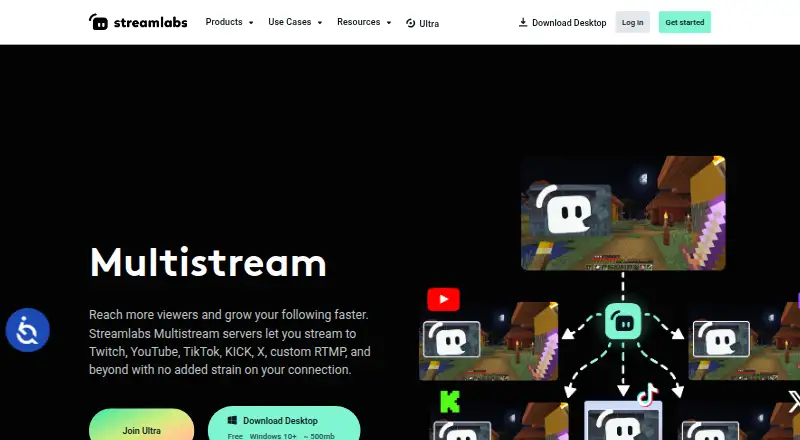
Streamlabs Multistream sends one live stream to multiple platforms, with Streamlabs servers splitting the incoming stream into separate feeds.
What Streamlabs Multistream is
Streamlabs Multistream sends one live stream to multiple platforms, with Streamlabs servers splitting the incoming stream into separate feeds. The maker says this avoids requiring extra upload bandwidth for each destination. Listed destinations include Twitch, YouTube, TikTok, Kick, Facebook, Instagram, Patreon, X, and custom RTMP destinations. Dual Output provides horizontal and vertical canvases, with one destination per canvas available for free; creators can set layout and resolution for each canvas and customize titles and descriptions by platform. Multichat supports reading and posting comments on YouTube, Twitch, and Facebook Pages, and reading chat on Kick, X, and Facebook Profiles. The service works with Streamlabs Desktop, the OBS Plugin with Ultra, the Mobile app, or other streaming software set up through the Dashboard and RTMP credentials. Stream Shift lets a creator move a stream between a PC and mobile device or another computer without ending it. It is listed for web, Windows, macOS, iOS, and Android, and supports stream scheduling.
Good
- Sends one stream to multiple listed destinations.
- Cloud processing avoids extra upload bandwidth per destination.
- Free Dual Output supports one destination per canvas.
- Stream Shift moves a stream without ending it.
Watch out
- Windows 10+ is the stated minimum for Streamlabs Desktop.
- macOS 12+ is the stated minimum for Streamlabs Desktop.
- Starter includes one horizontal and one vertical destination.
Who it suits
Streamlabs Multistream may suit streamers, gamers, and creators who want to broadcast to multiple destinations. Its cloud processing and support for desktop, mobile, and other streaming software may fit varied setups.
Verdict
Streamlabs Multistream supports multiple destinations, chat, and horizontal and vertical output. Check the destination setup and software requirements against your streaming workflow.
Plans and prices
From Streamlabs Multistream's own pricing page, checked 20 Sep 2026.
| Plan | Price | What it gives you |
|---|---|---|
| Ultra | $27 a month | 3+ destinations · Up to 11 guests or cameras · 10 GB cloud storage · Monthly pricing shown as $27/mo |
| Starter | Free | Dual Output: one horizontal and one vertical destination; full Multistream is an Ultra feature · Free, always |
| Streamlabs Ultra | $15.75 a month | Multistream to multiple destinations; 3+ destinations · Starting at $15.75/mo |
The facts
Each one read from Streamlabs Multistream's own pages, with the date it was checked.
What it does
- Chat
- Multichat supports reading and posting comments on YouTube, Twitch, and Facebook Pages, and reading chat on Kick, X, and Facebook Profiles.checked 11 Oct 2026
- Cloud processing
- Streamlabs says its servers split one incoming stream into multiple feeds, avoiding extra upload bandwidth for each destination.checked 11 Oct 2026
- Destinations
- The product lists Twitch, YouTube, TikTok, Kick, Facebook, Instagram, Patreon, X, and custom RTMP destinations.checked 11 Oct 2026
- Dual Output
- Dual Output provides a horizontal and a vertical canvas, and allows one destination per canvas for free.checked 11 Oct 2026
- Intended users
- Streamlabs Desktop is described as for streamers, gamers, and creators who want to broadcast content and engage their audience.checked 11 Oct 2026
- Paid from
- 15.75checked 20 Sep 2026
- Software options
- Multistream works with Streamlabs Desktop, the OBS Plugin with Ultra, the Mobile app, or other streaming software configured through the Dashboard and RTMP credentials.checked 11 Oct 2026
- Stream Shift
- Stream Shift lets a creator move a stream between a PC and mobile device or another computer without ending the stream.checked 11 Oct 2026
- Support
- The Multistream page directs users with questions to Streamlabs support.checked 11 Oct 2026
- What it does
- Streamlabs Multistream broadcasts one live stream to multiple platforms, with Streamlabs servers forwarding it to each destination.checked 11 Oct 2026
The company
- Company
- Streamlabs describes itself as a provider of tools and software for live streamers and content creators.checked 11 Oct 2026
- Founded
- 2014checked 28 Sep 2026
- Headquarters
- Lausanne, Switzerlandchecked 28 Sep 2026
Where it runs
- Desktop platforms
- Streamlabs Desktop runs on Windows and macOS; the page specifies Windows 10+ and macOS 12+ minimum requirements.checked 11 Oct 2026
- Mobile platform
- Streamlabs says users can multistream from a mobile device with the Streamlabs Mobile app.checked 11 Oct 2026
- Per-platform customization
- Creators can customize stream title and description per platform, and set layout and resolution per Dual Output canvas.checked 11 Oct 2026
Money
- Free plan
- Yeschecked 20 Sep 2026
The full review of Streamlabs Multistream
Streamlabs Multistream is a cloud distribution service that sends one live broadcast to several platforms at once. It is best suited to creators who want broad reach, separate horizontal and vertical presentations, and centralized chat without maintaining multiple upload feeds. The main trade-off is that meaningful destination, guest, and storage expansion sits behind paid plans.
Overview
Streamlabs servers receive a single stream and forward it to destinations including Twitch, YouTube, TikTok, Kick, Facebook, Instagram, Patreon, X, and custom RTMP endpoints. That architecture avoids consuming additional upload bandwidth for every platform, making it a sensible choice when the broadcaster’s connection is more limited than the audiences they want to reach. Stream scheduling is supported, and Stream Shift can move an active broadcast between a PC, mobile device, or another computer without ending it.
Key features
Dual Output supplies horizontal and vertical canvases at the same time. Each canvas can have its own layout and resolution, while titles and descriptions can be tailored per destination. The free setup allows one destination on each canvas, which is enough for a basic landscape-plus-portrait workflow but not for distributing both formats widely without upgrading.
Multichat brings comments into one place, with different controls by service. You can read and post on YouTube, Twitch, and Facebook Pages; Kick, X, and Facebook Profiles provide reading only. That is useful for monitoring a mixed audience, but creators expecting universal reply capability should not treat every listed destination as equivalent.
Input options include Streamlabs Desktop, the OBS Plugin with Ultra, the Streamlabs Mobile app, or other streaming software configured through the Dashboard and RTMP credentials. This range accommodates desktop production, mobile broadcasting, and existing encoder setups. Streamlabs positions its desktop software for streamers, gamers, and creators who want to broadcast and engage audiences.
Pricing
Streamlabs uses a freemium model. A free plan includes Multistream and Dual Output with one horizontal and one vertical destination, making it suitable for trying the workflow or maintaining a two-endpoint presence.
Starter has custom pricing. It includes one vertical destination, one horizontal destination, one guest or camera, and 1 GB of cloud storage, so it remains a constrained option for small productions that need limited collaboration and storage.
Ultra costs $27 a month on monthly billing and includes three or more destinations, up to 11 guests or cameras, and 10 GB of cloud storage. It is the stronger fit for collaborative shows and productions that need substantially more inputs. Streamlabs Ultra starts at $15.75 a month and includes multistreaming to multiple destinations with three or more destinations; the published starting price is tied to annual billing. Compare the billing term before choosing between the monthly Ultra price and the lower annual starting rate.
Platforms
Streamlabs Multistream is available on Android, iOS, macOS, the web, and Windows. Streamlabs Desktop runs on Windows 10 or later and macOS 12 or later. Mobile multistreaming is handled through the Streamlabs Mobile app, while web and RTMP configuration support other encoder workflows.
Who it's for
Choose it if you publish to several mainstream networks, need one cloud-managed upload, or want distinct portrait and landscape treatments. It also suits creators who move between desktop and mobile during a live event. It is less appropriate if your priority is completely free, unrestricted multistreaming, universal two-way chat, or a production that needs many guests without a paid subscription.
Pros and cons
- Pros: Cloud forwarding reduces the upload burden of separate platform feeds.
- Pros: Broad destination coverage includes major networks and custom RTMP.
- Pros: Dual Output supports horizontal and vertical presentations with per-canvas settings.
- Pros: Stream Shift preserves a live session when changing devices.
- Cons: Free Dual Output is limited to one destination per canvas.
- Cons: Chat posting works on only some listed services.
- Cons: More destinations, guests, and storage require paid access.
Alternatives
Restream is a strong alternative if a free plan with two simultaneous channels, Restream branding, and recording limits matches your needs. Pick OBS Studio when you want free software with no watermarks or usage limits on Linux, macOS, or Windows, rather than a bundled cloud multistream service. mimoLive suits Mac and iOS users who want a feature-rich free tier but can accept a watermark. PRISM Live Studio is worth considering for mobile and desktop creators who need up to six channels on its $9.99 monthly Plus plan. Agora Interactive Live Streaming is an option for developers building around participant-minute usage. XSplit Broadcaster fits Windows users seeking a conventional broadcaster, though its free tier has no simultaneous multistreaming. OneStream Live is preferable when two free destinations, 720p output, one team seat, and scheduled events cover the workflow. Meld Studio is an alternative for Windows and macOS users who want multistreaming alongside recording and clipping tools.
Verdict
Streamlabs Multistream is a good choice for creators who need cloud-based distribution across several networks, especially when one stream must serve both horizontal and vertical audiences. Its destination breadth, device handoff, and reduced upload demand are the main reasons to choose it. Look elsewhere if your budget requires genuinely unrestricted free multistreaming, if every chat service must support replies, or if you prefer a standalone encoder without paid destination and production limits.
Alternatives to Streamlabs Multistream
- 1
Restream
Free planAndroidiOSWebAPI9.1From $19 a month - 2
mimoLive
Free planiOSWebAPImacOS8.7From $70 a month - 3

Amazon Interactive Video Service
Free planAndroidiOSWebAPI8.7Free plan - 4

BoxCast
AndroidiOSWebAPI8.6From $8.25 a month - 5
OneStream Live
Free planAndroidiOSWebExtension8.5From $15 a month - 6
StreamYard On-Air
Free planiOSWebExtension8.5From $35.99 a month