
starryai
starryai is an AI art tool that turns written prompts, emojis, and uploaded images into generated artwork.
What starryai is
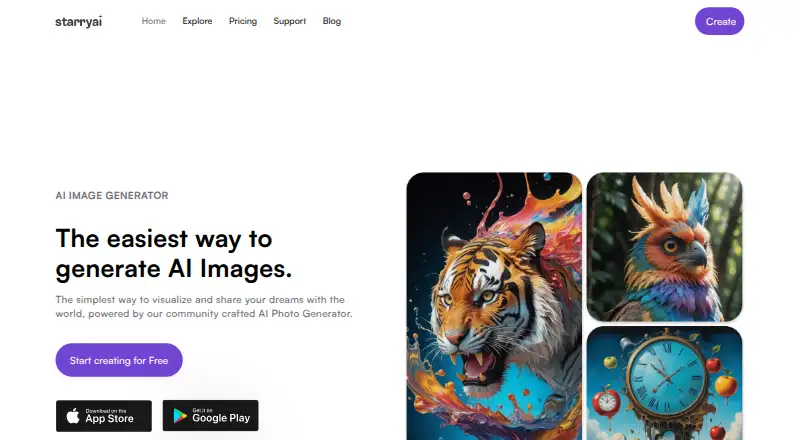
starryai is an AI art tool that turns written prompts, emojis, and uploaded images into generated artwork. It supports text-to-image creation, reference-image input, and image editing, so users can begin with words or visual material and continue refining the result. Its listed tools include image reimagining, enhancement, upscaling, and background removal. A library of more than 1,000 styles and models provides different creative directions, and the help center explains how to create, train, publish, and manage custom AI styles. New accounts receive 5 lumens, which the site equates to 25 AI images, while the service also advertises daily free images without watermarks. The product lists 200 monthly credits, and commercial use is included. Creators can publish work to a starryai profile and share it with the online community. starryai runs on the web and has iOS, Android, and macOS availability. The company presents it as an accessible option for non-coders using simple prompts. Face-related features require permission, and the privacy policy says face data is not sold or used for identification or advertising profiling.
Good
- Text, emoji, and uploaded-image inputs
- More than 1,000 styles and models
- Editing, enhancement, upscaling, and background removal
- Commercial use included
- Web, iOS, Android, and macOS access
- Daily free images without watermarks
Watch out
- Free allowance is 25 images daily
- Monthly allowance lists 200 credits
- Integrations with other design platforms are not named
Who it suits
starryai suits people who want to create AI artwork from text, emojis, reference images, or existing uploads without coding. It also fits creators who need editing tools, commercial use, mobile and web access, or a community profile for sharing work.
Verdict
Pick starryai if you want prompt-based AI art with reference images, editing, broad style choices, and commercial use. Its free access and cross-platform availability make it easy to start. Look elsewhere if you need named integrations with other design software or clearly listed prices for paid plans.
Plans and prices
From starryai's own pricing page, checked 20 Sep 2026.
| Plan | Price | What it gives you |
|---|---|---|
| Free | Free | 25 images daily |
| Starter Pro Weekly | — | — |
| Unlimited Pro | — | — |
| starryai 1 Month Pro | — | — |
| starryai 1 Month Unlimited Pro | — | — |
| 40 Lumens Premium | — | 40 Lumens |
| 40 Lumens Pack | — | 40 Lumens |
The facts
Each one read from starryai's own pages, with the date it was checked.
What it does
- Commercial rights
- The site says creators own the images they make, and its license says creations are free for the creator to use.checked 8 Oct 2026
- Commercial use
- includedchecked 20 Sep 2026
- Community features
- Users can publish creations to a starryai profile and share their art with the online community.checked 8 Oct 2026
- Custom styles
- The help center provides guidance for creating, training, publishing, and managing custom AI styles.checked 8 Oct 2026
- Data processors
- The privacy policy names AWS, Cloudflare, Google Cloud, OpenAI, Replicate, Mixpanel, AppsFlyer, Intercom, and Stripe as service providers that may process personal information.checked 8 Oct 2026
- Image editing
- Yeschecked 20 Sep 2026
- Image tools
- The site lists image reimagining, enhancement, upscaling, and background removal among its tools.checked 8 Oct 2026
- Integrations
- The opened design page describes text prompts and generated images but does not name integrations with other design software or platforms.checked 8 Oct 2026
- Mobile and web
- starryai is offered as a web tool and mobile apps for iOS and Android.checked 8 Oct 2026
- Monthly credits
- 200checked 20 Sep 2026
- Privacy and face data
- The privacy policy says face-related features require explicit permission and that face data is not sold or used for identification or advertising profiling.checked 8 Oct 2026
- Reference images
- Yeschecked 20 Sep 2026
- Security
- The privacy policy says personal information is protected using commercially acceptable means and notes that no electronic transmission or storage method is completely secure.checked 8 Oct 2026
- Styles
- The site says users can create in more than 1,000 styles and choose from a library of styles and models.checked 8 Oct 2026
- Support
- The site lists [email protected] as its contact email and links to a help center.checked 8 Oct 2026
- Text-to-image
- Yeschecked 20 Sep 2026
- What it does
- starryai turns text prompts, emojis, and uploaded images into AI generated art.checked 8 Oct 2026
- Who it serves
- The company says its founder aimed to make AI art accessible to non-coders through simple text prompts on web and mobile.checked 8 Oct 2026
Money
- Free allowance
- New accounts receive 5 lumens, which the site equates to 25 AI images, and the site advertises daily free images without watermarks.checked 8 Oct 2026
- Free plan
- Yeschecked 20 Sep 2026
The full review of starryai
starryai is a prompt-driven AI art studio that also accepts reference images and provides post-generation editing. It is best suited to non-coders, hobbyists, and creators who want broad stylistic exploration across phone and desktop. The free allowance makes occasional image-making accessible, while commercial-use rights and custom styles give more serious users room to build a repeatable workflow.
Overview
Text prompts, emojis, and uploaded images can all launch a creation, so users are not limited to describing an idea from scratch. Reference images are particularly useful when a subject, composition, or visual cue needs to carry through to the result. A library of more than 1,000 styles and models encourages experimentation, although that breadth will be less valuable to someone seeking a tightly curated, single-purpose look.
Generation is followed by practical image tools: reimagining, enhancement, upscaling, and background removal. That makes starryai more than a one-click generator for users who want to polish an output in the same app. Creations can be published to a profile and shared with the community. Guidance for creating, training, publishing, and managing custom AI styles also supports artists who want a consistent personal aesthetic rather than a different look on every prompt.
Key features
- Prompt and reference generation: Produce artwork from text, emojis, or uploaded images. The reference option gives visual direction that words alone may not capture.
- Editing tools: Reimagine, enhance, upscale, and remove backgrounds after generation. These tools reduce the need to move a draft to another editor for common cleanup work.
- Style range: More than 1,000 styles and a model library suit users who enjoy comparing visual treatments. The choice may feel excessive for a narrowly defined production pipeline.
- Custom styles: Help-center instructions cover training and managing custom AI styles, making repeatable branding or character treatment more achievable.
- Community publishing: Profiles and sharing provide a built-in way to show work and discover other creations, though community participation is optional.
- Commercial rights: Creators own the images they make, and the license allows them to use those creations commercially. That is a meaningful advantage for freelance, promotional, and small-business projects.
- Privacy controls: Face-related features require explicit permission. Face data is not sold or used for identification or advertising profiling, while named processors include AWS, Cloudflare, Google Cloud, OpenAI, Replicate, Mixpanel, AppsFlyer, Intercom, and Stripe.
Pricing
starryai uses a freemium model. The Free plan costs nothing and allows 25 images daily. New accounts receive 5 lumens, equivalent to 25 AI images, and the service advertises daily free images without watermarks. This is enough for casual experimentation and occasional social or concept work, but frequent creators will quickly need more capacity.
Paid options are offered as Starter Pro Weekly, Unlimited Pro, starryai 1 Month Pro, starryai 1 Month Unlimited Pro, 40 Lumens Premium, and 40 Lumens Pack. Each has custom pricing rather than a published amount; the 40 Lumens options specify a 40-lumen quantity. A monthly allowance of 200 credits is available as a product limit, but the plan attached to that allowance is not identified.
Platforms
starryai runs on the web and has apps for Android, iOS, and macOS. That coverage suits users who switch between mobile capture, desktop creation, and browser-based work. The design experience centers on prompts and generated images; no integrations with other design software are identified.
Who it's for
Choose starryai if you want accessible AI art without coding, need reference-image guidance, or value editing and a large style catalog. It is also a credible fit for creators who need commercial use and want to develop custom styles. Look elsewhere if transparent paid pricing, named design-software integrations, or a highly specialized workflow matters more than broad creative choice.
Pros and cons
- Pro: Text, emoji, and image inputs provide several ways to direct a result.
- Pro: Reimagining, enhancement, upscaling, and background removal extend work beyond initial generation.
- Pro: Commercial rights and creator ownership support paid projects.
- Pro: Web, Android, iOS, and macOS access makes the tool broadly reachable.
- Con: Paid plan prices are custom, so upgrade value and renewal cost cannot be judged in advance.
- Con: The free tier's 25-image daily allowance is suited to light use, not sustained high-volume production.
- Con: No named integrations are provided for workflows built around other design platforms.
Alternatives
For a wider comparison, browse AI Art Generators and AI image generators.
- Adobe Firefly is the better pick for users who want Adobe's ecosystem and a free tier with limited daily generations.
- FLUX suits technically oriented users seeking API, self-hosted, Linux, Windows, and macOS availability, with usage-based pricing.
- Dream by WOMBO is an alternative with Android, iOS, web, and API access plus a 9.99 USD monthly premium plan.
- SeaArt AI offers a free tier with 130 stamina per day and two simultaneous tasks.
- Vizcom is aimed at visual workflows on macOS, Windows, and the web, with a free Starter tier providing 800 credits.
- Draw Things is a stronger fit for local, self-directed work, including downloadable models and local LoRA training.
- InvokeAI is a free, open-source, self-hosted option under the Apache 2.0 license.
- Krea Video is the alternative for users focused on video generation, with a free tier of 100 units per day.
Verdict
starryai is a strong choice for non-coders who want prompt-based art with reference control, built-in editing, extensive styles, and commercial rights across web and mobile platforms. Its free daily allowance makes starting painless. Choose another tool if you need predictable paid pricing or an explicitly integrated design-software workflow.
Getting started
- Open https://starryai.com/
- Create a free account
- Choose the web tool or an iOS, Android, or macOS app
- Enter a text prompt, emoji, or upload a reference image
- Select a style or model and generate artwork
- Use editing, enhancement, upscaling, or background removal tools
Limits worth knowing
The Free plan is listed as free and provides 25 images daily. The product also lists 200 monthly credits; paid plan prices are not provided.
Questions
Is starryai free?
Yes. It has a Free plan listed as free, with 25 images daily.
Which platforms support starryai?
starryai is available on the web, macOS, iOS, and Android.
Can I use generated images commercially?
Yes. Commercial use is included, and the license says creators can use their creations.
Does starryai accept reference images?
Yes. Reference-image input is listed alongside text-to-image generation and image editing.
Can I create custom styles?
Yes. The help center provides guidance for creating, training, publishing, and managing custom AI styles.
Alternatives to starryai
- 1

FLUX
Free planOpen sourceWebAPILinuxmacOS9.1$0.01 one-time - 2
Recraft
Free planAndroidiOSWebAPI9.0Free plan - 3
Tensor.Art
Free planAndroidiOSWebAPI8.8Free plan - 4
Sogni
Free planAndroidiOSWebAPI8.8From $20 a month - 5

Adobe Firefly
Free planAndroidiOSWebAPI8.6Free plan - 6
Dream by WOMBO
Free planAndroidiOSWebAPI8.6Free plan