
SeaArt AI
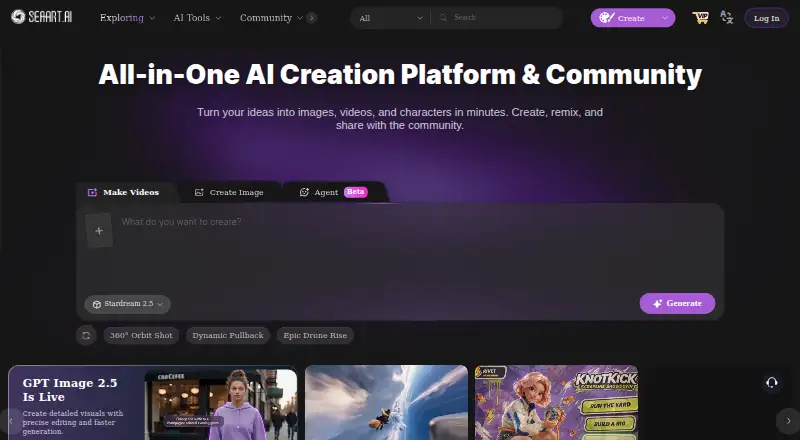
SeaArt AI is an AI creation platform and community for generating and editing images and videos, creating characters, and sharing work.
What SeaArt AI is
SeaArt AI is an AI creation platform and community for generating and editing images and videos, creating characters, and sharing work. Its image tools include generation, upscaling, filters, erasing and background removal. Video tools include generation, lip sync, reference-to-video and camera movement. Users can switch among models such as Veo, Sora, Wan AI, Kling AI, Pixverse, Vidu, GPT, Seedream and Flux AI. A community gallery lets users explore and share creations. LoRA training is available to all users and uses Credits according to training complexity and duration. SVIP Private Creation can make work visible only to its creator when enabled. Free users receive 130 Stamina each day, described as enough for approximately 21 image creations, and can process two tasks at once. Daily Stamina does not accumulate; Credits can accumulate, with expiry rules depending on how and when they were obtained. Accounts can be logged into on up to three devices at the same time. The free plan is listed as free, and the platform is available on Android, iOS, web and API.
Good
- Includes image and video creation tools.
- Supports reference images and image editing.
- LoRA training is available to all users.
- Free plan includes 130 Stamina per day.
Watch out
- Free users can process only two tasks simultaneously.
- Daily Stamina does not accumulate.
- Credits have expiry rules based on how and when obtained.
- Account access is limited to three devices at once.
Who it suits
SeaArt AI suits people who want to generate or edit images and videos, create characters, or share work in a community gallery. It may also suit users interested in LoRA training or switching among listed models.
Verdict
SeaArt AI brings image and video tools, model choices, community sharing and LoRA training together. Free users should consider the daily Stamina and task limits, along with the different rules for Credits.
Plans and prices
From SeaArt AI's own pricing page, checked 9 Oct 2026.
| Plan | Price | What it gives you |
|---|---|---|
| Free | Free | Limited Access · 130 Stamina per day · 2 simultaneous tasks |
| Beginner | — | SVIP plan · 300 Stamina per day · 5 simultaneous tasks · Billed Annually |
| Master | — | SVIP plan · 3,500–100,000 Stamina per day, depending on tier · 20 simultaneous tasks · Billed Annually |
| Professional | — | SVIP plan · 2,100 Stamina per day · 15 simultaneous tasks · Billed Annually |
| Standard | — | SVIP plan · 700 Stamina per day · 10 simultaneous tasks · Billed Annually |
The facts
Each one read from SeaArt AI's own pages, with the date it was checked.
What it does
- Account access
- An account can be logged into on up to 3 devices at the same time.checked 9 Oct 2026
- API access
- Yeschecked 20 Sep 2026
- Commercial use
- The site says creators own intellectual property rights to their generated content, while use of other users' work commercially requires permission from its owners.checked 9 Oct 2026
- Community
- Users can explore and share creations through SeaArt's community gallery.checked 9 Oct 2026
- Image editing
- Yeschecked 20 Sep 2026
- Image tools
- The site lists image generation, upscaling, filters, erasing, and background removal tools.checked 9 Oct 2026
- LoRA training
- LoRA training is available to all users and uses Credits based on training complexity and duration.checked 9 Oct 2026
- Models
- The platform lets users switch among models including Veo, Sora, Wan AI, Kling AI, Pixverse, Vidu, GPT, Seedream, and Flux AI.checked 9 Oct 2026
- Privacy feature
- SVIP Private Creation makes work visible only to the creator when enabled.checked 9 Oct 2026
- Reference images
- Yeschecked 20 Sep 2026
- Support
- The pricing page directs users who cannot find an answer in its FAQ to contact customer service.checked 9 Oct 2026
- Text-to-image
- Yeschecked 20 Sep 2026
- Token limits
- Stamina is valid for the current day and does not accumulate; Credits can be accumulated, with expiry rules depending on when and how they were obtained.checked 9 Oct 2026
- Usage limits
- Free users receive 130 Stamina per day for approximately 21 image creations, and can process 2 tasks simultaneously.checked 9 Oct 2026
- Video tools
- The site lists video generation, lip sync, reference-to-video, and camera-movement tools.checked 9 Oct 2026
- What it does
- SeaArt AI is an AI creation platform and community for generating and editing images and videos, creating characters, and sharing work.checked 9 Oct 2026
Money
- Free plan
- Yeschecked 20 Sep 2026
The full review of SeaArt AI
SeaArt AI is a broad creation platform for making and editing images and videos, developing characters, and sharing results. It is best for creators who want multiple media workflows and model choices in one account. The main trade-off is capacity: free use is practical for light, planned sessions, but heavier production quickly meets daily and concurrency limits.
Overview
SeaArt combines text-to-image generation, reference-image workflows, image editing, video creation, character making, and a community gallery. Commercial use is included, and API access makes it relevant to developers as well as individual creators. Its range suits projects that move between stills and motion; users focused on one narrow workflow may prefer a more specialized service.
It is available on Android, iOS, web, and through an API. An account can be logged in on up to three devices simultaneously, a useful allowance for people moving between phone and desktop.
Key features
Image and video tools
Image generation accepts text prompts and reference images, while built-in tools handle upscaling, filters, erasing, and background removal. That combination covers both creation and routine cleanup without requiring a separate editor. Video features include generation, lip sync, reference-to-video, and camera-movement controls, giving users a path from a still concept to an animated result. The breadth is valuable, although every additional task increases pressure on Stamina or Credits.
Model choice and community
Users can switch among models including Veo, Sora, Wan AI, Kling AI, Pixverse, Vidu, GPT, Seedream, and Flux AI. Multiple model families are useful when a project needs different visual or motion characteristics, but the choice can feel excessive for anyone who wants one predictable pipeline. SeaArt’s community gallery adds a place to browse and share creations, which helps with discovery and reference.
LoRA training and privacy
LoRA training is available to every user and consumes Credits according to training complexity and duration. That makes personalization accessible beyond paid tiers, but it also introduces a separate resource to manage. SVIP Private Creation keeps work visible only to its creator when enabled, an important setting for confidential or unfinished projects.
Usage rules
Free accounts receive 130 Stamina each day, enough for approximately 21 image creations, and can process two tasks at once. Stamina expires at the end of the current day rather than accumulating, so unused capacity cannot be saved for a larger session. Credits can accumulate, with expiry depending on when and how they were obtained; LoRA users should therefore track both resource types. The service directs unresolved questions to customer service after users check its FAQ.
Pricing
| Plan | Price and billing | Included capacity | Best for |
|---|---|---|---|
| Free | free | Limited access; 130 Stamina per day; 2 simultaneous tasks | Occasional creators evaluating the platform |
| Beginner | Custom pricing; billed annually | SVIP; 300 Stamina per day; 5 simultaneous tasks | Regular users needing more headroom than free |
| Standard | Custom pricing; billed annually | SVIP; 700 Stamina per day; 10 simultaneous tasks | Small production workloads |
| Professional | Custom pricing; billed annually | SVIP; 2,100 Stamina per day; 15 simultaneous tasks | Frequent creators running parallel jobs |
| Master | Custom pricing; billed annually | SVIP; 3,500–100,000 Stamina per day, depending on tier; 20 simultaneous tasks | High-volume work and teams with demanding throughput |
A three-day trial is offered, while the paid plans shown use annual billing. The cheaper tiers give up daily Stamina and simultaneous-task capacity compared with Professional and Master, so the right upgrade depends on throughput rather than feature access alone.
Platforms
SeaArt runs on Android, iOS, and the web, with API access for integrations. That cross-platform spread fits creators who alternate between mobile ideation, desktop production, and automated workflows.
Who it's for
Choose SeaArt for mixed image-and-video projects, model experimentation, community inspiration, commercial work, or accessible LoRA training. It is less suitable for users who need large uninterrupted daily volumes on a free account, or who want a single tightly focused tool with fewer resource rules.
Pros and cons
- Pro: Image and video generation, editing, character creation, and sharing are combined in one service.
- Pro: Commercial use and API access support both independent creators and software-driven workflows.
- Pro: LoRA training is open to all users, with private creation available through SVIP.
- Con: Free Stamina expires daily, limiting the value of saving up for intensive sessions.
- Con: Two simultaneous free tasks can slow batch-oriented work.
- Con: Credits and Stamina follow different rules, adding resource-management overhead.
Alternatives
For a wider starting point, browse the AI Art Generators, AI image generators, and AI video generators lists.
- Adobe Firefly is a freemium Adobe option with a free tier offering limited daily generations and a Standard plan with 2,000 monthly credits.
- FLUX suits readers seeking a freemium, API-friendly service that also supports desktop and self-hosted platforms.
- starryai is a simpler freemium choice with 25 images daily on its free plan.
- Dream by WOMBO offers mobile and web access, a free tier, and a listed Premium monthly plan at 9.99 USD.
- Vizcom is aimed at macOS, Windows, and web users, with a free Starter plan including 800 credits.
- Draw Things emphasizes local compute, downloadable models, an infinite canvas, and local LoRA training on its free edition.
- InvokeAI is a free, open-source, self-hosted alternative under the Apache 2.0 license.
- Krea Video is focused on video, with a free allowance of 100 units per day and no free-tier video concurrency.
Verdict
SeaArt AI is a strong choice for creators who want image, video, model-switching, community, and LoRA capabilities together, with commercial use and API access included. Choose it when breadth and experimentation matter more than a simple quota model. Look elsewhere if daily-expiring Stamina, separate Credit rules, or the free tier’s two-task ceiling conflicts with your production volume.
Alternatives to SeaArt AI
- 1

FLUX
Free planOpen sourceWebAPILinuxmacOS9.1$0.01 one-time - 2
Recraft
Free planAndroidiOSWebAPI9.0Free plan - 3
Tensor.Art
Free planAndroidiOSWebAPI8.8Free plan - 4
Sogni
Free planAndroidiOSWebAPI8.8From $20 a month - 5

Adobe Firefly
Free planAndroidiOSWebAPI8.6Free plan - 6

Dream by WOMBO
Free planAndroidiOSWebAPI8.6Free plan