sqlx-cli
sqlx-cli is SQLx’s command-line utility for database management, migrations, and preparing query macros for offline builds.
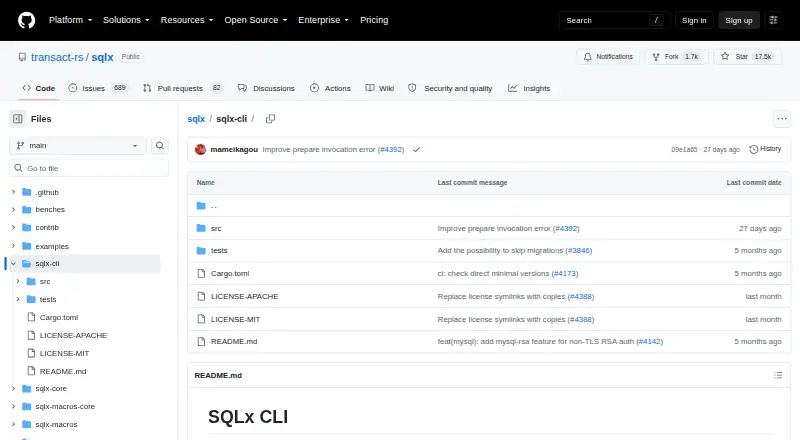
What sqlx-cli is
sqlx-cli is SQLx’s command-line utility for database management, migrations, and preparing query macros for offline builds. It can create or drop the database specified by `DATABASE_URL`, and create, run, inspect, or revert migrations, including paired up and down scripts. The `cargo sqlx prepare` command saves query metadata in a `.sqlx` directory; when checked into version control, this metadata lets builds run without an active database connection.
For continuous integration, `cargo sqlx prepare --check` returns a nonzero status if saved metadata is outdated. In a workspace with multiple crates using query macros, `cargo sqlx prepare --workspace` writes one `.sqlx` directory at the workspace root. Commands can receive the database URL through `--database-url`, the `DATABASE_URL` environment variable, or a `.env` file in the current directory. The project lists PostgreSQL, MySQL, MariaDB, and SQLite support. Installation is documented with `cargo install sqlx-cli`, with options for database drivers and TLS backends. The CLI is free and open source under either the Apache-2.0 or MIT license. The README says MSSQL support was removed pending a full driver rewrite, and directs users to an FAQ and Discord for questions.
Good
- Creates, inspects, runs, and reverts migrations.
- Prepares query metadata for offline builds.
- Checks saved metadata for CI workflows.
- Supports PostgreSQL, MySQL, MariaDB, and SQLite.
- Free and open source under Apache-2.0 or MIT.
Watch out
- MSSQL support was removed pending a driver rewrite.
- Commands require a database URL.
- MySQL RSA authentication may require the `mysql-rsa` feature.
Who it suits
sqlx-cli suits developers using SQLx who need to manage databases and migrations or keep query-macro metadata available for offline builds. Its metadata check is also relevant to teams running CI.
Verdict
sqlx-cli covers database lifecycle tasks, migrations, and offline query-macro preparation in a free command-line package. Check the documented database support and connection requirements against your project before adopting it.
Plans and prices
From sqlx-cli's own pricing page, checked 11 Oct 2026.
| Plan | Price | What it gives you |
|---|---|---|
| sqlx-cli | Free | Database management · migrations · offline query metadata |
The facts
Each one read from sqlx-cli's own pages, with the date it was checked.
What it does
- CI check
- `cargo sqlx prepare --check` exits with a nonzero status when cached metadata is outdated and is described as intended for continuous integration.checked 11 Oct 2026
- CI use
- `cargo sqlx prepare --check` exits with a nonzero status if the saved query metadata is out of date, and the README describes it as intended for Continuous Integration.checked 4 Oct 2026
- Configuration
- Commands require a database URL supplied through `--database-url`, the `DATABASE_URL` environment variable, or a `.env` file in the current working directory.checked 4 Oct 2026
- Connection configuration
- Commands require a database URL supplied with `--database-url` or through `DATABASE_URL` in the environment or a `.env` file.checked 11 Oct 2026
- Database commands
- The CLI can create and drop the database specified by `DATABASE_URL`.checked 11 Oct 2026
- Database management
- The CLI can create and drop the database specified by `DATABASE_URL`.checked 4 Oct 2026
- Database support
- Its default installation supports the databases supported by SQLx; installation options include PostgreSQL-only and SQLite-specific configurations.checked 11 Oct 2026
- Installation
- The CLI can be installed with `cargo install sqlx-cli`.checked 11 Oct 2026
- License
- The SQLx repository lists Apache-2.0 and MIT license files.checked 11 Oct 2026
- Migrations
- It can create migration files, run pending migrations, show migration status, and revert reversible migrations.checked 11 Oct 2026
- MySQL authentication limit
- The `mysql-rsa` feature is needed for non-TLS MySQL or MariaDB connections when the server requires RSA authentication using `caching_sha2_password` or `sha256_password`.checked 11 Oct 2026
- Notable limitation
- The project README says MSSQL support was removed pending a full rewrite of the driver as part of the SQLx Pro initiative.checked 4 Oct 2026
- Offline builds
- `cargo sqlx prepare` saves query metadata to `.sqlx`, allowing builds without an active database connection after that directory is checked into version control.checked 11 Oct 2026
- Offline mode setting
- Setting `SQLX_OFFLINE=true` forces offline builds when a `DATABASE_URL` variable or `.env` file is present.checked 4 Oct 2026
- Offline query preparation
- `cargo sqlx prepare` saves query metadata to `.sqlx`, allowing builds without an active database connection when that metadata is checked into version control.checked 4 Oct 2026
- Project scope
- The SQLx project describes itself as an asynchronous, pure Rust SQL toolkit with compile-time checked queries and support for PostgreSQL, MySQL, and SQLite.checked 11 Oct 2026
- Purpose
- SQLx CLI is a command-line utility for managing databases and migrations and enabling offline mode for SQLx query macros.checked 11 Oct 2026
- Query metadata scope
- For workspaces with multiple crates using query macros, `cargo sqlx prepare --workspace` generates a single `.sqlx` directory at the workspace root.checked 4 Oct 2026
- Security
- The project README says SQLx forbids unsafe code unless the SQLite feature is enabled, where SQLite API calls use unsafe code that the maintainers welcome auditing and feedback on.checked 4 Oct 2026
- Support
- The SQLx repository links to its FAQ and Discord community for questions.checked 11 Oct 2026
- Support channel
- The project README directs users with questions to its FAQ and links to a Discord community.checked 4 Oct 2026
- Supported databases
- The CLI installation instructions say it supports the databases supported by SQLx; the project lists PostgreSQL, MySQL, MariaDB, and SQLite.checked 4 Oct 2026
- TLS options
- Installation options include native TLS, vendored OpenSSL, and Rustls configurations.checked 11 Oct 2026
The full review of sqlx-cli
sqlx-cli is a command-line tool for database setup, SQL migrations and SQLx query-macro workflows. It is best suited to Rust teams already using SQLx and a supported database. Its appeal is a free, focused toolkit that can also check query metadata in CI; it is not the right fit for MSSQL projects.
Overview
SQLx is an asynchronous, pure-Rust SQL toolkit with compile-time checked queries, and sqlx-cli brings several related database tasks into the command line. It can create or drop the database named in your connection configuration, manage migrations and prepare metadata for query macros. The CLI is open source under either Apache-2.0 or MIT, at the user's option.
Commands require a database URL, supplied with --database-url, through the DATABASE_URL environment variable, or in a .env file in the current working directory. That keeps configuration flexible, but also makes connection setup a necessary part of local and CI workflows.
Key features
Database and migration management
The CLI can create and drop the configured database, and create, run, inspect or revert migrations. Paired up and down SQL scripts provide a direct way to define changes and reversals. This is a sensible fit for SQLx projects that want routine database and migration work in one Rust-oriented tool. Teams seeking a migration workflow outside SQLx may find a dedicated alternative a better match.
Offline query metadata and CI
cargo sqlx prepare saves query metadata in a .sqlx directory. Once that directory is checked into version control, builds can proceed without an active database connection. For a workspace with multiple crates using query macros, cargo sqlx prepare --workspace places a single metadata directory at the workspace root.
For CI, cargo sqlx prepare --check returns a nonzero status when saved metadata is out of date, making stale query metadata visible in an automated check. Setting SQLX_OFFLINE=true forces offline builds even if a database URL or .env file is present. These features reduce the need for a live database during builds, though teams still need to prepare and maintain the checked-in metadata.
Drivers and connection options
The project lists PostgreSQL, MySQL, MariaDB and SQLite as supported databases. Installation is documented through cargo install sqlx-cli, with feature options to select database drivers and TLS backends, including native TLS, vendored OpenSSL and Rustls. Choosing features makes the installation more configurable, but requires matching the build to the project's database and connection needs.
For non-TLS MySQL or MariaDB connections where the server requires RSA authentication using caching_sha2_password or sha256_password, the mysql-rsa feature is needed. MSSQL support was removed pending a full rewrite of the driver as part of the SQLx Pro initiative, so SQL Server users should choose another tool.
Pricing
sqlx-cli costs nothing. The free plan includes database management, migrations and offline query metadata; there is no free trial because the software is free to use. The open-source project offers a choice of Apache-2.0 or MIT licensing. That makes it a straightforward option for SQLx projects that need these command-line workflows without a paid plan.
Platforms
sqlx-cli supports Linux, macOS and Windows. Its database coverage and TLS configuration depend on the driver and backend features selected during installation.
Who it's for
Choose sqlx-cli if your project uses SQLx with PostgreSQL, MySQL, MariaDB or SQLite and you want database lifecycle commands, SQL migration management and query-macro metadata preparation together. Its offline build support and metadata check are especially useful for teams that want query changes checked in CI. Look elsewhere if you need MSSQL support or do not want to manage database URL configuration.
Pros and cons
- Pros: A free, open-source CLI combines database creation and removal with migration creation, execution, inspection and reversion.
- Pros: Checked-in query metadata enables offline builds, and --check can flag stale metadata in CI.
- Pros: Driver and TLS feature choices let installations target different database and connection setups.
- Cons: Commands require a database URL, so local and automated environments need deliberate connection configuration.
- Cons: MSSQL support has been removed, ruling out SQL Server projects.
- Cons: Some non-TLS MySQL or MariaDB setups require the additional mysql-rsa feature.
Alternatives
If you want to compare migration-focused tools, start with Database Migration Tools. Skeema has a free Community plan with tables, stored procedures and functions, and 18 linter checks; it may suit teams looking for those schema and linting capabilities. Its Plus plan costs $124 a month.
Sqitch is another free database change-management application, with a license permitting use, modification and distribution. Atlas is an open-core alternative with an Apache-2.0 core, advanced features and a free trial.
dbmate is a free open-source migration tool with no paid SaaS upsell stated, while FluentMigrator is an Apache-2.0 licensed framework distributed through NuGet, with provider packages selected separately. Goose is a free open-source migration tool.
pgroll is a free option for PostgreSQL 14.0 or later, distributed as a single cross-platform binary. Refinery is a free MIT-licensed SQL migration toolkit whose database drivers must be selected as features.
Verdict
sqlx-cli is a strong choice for Rust developers already building with SQLx who want migration commands and offline query-macro preparation in the same free tool. Its CI metadata check is a practical advantage for keeping query metadata current. Choose another option if your project needs MSSQL support or a workflow that does not depend on SQLx and database URL configuration.
Getting started
- Open the sqlx-cli repository
- Install with cargo install sqlx-cli
- Choose database-driver and TLS features during installation
- Provide a URL with --database-url, DATABASE_URL, or a .env file
- Run migration commands or cargo sqlx prepare
- Use cargo sqlx prepare --check in continuous integration
Limits worth knowing
MSSQL support is unavailable pending a full driver rewrite. Non-TLS MySQL or MariaDB servers requiring RSA authentication need the mysql-rsa feature.
Questions
Is sqlx-cli free?
Yes. sqlx-cli is free and open source, with a plan listed as free.
Which databases does it support?
The project lists PostgreSQL, MySQL, MariaDB, and SQLite.
How does offline query preparation work?
cargo sqlx prepare saves query metadata in .sqlx; checked-in metadata lets builds run without an active database connection.
How are database connections configured?
Commands accept --database-url, the DATABASE_URL environment variable, or a .env file in the current working directory.
Is MSSQL supported?
MSSQL support was removed pending a complete driver rewrite as part of the SQLx Pro initiative.
What licenses are available?
The SQLx repository offers Apache-2.0 or MIT licensing, at the user’s option.
Alternatives to sqlx-cli
- 1

Atlas
Free planOpen sourceWebAPILinuxmacOS8.3From $39 a month - 2
DeepFilterNet
Free planOpen sourceAPILinuxmacOSSelf-hosted7.6Free plan - 3
pgroll
Free planOpen sourceLinuxmacOSSelf-hostedWindows7.3Free plan - 4

Skeema
Free planLinuxmacOSWindows6.9From $649 a year - 5

Bytebase Enterprise
Free planWebAPISelf-hosted6.8From $20 a month - 6
Sqitch
Free planLinuxmacOSSelf-hostedWindows6.7Free plan