dbmate
dbmate is a free, open-source command-line tool for applying database schema migrations across developer environments and production servers.
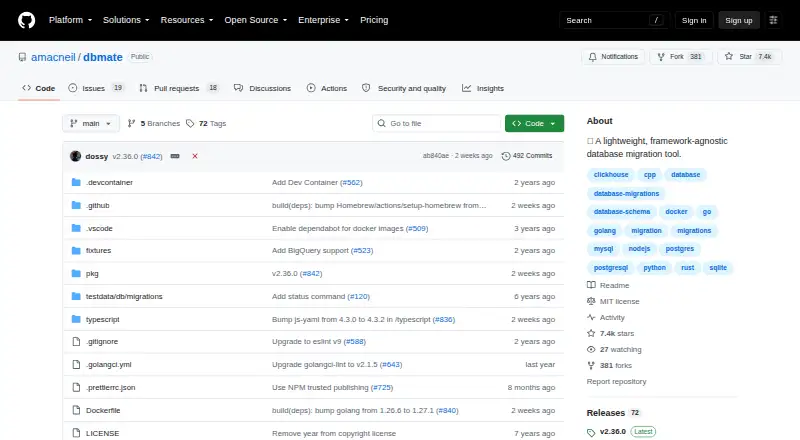
What dbmate is
dbmate is a free, open-source command-line tool for applying database schema migrations across developer environments and production servers. Its migrations are plain SQL files with timestamp-based versions, and its commands cover creating, applying, and rolling back changes, checking status, and dumping or loading a schema. It supports MySQL, MariaDB, PostgreSQL, SQLite, and ClickHouse, with documented connections for BigQuery and limited Spanner support for databases using the PostgreSQL dialect. Migrations run in transactions by default when supported, though individual migrations can opt out. dbmate can maintain a schema.sql file for review and Git diffs; creating that dump depends on database client tools such as pg_dump, mysqldump, or sqlite3. Configuration uses DATABASE_URL by default and can load environment variables from a .env file. The tool works with Go, Node.js, Python, Ruby, PHP, Rust, C++, and other languages. It is available for Linux, macOS, and Windows, as well as self-hosted use, with installation options including NPM, Homebrew, Scoop, a Linux binary, and Docker images.
Good
- Free and open source under the MIT license.
- Creates, applies, and rolls back migrations.
- Supports multiple databases and programming languages.
- Can maintain schema.sql for Git review and diffs.
Watch out
- Spanner schema dumps are not supported.
- Schema dumps rely on database client tools.
Who it suits
dbmate suits developers and teams who want SQL-based schema migrations across supported databases without tying the tool to one programming language. Go applications can also use it as a library and embed migrations in an application binary.
Verdict
dbmate offers a focused SQL migration workflow, with rollback support and schema tracking across a broad set of databases. Consider the client-tool requirement for schema dumps and the Spanner dump limitation when choosing it.
Plans and prices
From dbmate's own pricing page, checked 5 Oct 2026.
| Plan | Price | What it gives you |
|---|---|---|
| dbmate | Free | Open-source database migration tool · no paid SaaS upsell stated |
The facts
Each one read from dbmate's own pages, with the date it was checked.
What it does
- Additional database support
- The README also documents BigQuery connections and Spanner support limited to databases using the PostgreSQL dialect.checked 5 Oct 2026
- Commands
- Its commands include creating, applying, and rolling back migrations, checking migration status, dumping or loading a schema, and waiting for a database server.checked 5 Oct 2026
- Configuration
- Dbmate reads DATABASE_URL by default and has built-in support for loading environment variables from a .env file.checked 5 Oct 2026
- Databases
- The README lists MySQL, MariaDB, PostgreSQL, SQLite, and ClickHouse as supported databases.checked 5 Oct 2026
- Database support
- The README lists MySQL, MariaDB, PostgreSQL, SQLite, and ClickHouse as supported databases.checked 5 Oct 2026
- Distribution
- The README documents installation through NPM, Homebrew, Scoop, a Linux binary, and Docker images published to GitHub Container Registry.checked 5 Oct 2026
- Embedding
- Dbmate can be used as a library in Go applications, and migrations can be embedded into an application binary using Go embed.checked 5 Oct 2026
- Framework support
- It is a standalone command-line tool usable with Go, Node.js, Python, Ruby, PHP, Rust, C++, or other languages and frameworks.checked 5 Oct 2026
- Language independent
- The standalone command line tool can be used with Go, Node.js, Python, Ruby, PHP, Rust, C++, or other languages and frameworks.checked 5 Oct 2026
- License
- The repository includes an MIT license.checked 5 Oct 2026
- Limit
- The README says Spanner schema dumps are not supported because pg_dump uses functions Spanner does not provide.checked 5 Oct 2026
- Migration transactions
- Migrations run atomically inside a transaction by default when the database supports transactions, and migration blocks can opt out.checked 5 Oct 2026
- Purpose
- Dbmate is a database migration tool that keeps database schemas in sync across developers and production servers.checked 5 Oct 2026
- SaaS
- The README says dbmate does not try to upsell users on a SaaS service.checked 5 Oct 2026
- Schema snapshots
- Dbmate can keep a schema.sql dump updated for review in source control; dumping relies on database client tools such as pg_dump, mysqldump, or sqlite3.checked 5 Oct 2026
- Schema tracking
- Dbmate can save a schema.sql file so schema changes can be diffed in Git.checked 5 Oct 2026
- Security page
- The repository's GitHub Security page is available, but the opened page does not state a security or compliance certification.checked 5 Oct 2026
- SQL migrations
- Migrations are written as plain SQL in timestamp-versioned files, which the README says helps avoid version number conflicts among developers.checked 5 Oct 2026
- Support
- The repository README links to a discussion of alternatives and a contribution guide, but the opened page does not specify a support service or response time.checked 5 Oct 2026
- Transactions
- Migrations run atomically inside a transaction, with per-migration transaction behavior configurable in migration files.checked 5 Oct 2026
The company
- Security and company details
- The opened README and repository page do not state security certifications, support terms, company headquarters, or a founding date.checked 5 Oct 2026
The full review of dbmate
dbmate is a free, open-source command-line tool for managing SQL migrations across development and production databases. It best suits teams that want a language-independent workflow and direct control over migration SQL. Its main trade-off is that schema dumps depend on external database clients, and Spanner dumps are unsupported.
Overview
Dbmate keeps schema changes in timestamp-versioned SQL files, avoiding hand-assigned migration numbers that can collide when developers work in parallel. Because it runs as a standalone command-line tool, teams can use it with Go, Node.js, Python, Ruby, PHP, Rust, C++, or other languages and frameworks. That makes it a reasonable fit for mixed-language projects, but less compelling for teams that want migrations expressed in application code.
Its commands cover creating, applying, and rolling back migrations, checking status, dumping or loading a schema, and waiting for a database server. Migrations run in a transaction by default when the database supports transactions; individual migration blocks can opt out. This provides a useful atomic default without forcing every migration into the same transaction behavior.
Key features
Database coverage and schema tracking
Dbmate supports MySQL, MariaDB, PostgreSQL, SQLite, and ClickHouse, and documents BigQuery connections plus Spanner databases using the PostgreSQL dialect. It can maintain a schema.sql snapshot for source control, making schema changes easier to review and diff in Git. The dump workflow relies on database client tools such as pg_dump, mysqldump, or sqlite3, so teams need those installed as well as dbmate. Spanner is a particular exception: schema dumps are unsupported because pg_dump uses functions Spanner does not provide.
Configuration and deployment
Dbmate reads DATABASE_URL by default and can load environment variables from a .env file, which keeps routine connection setup straightforward. Installation options include NPM, Homebrew, Scoop, a Linux binary, and Docker images published to GitHub Container Registry. Go applications can also use dbmate as a library and embed migrations into an application binary with Go embed. These options suit teams that want to run migrations in their own environments rather than adopt a hosted service.
Pricing
Dbmate is free and open source under the MIT license. Its plan is free, with no free-trial period or paid SaaS upsell. That makes the full migration tool accessible without a seat or usage charge; the cost is operational instead, including installing any database client tools needed for schema dumps. It is a strong fit for teams comfortable maintaining their own command-line workflow, but not for buyers seeking a paid support or hosted-service plan.
Platforms
Dbmate supports Linux, macOS, Windows, and self-hosted use. Its multiple installation routes make it workable across developer machines and deployment environments, though schema-dump requirements still depend on the relevant database client being present.
Who it's for
Choose dbmate if your team prefers plain SQL, needs rollback support, and wants one migration workflow across different application languages. It is also well suited to teams that want schema snapshots under version control and are comfortable supplying database client utilities. Look elsewhere if you need Spanner schema dumps, an application-language migration framework, or a hosted service and support commitments.
Pros and cons
- Pro: Plain SQL and timestamp-versioned files give developers direct control over database changes while reducing migration-number conflicts.
- Pro: Rollback, status checks, schema loading and dumping, and database-wait commands cover more than just applying migrations.
- Pro: Transactional execution is the default where supported, with per-migration opt-outs for exceptions.
- Con: Schema dumps require external database client tools, adding setup work beyond installing dbmate.
- Con: Spanner schema dumps are not supported, limiting the snapshot workflow for those databases.
- Con: The project does not provide a stated support service or response time, so teams needing a defined support commitment should consider another option.
Alternatives
Database Migration Tools is the broader category to browse when dbmate's SQL-first workflow is not the right fit.
- Skeema is worth considering if you want a freemium option with a free Community plan for tables, stored procedures and functions, and 18 linter checks.
- Atlas is an alternative if an open-core tool with a free plan and free trial better matches your evaluation process.
- FluentMigrator may suit teams seeking an Apache-2.0 licensed framework distributed through NuGet, with provider packages selected separately.
- Goose is another free, open-source database migration tool to compare.
- pgroll is a free option if your database is PostgreSQL 14.0 or later and you want a single cross-platform binary.
- Refinery is a free, MIT-licensed SQL migration toolkit; database drivers must be selected as features.
- Doctrine Migrations is a free, open-source PHP library installed with Composer or downloaded as a PHAR.
Verdict
Dbmate is a strong choice for teams that want free, language-independent SQL migrations with rollback support and Git-friendly schema snapshots. Its focused command-line workflow keeps the tool practical across varied projects. Choose another option if Spanner dumps are essential, you do not want to manage database client utilities, or your team requires a defined support service.
Alternatives to dbmate
- 1

Atlas
Free planOpen sourceWebAPILinuxmacOS8.3From $39 a month - 2
DeepFilterNet
Free planOpen sourceAPILinuxmacOSSelf-hosted7.6Free plan - 3
pgroll
Free planOpen sourceLinuxmacOSSelf-hostedWindows7.3Free plan - 4

Skeema
Free planLinuxmacOSWindows6.9From $649 a year - 5

Bytebase Enterprise
Free planWebAPISelf-hosted6.8From $20 a month - 6
Sqitch
Free planLinuxmacOSSelf-hostedWindows6.7Free plan