
SQLPro Studio
SQLPro Studio is a native database management application for querying and managing relational databases.
What SQLPro Studio is
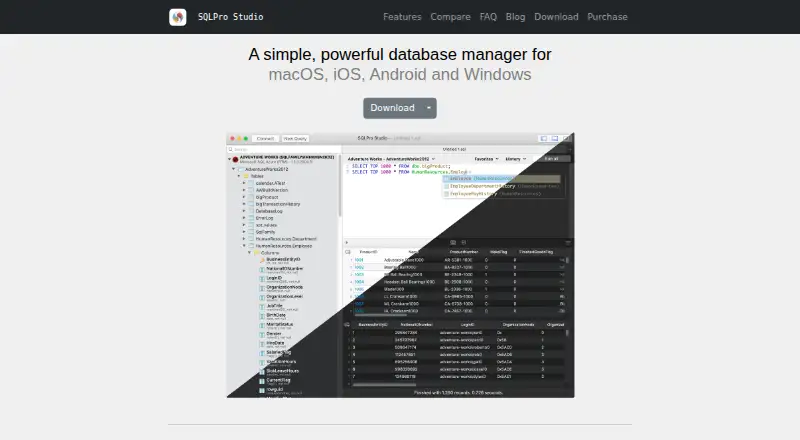
SQLPro Studio is a native database management application for querying and managing relational databases. It supports MySQL, MariaDB, PostgreSQL, Microsoft SQL Server, SQLite, Oracle, Snowflake, and Amazon Redshift, as well as cloud connections such as Amazon RDS, Azure SQL, Google Cloud SQL, Heroku Postgres, DigitalOcean Managed Databases, and Snowflake. The query editor includes syntax highlighting, autocomplete, query history, error highlighting, and simultaneous multiple result sets. Users can browse and edit table data, change structures visually, and import or export CSV, JSON, SQL, and XML. Connection security options include SSH tunnels with password or key authentication and SSL/TLS encryption. The maker says credentials are stored in iCloud Keychain on Apple devices and Android Keystore on Android. Native apps are listed for macOS, iOS and iPadOS, Android, and Windows; no Linux version is listed. SQLPro Studio is paid, has a 7-day trial, and has no general free plan. A student license is free for one year with an educational institution email and approval. Subscription licenses cover multiple platforms and devices for one user, while lifetime licenses apply to one platform only.
Good
- Supports eight listed database systems
- Query editor includes history and autocomplete
- Edits table data and structures visually
- Exports results in four listed formats
- Supports SSH tunneling and SSL/TLS
Watch out
- No general free plan
- Trial lasts 7 days
- No Linux version is listed
- Lifetime licenses cover one platform only
Who it suits
SQLPro Studio suits developers, database administrators, and data analysts who regularly query or manage relational databases. It may also suit users who need native apps across desktop and mobile platforms or secure SSH and SSL/TLS connections.
Verdict
SQLPro Studio combines a broad database list with query, editing, export, and connection-security tools. Consider its paid model, 7-day trial, and platform-specific lifetime license terms when choosing a plan.
Plans and prices
From SQLPro Studio's own pricing page, checked 8 Oct 2026.
| Plan | Price | What it gives you |
|---|---|---|
| Student license | Free | Free year · requires educational institution email and approval |
| Lifetime | — | Single platform license · Android lifetime license sold through Google Play |
| Monthly subscription | — | macOS, iOS, Android & Windows · single user |
| Yearly subscription | — | macOS, iOS, Android & Windows · single user |
The facts
Each one read from SQLPro Studio's own pages, with the date it was checked.
What it does
- Cloud connections
- The product lists support for Amazon RDS, Azure SQL, Google Cloud SQL, Heroku Postgres, DigitalOcean Managed Databases, and Snowflake.checked 8 Oct 2026
- Credential storage
- Connection credentials are stored in iCloud Keychain on Apple devices and in Android Keystore on Android.checked 8 Oct 2026
- Database support
- It supports MySQL, MariaDB, PostgreSQL, Microsoft SQL Server, SQLite, Oracle, Snowflake, and Amazon Redshift.checked 8 Oct 2026
- Data management
- Users can browse and edit table data, change table structures visually, and import or export CSV, JSON, SQL, and XML.checked 8 Oct 2026
- Data sharing
- The privacy policy says crash reports may contain app state and generic device details, but do not include query text or database connection details.checked 8 Oct 2026
- Intended users
- The maker describes the product as designed for developers, database administrators, and data analysts who regularly work with relational databases.checked 8 Oct 2026
- License terms
- A website subscription covers multiple platforms and devices for one user, while lifetime licenses apply to one platform only.checked 8 Oct 2026
- Privacy
- The maker says app analytics exclude query text, connection details, and other personal information, and can be disabled in settings.checked 8 Oct 2026
- Product
- SQLPro Studio is a native database management application for querying and managing relational databases.checked 8 Oct 2026
- Query editor
- The query editor includes syntax highlighting, autocomplete, query history, error highlighting, and simultaneous multiple result sets.checked 8 Oct 2026
- Security
- It supports SSH tunnels with password or key authentication and SSL/TLS encrypted connections.checked 8 Oct 2026
The company
- Company and support
- SQLPro Studio is independently developed and maintained by Hankinsoft Development, Inc.; the site links to GitHub issues for support.checked 8 Oct 2026
- Founded
- 2015checked 28 Sep 2026
Where it runs
- Native apps
- SQLPro Studio is available as native apps for macOS, iOS and iPadOS, Android, and Windows; the maker lists no Linux version.checked 8 Oct 2026
Alternatives to SQLPro Studio
- 1

Outerbase Studio
Free planOpen sourceAndroidiOSWebAPI8.5From $9 a month - 2
DBeaver
Free planOpen sourceWebAPIExtensionLinux8.2From $113 a year - 3

Beekeeper Studio
Free planOpen sourceAPIExtensionLinuxmacOS8.0From $18 a month - 4

MySQL
Free planAPILinuxmacOSSelf-hosted7.9Free plan - 5
Database Workbench
Free planLinuxmacOSWindows7.5€199 one-time - 6
dbForge Studio for PostgreSQL
Free planLinuxmacOSWindows7.5From $89.95 a year