
Speedscale
Speedscale is a hybrid API testing, load testing, and service-virtualization product for teams building cloud-native software.
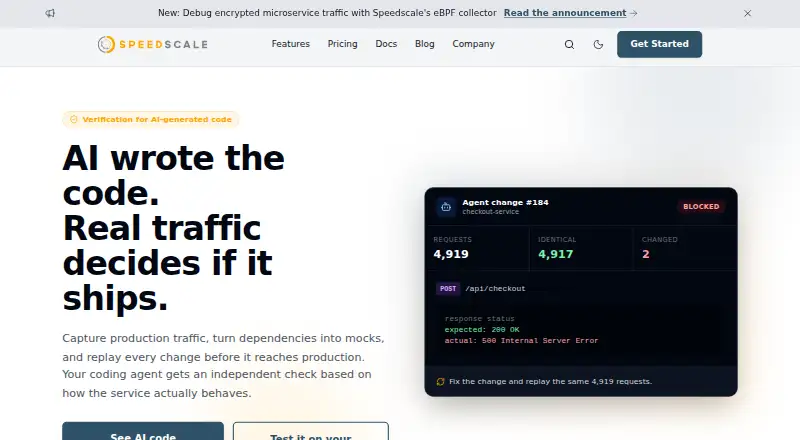
What Speedscale is
Speedscale is a hybrid API testing, load testing, and service-virtualization product for teams building cloud-native software. It uses captured production traffic to replay requests in Kubernetes and help validate changes. Teams can also create production-realistic mocks for flaky or third-party dependencies. For load testing, Speedscale builds tests from captured traffic and tracks latency and throughput against budgets; it supports stress testing and distributed load.
The product lists pipeline integrations including GitHub, GitLab, Jenkins, Azure DevOps, Google Cloud Deploy, AWS CodeBuild, Bitbucket Pipelines, TeamCity, and CircleCI. Other listed integrations include CI/CD, GitHub Actions, k6, and Postman. The full stack can run in a customer’s AWS, GCP, or Azure account, keeping traffic inside that VPC. Speedscale offers DLP to redact sensitive data and says sensitive data can be deleted retroactively after leakage. It reports completing an AICPA SOC 2 Type I audit.
The free proxymock tool provides unlimited local mocking, basic traffic recording, community support, and a desktop CLI for local development. It has native command-line installation options for macOS, Linux, and Windows. Speedscale lists support for HTTP, gRPC, Kafka, RabbitMQ, PostgreSQL, and many other protocols, databases, and APIs; IMAP is capture-only and mTLS support is partial.
Good
- Replays captured Kubernetes traffic to validate changes.
- Creates mocks for flaky or third-party dependencies.
- Builds load tests from captured traffic and tracks budgets.
- Supports distributed load and stress testing.
- Full stack can run within a customer cloud VPC.
- Free proxymock provides unlimited local mocking.
Watch out
- Free proxymock includes unlimited local mocking and basic traffic recording.
- Pro and Enterprise prices are custom or unlisted.
- IMAP is capture-only and mTLS support is partial.
Who it suits
Speedscale suits teams testing and delivering cloud-native applications with production-traffic replication, especially those seeking API validation, service virtualization, or load tests tied to latency and throughput budgets. Its free local proxymock option is for developers who need local API mocking and testing; teams needing cloud replay, collaboration, or enterprise deployment can consider Pro or Enterprise plans.
Verdict
Choose Speedscale if production-traffic replay, dependency virtualization, or traffic-derived load testing fits your cloud-native testing needs.
Plans and prices
From Speedscale's own pricing page, checked 7 Oct 2026.
| Plan | Price | What it gives you |
|---|---|---|
| Free (proxymock) | Free | Unlimited local mocking · basic traffic recording · community support · desktop CLI tool · local dev setup |
| Enterprise | Priced on request | Custom deployment · dedicated support and SLAs · SSO and enterprise controls · BYOC option · cloud dedicated tenant |
| Pro (Speedscale cloud) | Priced on request | Advanced traffic replay · CI/CD integration · priority email support · team collaboration and dashboard · cloud multi-tenant storage |
The facts
Each one read from Speedscale's own pages, with the date it was checked.
What it does
- BYOC
- The full Speedscale stack can run inside a customer's AWS, GCP, or Azure account, with traffic staying inside that VPC.checked 7 Oct 2026
- CI/CD integrations
- The load-testing page lists GitHub, GitLab, Jenkins, Azure DevOps, Google Cloud Deploy, AWS CodeBuild, Bitbucket Pipelines, TeamCity, and CircleCI as supported pipeline integrations.checked 7 Oct 2026
- Load testing
- It can generate load tests from captured production traffic and track latency and throughput against budgets.checked 7 Oct 2026
- Operating systems
- proxymock provides native command-line installation options for macOS, Linux, and Windows.checked 7 Oct 2026
- Other integrations
- The features page says it works with CI/CD, GitHub Actions, k6, and Postman.checked 7 Oct 2026
- Security certification
- Speedscale says it successfully completed an AICPA SOC 2 Type I audit.checked 7 Oct 2026
- Sensitive data
- Speedscale offers DLP to redact sensitive data, and its compliance page says sensitive data can be retroactively deleted after leakage.checked 7 Oct 2026
- Service virtualization
- It can mock flaky or third-party dependencies with production-realistic responses.checked 7 Oct 2026
- Support
- The pricing page lists community support for Free, priority email support for Pro, and dedicated channels and onboarding for Enterprise.checked 7 Oct 2026
- Target users
- Speedscale describes its product as a way to test and deliver cloud-native software applications using production traffic replication.checked 7 Oct 2026
- Technology coverage
- The documentation lists full support for HTTP, gRPC, Kafka, RabbitMQ, PostgreSQL, and many other protocols, databases, and APIs; it marks IMAP as capture-only and mTLS as partial.checked 7 Oct 2026
- Traffic replay
- It captures and replays real production traffic in Kubernetes to validate changes.checked 7 Oct 2026
- What it does
- Speedscale provides API testing, load testing, and service virtualization using captured production traffic.checked 7 Oct 2026
Money
- Free local tool
- proxymock is free for local API mocking and testing, and the pricing page says local mocking is unlimited.checked 7 Oct 2026
The full review of Speedscale
Speedscale is a hybrid testing platform for cloud-native software, spanning API tests, load tests, and service virtualization. Its defining advantage is that teams can build tests from traffic already observed in production, while its narrower fit is browser-based testing, which it does not support.
Overview
Speedscale captures and replays Kubernetes production traffic to validate application changes. That makes it a strong fit when a team wants test requests and load patterns grounded in actual service behavior rather than relying solely on handcrafted scenarios. It can also replace flaky or third-party dependencies with production-realistic responses, reducing those services as a source of disruption during testing.
The hybrid deployment model offers Speedscale cloud or a full stack inside a customer's AWS, GCP, or Azure account. With the BYOC option, traffic remains within that VPC, which suits teams with strict data-location requirements. Speedscale offers DLP redaction and says sensitive data can be deleted retroactively after leakage; it has completed an AICPA SOC 2 Type I audit. These controls address important data-handling concerns, but do not remove the need to check protocol support for a particular environment.
Key features
Replay, virtualization, and load testing
Replay uses captured Kubernetes traffic to check changes against real production request patterns. The same captured traffic can generate load tests, with latency and throughput tracked against budgets. Stress testing and distributed load are supported, making Speedscale relevant to teams assessing more than individual API responses. Its CI/CD integrations include GitHub, GitLab, Jenkins, Azure DevOps, Google Cloud Deploy, AWS CodeBuild, Bitbucket Pipelines, TeamCity, and CircleCI; the features page also cites GitHub Actions, k6, and Postman.
Service virtualization is useful when an external or unreliable dependency makes tests inconsistent: Speedscale can supply a realistic response without requiring that dependency to be available. For local API mocking and testing, the free proxymock tool offers unlimited local mocking, basic traffic recording, and a desktop CLI. It has native command-line installation options for macOS, Linux, and Windows, but it is a local tool rather than a substitute for the full cloud or enterprise stack.
Protocol coverage
Documentation lists full support for HTTP, gRPC, Kafka, RabbitMQ, PostgreSQL, and many other protocols, databases, and APIs. IMAP is capture-only and mTLS is partial, so teams depending on those cases should treat compatibility as a potential constraint. Speedscale is API-focused rather than browser-focused: browser-based testing is not supported.
Pricing
Speedscale uses a freemium model, with a free local tool and custom pricing for its cloud and enterprise plans. The free plan costs nothing and includes unlimited local mocking, basic traffic recording, community support, a desktop CLI tool, and local development setup. It is a sensible starting point for individual local API mocking, but it does not include the advanced replay and team capabilities of the paid plans.
Pro (Speedscale cloud) has custom pricing. It adds advanced traffic replay, CI/CD integration, priority email support, team collaboration and a dashboard, plus cloud multi-tenant storage. It fits teams that want the managed cloud workflow and shared testing features. Enterprise also has custom pricing and adds custom deployment, dedicated support and SLAs, SSO and enterprise controls, a BYOC option, and a dedicated cloud tenant. That is the better fit for organizations requiring deployment choice and formal support arrangements.
A free trial is available. The plan details do not give prices or seat and usage quotas for Pro or Enterprise, so teams should confirm those terms before choosing a plan.
Platforms
Speedscale supports API, Linux, macOS, self-hosted, web, and Windows environments. Its deployment model is hybrid, while proxymock offers native CLI installation for the three major desktop operating systems. The platform's API and load-testing focus means the broad platform list should not be read as browser-test coverage.
Who it's for
Speedscale is best suited to cloud-native engineering teams that want to replay production behavior, isolate tests from unreliable dependencies, or derive load tests from captured traffic. Teams that need traffic to stay in their own cloud account have a BYOC path, while teams beginning with local API mocking can start with proxymock at no charge. It is a weaker match for browser-testing workflows or environments that depend on protocol cases with only partial or capture-only support.
Pros and cons
- Pros: Production-derived replay and load tests make validation reflect real request patterns rather than only synthetic scenarios.
- Pros: Dependency virtualization can reduce test failures caused by flaky or third-party services.
- Pros: BYOC keeps traffic inside a customer's AWS, GCP, or Azure VPC; DLP and retroactive deletion address sensitive-data handling.
- Pros: Unlimited local mocking in free proxymock gives developers a no-cost way to mock and test APIs locally.
- Cons: Browser-based testing is not supported, ruling it out for teams whose primary requirement is browser automation.
- Cons: IMAP is capture-only and mTLS support is partial, which may limit particular protocol-dependent workflows.
- Cons: Pro and Enterprise use custom pricing, so their cost must be established before a team can compare them with fixed-price alternatives.
Alternatives
Speedscale sits among Performance Testing Software. Choose Artillery instead if its Team plan's $199 a month price, 1,000 reports per month, six months of data retention, eight team members, and up to 25 workers per distributed test better match your needs. Choose Taurus for a free, open-source option under the Apache 2.0 License. Tricentis Testim is another option, with a free plan capped at 1,000 runs per month and paid plans customized to mobile and web testing needs.
For a free tool, consider Fortio, an open-source project, or Locust, which is open source under the MIT license. Vegeta is a free, open-source HTTP load-testing tool and Go library. Apache JMeter is free and open source and requires Java 8 or later. HammerDB is a free, open-source database benchmarking option with Windows and Linux builds and a Docker image.
Verdict
Choose Speedscale when your cloud-native team needs production-traffic replay, dependency virtualization, or traffic-derived load testing, especially if BYOC matters. Its combination of realistic traffic and testing workflows is the central reason to choose it; look elsewhere if browser testing is essential, your protocol requirements fall outside full support, or you need published pricing before committing.
Getting started
- Visit https://speedscale.com/.
- For local development, install proxymock using its native command-line option for macOS, Linux, or Windows.
- Use the Free plan for unlimited local mocking, basic traffic recording, and the desktop CLI.
- Consider Pro for advanced traffic replay, CI/CD integration, team collaboration, and dashboard access.
- Consider Enterprise for custom deployment, dedicated support and SLAs, SSO and enterprise controls, or BYOC.
Limits worth knowing
The Free proxymock plan includes local mocking, basic traffic recording, and community support. Pro includes advanced traffic replay and cloud multi-tenant storage; Enterprise includes custom deployment and a BYOC option.
Questions
Is Speedscale free?
Yes. Its Free proxymock plan costs nothing and includes unlimited local mocking, basic traffic recording, community support, and a desktop CLI tool.
Does Speedscale offer a free trial?
Yes, a free trial is listed.
Which platforms does Speedscale support?
Listed platforms are API, Linux, macOS, self-hosted, web, and Windows. Proxymock has native command-line installation options for macOS, Linux, and Windows.
What integrations are listed?
Pipeline integrations include GitHub, GitLab, Jenkins, Azure DevOps, Google Cloud Deploy, AWS CodeBuild, Bitbucket Pipelines, TeamCity, and CircleCI. Other listed integrations include CI/CD, GitHub Actions, k6, and Postman.
Can Speedscale run in a customer's cloud account?
Yes. The full stack can run in a customer's AWS, GCP, or Azure account, with traffic staying inside that VPC.
Alternatives to Speedscale
- 1
Keysight Eggplant Test
AndroidiOSWebAPI7.9$9,999 one-time - 2
Loadster Synthetic Monitoring
Free planWebAPIExtensionLinux7.8From $29 a month - 3
Avidemux
Free planOpen sourceWebLinuxmacOSWindows7.3Free plan - 4
LoadFocus
Free planWebAPIExtension7.3Free plan - 5
LoadView
Free planWebAPISelf-hosted7.3From $199 a month - 6

Artillery
Free planWebAPILinuxmacOS7.1From $199 a month