Taurus
Taurus is a free, open-source framework for automating continuous testing.
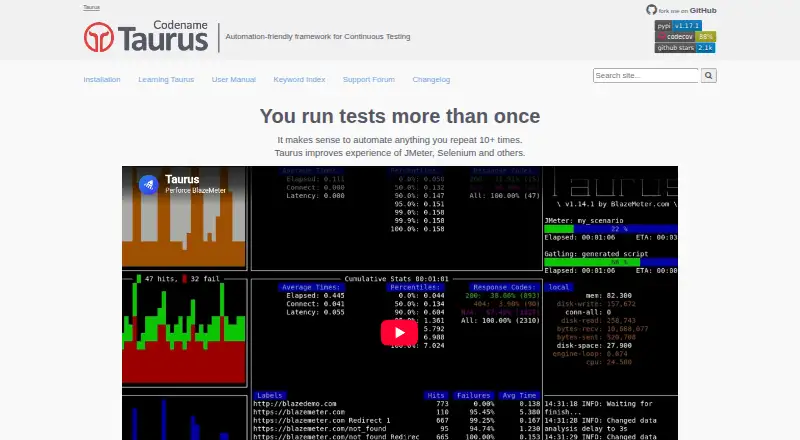
What Taurus is
Taurus is a free, open-source framework for automating continuous testing. It acts as a wrapper for performance and functional tests and relies on tools including JMeter, Gatling, Locust.io, and Selenium WebDriver. Documented executors also cover JUnit, K6, Postman/Newman, PyTest, TestNG, and Playwright. Test scripts can be written in YAML or JSON, with configurable pass/fail criteria. Taurus can show live statistics in the terminal and generate interactive reports, JUnit XML, and CSV outputs. It documents integrations with Jenkins, Bamboo, and TeamCity, and provides a Docker image. Installation can use Python's package manager with `pip install bzt`; official instructions cover Linux, Mac OS, and Windows. Requirements depend on the operating system and test type: Linux installation requires Python 3.7+ and Java, and some tests need additional software. Cloud-provisioned runs use BlazeMeter locations and require an API key in the cloud module settings. The project directs users to GitHub Issues and a support forum for help.
Good
- Free and open source under Apache 2.0
- Supports YAML and JSON test scripts
- Live terminal statistics and multiple report outputs
- Documented integrations with Jenkins, Bamboo, and TeamCity
- Docker image and Python package installation available
Watch out
- Linux installation requires Python 3.7+ and Java
- Some test types need additional software
- Cloud execution requires a BlazeMeter API key
- Installation may collect the desktop operating system name
Who it suits
Taurus suits testers who want to automate performance or functional tests using supported engines and CI tools. It may also fit teams that want configurable pass/fail criteria and several report formats.
Verdict
Taurus provides a flexible wrapper for continuous testing across a broad set of documented executors. Requirements vary by test type, and cloud-provisioned execution depends on an API key.
Plans and prices
From Taurus's own pricing page, checked 2 Oct 2026.
| Plan | Price | What it gives you |
|---|---|---|
| Taurus | Free | Free and open source under Apache 2.0 License |
The facts
Each one read from Taurus's own pages, with the date it was checked.
What it does
- CI integration
- The maker’s learning materials describe running Taurus tests with Jenkins, Bamboo, and TeamCity.checked 2 Oct 2026
- CI integrations
- The knowledge base documents integrations with Jenkins, Bamboo and TeamCity.checked 1 Oct 2026
- Cloud execution
- Taurus documentation describes cloud-provisioned test execution using BlazeMeter.checked 2 Oct 2026
- Configuration
- Tests can be configured using YAML, and Taurus can run existing JMeter scripts.checked 2 Oct 2026
- Container
- Taurus provides a Docker image for running the tool as a container.checked 1 Oct 2026
- Dependencies
- Additional software such as Java or test-specific Python tools may be required depending on the test type.checked 2 Oct 2026
- Executors
- Documented executors include Gatling, JMeter, JUnit, K6, Locust, Postman/Newman, PyTest, Selenium, TestNG and Playwright.checked 1 Oct 2026
- Extensibility
- Users can develop separate Python packages that add Taurus executors, services, or reporters.checked 2 Oct 2026
- Installation
- The maker documents installation on Linux, macOS, and Windows, and provides a Docker image.checked 2 Oct 2026
- License
- Taurus is free and open source under the Apache 2.0 License.checked 1 Oct 2026
- Operating systems
- Official installation instructions cover Linux, Mac OS and Windows.checked 1 Oct 2026
- Pass or fail
- Taurus supports configurable pass/fail criteria for test runs.checked 2 Oct 2026
- Purpose
- Taurus is an automation-friendly framework for continuous testing that wraps performance and functional test tools.checked 2 Oct 2026
- Reporting
- Taurus can show live terminal statistics and generate interactive reports, JUnit XML and CSV outputs.checked 1 Oct 2026
- Reports
- Taurus can show live test statistics in the terminal and generate online interactive reports.checked 2 Oct 2026
- Requirements
- Linux installation requires Python 3.7+ and Java, and some test types require additional software such as Locust.checked 1 Oct 2026
- Support
- The maker directs users to its support forum and GitHub issue tracker.checked 2 Oct 2026
- Test engines
- The documentation lists executors for JMeter, Gatling, k6, Locust, Selenium, Playwright, and other tools.checked 2 Oct 2026
- Testing scope
- It is a convenience wrapper for performance and functional tests.checked 1 Oct 2026
- Underlying tools
- Taurus relies on JMeter, Gatling, Locust.io and Selenium WebDriver.checked 1 Oct 2026
- Usage data
- The installation page says Taurus collects the name of the desktop operating system where it was run and may display anonymous usage statistics.checked 2 Oct 2026
The full review of Taurus
Taurus is an open-source framework that wraps performance and functional testing tools in an automation-friendly workflow. It suits teams that want to run different test engines through YAML or JSON and connect runs to CI. Its breadth is useful, but choosing it means managing the underlying tools and their dependencies.
Overview
Rather than replace established test engines, Taurus provides a common way to configure and run them. It relies on tools including JMeter, Gatling, Locust.io and Selenium WebDriver, with documented executors spanning load, browser, API and other test types. That makes Taurus a practical fit for teams combining several engines; it is less compelling if you need one self-contained testing product.
Taurus is free and open source under the Apache 2.0 License. It supports load testing, browser-based testing, distributed load and API testing, and its deployment model is hybrid. The framework supports configurable pass/fail criteria, so runs can produce a result that fits an automated testing workflow rather than only a stream of measurements.
Key features
One wrapper, multiple executors
YAML and JSON test scripts provide a shared configuration format across documented executors such as JMeter, Gatling, k6, Locust, Postman/Newman, PyTest, Selenium, TestNG and Playwright. This flexibility can reduce the need to build separate automation around each engine. It does not remove the need to understand or install the engine a particular test uses.
Results and automation
Live terminal statistics help track a run while it is underway. Taurus can also generate interactive reports, JUnit XML and CSV outputs, giving teams several ways to review results or carry them into other workflows. Its learning materials cover Jenkins, Bamboo and TeamCity integrations, making it a reasonable option for CI-based testing.
Cloud-provisioned execution uses BlazeMeter locations and requires an API key in the cloud module settings. That offers a path beyond local execution, but adds a credential and cloud configuration step. Additional executors, services and reporters can be developed as separately installed Python packages, which extends the framework at the cost of more setup.
Pricing
Taurus costs nothing and is free and open source under Apache 2.0. There are no paid tiers or seat and usage quotas in the Taurus plan described here. That makes it accessible for individual users and teams alike, though the price does not cover the separate software some test types require.
The simplest installation uses pip install bzt. Linux installation requires Python 3.7+ and Java, and some tests need additional software such as Locust. Dependencies vary by test type, so the low purchase price does not mean every testing setup is dependency-free. The installation page says Taurus collects the desktop operating system name and may display anonymous usage statistics.
Platforms
Official installation instructions cover Linux, Mac OS and Windows. Taurus also provides a Docker image, useful for running it as a container, and supports self-hosted deployment. Linux users should account for the Python and Java requirements; other test engines may add their own prerequisites.
Who it's for
Taurus is best suited to engineering teams that already use, or are willing to manage, multiple testing engines and want a common automation layer across them. Its CI integrations, configurable pass/fail criteria and varied report outputs make it particularly relevant to continuous testing workflows.
It is a weaker choice for someone seeking a turnkey service with a single interface and no engine-specific setup. Cloud execution also depends on BlazeMeter locations and an API key, so teams wanting cloud-provisioned runs should be comfortable with that arrangement. The project directs users to GitHub Issues and a support forum for help and feedback.
Pros and cons
- Pro: A wide set of documented executors lets teams bring several test types into a YAML- or JSON-driven workflow.
- Pro: Live statistics, interactive reports, JUnit XML and CSV outputs support both monitoring runs and carrying results into CI workflows.
- Pro: Free and open-source licensing avoids a software fee and permits separately installed extensions.
- Con: Test-specific dependencies such as Java or Locust mean setup can vary, and Taurus does not eliminate engine management.
- Con: Cloud-provisioned execution requires a BlazeMeter API key and uses BlazeMeter locations.
Alternatives
For a broader set of performance-testing options, browse Performance Testing Software.
- Artillery is worth considering for readers who want a freemium alternative with a paid Team plan at $199 a month, including 1,000 reports per month, six months of data retention, eight team members and up to 25 workers per distributed test.
- Fortio is another free, open-source option for readers who want a dedicated alternative rather than Taurus's wrapper approach.
- Locust is a free, MIT-licensed alternative for readers who prefer to use that test tool directly instead of running it through Taurus.
- Apache JMeter is free and self-hostable; choose it if you want JMeter itself and can meet its Java 8+ requirement.
- LoadFocus may suit readers seeking a web-based freemium option; its API Monitoring Free plan includes 10,000 checks per month, five-minute check frequency and one-month data retention.
- Grafana k6 is a freemium alternative with a Linux platform listing; its Free plan is limited to 500 virtual user hours per month.
- OctoPerf offers a free plan with 50 VUs, unlimited tests, a 20-minute maximum duration and one parallel run, which may fit readers who want those stated limits in a freemium service.
- Loader.io has a free web-based plan capped at 10,000 clients per test, one target host, one-minute tests and two URLs per test.
Verdict
Choose Taurus if you want a free, flexible automation layer across multiple performance and functional test engines, especially as part of a CI workflow. Its breadth and reporting options are the main draw; the need to install and manage test-specific dependencies is the main reason to choose a direct engine or another alternative instead.
Getting started
- Choose Linux, Mac OS, Windows, Docker, or a self-hosted deployment
- Install Taurus with `pip install bzt`, or use its Docker image
- Prepare a YAML or JSON test script
- Select a documented executor such as JMeter, Gatling, Selenium, or Playwright
- Configure pass/fail criteria and reporting outputs
- For cloud execution, add a BlazeMeter API key in the cloud module settings
Questions
How much does Taurus cost?
Taurus is free, with a listed price of no cost plan.
Which platforms can run Taurus?
Official installation instructions cover Linux, Mac OS, and Windows; Docker and self-hosted deployment are also supported.
Is Taurus open source?
Yes. It is released under the Apache 2.0 License.
How is Taurus installed?
The simplest route uses Python’s package manager with `pip install bzt`; a Docker image is also available.
Which test tools can it run?
Documented executors include Gatling, JMeter, JUnit, K6, Locust, Postman/Newman, PyTest, Selenium, TestNG, and Playwright.
What reports can it produce?
It can show live terminal statistics and generate interactive reports, JUnit XML, and CSV outputs.
Alternatives to Taurus
- 1
Keysight Eggplant Test
AndroidiOSWebAPI7.9$9,999 one-time - 2
Loadster Synthetic Monitoring
Free planWebAPIExtensionLinux7.8From $29 a month - 3
Avidemux
Free planOpen sourceWebLinuxmacOSWindows7.3Free plan - 4
LoadFocus
Free planWebAPIExtension7.3Free plan - 5
LoadView
Free planWebAPISelf-hosted7.3From $199 a month - 6

Artillery
Free planWebAPILinuxmacOS7.1From $199 a month