SoundToMIDI
SoundToMIDI turns recordings into editable MIDI notes in a browser, using Spotify’s open-source Basic Pitch model to detect pitches across multiple instrumen…
What SoundToMIDI is
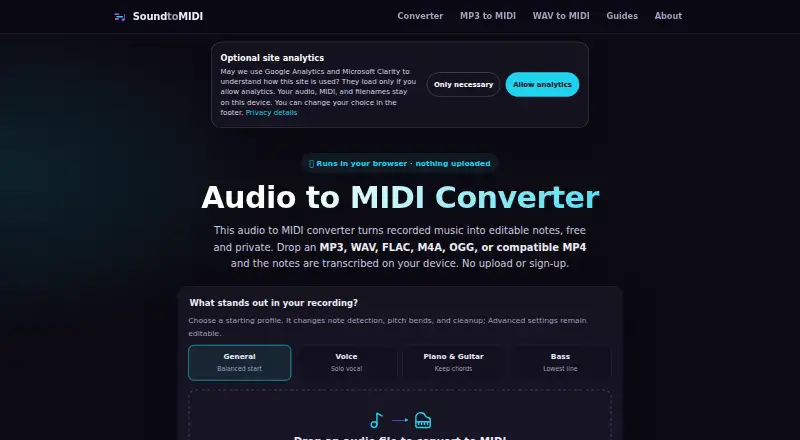
SoundToMIDI turns recordings into editable MIDI notes in a browser, using Spotify’s open-source Basic Pitch model to detect pitches across multiple instruments. It accepts MP3, WAV, FLAC, M4A, OGG, AAC, and compatible MP4 or WebM audio up to 100 MB. After conversion, you can transpose notes, narrow the pitch range, adjust timing, edit notes individually, and compare Raw MIDI with Cleaned MIDI. The free plan provides conversion and Raw MIDI downloads without signup or a daily limit. A one-time Music Export Pack costs $2.99, paid once and provides eight files for that result and its edits, including edited MIDI, a score PDF, MusicXML, practice WAVs, a note-map PNG, a note-list CSV, and a quick-start guide. WAV exports can cover up to 10 minutes of notes. The service runs in modern mobile browsers without installation and can record a melody through a microphone for up to 60 seconds. The maker says processing stays on your device, but warns that transcription can miss, add, mistime, or misidentify notes.
Good
- Free Raw MIDI conversion without signup or daily limits
- Edits include transposition, timing, and individual notes
- Supports common audio formats up to 100 MB
- Runs in modern mobile browsers without installation
Watch out
- Transcriptions may contain missing or incorrect notes
- Score drafts omit tuplets, pedal, fingering, and tempo changes
- Paid downloads must use the same browser and device
- Cleared browser data or expired tasks may remove saved results
Who it suits
It suits musicians who want to turn recordings into editable MIDI in a browser, including users working from mobile browsers. It may also help those who want a quick score draft or practice exports, with the caveat that generated notes and scores can be incomplete or inaccurate.
Verdict
SoundToMIDI offers a free way to convert recordings and edit the resulting MIDI in a browser. Consider the paid export pack if you need its additional file types, and review the output because transcription and score drafts have stated limitations.
Plans and prices
From SoundToMIDI's own pricing page, checked 9 Oct 2026.
| Plan | Price | What it gives you |
|---|---|---|
| Free Raw MIDI | Free | Audio conversion · Raw MIDI download · Free; no sign-up or daily limit |
| Music Export Pack | $2.99, paid once | 8 files · applies to this result and edits · new conversions need a new pack · WAV exports up to 10 minutes of notes · USD 2.99 once |
The facts
Each one read from SoundToMIDI's own pages, with the date it was checked.
What it does
- Audio formats
- The converter accepts MP3, WAV, FLAC, M4A, OGG, AAC, and compatible MP4 or WebM audio, with a 100 MB file limit.checked 9 Oct 2026
- Download availability
- Paid downloads must be completed in the same browser and device, and locally saved results may be unavailable after browser data is cleared or the local task expires.checked 9 Oct 2026
- Editing
- Users can transpose notes, filter a pitch range, adjust timing, edit individual notes, and compare Raw MIDI with Cleaned MIDI.checked 9 Oct 2026
- Export files
- The paid Music Export Pack includes edited MIDI, score PDF, MusicXML, two practice WAVs, a note-map PNG, a note-list CSV, and a quick-start guide.checked 9 Oct 2026
- Integrations
- The maker says standard MIDI files open in DAWs and notation software including Ableton Live, FL Studio, Logic Pro, GarageBand, Cubase, Reaper, and MuseScore.checked 9 Oct 2026
- Local processing
- Audio is decoded and transcribed on the user's device, and the maker says it does not upload or store audio, generated MIDI, note events, or filenames on its servers.checked 9 Oct 2026
- Output limitations
- The maker cautions that transcription may produce missing, extra, mistimed, or incorrect notes, and its automatic score draft does not infer tuplets, pedal, fingering, or tempo changes.checked 9 Oct 2026
- Payment
- Optional one-time payments are processed by Stripe, which receives checkout information; SoundToMIDI says it does not receive or store full card numbers.checked 9 Oct 2026
- Privacy analytics
- The privacy page says audio and MIDI stay local and describes limited analytics and security information processed by service providers such as Cloudflare and Stripe.checked 9 Oct 2026
- Purpose
- SoundToMIDI converts audio recordings into editable MIDI notes in a browser.checked 9 Oct 2026
- Recording limit
- The browser tool can record a melody through a microphone for up to 60 seconds.checked 9 Oct 2026
- Transcription model
- The converter uses Spotify's open-source Basic Pitch model for polyphonic, instrument-agnostic pitch detection.checked 9 Oct 2026
Where it runs
- Browser and mobile use
- The service runs in modern mobile browsers and requires no software installation.checked 9 Oct 2026
Alternatives to SoundToMIDI
- 1

Guitar2Tabs
Free planAndroidiOSWebAPI8.1Free plan - 2

Klangio Transcription Studio
Free planAndroidiOSWebAPI8.1Free plan - 3
Sing2Notes
Free planAndroidiOSWebAPI8.0From $14.99 a month - 4
AnthemScore
Free planWebLinuxmacOSWindows7.9From $8.33 a month - 5

Songscription
Free planiOSWebAPI7.8From $99.90 a year - 6

MuScriptor
Free planOpen sourceWebAPILinuxmacOS7.7Free plan