AnthemScore
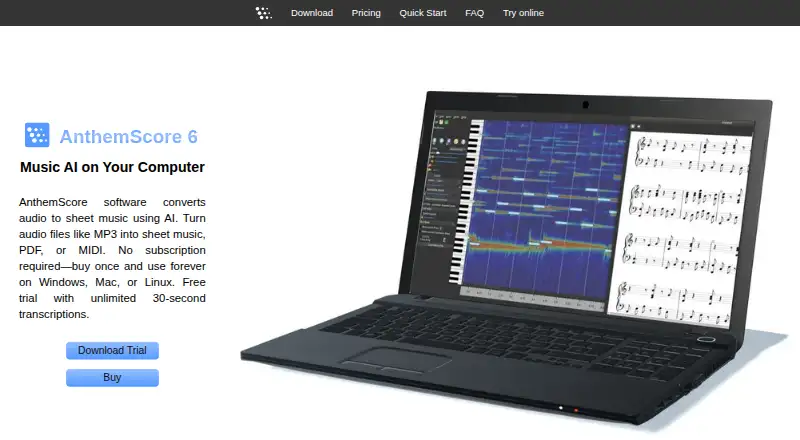
AnthemScore uses AI to turn audio into sheet music, PDF, or MIDI.
What AnthemScore is
AnthemScore uses AI to turn audio into sheet music, PDF, or MIDI. Its desktop app applies machine learning to identify notes, percussion, beats, and instruments, then lets users edit notes, measures, signatures, and tempo. Playback can be slowed without changing pitch, and score formatting can be tailored to an instrument’s key, range, and staff, including tablature. AnthemScore Web accepts audio or MIDI and provides PDF, MusicXML, and MIDI output; listed inputs include MP3, WAV, M4A, FLAC, OGG, MP4, and MID, as well as microphone recording.
Desktop downloads are available for Windows, macOS, and Linux and require a 64-bit laptop or desktop. The desktop app supports MP3, WAV, FLAC, OGG, WavPack, and MusePack, but not DRM-protected files. The free web plan includes a 14-day full-song trial and then unlimited 30-second clips. Web subscriptions are listed at $8.33 a month (billed annually) for Plus and $24.99 a month (billed annually) for Pro. Desktop one-time plans are $29, paid once for Lite, $39, paid once for Professional, and $99, paid once for Studio. The FAQ says vocals and chords are not currently detected, and music outside standard A440 tuning may be processed inaccurately.
Good
- Converts audio into sheet music, PDF, or MIDI
- Can edit notes, measures, signatures, and tempo
- Playback can slow without changing pitch
- Supports standard notation and tablature
- Desktop activation can run offline
Watch out
- Cannot currently detect vocals or chords
- DRM-protected audio files do not work
- Desktop app does not support phones or tablets
- Web free plan limits clips to 30 seconds after trial
Who it suits
AnthemScore suits musicians who want to turn recordings into editable notation or MIDI. The desktop version is for users with a 64-bit computer; the web version accepts audio or MIDI in a browser.
Verdict
AnthemScore offers transcription and score-editing tools, with desktop and browser options. Check its vocal, chord, DRM, and A440 limitations before choosing it for a particular recording.
Plans and prices
From AnthemScore's own pricing page, checked 21 Oct 2026.
| Plan | Price | What it gives you |
|---|---|---|
| AnthemScore Web Free | Free | 30-second transcriptions · 14-day full-song trial |
| AnthemScore Web Plus | $8.33 a month | 30 songs/month · 6 minutes/song · PDF, MIDI, musicXML downloads · $99.90 billed annually |
| AnthemScore Web Pro | $24.99 a month | 100 songs/month · 10 minutes/song · PDF, MIDI, musicXML downloads · desktop app included while subscribed · $299.90 billed annually |
| AnthemScore 6 Lite | $29, paid once | Unlimited full-song transcription · PDF viewing, saving and printing · 1 year updates |
| AnthemScore 6 Professional | $39, paid once | Lite features · musicXML, MIDI and ASDT export · note editing · playback controls · 1 year updates |
| AnthemScore 6 Studio | $99, paid once | Professional features · batch processing · lifetime updates |
The facts
Each one read from AnthemScore's own pages, with the date it was checked.
What it does
- API and SDKs
- The official documentation pages describe desktop and browser use but provide no public API or SDK documentation.checked 21 Oct 2026
- Audio formats
- Desktop documentation lists MP3, WAV, FLAC, OGG, WavPack and MusePack input, while DRM files are unsupported.checked 21 Oct 2026
- Automatic detection
- Machine learning detects notes, percussion, beats and instruments.checked 21 Oct 2026
- Batch processing
- Batch audio queuing is restricted to the Studio edition.checked 21 Oct 2026
- Chord detection
- Chord symbols can be detected from audio and edited manually.checked 21 Oct 2026
- Desktop audio formats
- The FAQ lists MP3, WAV, FLAC, OGG, WavPack, and MusePack as supported common formats, and says DRM-protected files do not work.checked 3 Oct 2026
- Desktop license
- A desktop activation key works on up to four computers initially, with one additional device per full year after purchase, and the activated app can run offline.checked 3 Oct 2026
- Desktop operating systems
- The desktop app offers Windows, macOS, and Linux downloads and requires a 64-bit laptop or desktop; phones, tablets, virtual machines, and 32-bit systems are unsupported.checked 3 Oct 2026
- Documentation depth
- Official documentation covers installation, file formats, instruments, playback, notes, measures, percussion, lyrics, viewing, export, languages, memory and display.checked 21 Oct 2026
- Editing tools
- The desktop app supports note, beat, measure, time-signature, key-signature and tempo editing.checked 21 Oct 2026
- Instrument formatting
- Scores can be formatted for instrument key, range and staff, including standard notation or tablature.checked 21 Oct 2026
- Licence
- AnthemScore is proprietary commercial software; the terms require acceptance of an included license.txt file.checked 21 Oct 2026
- Limit: manual work
- Reddit users said generated notation can require more work than manual transcription and needs musical review.checked 21 Oct 2026
- Limit: transcription accuracy
- Reddit commenters repeatedly described recognition as imperfect, especially for professional work, and said results vary by song.checked 21 Oct 2026
- Notable release
- Version 6.3.0 was released on 2026-09-29 with improved melody, rhythm, swing, chord, beat and instrument-part detection plus automatic updates.checked 21 Oct 2026
- Notable transcription limits
- The FAQ says AnthemScore cannot currently detect vocals or chords, DRM files do not work, and songs not tuned to standard A440 may not be processed accurately.checked 3 Oct 2026
- Note correction
- Users can add or remove notes with clicks or an intelligent slider.checked 21 Oct 2026
- Offline operation
- Activated desktop software runs offline indefinitely; internet is needed for activation or updates.checked 21 Oct 2026
- Praise: cleanup workflow
- An AlternativeTo reviewer called AnthemScore seemingly the best audio-to-MIDI option while warning that output needs cleanup.checked 21 Oct 2026
The company
- Company formation
- Washington records show Lunaverus LLC was established on 2023-07-26 and remains active in the listed record.checked 21 Oct 2026
- Company headquarters
- Washington business records list Lunaverus LLC at 22409 SE 244th St, Maple Valley, Washington.checked 21 Oct 2026
- Company history
- The AnthemScore trademark record lists first commercial use on 2015-12-23.checked 21 Oct 2026
- Company legal name
- The maker identifies AnthemScore as a trademark of Lunaverus LLC.checked 21 Oct 2026
Where it runs
- Linux support
- Linux is distributed as an AppImage and was tested on Ubuntu 20.04 and later.checked 21 Oct 2026
The full review of AnthemScore
Overview
AnthemScore uses AI to turn audio into sheet music, PDF, or MIDI. Its desktop application uses machine learning to identify notes, percussion, beats, and instruments, after which users can revise the score. It is available as desktop software for Windows, macOS, and Linux, and as a browser-based service.
The product’s capabilities differ by version. AnthemScore Web accepts audio or MIDI and provides PDF, MusicXML, and MIDI output, while desktop plans range from viewing and printing PDF scores to editing notes and exporting additional formats. The stated transcription limits matter: the FAQ says vocals and chords cannot currently be detected, DRM-protected files are unsupported, and audio not tuned to standard A440 may be processed inaccurately. Although the feature information also lists chord detection, that conflicts with the FAQ; clarify this with the maker if chord transcription is essential.
Key features
Transcription and score editing
The desktop app identifies notes, percussion, beats, and instruments in audio. Users can add or remove notes, edit measures and signatures, adjust tempo, and slow playback without changing pitch. Instrument formatting can tailor a score to an instrument’s key, range, and staff, with standard notation or tablature.
Web inputs and outputs
AnthemScore Web accepts audio and MIDI. Its listed inputs are MP3, WAV, M4A, FLAC, OGG, MP4, and MID, and users can also record through a microphone. Web output includes PDF, MusicXML, and MIDI, though downloads depend on the plan.
Desktop file support
The desktop FAQ lists MP3, WAV, FLAC, OGG, WavPack, and MusePack as common supported formats. DRM-protected audio files do not work.
Pricing
AnthemScore has a free plan and a 14-day trial. The web and desktop offerings use different limits and purchase terms:
- AnthemScore Web Free: free. Includes a 14-day full-song trial, songs up to 6 minutes during the trial, then unlimited 30-second clips, with viewing and playback in the browser.
- AnthemScore Web Plus: $8.33 a month, billed annually. Allows up to 30 songs a month and 6 minutes per song, unlimited 30-second clips, and PDF, MIDI, and MusicXML downloads.
- AnthemScore Web Pro: $24.99 a month, billed annually. Allows up to 100 songs a month and 10 minutes per song, unlimited 30-second clips, PDF, MIDI, and MusicXML downloads, and desktop app access while subscribed.
- AnthemScore 6 Lite: $29, paid once, billed as a one-time purchase. Includes unlimited full-song transcriptions, PDF viewing, saving, and printing, plus one year of free updates.
- AnthemScore 6 Professional: $39, paid once, billed as a one-time purchase. Adds to Lite’s features PDF, MIDI, MusicXML, and ASDT export, note editing tools, and audio playback controls; includes one year of free updates.
- AnthemScore 6 Studio: $99, paid once, billed as a one-time purchase. Includes Professional features, batch processing, and lifetime software updates.
Platforms
The web service runs in a browser. Desktop downloads are available for Windows, macOS, and Linux and require a 64-bit laptop or desktop. The desktop app is unsupported on phones, tablets, virtual machines, and 32-bit systems. A desktop activation key initially works on up to four computers, with one additional device for each full year after purchase. Once activated, the desktop app can run offline.
Who it's for
AnthemScore may suit musicians who want to turn supported audio into notation, then correct or format the resulting score. The desktop editing controls and instrument-specific formatting are relevant when transcription needs adjustment; the web service offers a browser-based route for audio or MIDI input. Users seeking vocal or chord detection should note the stated limitations, and people working with non-A440-tuned material should allow for possible inaccuracy.
Pros and cons
- Pros: Desktop note and measure editing, playback controls, standard notation and tablature formatting, and a choice of browser-based or desktop use.
- Cons: The FAQ says vocals and chords are not currently detected; DRM files do not work; non-A440 material may be inaccurate; and desktop use requires a 64-bit laptop or desktop.
Alternatives
Other options to consider include Klangio Transcription Studio, MuScriptor, Drum2Notes, Melody Scanner, Piano2Notes, ScoreCloud, Wind2Notes, and Guitar2Tabs. For broader browsing, see AI Music Transcription Software, AI Audio-to-MIDI Software, and Music Transcription Software.
Verdict
AnthemScore combines automated transcription with ways to edit and format scores, and its plans cover both browser-based use and desktop installations. The choice depends on the workflow: web plans set monthly song and duration limits, while desktop editions are one-time purchases with features that vary by tier. Its stated inability to detect vocals or chords and the possible difficulty with non-A440 audio are important constraints. The feature information’s conflicting chord-detection claim should be resolved with the maker before purchase if that capability is central.
For questions, the FAQ directs users to [email protected] and advises checking spam if a reply has not arrived within a week.
The privacy policy says web transcription content, settings, actions, modifications, and generated output are collected and stored. It also says sensitive information is encrypted using SSL, while card payments are handled by third parties such as Stripe or PayPal; card numbers are not stored on Lunaverus servers. Desktop users can disable update checks and opt out of feature usage reporting in Preferences. Crash reports are sent only with user permission.
Getting started
- Open the AnthemScore website.
- Choose AnthemScore Web or a desktop plan.
- For desktop use, download the Windows, macOS, or Linux app on a 64-bit computer.
- For web transcription, upload audio or MIDI, or record through a microphone.
- Use the free web trial or choose a paid web or desktop plan for its stated export and editing options.
Limits worth knowing
Web Free offers a 14-day full-song trial, then unlimited clips of up to 30 seconds. Web Plus costs $8.33 a month billed annually and allows up to 30 songs a month, each up to 6 minutes; Web Pro costs $24.99 a month billed annually and allows up to 100 songs a month, each up to 10 minutes. The desktop app requires a 64-bit laptop or desktop, and DRM-protected files do not work.
Questions
Is AnthemScore free?
AnthemScore Web Free costs nothing. It includes a 14-day full-song trial, then unlimited 30-second clips.
What do the paid plans cost?
Web Plus is $8.33 a month billed annually, and Web Pro is $24.99 a month billed annually. Desktop plans are one-time purchases: Lite is $29, paid once, Professional is $39, paid once, and Studio is $99, paid once.
Which platforms does it support?
AnthemScore supports web, Windows, macOS, and Linux. The desktop app requires a 64-bit laptop or desktop; phones, tablets, virtual machines, and 32-bit systems are unsupported.
What files can I use?
Web inputs include MP3, WAV, M4A, FLAC, OGG, MP4, and MID, along with microphone recording. The desktop FAQ also lists WavPack and MusePack among supported common formats; DRM-protected files do not work.
Can AnthemScore detect vocals or chords?
The FAQ says it cannot currently detect vocals or chords.
Can the desktop app run offline?
Yes. The activated desktop app can run offline. Its activation key initially works on up to four computers, with one additional device for each full year after purchase.
Alternatives to AnthemScore
- 1

Guitar2Tabs
Free planAndroidiOSWebAPI8.1Free plan - 2

Klangio Transcription Studio
Free planAndroidiOSWebAPI8.1Free plan - 3
Sing2Notes
Free planAndroidiOSWebAPI8.0From $14.99 a month - 4

Ivory
Free planiOSWebAPImacOS7.8From €59 a year - 5

Songscription
Free planiOSWebAPI7.8From $99.90 a year - 6
MuScriptor
Free planOpen sourceWebAPILinuxmacOS7.7Free plan