Snibox
Snibox is a self-hosted snippet manager for collecting and organizing code snippets, Markdown, and plain text.
What Snibox is
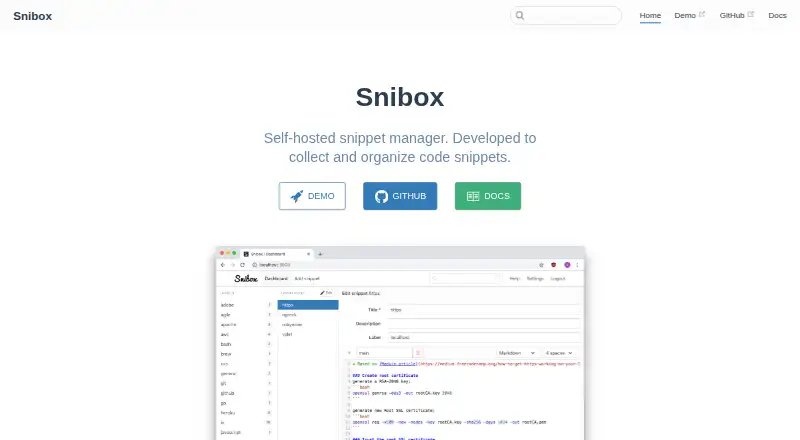
Snibox is a self-hosted snippet manager for collecting and organizing code snippets, Markdown, and plain text. Its label-oriented interface and search help users arrange and find saved material. The project is released under the MIT License and is listed as free. Deployment guides cover Docker, Heroku, macOS, Ubuntu, and Windows, with Linux, macOS, Windows, web, and self-hosted platforms listed. The out-of-the-box account setup is limited: only the first registered user can access the personal private snippets repository, and registration of more users is disabled by default. For production password resets, the application sends email through Mailgun; the maker says this service is needed only for resets. Deployment instructions call for configuring Mailgun variables in the .env file or adding Mailgun Starter on Heroku. The Ubuntu guide also notes that users may need to configure database credentials and set up the database before launching the server. The README links to a demo and notes that its free Heroku server may take up to 30 seconds to wake. The listed plan is self-hosted and configured for one registered user out of the box.
Good
- Supports programming languages, Markdown, and plain text.
- Search and labels help organize snippets.
- MIT-licensed and listed as free.
- Deployment guides cover Docker and several operating systems.
Watch out
- Only the first registered user accesses private snippets by default.
- Additional user registration is disabled out of the box.
- Production password resets require Mailgun configuration.
Who it suits
Snibox suits developers who want to keep snippets, Markdown, or plain text in a self-hosted, searchable collection. It is most directly suited to a single registered user unless the default authentication setup is changed.
Verdict
Snibox offers a free, self-hosted way to organize snippets across several text formats. Its one-user default and deployment setup requirements matter for anyone planning shared access or a production installation.
Plans and prices
From Snibox's own pricing page, checked 3 Oct 2026.
| Plan | Price | What it gives you |
|---|---|---|
| Snibox | Free | MIT-licensed · self-hosted · out of the box, one registered user |
The facts
Each one read from Snibox's own pages, with the date it was checked.
What it does
- Account limit
- The authentication documentation says only the first registered user can access the personal private snippets repository, and registration of additional users is disabled out of the box.checked 3 Oct 2026
- Content types
- It supports various programming languages, Markdown, and plain text.checked 3 Oct 2026
- Database setup
- The Ubuntu deployment guide instructs users to configure database credentials if needed and set up the database before launching the server.checked 3 Oct 2026
- Demo
- The project README links to a demo and notes that its free Heroku server may take up to 30 seconds to wake.checked 3 Oct 2026
- Deployment
- The maker provides deployment guides for Docker, Heroku, macOS, Ubuntu, and Windows.checked 3 Oct 2026
- Email setup
- Deployment instructions say to configure Mailgun account variables in the .env file, or install the Mailgun Starter add-on on Heroku.checked 3 Oct 2026
- License
- Snibox is released under the MIT License.checked 3 Oct 2026
- Organization
- Its interface is label-oriented and includes search.checked 3 Oct 2026
- Password reset
- Production email is sent through Mailgun, which the maker says is needed only for password resets.checked 3 Oct 2026
- Purpose
- Snibox is a self-hosted snippet manager for collecting and organizing code snippets.checked 3 Oct 2026
- Technology
- The README identifies Vue.js and Vuex as the frontend and Ruby on Rails as the backend.checked 3 Oct 2026
The full review of Snibox
Snibox is a self-hosted manager for code and text snippets, with support for programming languages, Markdown, and plain text. It suits people who want to keep a searchable, label-organized personal library under their own deployment. Its one-user default makes it a poor fit for teams seeking shared private snippets.
Overview
Snibox combines a label-oriented interface with search, giving personal collections a straightforward way to stay organized across different kinds of text. It is released under the MIT License and is free to self-host. That freedom comes with practical setup work: deployment guides cover several environments, but users still need to configure and launch the service themselves.
The project identifies Vue.js and Vuex as its frontend technologies and Ruby on Rails as its backend. A demo is linked from the README, though its free Heroku server may take up to 30 seconds to wake, so it may not respond immediately.
Key features
Flexible snippet collection
Snibox accepts code in various programming languages as well as Markdown and plain text. That breadth makes it useful as a small personal reference library, rather than a tool limited to executable code. Labels and search help retrieve saved material; there is no team-sharing feature in the included plan.
Private repository and access
Private snippets are supported, but out of the box only the first registered user can access the personal private repository, and further registration is disabled. That is a sensible boundary for an individual deployment, not a ready-made collaboration model. API access is included, while sync coverage is web-only.
Self-hosted deployment
Guides cover Docker, Heroku, macOS, Ubuntu, and Windows. Setup is not entirely hands-off: the Ubuntu guide calls for configuring database credentials if needed and setting up the database before starting the server. Production email runs through Mailgun, which is needed only for password resets; deployment instructions require Mailgun variables in the .env file or the Mailgun Starter add-on on Heroku.
Pricing
Snibox has one plan: Snibox: free. It is MIT-licensed, self-hosted, and configured for one registered user out of the box. Private snippets and API access are included; team sharing is not. There is no paid tier or per-seat pricing described in the plan, so the tradeoff is not a cheaper feature-reduced option but the responsibility of running the software yourself and accepting its one-user default.
Platforms
Snibox is available for Linux, macOS, and Windows, with web access and self-hosted deployment. The deployment guides span Docker, Heroku, macOS, Ubuntu, and Windows, giving technically capable users several ways to run it. Sync coverage is web-only, so it is not positioned as a broad cross-device sync service.
Who it's for
Snibox is best for an individual developer or writer who wants a free, private, self-hosted collection of code, Markdown, and plain-text snippets, and is comfortable setting up a service. It is less appropriate for a team that needs shared private libraries, or for someone who expects a hosted product to handle deployment and account management.
Pros and cons
- Pros: The MIT-licensed, free self-hosted plan avoids a subscription cost while supporting private snippets and API access.
- Pros: Support for programming languages, Markdown, and plain text makes one collection useful for more than code fragments alone.
- Pros: Deployment guides cover multiple operating systems and Docker or Heroku, accommodating different self-hosting approaches.
- Cons: Only the first registered user can access the private repository by default, and additional registration is disabled, ruling out straightforward team use.
- Cons: Database and password-reset email configuration can add deployment work; Ubuntu setup includes database preparation, while production email requires Mailgun configuration.
- Cons: Sync coverage is web-only, limiting its fit for users who want a broader synced experience across devices.
Alternatives
For a broader comparison, see Code Snippet Management Software and Code Snippet Managers.
- Cacher is worth considering if you want a freemium option with a free plan that caps private snippets at 15 and private labels at three, while allowing unlimited public snippets.
- Bitbucket is a different fit for readers who want repository hosting: its free plan supports up to five users and unlimited public and private repositories.
- Gisto is another free option across Linux, macOS, self-hosted, web, and Windows; its local mode does not sync across devices or cloud providers.
- Lepton may suit users who want a free desktop snippet manager with unlimited public or secret snippets and unlimited tags on Linux, macOS, and Windows.
- massCode is a free, open-source alternative that requires no account.
- ZCode Snippets is another free option for Linux, macOS, and Windows.
- ByteStash offers a hosted-style free tier capped at 100 snippets per workspace, one member, and 120 API requests per minute; its Pro plan is £2.50 a month, billed annually at £30.
- SafeScript offers a free, MIT-licensed Linux version, with a separate Mac plan priced at 7.99 USD.
Verdict
Choose Snibox if you want a free, MIT-licensed personal snippet library that you can host yourself and organize with labels and search.
Getting started
- Choose a deployment route such as Docker, Heroku, macOS, Ubuntu, or Windows
- Follow the project deployment guide for that environment
- Configure database credentials and create the database when required
- Configure Mailgun variables in .env or add Mailgun Starter on Heroku for production password resets
- Launch the server and open the web interface
- Register the first user to access the private snippets repository
Limits worth knowing
The Snibox plan is free and self-hosted, with one registered user out of the box. Registration of additional users is disabled by default, and team sharing is not supported in the listed capabilities.
Questions
How much does Snibox cost?
The listed Snibox plan is free. It is open source under the MIT License and self-hosted.
Which platforms can host Snibox?
Deployment guides cover Docker, Heroku, macOS, Ubuntu, and Windows. The service is accessed through the web after deployment.
What content can Snibox store?
It supports snippets in various programming languages, Markdown, and plain text.
Can Snibox keep snippets private?
Yes. It supports a personal private snippets repository. Out of the box, only the first registered user can access it.
Is there an API?
Yes. API access is listed as supported, while sync coverage is web-only.
Alternatives to Snibox
- 1

Bitbucket
Free planAndroidiOSWebAPI8.3From $3.65 a month - 2

GitHub CodeQL
Free planWebExtensionLinuxmacOS7.5From $30 a month - 3

Snipline
WebLinuxmacOSWindows7.4From $9 a year - 4

massCode
Free planOpen sourceAPIExtensionLinuxmacOS7.3Free plan - 5
Cacher
Free planWebExtensionLinuxmacOS7.2From $9.99 a month - 6
SafeScript
Free planLinuxmacOS6.6$7.99 one-time