Lepton
Lepton is a free desktop code snippet manager that uses GitHub Gist to store and sync snippets.
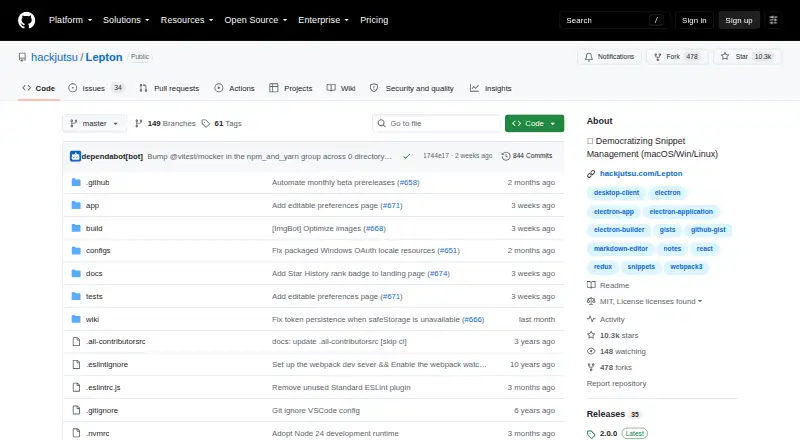
What Lepton is
Lepton is a free desktop code snippet manager that uses GitHub Gist to store and sync snippets. It supports unlimited public and secret snippets, tags, and language groups, along with Markdown and Jupyter Notebook snippets. Search can match filenames, languages, descriptions, tags, IDs, and downloaded snippet content. To search the full contents of all snippets globally, users need to enable `snippet.downloadAll` before syncing. Lepton works with GitHub Enterprise and allows sign-in through GitHub OAuth or a personal access token with the `gist` scope. The project says it has no separate synchronization service: data stays in the app locally or remotely in GitHub Gist. Packaged builds use Electron safeStorage for cached tokens when available, with a plaintext-file fallback if that feature is unavailable. Users can configure themes, editor options, proxy, shortcuts, notifications, and language in `.leptonrc`. Desktop releases are available for Linux, macOS, and Windows, including AppImage and Snap packages for Linux. The project is licensed under MIT and directs support requests to GitHub issues and feature requests.
Good
- Unlimited public and secret snippets and tags.
- Supports Markdown and Jupyter Notebook snippets.
- Searches snippet metadata and downloaded content.
- Supports GitHub Enterprise.
- Free and MIT-licensed.
Watch out
- Full-content global search requires downloading all snippets.
- No IDE integration, browser extension, or API access.
- macOS installation may require changing Security settings.
- Token fallback may store credentials in a plaintext file.
Who it suits
Lepton suits developers who want a desktop collection of code snippets organized and synced through GitHub Gist. It is available for Linux, macOS, and Windows.
Verdict
Lepton is a straightforward desktop option for managing snippets through GitHub Gist, with broad search and tagging. Note the setup needed for full-content search and the macOS installation warning.
Plans and prices
From Lepton's own pricing page, checked 29 Sep 2026.
| Plan | Price | What it gives you |
|---|---|---|
| Free | Free | Unlimited public/secret snippets · Unlimited tags |
The facts
Each one read from Lepton's own pages, with the date it was checked.
What it does
- Authentication
- Users can sign in with GitHub OAuth or a GitHub personal access token with the `gist` scope.checked 29 Sep 2026
- Customization
- Users can configure themes, editor settings, proxy, shortcuts, notifications, language, and other options in `.leptonrc`.checked 29 Sep 2026
- Data handling
- Lepton says it has no separate sync service and stores data locally in the app or remotely in GitHub Gist.checked 29 Sep 2026
- Distribution
- The project provides desktop releases for macOS, Windows, and Linux, including AppImage and Snap packages for Linux.checked 29 Sep 2026
- Editing
- It supports Markdown and Jupyter Notebook snippets.checked 29 Sep 2026
- Integration
- Lepton stores and syncs snippets with GitHub Gist and supports GitHub Enterprise.checked 29 Sep 2026
- License
- The project is licensed under the MIT License.checked 29 Sep 2026
- Purpose
- Lepton is a lean code snippet manager powered by GitHub Gist.checked 29 Sep 2026
- Search
- Search can cover snippet filenames, languages, descriptions, tags, IDs, and downloaded snippet file content.checked 29 Sep 2026
- Search limit
- Complete global search across snippet contents requires enabling `snippet.downloadAll` before syncing.checked 29 Sep 2026
- Snippet organization
- It supports unlimited public and secret snippets, unlimited tags, and language groups.checked 29 Sep 2026
- Support
- The project directs users to open issues and feature requests on GitHub.checked 29 Sep 2026
- Token storage
- Packaged builds use Electron safeStorage for cached tokens when available, with a legacy plaintext-file fallback if safeStorage is unavailable.checked 29 Sep 2026
Where it runs
- macOS installation note
- The maker says the macOS app is not signed with a paid Apple developer account and may need to be enabled in Security settings to install.checked 29 Sep 2026
The full review of Lepton
Lepton is a desktop snippet manager built around GitHub Gist. It is best for developers who already use GitHub and want an uncapped personal library rather than a team workspace. The free desktop app is appealing, but its deepest search mode needs preparation and its macOS install requires an extra security step.
Overview
Lepton keeps public and secret snippets in GitHub Gist while maintaining app data locally, with no separate synchronization service in between. That architecture keeps the product focused and lets GitHub remain the remote store, but it also makes a GitHub account and Gist-based workflow central to everyday use. GitHub Enterprise support broadens its fit for organizations running their own GitHub environment.
Authentication works through GitHub OAuth or a personal access token carrying the gist scope. Packaged builds cache tokens with Electron safeStorage where the platform provides it; otherwise, a legacy plaintext-file fallback is used. That fallback is a material consideration for users whose security policy requires encrypted token storage in every environment.
Key features
- Organization: Public and secret snippets, tags, and language groups are all unlimited. Large personal collections therefore do not run into an artificial item or labeling ceiling.
- Editing: Markdown and Jupyter Notebook snippets are supported alongside ordinary code, making the library useful for notes, examples, and exploratory work as well as source fragments.
- Search: Queries can target filenames, languages, descriptions, tags, IDs, and downloaded snippet file contents. Full, global content search is not automatic: enable snippet.downloadAll before syncing if searching inside every snippet matters to you. Without that preparation, Lepton remains stronger at metadata-driven retrieval than at immediate whole-library content discovery.
- Customization: The .leptonrc file exposes themes, editor behavior, proxy settings, shortcuts, notifications, language, and other preferences. This suits users who want a configurable desktop tool rather than a fixed interface.
- Integration and support: GitHub Gist is the storage and sync foundation, and issues and feature requests are handled through GitHub. The MIT license permits inspection and reuse of the project.
Pricing
Lepton has one plan: Free at no cost. It includes unlimited public and secret snippets and unlimited tags, with desktop synchronization through GitHub Gist. There are no paid tiers, seat charges, quotas, or trial deadline to weigh, so it is a straightforward choice for an individual developer who accepts the GitHub dependency.
The trade-off is scope rather than price. Lepton has no IDE integration, browser extension, or API access, and its sync coverage is desktop. Teams seeking shared administration, broader client access, or automation will need another product or a separate workflow.
Platforms
Desktop releases are provided for Linux, macOS, and Windows. Linux users can choose AppImage or Snap packages. On macOS, the application is not signed with a paid Apple developer account, so installation may require allowing it in Security settings. That warning does not change the price, but it adds friction for managed Macs and cautious first-time installers.
Who it's for
Choose Lepton if you are a developer who already keeps code in GitHub Gist, wants unlimited public and private snippets, and prefers a configurable desktop catalog. It is also a sensible open-source option for Markdown or Jupyter Notebook material and for GitHub Enterprise users.
Look elsewhere if snippets must be captured from a browser, inserted directly into an IDE, accessed through an API, or synchronized beyond desktop clients. Users who cannot accept a plaintext token fallback, or who need complete content search without configuring downloads first, should also consider alternatives.
Pros and cons
Pros
- Unlimited collection size: Public and secret snippets plus tags have no stated caps, so an expanding personal archive can stay in one place.
- GitHub-native storage: OAuth, personal-token authentication, Gist synchronization, and GitHub Enterprise support fit existing GitHub workflows.
- Broad snippet formats: Markdown and Jupyter Notebook support covers documentation and notebooks as well as code.
- Configurable desktop experience: Themes, editor settings, shortcuts, proxy, notifications, and language can be adjusted through .leptonrc.
Cons
- Content search requires preparation: Global searches inside snippet files depend on enabling snippet.downloadAll before syncing.
- Limited reach: There is no IDE integration, browser extension, or API, and synchronization is desktop-focused.
- Token-storage fallback: When Electron safeStorage is unavailable, cached credentials may be kept in a plaintext file.
- macOS installation friction: Unsigned builds may need manual approval in Security settings.
Alternatives
For a broader comparison, see Code Snippet Management Software and Code Snippet Managers.
- Cacher is the better pick when you want extension, web, and desktop access, but its free tier caps private snippets at 15 and private labels at three.
- Bitbucket suits teams needing repositories, up to five free users, and pipeline tooling rather than a dedicated snippet catalog.
- Snibox is preferable when a self-hosted, MIT-licensed deployment with one registered user fits your setup.
- Gisto is an option for a free desktop and self-hosted-capable workflow, though its local mode does not sync across devices or cloud providers.
- massCode fits users wanting free, open-source snippets with no account required.
- ZCode Snippets is another free desktop alternative for Linux, macOS, and Windows.
- ByteStash targets web and API users; its free workspace allows 100 snippets and one member.
- SafeScript is worth considering for a Linux or macOS-focused alternative with a free open-source Linux edition.
Verdict
Lepton is a strong fit for an individual developer who wants an unlimited, GitHub-centered snippet library with tagging, language grouping, and flexible desktop configuration at no cost. Choose it for its direct Gist integration and generous limits; choose another tool if browser or IDE capture, API access, cross-platform sync beyond desktop, or effortless full-content search is essential.
Alternatives to Lepton
- 1

Bitbucket
Free planAndroidiOSWebAPI8.3From $3.65 a month - 2

GitHub CodeQL
Free planWebExtensionLinuxmacOS7.5From $30 a month - 3

Snipline
WebLinuxmacOSWindows7.4From $9 a year - 4

massCode
Free planOpen sourceAPIExtensionLinuxmacOS7.3Free plan - 5

Cacher
Free planWebExtensionLinuxmacOS7.2From $9.99 a month - 6
SafeScript
Free planLinuxmacOS6.6$7.99 one-time