Gisto
Gisto is a free, open-source app for managing and sharing code snippets across Linux, macOS, Windows, web, and self-hosted setups.
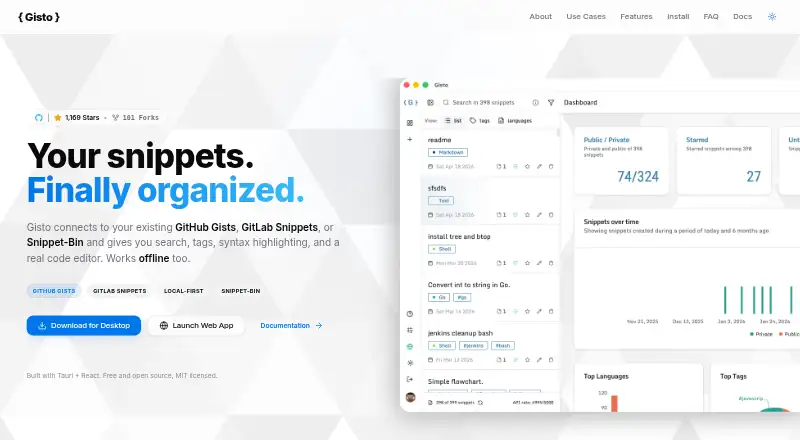
What Gisto is
Gisto is a free, open-source app for managing and sharing code snippets across Linux, macOS, Windows, web, and self-hosted setups. It works with GitHub Gists, GitLab Snippets, Snippet-Bin, and local browser storage. Search tools include full-text search, tags, language grouping, and filters for content, filenames, tags, or descriptions. Its Monaco editor offers syntax highlighting, autocomplete, Emmet, and configurable settings. Snippets can bundle multiple files, such as code, documentation, configurations, and README files. Supported file types include Markdown, HTML, JSON, CSV, and PDF, with a live preview for GitHub Flavored Markdown. Users can connect an AI API key to create snippet descriptions and tags. In local-only mode, Gisto stores snippets in IndexedDB and supports editing, tagging, searching, exporting, and importing JSON offline. GitHub and GitLab sync connects directly to their official APIs; access tokens are stored in local storage. Snippet-Bin can be self-hosted on the user's infrastructure. The desktop app is described as using under 40 MB of RAM and having an under 10 MB download.
Good
- Search by content, filename, tags, or description
- Supports multi-file snippets and several file types
- Local mode supports offline editing and JSON import/export
- Free and open source under the MIT license
Watch out
- Local mode does not sync across devices or cloud providers
- GitHub and GitLab tokens are stored in local storage
Who it suits
Gisto suits developers who want to organize snippets across code hosts or keep them in local browser storage. Its self-hosted option may suit users who want snippets on their own infrastructure.
Verdict
Gisto combines snippet organization, editing, and sharing with cloud-provider and local-only workflows. Choose local mode for offline use, or consider its GitHub, GitLab, and self-hosted options when syncing or infrastructure control matters.
Plans and prices
From Gisto's own pricing page, checked 1 Oct 2026.
| Plan | Price | What it gives you |
|---|---|---|
| Free | Free | Local mode does not sync across devices or cloud providers |
The facts
Each one read from Gisto's own pages, with the date it was checked.
What it does
- AI features
- Users can connect an AI API key to generate snippet descriptions and tags automatically.checked 1 Oct 2026
- Authentication
- Gisto stores GitHub or GitLab access tokens in local storage and also offers account-free IndexedDB local mode.checked 1 Oct 2026
- Editor
- Gisto uses the Monaco editor with syntax highlighting, autocomplete, Emmet, and configurable settings.checked 1 Oct 2026
- External tools
- Quick actions can copy or download snippets and open them in Plunker, Carbon, JSFiddle, and other tools.checked 1 Oct 2026
- File support
- It supports Markdown, HTML, JSON, CSV, and PDF files with GitHub Flavored Markdown live preview.checked 1 Oct 2026
- Licensing and support
- Gisto is free, open source, MIT licensed, and accepts issue reports, feature requests, and pull requests through GitHub.checked 1 Oct 2026
- Multi-file snippets
- A snippet can bundle multiple files, including code, documentation, configurations, and README files.checked 1 Oct 2026
- Offline use
- Local-only mode stores snippets in IndexedDB and supports creating, editing, tagging, querying, exporting, and importing JSON without an internet connection.checked 1 Oct 2026
- Performance
- The Tauri desktop app is described as using under 40 MB of RAM and having an under 10 MB download.checked 1 Oct 2026
- Providers
- It supports GitHub Gists, GitLab Snippets, Snippet-Bin, and local browser storage.checked 1 Oct 2026
- Purpose
- Gisto is a cross-platform application for managing and sharing code snippets.checked 1 Oct 2026
- Search and organization
- Features include advanced full-text search, custom tags, language grouping, and filtering by content, filename, tags, or description.checked 1 Oct 2026
- Security model
- For GitHub and GitLab synchronization, the client connects directly to official APIs without intermediary servers processing or backing up snippets or tokens.checked 1 Oct 2026
- Self-hosting
- Snippet-Bin is a self-hosted backend deployable with Docker behind a private domain or VPN, keeping snippets on the user's infrastructure.checked 1 Oct 2026
The full review of Gisto
Gisto is a code-snippet manager for developers who want to keep reusable code searchable and share it through a provider or locally. It suits people who need more than a basic clipboard of fragments; its strongest case is the choice between cloud sync, self-hosting, and offline storage.
Overview
Gisto brings snippet organization, editing, and sharing into one cross-platform tool. GitHub and GitLab integrations suit users already working with those services, while Snippet-Bin offers a route to self-hosting. Local browser storage is useful for offline work, but it does not sync across devices or cloud providers, so it is not a substitute for a synced library.
Key features
Full-text search, custom tags, language grouping, and filters for content, filename, tags, or description help keep a collection findable as it grows. Multi-file snippets can package code with documentation, configuration, or a README, a practical advantage when a fragment needs context. Users with only a handful of snippets may find this organization more than they need.
The Monaco editor provides syntax highlighting, autocomplete, Emmet, and configurable settings. Gisto supports Markdown, HTML, JSON, CSV, and PDF, with a live GitHub Flavored Markdown preview. Quick actions copy or download a snippet and open it in Plunker, Carbon, JSFiddle, or other tools, reducing friction when moving from saved code to another workflow.
An optional AI API key can generate descriptions and tags automatically. That can cut manual cataloguing, but depends on connecting an external AI service. Local-only mode stores snippets in IndexedDB and supports creating, editing, tagging, querying, exporting, and importing JSON without an internet connection. It is the right fit for account-free offline use, with the trade-off that the collection stays local.
For GitHub and GitLab sync, the client connects directly to their official APIs rather than routing snippets or tokens through an intermediary server. Gisto stores access tokens in local storage, so users should weigh that model against their own security requirements. Snippet-Bin can be deployed with Docker behind a private domain or VPN, keeping snippets on the user's infrastructure. The Tauri desktop app is described as using under 40 MB of RAM and downloading at under 10 MB, attractive constraints for users who value a light desktop footprint.
Pricing
Gisto is free and open source under the MIT License. The Free plan is free, and its local mode has no cross-device or cloud-provider sync. That makes it a straightforward choice for a single-device library; users who need synchronized snippets can use the supported GitHub or GitLab workflows, while infrastructure control points toward self-hosted Snippet-Bin. Gisto accepts issue reports, feature requests, and pull requests through GitHub.
Platforms
Gisto supports Linux, macOS, Windows, web, and self-hosted use. The desktop options suit developers who want a local app, while web and self-hosted deployments provide other ways to access or operate a snippet library.
Who it's for
Gisto is best for developers who want searchable, tagged snippets, a capable editor, and a choice of storage model. It is particularly compelling for GitHub or GitLab users, teams or individuals who want to keep snippets on their own infrastructure, and people who need offline local storage. It is less suited to anyone who requires local mode itself to synchronize across devices.
Pros and cons
- Pros: Search, tags, language grouping, and multiple filters make sizable collections easier to navigate.
- Pros: Multi-file snippets and broad file support keep related code and reference material together.
- Pros: Offline IndexedDB mode supports editing and JSON import/export without an account or connection.
- Pros: GitHub and GitLab sync connects directly to official APIs, and Snippet-Bin can keep data on private infrastructure.
- Cons: Local-only mode does not sync across devices or cloud providers.
- Cons: GitHub and GitLab access tokens are stored in local storage, which may not suit every security preference.
- Cons: AI-generated descriptions and tags require connecting an AI API key.
Alternatives
For a broader category comparison, browse Code Snippet Management Software or Code Snippet Managers.
- Cacher is worth considering for its free tier, which caps private snippets at 15 and private labels at 3 while allowing unlimited public snippets; it also limits attachments to 10 MB and uploads to 50 MB per month.
- Bitbucket may suit readers looking for repository hosting rather than a dedicated snippet manager; its free plan allows up to 5 users, unlimited public and private repositories, and 1 GB of LFS storage.
- Snibox is another MIT-licensed self-hosted option, with one registered user out of the box.
- Lepton fits users who want unlimited public or secret snippets and unlimited tags in a free desktop app for Linux, macOS, or Windows.
- massCode is a free, open-source option that requires no account and supports Linux, macOS, and Windows.
- ZCode Snippets is a free alternative for Linux, macOS, and Windows.
- ByteStash may work for a small web-based workspace, with its free plan limited to 100 snippets, one member, and 120 API requests per minute.
- SafeScript is an alternative for Linux and macOS; its Linux version is free and MIT licensed.
Verdict
Choose Gisto if you want a free, capable snippet manager that can connect to GitHub or GitLab, run locally offline, or use a self-hosted backend. Its search and editing tools make it more than a simple stash for code. Look elsewhere if local mode must sync across devices or if storing provider tokens in local storage does not fit your security needs.
Getting started
- Open https://gisto.org/
- Choose the Linux, macOS, or Windows application, or use the web version
- Connect GitHub Gists or GitLab Snippets through their official APIs if synchronization is needed
- Use local-only mode for account-free IndexedDB storage
- Deploy Snippet-Bin with Docker behind a private domain or VPN for self-hosting
Limits worth knowing
The Free plan costs nothing. Local mode does not synchronize across devices or cloud providers; synchronization uses the connected GitHub or GitLab services or a Snippet-Bin backend.
Questions
Is Gisto free?
Yes. The Free plan is free, and Gisto is open source under the MIT license.
Which platforms does it support?
Gisto supports Linux, macOS, Windows, web, and self-hosted deployments.
Can it work offline?
Yes. Local-only mode stores snippets in IndexedDB and supports creating, editing, tagging, querying, importing JSON, and exporting JSON without an internet connection.
Which snippet services can it use?
It supports GitHub Gists, GitLab Snippets, Snippet-Bin, and local browser storage.
Does it synchronize across devices?
Cross-device sync is available through connected services, while local-only mode does not sync across devices or cloud providers.
Can I use AI features?
Yes. Connecting an AI API key enables automatic generation of snippet descriptions and tags.
Alternatives to Gisto
- 1

Bitbucket
Free planAndroidiOSWebAPI8.3From $3.65 a month - 2
Snippets
Free planAndroidiOSAPILinux8.1From $12 a year - 3

Fabric
AndroidiOSWebAPI7.9From $8 a month - 4

Code Snippets
Free planOpen sourceWebAPISelf-hosted7.7From $3.90 a month - 5

Snipline
WebLinuxmacOSWindows7.4From $9 a year - 6

massCode
Free planOpen sourceAPIExtensionLinuxmacOS7.3Free plan