Smilebox
Smilebox is an online photo slideshow maker for occasions such as holidays, graduations, and family events.
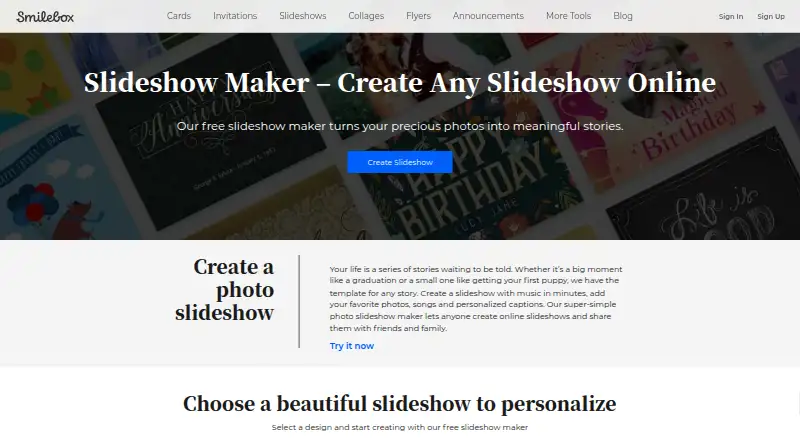
What Smilebox is
Smilebox is an online photo slideshow maker for occasions such as holidays, graduations, and family events. Its templates can be personalized with photos, songs, captions, text, animations, fonts, and color schemes. Photos can come from a computer or phone, Facebook, or Instagram, and the maker offers dozens of styles and layouts across its template categories. Completed slideshows can be shared by email or social media, saved to a computer, or downloaded as MP4 files. Smilebox advertises unlimited storage for photos and slideshows. The service also offers eCards, collages, invitations, and announcements, and describes branded slideshows for business use. It is available on Android, iOS, and the web. The pricing model is freemium, with a free plan and a 7-day trial; the listed Free plan costs nothing, with no plan limits stated on the maker page. Smilebox also says it provides service-related technical support through a helpdesk or online portal.
Good
- Templates cover dozens of styles and layouts.
- Uploads photos from devices, Facebook, or Instagram.
- Shares by email or social media.
- Can download slideshows as MP4 files.
- Advertises unlimited photo and slideshow storage.
Watch out
- Free trial lasts 7 days.
- The maker page does not state free-plan limits.
Who it suits
Smilebox suits people making photo slideshows to share with family and friends, as well as businesses creating branded slideshows. It may appeal to users who want to combine photos, music, captions, and animations in a template.
Verdict
Smilebox centers on customizable occasion slideshows with several ways to share or save the result. Its free plan and 7-day trial give users a way to start, while the maker page does not specify free-plan limits.
Plans and prices
From Smilebox's own pricing page, checked 30 Sep 2026.
| Plan | Price | What it gives you |
|---|---|---|
| Free | Free | Free slideshow creation is described; no price or plan limits stated on the opened maker page |
The facts
Each one read from Smilebox's own pages, with the date it was checked.
What it does
- Age eligibility
- Smilebox says its services are not intended for children under 16 and that it does not knowingly process children's information.checked 30 Sep 2026
- Audience
- Smilebox describes its service as a way to share life's special moments with family and friends, and its maker pages also describe branded slideshows for business use.checked 30 Sep 2026
- Integrations
- Smilebox names Facebook and Instagram as photo upload sources, and email and social media as sharing options.checked 30 Sep 2026
- Other products
- Smilebox says its product selection also includes eCards, collages, invitations, and announcements.checked 30 Sep 2026
- Personalization
- Users can add photos, songs, captions, text, animations, fonts, and color schemes to slideshow templates.checked 30 Sep 2026
- Photo sources
- The maker page says users can upload photos from a computer or phone, Facebook, and Instagram.checked 30 Sep 2026
- Privacy and data
- Smilebox's privacy policy says creative content is processed to provide the service and deleted when the account is deleted, subject to the policy's stated qualifications.checked 30 Sep 2026
- Purpose
- Smilebox lets users create online photo slideshows for occasions such as holidays, graduations, and family events.checked 30 Sep 2026
- Security
- Smilebox says it uses security measures including SSL encryption, limits stored data, and restricts access to personal data to its personnel and contractors.checked 30 Sep 2026
- Sharing and export
- Users can share slideshows by email or social media, save them to a computer, or download them as MP4 files.checked 30 Sep 2026
- Storage
- The slideshow maker page advertises unlimited storage for photos and slideshows.checked 30 Sep 2026
- Support
- Smilebox says it provides service-related technical support through a helpdesk or online portal, including support.smilebox.com.checked 30 Sep 2026
- Templates
- Smilebox says its slideshow maker includes dozens of styles and layouts across its template categories.checked 30 Sep 2026
The company
- Company history
- Smilebox says it was founded in 2005 and later became part of Perion Network Ltd.checked 30 Sep 2026
- Founded
- 2005checked 28 Sep 2026
The full review of Smilebox
Smilebox is a template-led tool for turning personal photographs into occasion slideshows, with mobile apps and a browser editor. It fits families, friends, and small businesses that want a presentable result without building a timeline from scratch. The main trade-off is that its broad creative menu is clearer than its plan structure.
Overview
Founded in 2005 and now part of Perion Network Ltd., Smilebox focuses on presentations for holidays, graduations, family gatherings, and other milestones. Its audience also includes businesses making branded slideshows. The service sits within a wider collection that includes eCards, collages, invitations, and announcements, so it can make sense for users who need several kinds of occasion material rather than a single video tool.
Key features
Smilebox provides dozens of styles and layouts across its template categories. That gives casual creators a defined visual starting point and makes it practical for event recaps or family tributes. Users can add photos, songs, captions, other text, animations, fonts, and color schemes. The controls cover the elements that most affect the character of a slideshow, although a template-centered approach is less compelling for editors seeking fully bespoke composition.
Photos can come from a computer or phone, Facebook, or Instagram. This is useful when a project draws on several personal libraries, while the named social sources keep collection focused on familiar channels. Finished work can be sent by email or social media, saved to a computer, or downloaded as an MP4. Those choices support both immediate sharing and retaining a conventional video file for later playback.
The maker page advertises unlimited storage for photos and slideshows, a meaningful advantage for users building an ongoing archive of family projects. Smilebox also says it uses SSL encryption, limits stored data, and restricts access to personal data to personnel and contractors. Creative content is processed to provide the service and is deleted when an account is deleted, subject to the privacy policy’s qualifications. The service is intended for people aged 16 and over, and technical support is provided through a helpdesk or online portal.
Pricing
Smilebox uses a freemium model. The Free plan is listed as free and includes free slideshow creation, making it the natural starting point for occasional users who want to see whether the template workflow suits them. A 7-day trial is also offered, giving prospective users a short window to explore the service beyond the basic free entry point. Readers who need a defined allowance, team seats, or a clearly stated paid entitlement should confirm those terms before relying on Smilebox for recurring work.
Platforms
Smilebox supports Android, iOS, and the web, with the maker identified as a web product. That combination lets users assemble or access projects across common phones and a browser, while MP4 download provides a portable output independent of the editor.
Who it's for
Choose Smilebox for family and friend projects, celebration slideshows, and straightforward branded presentations where templates, music, captions, and quick distribution matter more than advanced editing control. It is also a sensible fit for users who want stored access to a growing collection of slideshows. Look elsewhere if your work depends on a narrowly defined commercial plan, detailed quota planning, or a production workflow built around extensive manual timeline editing.
Pros and cons
Pros
- Broad personalization: songs, captions, text, animation, typography, and color controls let a template feel specific to the occasion.
- Convenient photo intake: computer, phone, Facebook, and Instagram sources reduce the need to gather images in one place first.
- Flexible delivery: email, social sharing, computer saves, and MP4 export cover both online distribution and local playback.
- Cross-device access: Android, iOS, and web support suit households that use different devices.
Cons
- Template-led workflow: users wanting highly bespoke slideshow construction may find the predefined styles restrictive.
- Short trial: the 7-day trial leaves limited time for extended evaluation.
- Plan uncertainty: the free entry point is clear, but readers planning regular or business use should verify the commercial terms before committing.
Alternatives
For a wider cross-platform creative suite with a free starting option, consider Zno, which supports Android, iOS, macOS, web, and Windows. Cofeshow is a better fit when you want a free desktop download for Windows or macOS. On Windows, PhotoStage offers a free non-commercial version and also runs on Android, iOS, macOS, and Windows. Mac users who need slideshow playback without editing can choose FotoMagico’s free Player plan. Icecream Slideshow Maker suits Windows users who want a free, unlimited-use edition or a one-time Pro license. Memoriam is the more specialized choice for draft memorial slideshows. 4K Video Downloader+ is an alternative software option with a permanent free Starter plan, though its focus is different.
For adjacent design needs, browse Photo Slideshow Makers, Invitation Maker Software, or Print Design Template Libraries.
Verdict
Smilebox is a strong choice for people who want occasion-ready slideshows with varied templates, personal media sources, and several sharing or export routes. Its free entry and broad device support lower the barrier to trying it. Choose another product when you need tightly documented plan allowances or deeper, manually controlled slideshow production.
Alternatives to Smilebox
- 1
PhotoStage
Free planAndroidiOSmacOSWindows7.9From $34.99 a year - 2
Zno
Free planAndroidiOSWebmacOS7.6Free plan - 3

Cofeshow
Free planiOSmacOSWindows6.9From $49.99 a year - 4

FotoMagico
Free planiOSmacOS6.8From $79.99 a year - 5
SmartSHOW 3D
Windows6.7From $29.95 a year - 6
Memoriam
Free planWeb6.6From $99 a month